
KLIM ER
Manuale di istruzioni della sedia da gaming KLIM Esports ER
Model: ER
1. Introduzione
Thank you for choosing the KLIM Esports Gaming Chair ER. This manual provides essential information for the assembly, operation, and maintenance of your new chair. Designed for comfort and durability, the KLIM Esports Gaming Chair supports extended periods of use, whether for gaming or professional work. Please read these instructions carefully before assembly and use to ensure proper function and longevity of your product.

Image 1.1: KLIM Esports Gaming Chair ER (Red) and available color variants.
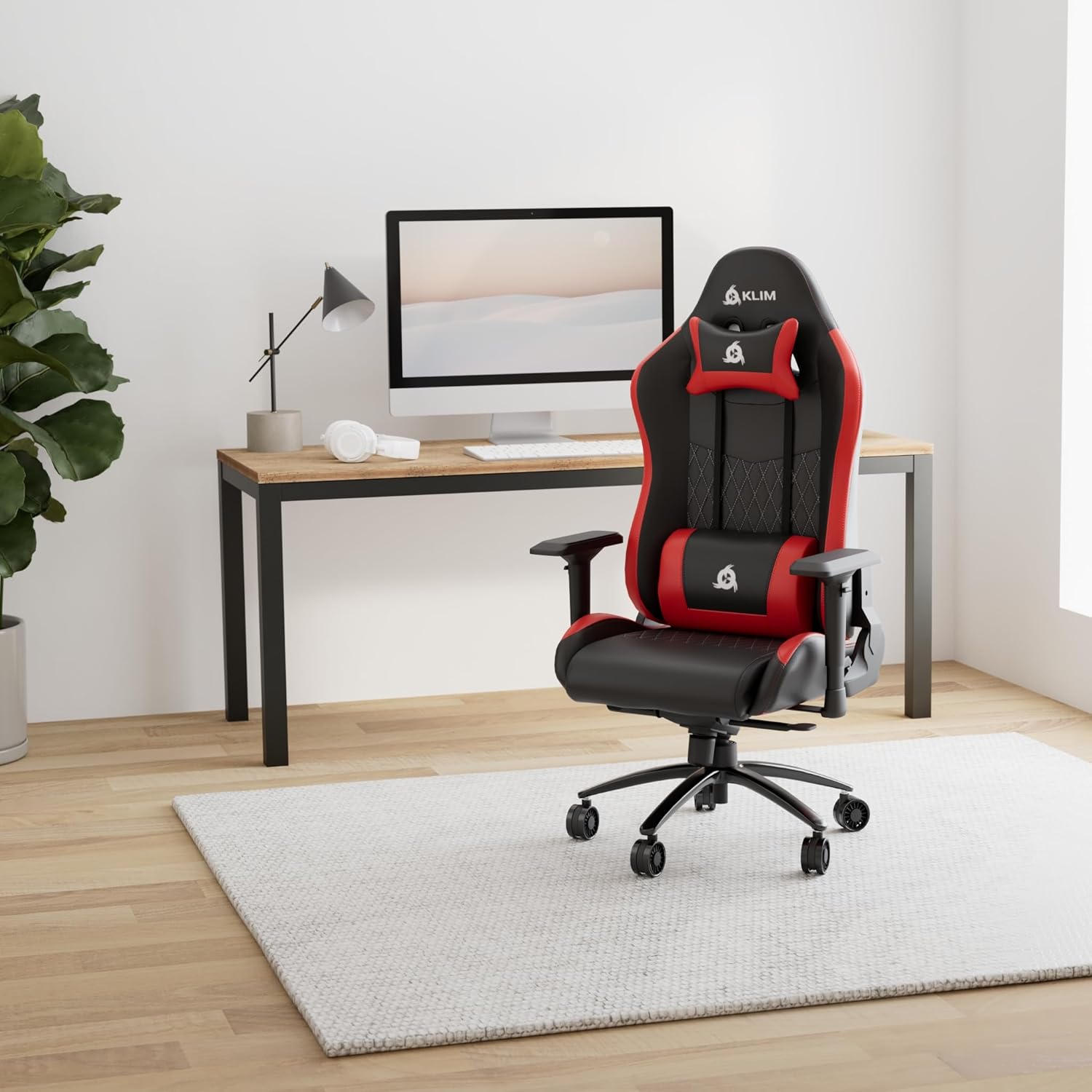
Image 1.2: KLIM Esports Gaming Chair ER in a typical usage environment.
2. Caratteristiche del prodotto
The KLIM Esports Gaming Chair ER is engineered with user comfort and durability in mind, incorporating several key features:
- Design ergonomico: High-density foam and supportive cushions promote proper posture and back health during long sessions.
- Materiali di prima qualità: Constructed with a reinforced steel frame, robust casters, and high-quality faux leather for enhanced durability and comfort.
- Braccioli regolabili: Fully adjustable armrests provide support for shoulders, arms, and wrists, reducing strain.
- Recline Functionality: The chair can recline up to 160 degrees, allowing for various positions from working to resting.
- Altezza regolabile: Easily adjust the seat height to find your optimal ergonomic position.

Image 2.1: Key materials and construction details of the chair.

Image 2.2: Additional features including synthetic leather and durable metal base.

Image 2.3: Illustration of ergonomic support for absolute comfort.
3. Contenuto della confezione
Dopo aver disimballato il prodotto, assicurarsi che siano presenti tutti i seguenti componenti:
- Schienale
- Seat Base with Armrests attached
- Star Base (5-star wheel base)
- Ruote (5 pezzi)
- Cilindro di sollevamento a gas
- Coperchio per ascensore a gas
- Piastra del meccanismo
- Cuscino di supporto lombare
- Cuscino poggiatesta
- Side Covers (2 pieces)
- Ferramenta di montaggio (viti, rondelle, chiave a brugola)
- Manuale di istruzioni
4. Installazione e assemblaggio
Assembly of the KLIM Esports Gaming Chair ER is designed to be straightforward and typically takes about 15 minutes. All necessary tools are included. Follow these steps carefully:
- Fissare le rotelle alla base stellare: Insert each caster into the holes on the star base until they click securely into place.
- Inserire il pistone a gas: Posizionare il cilindro del pistone a gas nel foro centrale della base a stella. Coprirlo con il coperchio del pistone a gas.
- Fissare la piastra del meccanismo alla base del sedile: Align the mechanism plate with the pre-drilled holes on the underside of the seat base. Secure it with the provided screws. Ensure the front of the mechanism faces the front of the seat.
- Fissare lo schienale alla base del sedile: Align the backrest with the metal brackets on the seat base. Secure it using the provided screws.
- Installare le coperture laterali: Once the backrest is secured, attach the plastic side covers over the metal brackets and screws.
- Collegare il sedile al pistone a gas: Posizionare con attenzione il sedile e lo schienale assemblati sul cilindro di sollevamento a gas, assicurandosi che siano centrati.
- Fissare i cuscini: Secure the lumbar support and headrest cushions using their elastic straps.
For visual guidance, a detailed assembly video is available on YouTube by searching for "KLIM Esports Gaming Chair Assembly".
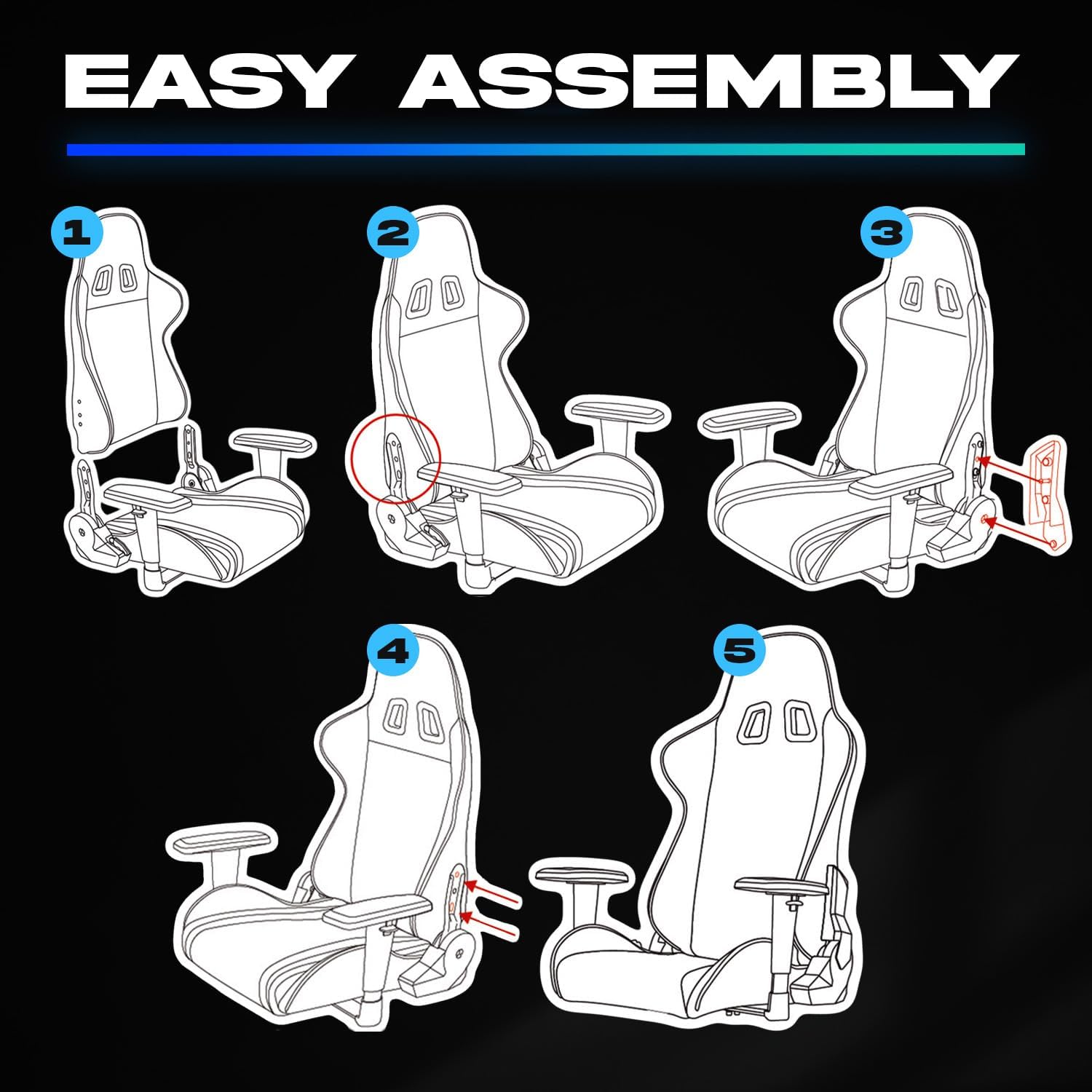
Image 4.1: Assembly steps for the KLIM Esports Gaming Chair ER.
5. Istruzioni per l'uso
Your KLIM Esports Gaming Chair ER offers several adjustable features to customize your seating experience:
- Regolazione dell'altezza del sedile: Locate the lever on the right side, beneath the seat. Pull the lever up while seated to lower the seat, or pull it up while standing to raise the seat. Release the lever to lock the height.
- Inclinazione dello schienale: Use the lever on the right side of the chair to adjust the backrest angle. Pull the lever up to unlock, recline to your desired angle (up to 160 degrees), and release the lever to lock.
- Regolazione del bracciolo: The armrests are multi-directional. They can be adjusted in height, forward/backward, and rotated left/right. Use the buttons or levers on the armrests to make these adjustments.
- Blocco/sblocco inclinazione: The main mechanism under the seat may have a knob to adjust tilt tension and a lever to lock/unlock the tilt function. Refer to the mechanism for specific controls.

Image 5.1: Recline and height adjustment capabilities.
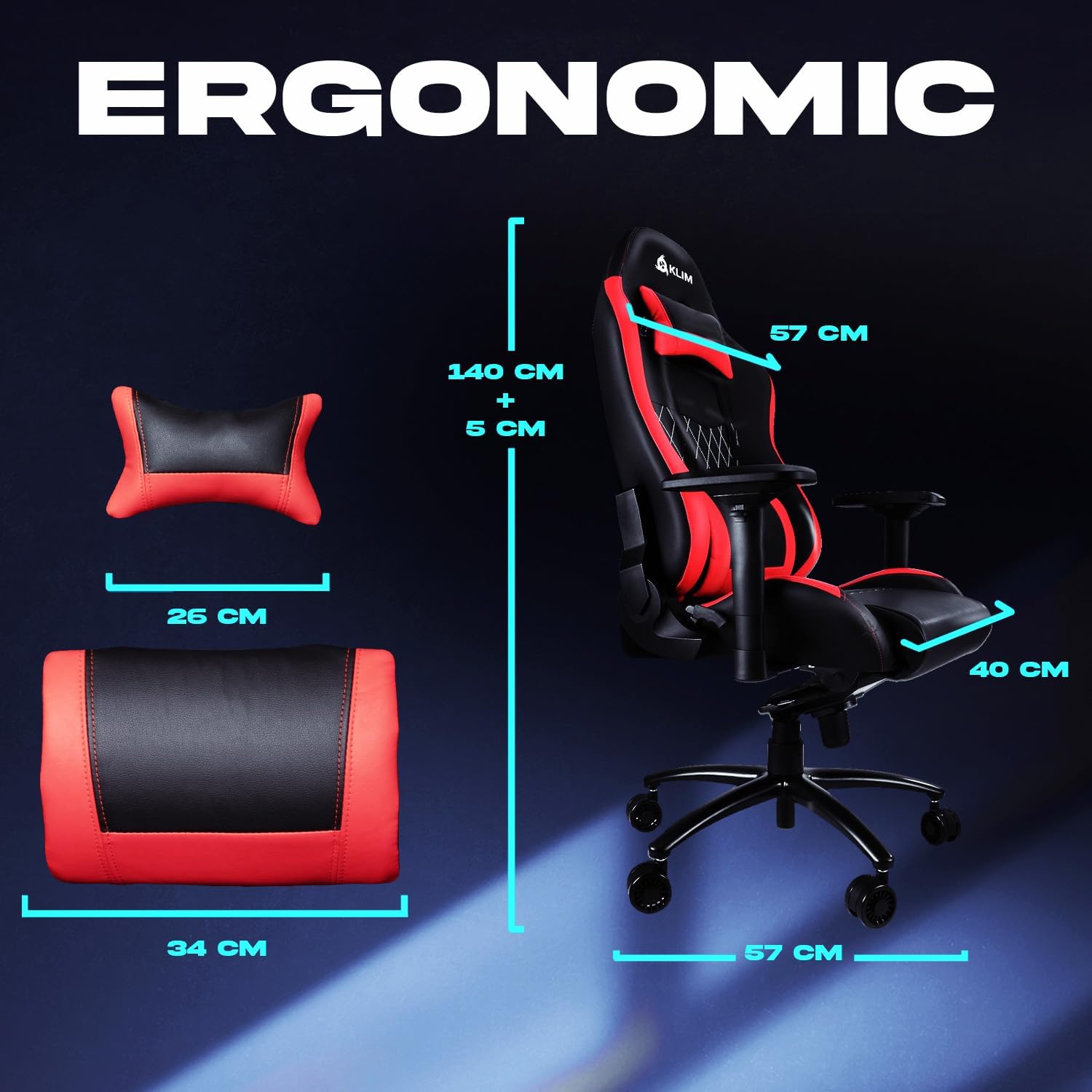
Image 5.2: Ergonomic dimensions of the chair and cushions.
6. Manutenzione
To ensure the longevity and appearance of your KLIM Esports Gaming Chair ER, follow these simple maintenance guidelines:
- Pulizia: Pulisci le superfici in similpelle con un panno morbido eamp panno. Per le macchie più ostinate, utilizzare una soluzione di sapone delicato e asciugare immediatamente. Evitare prodotti chimici aggressivi o detergenti abrasivi.
- Cura delle rotelle: Periodically check the casters for accumulated dust or hair and clean them to ensure smooth movement.
- Stringere le viti: Con il tempo, le viti potrebbero allentarsi. Controllare e serrare periodicamente tutte le viti di montaggio per mantenere la stabilità.
- Evitare la luce solare diretta: Prolonged exposure to direct sunlight can cause the faux leather to fade or crack. Position your chair away from direct sunlight when possible.
7. Risoluzione Dei Problemi
If you encounter any issues with your KLIM Esports Gaming Chair ER, consider the following common solutions:
- Scricchiolii della sedia: Check all screws and bolts for tightness. Apply a small amount of silicone lubricant to moving parts if necessary, avoiding contact with upholstery.
- La pompa a gas non si regola: Assicurarsi che la leva del pistone a gas sia completamente inserita o disinserita. Se il problema persiste, potrebbe essere necessario sostituire il cilindro del pistone a gas.
- La sedia sembra instabile: Verify that all casters are securely inserted into the star base and that the star base is not damaged. Ensure all screws are tightened.
- Armrests Wobble: Check the screws securing the armrests to the seat base and tighten them.
If these steps do not resolve the issue, please contact KLIM customer support for further assistance.
8. Specifiche
| Caratteristica | Dettaglio |
|---|---|
| Marca | CLIMA |
| Numero di modello | ER |
| Colore | Rosso (variante mostrata) |
| Dimensioni del prodotto (L x P x A) | Dimensioni: 140 x 57 x 57 cm |
| Materiale | Faux Leather, Alloy Steel Frame |
| Caratteristiche speciali | Adjustable Armrest, Adjustable Height, Padded |
| Peso dell'articolo | 25.5 chilogrammi |
| Stile posteriore | Cuscino schienale |
9. Garanzia e supporto
The KLIM Esports Gaming Chair ER comes with a Garanzia di 5 anno, reflecting our commitment to quality and durability. Spare parts are available for 5 years from the date of purchase.
If you require assistance, have questions, or need to claim warranty service, please contact KLIM customer support. Our specialists are available to help you.
For more information and support, please visit the official KLIM websito o contattare il rivenditore.
Ask a question about this manual
Ask about setup, troubleshooting, compatibility, parts, safety, or missing instructions. Manuals+ will review the question and use this page’s manual context to help answer it.