
1. Introduzione
This manual provides essential instructions for the safe and effective installation and handling of the Technical Precision replacement light bulb for the AMETEK DIGISTROBE III. This product is a high-quality replacement component designed to restore the functionality of your AMETEK DIGISTROBE III device. Please read this manual thoroughly before proceeding with installation.
2. Informazioni sulla sicurezza
Always prioritize safety when handling electrical components. Failure to follow these safety guidelines may result in electric shock, fire, or damage to the product or device.
- Scollegare l'alimentazione: Before attempting any installation or replacement, ensure the AMETEK DIGISTROBE III device is completely disconnected from its power source.
- Consenti raffreddamento: If the previous bulb was in use, allow sufficient time for it to cool down before handling to prevent burns.
- Maneggiare con cura: Light bulbs, especially halogen types, can be fragile. Avoid touching the glass envelope directly with bare hands, as oils can create hot spots and reduce bulb life. Use a clean cloth or gloves.
- Vol. correttotage: Ensure the replacement bulb's voltage (230 Volts) matches the requirements of your AMETEK DIGISTROBE III device.
- Disposizione: Smaltire le vecchie lampadine secondo le normative locali.
3. Istruzioni per l'installazione
Follow these steps carefully to replace the light bulb in your AMETEK DIGISTROBE III.
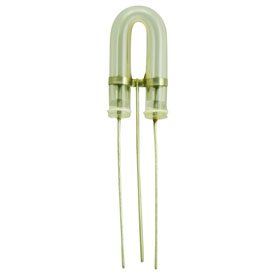
Figure 1: The Technical Precision replacement light bulb. This image displays the replacement light bulb, characterized by its distinctive U-shaped glass envelope and three electrical contact pins at the base, designed for precise fit and function within the AMETEK DIGISTROBE III.
- Preparare il dispositivo: Ensure the AMETEK DIGISTROBE III is turned off and unplugged from all power sources. Place it on a stable, clean surface.
- Access the Bulb Compartment: Refer to your AMETEK DIGISTROBE III's original manual for specific instructions on how to open the device and access the light bulb compartment. This usually involves removing a cover or panel.
- Rimuovere la vecchia lampadina:
- If the bulb was recently in use, allow it to cool completely.
- Gently grasp the old bulb (using a cloth or gloves) and carefully pull it straight out from its socket. Avoid twisting if the socket is a push-in type. Note the orientation of the pins if applicable.
- Installare la nuova lampadina:
- Carefully unpackage the Technical Precision replacement bulb. Avoid touching the glass with bare hands.
- Align the pins of the new bulb with the corresponding holes in the socket.
- Gently push the bulb firmly into the socket until it is fully seated. Do not force it.
- Proteggere il dispositivo: Close the bulb compartment and re-secure any covers or panels that were removed.
- Funzionalità di prova: Plug the AMETEK DIGISTROBE III back into its power source and turn it on to verify that the new bulb is functioning correctly.
4. Operating the Device (After Bulb Replacement)
Once the Technical Precision replacement bulb is installed, the operation of your AMETEK DIGISTROBE III device will resume as per its original design. Refer to the original AMETEK DIGISTROBE III user manual for detailed instructions on operating the device, including power settings, strobe frequency adjustments, and other functions.
5. Manutenzione
The Technical Precision replacement bulb requires minimal maintenance. To ensure optimal performance and longevity:
- Pulizia: If the bulb's glass surface becomes dusty or smudged, ensure the device is unplugged and the bulb is cool. Gently wipe the glass with a clean, dry, lint-free cloth. Avoid using abrasive cleaners or liquids.
- Magazzinaggio: If storing a spare bulb, keep it in its original packaging in a cool, dry place away from direct sunlight and extreme temperatures.
- Ispezione regolare: Periodically inspect the bulb for any signs of damage or discoloration. If any issues are observed, replace the bulb.
6. Risoluzione Dei Problemi
If the new bulb does not function after installation, consider the following:
- Nessuna luce:
- Ensure the AMETEK DIGISTROBE III is properly plugged into a working power outlet.
- Verify that the device's power switch is in the "ON" position.
- Check if the bulb is fully and correctly seated in its socket. Gently re-seat it if necessary (after disconnecting power).
- Inspect the bulb for any visible damage (e.g., broken filament, cracked glass). If damaged, replace it.
- If the device still does not light up, the issue may lie with the AMETEK DIGISTROBE III unit itself, not the bulb. Consult the device's original manual or manufacturer for further assistance.
- Luce fioca o tremolante:
- Ensure the bulb is securely seated.
- Check for any loose connections within the device (if safely accessible and you are qualified to do so).
- This could indicate an issue with the device's power supply or internal components.
7. Specifiche del prodotto
| Marca | Precisione tecnica |
| Numero di modello | DIGISTROBE III (Replacement) |
| Tipo | Lampadina alogena |
| Cosatage | 16 watt |
| Voltage | 230 Volt |
| Materiale | Copper (contacts), Glass (envelope) |
| Componenti inclusi | 1 x Replacement Part |
8. Garanzia e supporto
For information regarding warranty coverage for this Technical Precision replacement bulb, please refer to the purchase documentation or contact Technical Precision directly. Support for the AMETEK DIGISTROBE III device itself should be directed to the original manufacturer of the AMETEK device.
Technical Precision Contact: Si prega di visitare il Technical Precision Store on Amazon per informazioni di contatto o ulteriori dettagli sul prodotto.