
1. Introduzione
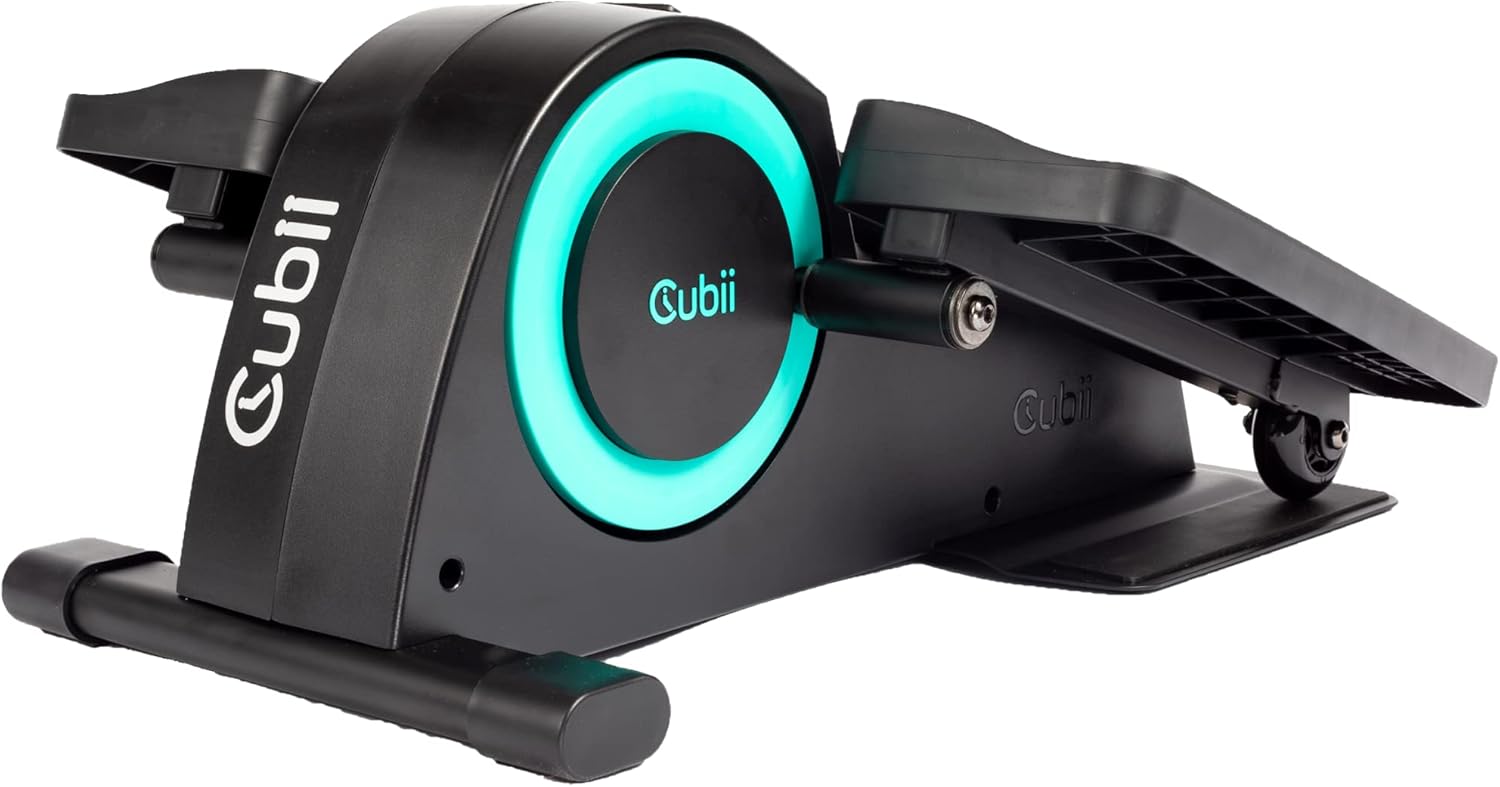
The Cubii JR1 is a compact, ergonomic under-desk elliptical designed to facilitate physical activity while seated. This manual provides essential information for the safe and effective use of your Cubii JR1, including assembly, operation, maintenance, and troubleshooting.
2. Linee guida di sicurezza
- Consult with a healthcare professional before beginning any new exercise program.
- Ensure the Cubii JR1 is placed on a stable, level surface.
- Maintain a clear area around the device during use.
- The maximum recommended user weight for this device is 150 pounds.
- Tenere mani e piedi lontani dalle parti in movimento.
- Do not stand on the device. It is designed for seated use only.
- If you experience pain or discomfort, discontinue use immediately.
3. Contenuto della confezione
Verificare che tutti i componenti siano presenti nella confezione:
- Cubii JR1 Main Unit
- Pedale sinistro
- Pedale destro
- Cacciavite
- Manuale di istruzioni (questo documento)
4. Istruzioni di montaggio
The Cubii JR1 requires minimal assembly. Follow these steps to attach the pedals:
- Rimuovere con attenzione tutti i componenti dalla confezione.
- Identify the left and right pedals. They are typically marked.
- Align the left pedal with the left crank arm on the main unit.
- Insert the provided screws and tighten them securely using the included screwdriver.
- Repeat the process for the right pedal on the right crank arm.
- Ensure both pedals are firmly attached before use.

5. Funzionamento
5.1 Posizionamento
Position the Cubii JR1 under your desk or in front of your chair. Ensure there is enough space for your knees to move freely without hitting the underside of the desk.

5.2 Regolazione della resistenza
The Cubii JR1 features 8 levels of resistance. To adjust the resistance, turn the dial located on the front of the unit. Turn clockwise for increased resistance and counter-clockwise for decreased resistance. Start with a lower resistance level and gradually increase as your fitness improves.

5.3 Utilizzo del display LCD
The built-in LCD display tracks various metrics during your exercise session, including:
- Calorie bruciate
- Strides Pedaled
- Distanza percorsa
- Tempo trascorso
Press the button on the display to cycle through the different metrics or to reset the data.
5.4 Integrazione delle app mobili
The Cubii mobile app can be used to manually enter data from your LCD display to track progress over time. Download the Cubii app from your device's app store for additional features and workout tracking capabilities.

6 Caratteristiche
- Sotto Design della scrivania: Compact and ergonomic for use while seated.
- Low Impact Exercise: Provides a smooth, joint-friendly motion.
- Resistenza regolabile: 8 levels to customize workout intensity.
- Display LCD integrato: Tracks calories, strides, distance, and time.
- Funzionamento silenzioso: Progettato per ridurre al minimo il rumore durante l'uso.
- Compatibilità con le app mobili: Manual data entry for progress tracking.
7. Manutenzione
Regular maintenance ensures the longevity and optimal performance of your Cubii JR1:
- Pulizia: Pulisci l'unità con l'annuncioamp panno dopo ogni utilizzo. Evitare detergenti abrasivi o solventi.
- Ispezione: Controllare periodicamente tutte le viti e i collegamenti per assicurarsi che siano ben serrati. Serrare nuovamente se necessario.
- Magazzinaggio: Quando non viene utilizzato, conservare l'unità in un luogo fresco e asciutto, lontano dalla luce solare diretta.
8. Risoluzione Dei Problemi
If you encounter issues with your Cubii JR1, refer to the following common problems and solutions:
| Problema | Possibile causa | Soluzione |
|---|---|---|
| Squeaking or noise during operation | New unit, components settling, or loose parts. | A slight squeal may occur when starting, which often dissipates as the machine warms up. Ensure all screws are tightened. If persistent, contact customer support. |
| Unit slides on the floor during use | Smooth flooring surface. | Place the unit on a non-slip mat or carpet. Cubii offers a Grippii Floor Mat designed to prevent sliding. |
| Il display LCD non funziona | Battery depletion or loose connection. | Check and replace the battery in the LCD unit. Ensure the display is securely connected. |
9. Specifiche del prodotto
| Specificazione | Dettaglio |
|---|---|
| Nome del modello | JR1 |
| Marca | Cubi |
| Dimensioni del prodotto (LxWxH) | 23.15" x 17.56" x 10" |
| Materiale | Metallo, Plastica |
| Meccanismo di resistenza | Manuale |
| Peso massimo raccomandato | 150 libbre |
| Numero di livelli di resistenza | 8 |
| Codice UPC | 861062000243, 852811008030 |
| Numero di parte | 01386 |
10. Informazioni sulla garanzia
The Cubii JR1 comes with a warranty. Please refer to the specific warranty details provided on the product packaging or contact Cubii customer support for more information regarding coverage and terms.
11. Contatto e supporto
For further assistance, technical support, or inquiries regarding your Cubii JR1, please visit the official Cubii websito o fare riferimento alle informazioni di contatto fornite sulla confezione del prodotto.