
Introduzione
Grazie per l'acquistoasing the POWERFLEX PF-AZ01-Z003 Portable Bluetooth Speaker. This device is designed to provide high-quality audio playback and hands-free calling capabilities. Please read this manual carefully before using the speaker to ensure proper operation and to maximize its performance.

Immagine: The POWERFLEX PF-AZ01-Z003 Portable Bluetooth Speaker is shown from an angled perspective, highlighting its black finish, front grille, and the touch-sensitive control panel on its top surface, which features illuminated volume controls.
Contenuto della confezione
Si prega di selezionare la casella per i seguenti elementi:
- POWERFLEX PF-AZ01-Z003 Portable Bluetooth Speaker
- Cavo di ricarica micro USB
- Cavo AUX
- Manuale d'uso

Immagine: This image displays the POWERFLEX PF-AZ01-Z003 Portable Bluetooth Speaker alongside its accessories: a Micro USB charging cable, an AUX cable, and the instruction manual. These are the items typically found inside the product packaging.
Caratteristiche oltreview
The POWERFLEX PF-AZ01-Z003 speaker offers several key features for an enhanced audio experience:
- Audio superiore: Equipped with dual five-watt drivers for clear highs, detailed mid-ranges, and deep bass.
- Connettività Bluetooth 3.0: Fornisce una connessione wireless stabile fino a 10 metri (33 piedi).
- Chiamate in vivavoce: Integrated microphone allows for clear phone calls.
- Molteplici opzioni di riproduzione: Supports Bluetooth, AUX input, and TF (MicroSD) card playback.
- Controlli touch: Intuitive touch-sensitive panel for easy music and call management.
- Design portatile: Compact build for easy transport.

Immagine: This image presents a cutaway view of the POWERFLEX PF-AZ01-Z003 speaker, revealing its internal components, specifically the dual five-watt drivers. The visual emphasizes the speaker's design for delivering vibrant highs, detailed mid-ranges, and deep bass for true stereo sound.

Immagine: This image showcases the POWERFLEX PF-AZ01-Z003 speaker positioned in front of a collection of diverse iOS and Android Bluetooth-enabled devices, including smartphones and tablets. The arrangement visually confirms the speaker's broad compatibility with various mobile operating systems.

Immagine: This image demonstrates the compact design of the POWERFLEX PF-AZ01-Z003 speaker, showing it being easily placed into a backpack. The accompanying text highlights its portability and specific dimensions (190 x 58 x 70mm), indicating it fits conveniently into bags.
Impostare
1. Ricarica dell'altoparlante
The speaker is powered by an internal 1800 mAh rechargeable battery. Before first use, fully charge the speaker.
- Connect the Micro USB charging cable to the DC5V port on the speaker.
- Collegare l'altra estremità del cavo USB a un adattatore di alimentazione USB (non incluso) o alla porta USB di un computer.
- The charging indicator light will illuminate. Once fully charged, the light will change color or turn off (refer to LED indicator section in the full manual for details).
2. Accensione/Spegnimento
To power on the speaker, slide the ON/OFF switch to the 'ON' position. To power off, slide the switch to the 'OFF' position.
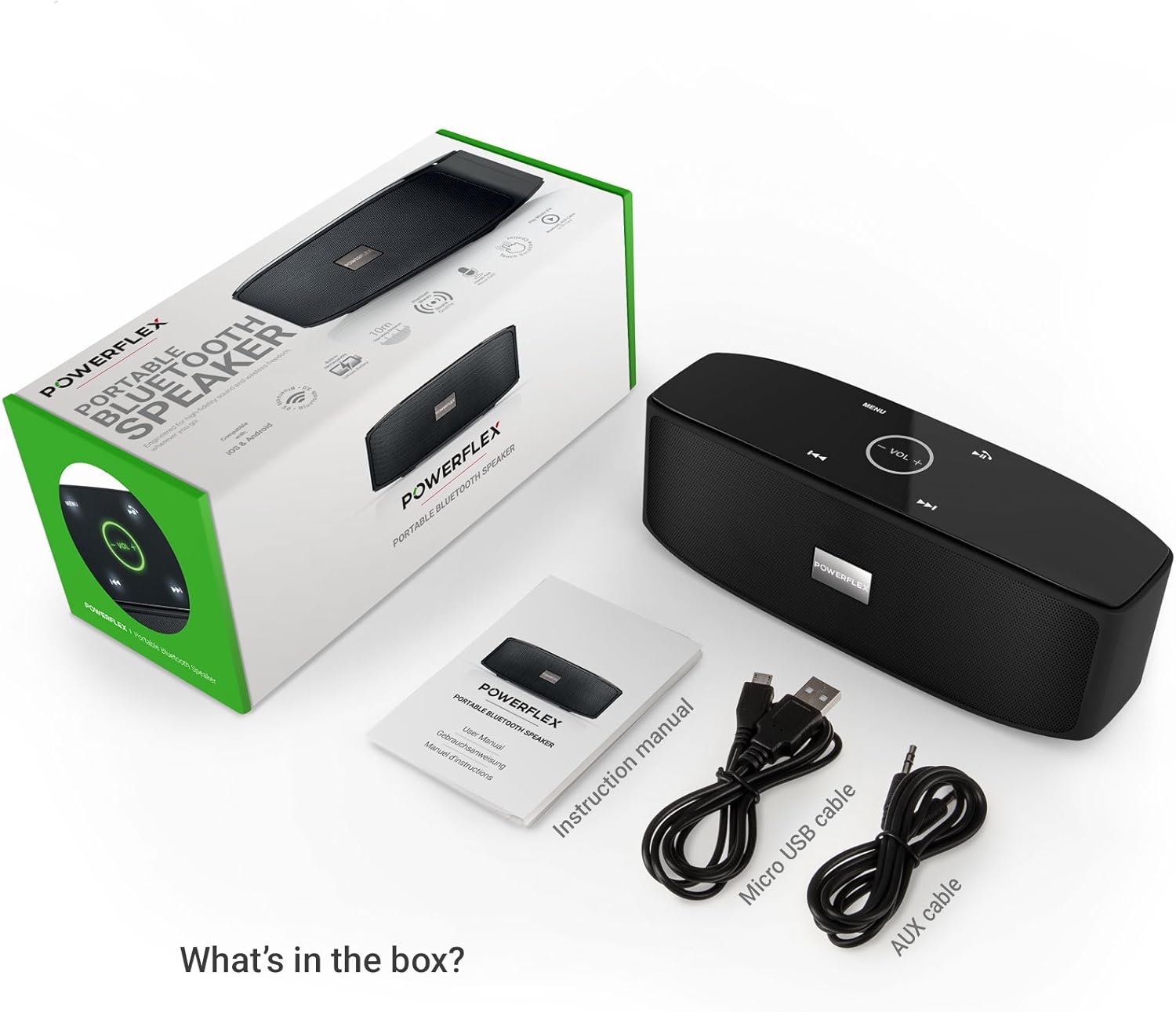
Immagine: Questa immagine fornisce una descrizione dettagliata view of the speaker's rear panel, highlighting the physical ON/OFF switch, the DC5V port for charging, the AUX input jack for wired connections, and the TF (MicroSD) card slot for direct media playback.
Istruzioni per l'uso
1. Accoppiamento Bluetooth
- Assicurati che l'altoparlante sia acceso e che si trovi entro 10 metri (33 piedi) dal tuo dispositivo abilitato Bluetooth.
- The speaker will automatically enter Bluetooth pairing mode, indicated by a flashing LED light (refer to LED indicator section in the full manual).
- Sul tuo dispositivo (smartphone, tablet, ecc.), vai alle impostazioni Bluetooth e cerca i dispositivi disponibili.
- Select "PF-AZ01-Z003" from the list.
- Once paired, the speaker will emit an audible confirmation, and the LED light will become solid.

Immagine: This image demonstrates the speaker's Bluetooth connectivity, showing a smartphone wirelessly streaming music to the POWERFLEX PF-AZ01-Z003. Blue concentric circles emanate from the phone towards the speaker, symbolizing the wireless connection, and text indicates playback from up to 10 meters.
2. Riproduzione di musica
Once connected via Bluetooth, you can play music from your device. The speaker also supports AUX cable and TF card playback.
- Bluetooth: Riproduci la musica direttamente dal tuo dispositivo associato.
- Ingresso AUX: Collega un dispositivo audio alla porta AUX utilizzando il cavo AUX da 3.5 mm in dotazione. L'altoparlante passerà automaticamente alla modalità AUX.
- Carta TF: Inserire una scheda TF (MicroSD) con MP3 filenello slot per schede TF. L'altoparlante inizierà automaticamente a riprodurre la musica dalla scheda.
3. Toccare Controlli
The speaker features touch-sensitive controls on its top panel for easy operation.
- Riproduci/Pausa: Tap the Play/Pause button (usually indicated by a triangle or two vertical bars).
- Volume su/giù: Tap the '+' or '-' buttons to adjust the volume.
- Traccia successiva: Tocca il pulsante '>>|'.
- Traccia precedente: Tocca il pulsante '|<<'.
- Modalità/Menu: Tap the 'MENU' button to switch between input modes (Bluetooth, AUX, TF).

Immagine: This image shows a hand interacting with the touch-sensitive controls on the top surface of the POWERFLEX PF-AZ01-Z003 speaker. A finger is pressing the 'VOL +' button, which is illuminated in green, while a smartphone displaying music playback is visible in the foreground, emphasizing the ease of control.
4. Chiamate in vivavoce
The speaker includes a built-in microphone, allowing you to answer phone calls when connected via Bluetooth.
- Quando arriva una chiamata, la musica si mette in pausa.
- Tap the Play/Pause button to answer the call.
- Speak into the speaker.
- Tap the Play/Pause button again to end the call.

Immagine: This image depicts a smartphone displaying an incoming call, positioned next to the POWERFLEX PF-AZ01-Z003 speaker. The text "Make hands free calls with the built-in microphone" is prominently displayed, indicating the speaker's capability for hands-free communication.
Manutenzione
To ensure the longevity and optimal performance of your POWERFLEX PF-AZ01-Z003 speaker, follow these maintenance guidelines:
- Pulizia: Utilizzare un panno morbido e asciutto per pulire la superficie dell'altoparlante. Non utilizzare detergenti abrasivi, alcol o solventi chimici.
- Magazzinaggio: Conservare l'altoparlante in un luogo fresco e asciutto, lontano dalla luce solare diretta e da temperature estreme.
- Esposizione all'acqua: Questo altoparlante non è impermeabile. Evitare di esporlo all'acqua o a umidità eccessiva.
- Cura della batteria: To preserve battery life, avoid fully discharging the battery frequently. Charge the speaker regularly, even if not in use for extended periods.
Risoluzione dei problemi
If you encounter issues with your POWERFLEX PF-AZ01-Z003 speaker, refer to the following common problems and solutions:
| Problema | Possibile causa | Soluzione |
|---|---|---|
| L'altoparlante non si accende. | La batteria è scarica. | Caricare l'altoparlante tramite il cavo Micro USB. |
| Impossibile effettuare l'associazione tramite Bluetooth. | L'altoparlante non è in modalità di associazione; il dispositivo è troppo lontano; il Bluetooth è disattivato sul dispositivo. | Ensure speaker is in pairing mode (flashing LED). Move device closer. Enable Bluetooth on your device. Forget previous pairings and try again. |
| Nessun suono o volume basso. | Volume too low on speaker or device; incorrect input mode; loose AUX cable. | Increase volume on both speaker and connected device. Press 'MENU' to select correct input mode. Ensure AUX cable is securely connected. |
| Distorsione del suono. | Volume troppo alto; dispositivo troppo lontano dall'altoparlante. | Reduce volume on speaker and/or connected device. Move device closer to the speaker. |
Specifiche
| Caratteristica | Dettaglio |
|---|---|
| Nome del modello | PF-AZ01-Z003 |
| Marca | POTENZA FLEX |
| Tecnologia di connettività | Bluetooth, USB |
| Versione Bluetooth | 3.0 |
| Caratteristica speciale | Portable, Built-in Microphone |
| Dispositivi compatibili | Universal (iOS & Android Bluetooth enabled devices) |
| Tipo di montaggio | Da tavolo |
| Fonte di alimentazione | Batteria |
| Capacità della batteria | 1800 mAh |
| Contenuto energetico della batteria | 6.66 Wattora |
| Lithium Ion Cells | 1 |
| Dimensioni del prodotto | Dimensioni: 23 x 10.6 x 9.6 cm |
| Peso del prodotto | 760 grammi |
| Colore | Nero |
Garanzia e supporto
For warranty information and technical support, please refer to the documentation included with your purchase or contact POWERFLEX customer service. Keep your proof of purchase for warranty claims.
Produttore: POTENZA FLEX
Prodotto ASIN: B074M8W712