
Prodotto finitoview
The MOTOROLA Talkabout T280 is a rechargeable two-way radio designed for instant communication. It features 22 channels, a maximum talking range of 25 miles under optimal conditions, and weather alert capabilities. The T280 is suitable for various communication needs, including outdoor activities and emergency preparedness.
Le caratteristiche principali includono:
- 22 FRS channels for communication.
- Rechargeable NiMH battery packs with micro-USB charging.
- Weatherproof design for durability.
- Emergency preparedness features, including weather alerts.

Immagine: In basso view of the Motorola T280 radio, featuring the 'Talkabout' branding.
Contenuto della confezione
The MOTOROLA Talkabout T280 bundle includes the following items:
- Two (2) T280 Radios
- One (1) Y Cable with Dual Micro-USB Chargers
- Two (2) NiMH Rechargeable Battery Packs
- Two (2) Belt Clips
- One (1) Red Carry Case
- Emergency Preparedness Checklist
Impostare
1. Installazione della batteria
- Assicurarsi che la radio sia spenta.
- Individuare il coperchio del vano batteria sul retro della radio.
- Aprire il coperchio del vano batterie.
- Insert the NiMH rechargeable battery pack, ensuring correct polarity. The radio also supports 4 AAA alkaline batteries (not included) as an alternative.
- Chiudere saldamente il coperchio del vano batterie.

Immagine: Lato view of the Motorola T280 radio, illustrating the general area for battery access and the belt clip attachment point.
2. Ricarica delle batterie
- Connect the Y cable with dual micro-USB chargers to a compatible USB power source.
- Collegare i connettori micro-USB alle porte di ricarica situate nella parte inferiore di ciascuna radio.
- L'indicatore della batteria sul display della radio mostrerà lo stato di carica.
- Allow sufficient time for a full charge before first use (typically 8-10 hours).
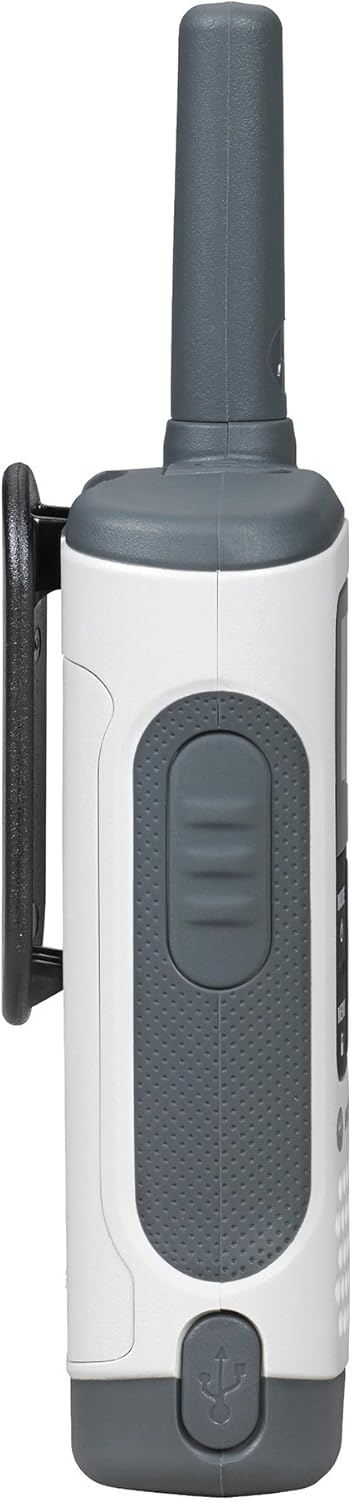
Immagine: In basso view of the Motorola T280 radio, highlighting the micro-USB charging port.
3. Fissaggio della clip da cintura
- Allineare la clip da cintura con le scanalature sul retro della radio.
- Far scorrere la clip da cintura verso il basso finché non scatta in posizione.
- To remove, push the release tab and slide the clip upwards.
Istruzioni per l'uso
1. Accensione/spegnimento
- Per accendere: tenere premuto il tasto MODALITÀ/MENU button until the radio turns on.
- Per spegnere: tenere premuto il tasto MODALITÀ/MENU button until the radio turns off.

Immagine: Frontale view of two Motorola T280 radios, showing the display, MODE/MENU, plus/minus, and monitor buttons.
2. Regolazione del volume
- Utilizzare il + (Plus) and - (Minus) buttons to increase or decrease the listening volume.
3. Selezione di un canale
- Con la radio accesa, premere il tasto MODALITÀ/MENU una volta il pulsante. Il numero del canale lampeggerà.
- Utilizzare il + or - pulsanti per selezionare il canale desiderato (1-22).
- Premere il tasto MODALITÀ/MENU nuovamente il pulsante per confermare la selezione del canale.
- For optimal communication, ensure all radios in your group are set to the same channel and privacy code.
4. Impostazione di un codice sulla privacy
Privacy codes help reduce interference from other users. The T280 supports 121 privacy codes (38 CTCSS codes and 83 DCS codes).
- Dopo aver selezionato un canale, premere il tasto MODALITÀ/MENU due volte il pulsante. Il numero del codice privacy lampeggerà.
- Utilizzare il + or - pulsanti per selezionare il codice di privacy desiderato.
- Premere il tasto MODALITÀ/MENU nuovamente il pulsante per confermare il codice della privacy.
5. Trasmissione e ricezione
- Per trasmettere: tenere premuto il tasto Premere per parlare (PTT) pulsante situato sul lato della radio. Parlare chiaramente nel microfono. Rilasciare il pulsante PTT per ascoltare.
- To receive: Ensure the PTT button is not pressed. The radio will automatically receive transmissions on the selected channel and privacy code.
Immagine: Lato view of the Motorola T280 radio, highlighting the Push-to-Talk (PTT) button.
6. Funzione di monitoraggio
- Premere il tasto LUNEDÌ button (often labeled with a 'Z' or 'MON' icon) to temporarily disable the privacy code and listen for activity on the current channel. This is useful for checking for weak signals or if you suspect interference.
7. Weather Alerts
The T280 can receive NOAA weather alerts. Refer to the radio's display for weather channel indicators. In areas with NOAA broadcasts, the radio can alert you to severe weather conditions.
- To activate/deactivate weather alerts, consult the full user manual for specific menu navigation steps.
Manutenzione
1. Cura della batteria
- Always use the provided NiMH rechargeable battery packs or approved AAA alkaline batteries.
- Non mischiare batterie vecchie e nuove o diversi tipi di batterie.
- Remove batteries if the radio will not be used for extended periods.
- Conservare le batterie in un luogo fresco e asciutto.
2. Pulizia
- Pulisci la radio con un panno morbido eamp stoffa.
- Non utilizzare detergenti abrasivi o solventi.
- Ensure the micro-USB charging port is free of debris.
3. Resistenza all'acqua
The T280 radio is designed to be waterproof. However, ensure all port covers (e.g., micro-USB charging port, accessory port) are securely closed to maintain its water resistance. Avoid submerging the radio for extended periods or exposing it to high-pressure water jets.

Immagine: in alto view of the Motorola T280 radio, showing the antenna and the covered accessory port.
Risoluzione dei problemi
| Problema | Possibile soluzione |
|---|---|
| La radio non si accende. |
|
| Impossibile comunicare con altre radio. |
|
| Scarsa qualità audio o rumore statico. |
|
| Portata limitata. |
|
Specifiche
| Caratteristica | Dettaglio |
|---|---|
| Numero di modello | T280 |
| Dimensioni del prodotto | 6.42 x 2.13 x 1.24 pollici |
| Peso dell'articolo | 6.4 once |
| Numero di canali | 22 |
| Gamma di frequenza | 300 MHz - 3 GHz |
| Portata massima di conversazione | 25 miglia (in condizioni ottimali) |
| Fonte di alimentazione | NiMH Rechargeable Battery Packs (included) or 4 AAA batteries (not included) |
| Voltage | 9.6 Volt (CC) |
| Livello di resistenza all'acqua | Impermeabile |
| Caratteristiche speciali | Rechargeable, Waterproof, Weather Alerts |
Garanzia e supporto
For warranty information, technical support, and additional resources, please visit the official Motorola Solutions websito o contattare il loro servizio clienti.
You can find more information and products from Motorola Solutions at their official store: Negozio di soluzioni Motorola.