
Importanti istruzioni di sicurezza
Si prega di leggere attentamente tutte le istruzioni di sicurezza prima di utilizzare questo prodotto. Conservare queste istruzioni per riferimento futuro.
- Non utilizzare questo apparecchio vicino all'acqua o all'umidità.
- Pulire solo con un panno asciutto.
- Non ostruire le aperture di ventilazione. Installare secondo le istruzioni del produttore.
- Non installare vicino a fonti di calore come radiatori, bocchette di riscaldamento, stufe o altri apparecchi (inclusi amplificatori) che producono calore.
- Proteggere il cavo di alimentazione per evitare che venga calpestato o schiacciato, in particolare in corrispondenza delle spine, delle prese di corrente e del punto in cui esce dall'apparecchio.
- Utilizzare solo accessori/componenti specificati dal produttore.
- Scollegare l'apparecchio durante i temporali o quando non viene utilizzato per lunghi periodi di tempo.
- Affidare tutti gli interventi di assistenza a personale di assistenza qualificato. L'assistenza è richiesta quando l'apparecchio è stato danneggiato in qualsiasi modo, ad esempio se il cavo di alimentazione o la spina sono danneggiati, se è stato versato del liquido o sono caduti degli oggetti nell'apparecchio, se l'apparecchio è stato esposto a pioggia o umidità, se non funziona normalmente o se è caduto.
Prodotto finitoview
The AUNA Roadie KIDS Boombox is a versatile audio system featuring a top-loading CD player, Bluetooth connectivity, USB playback, AUX input, and AM/FM radio. It is designed for portable use with both AC power and battery options, and includes integrated LED lights.

Figura 1: Fronte view of the AUNA Roadie KIDS Boombox with active red LED lights.

Figura 2: Dettaglio frontale view showing the display, USB port, and control panel.
Controlli e componenti
- Scomparto CD: Top-loading tray for audio CDs.
- Display: LED screen showing track number, mode, and radio frequency.
- Pulsanti di controllo: Play/Pause, Stop, Skip Forward/Backward, Program, Album.
- Relatori: Integrated stereo speakers with LED illumination.
- Porta USB: Per riprodurre MP3/WMA files da un'unità flash USB.
- Presa AUX IN: Ingresso da 3.5 mm per il collegamento di dispositivi audio esterni.
- Jack per cuffie: Uscita da 3.5 mm per l'ascolto privato.
- Antenna AM/FM: Antenna estensibile per la ricezione radio.
- Manopola del volume: Regola il livello di uscita audio.
- Selettore di modalità: Toggles between CD, USB, Bluetooth, AUX, AM, and FM modes.
- Interruttore della luce: Turns the LED speaker lights on or off.
- Presa AC IN: Per collegare l'adattatore di alimentazione CA.
- Vano batteria: Located on the bottom for C-type batteries.
- Maniglia per il trasporto: Per una facile trasportabilità.
Impostare
Alimentazione elettrica
The AUNA Roadie KIDS Boombox can be powered by either the included AC power adapter or by batteries.
Collegamento all'alimentazione CA
- Assicurarsi che lo stereo portatile sia spento.
- Connect the small end of the AC power adapter to the INGRESSO AC jack on the back of the boombox.
- Plug the other end of the AC power adapter into a standard wall outlet (110-120V ~ / 50-60 Hz).

Figura 3: Posteriore view with AC power input and antenna.
Installazione della batteria
For portable use, the boombox requires 6 x C-type batteries (not included).
- Ensure the boombox is switched off and disconnected from AC power.
- Individuare il vano batterie nella parte inferiore dell'unità.
- Aprire il coperchio del vano batterie.
- Insert 6 C-type batteries, ensuring correct polarity (+/-) as indicated inside the compartment.
- Chiudere saldamente il coperchio del vano batterie.
Istruzioni per l'uso
Funzionamento generale
- Accensione/spegnimento: Use the main power switch located on the side of the unit.
- Controllo del volume: Ruotare il VOLUME manopola sul lato dell'unità per regolare il livello del suono.
- Selezione della modalità: Utilizzare il MODALITÀ selector switch on the side to choose between CD/USB/BT/AUX and AM/FM radio functions.

Figura 4: lato view showing Volume and Mode controls.
Funzionamento del lettore CD
The boombox supports Audio CD, CD-R, CD-RW, and MP3-CDs.
- Cambia il MODALITÀ selettore per CD.
- Gently press the 'OPEN' area on the CD compartment lid to open it.
- Posizionare un CD sul perno con il lato dell'etichetta rivolto verso l'alto.
- Close the CD compartment lid firmly until it clicks. The display will show 'CD' and then the total number of tracks.
- Premere il tasto RIPRODUCI/PAUSA pulsante per avviare la riproduzione.
- Premere RIPRODUCI/PAUSA di nuovo per mettere in pausa e premere FERMARE per terminare la riproduzione.
- Utilizzare il SALTA AVANTI (>>|) O SALTA INDIETRO (|<) buttons to navigate between tracks.
- Riproduzione programmata: In modalità di arresto, premere il tasto PROGRAMMA button. The display will show '01'. Use SALTA AVANTI/INDIETRO per selezionare una traccia, quindi premere PROGRAMMA again to confirm. Repeat for up to 20 tracks (CD) or 99 tracks (MP3). Press GIOCARE per avviare la riproduzione programmata.
- Funzioni di ripetizione: Durante la riproduzione, premere il tasto RIPETERE button to cycle through repeat modes (e.g., repeat one track, repeat all tracks, repeat folder for MP3 CDs).
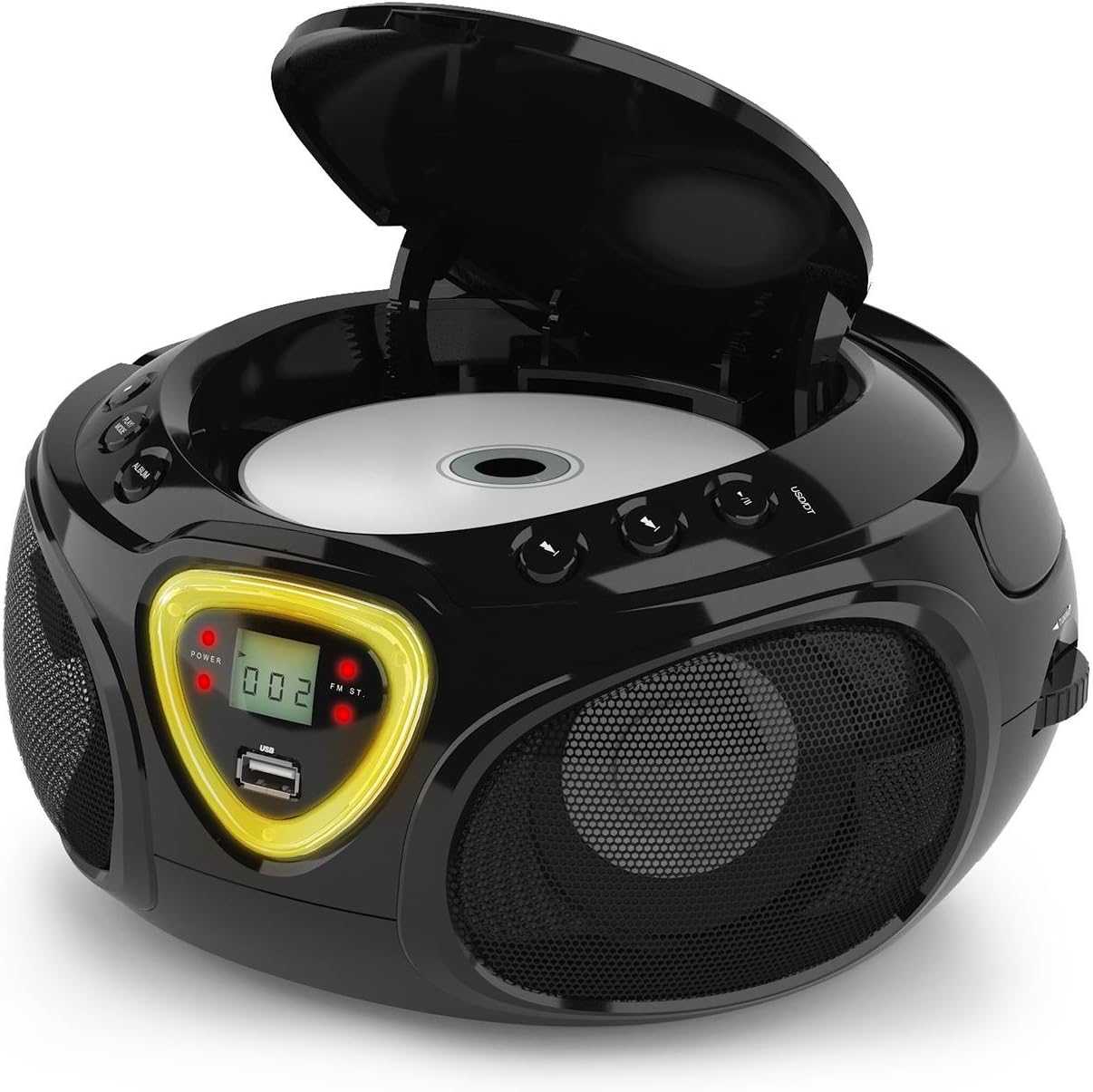
Figure 5: CD compartment open for disc insertion.
Funzionamento Bluetooth
- Cambia il MODALITÀ selettore per BT (Bluetooth). The display will show 'BT' and flash, indicating pairing mode.
- Abilita il Bluetooth sul tuo smartphone, tablet o altro dispositivo abilitato Bluetooth.
- Cercare available devices and select 'AUNA Roadie' from the list.
- Once successfully paired, the 'BT' indicator on the boombox display will stop flashing and remain solid.
- You can now play audio from your connected device through the boombox. Use the controls on your device or the boombox's Play/Pause and Skip buttons to manage playback.
Riproduzione USB
The boombox supports MP3 and WMA file formats from USB flash drives.
- Inserisci un'unità flash USB nel USB port on the front of the boombox.
- Cambia il MODALITÀ selettore per USB. The unit will automatically detect and begin playing compatible audio files.
- Utilizzare il RIPRODUCI/PAUSA, FERMARE, E SALTA AVANTI/INDIETRO pulsanti per controllare la riproduzione.
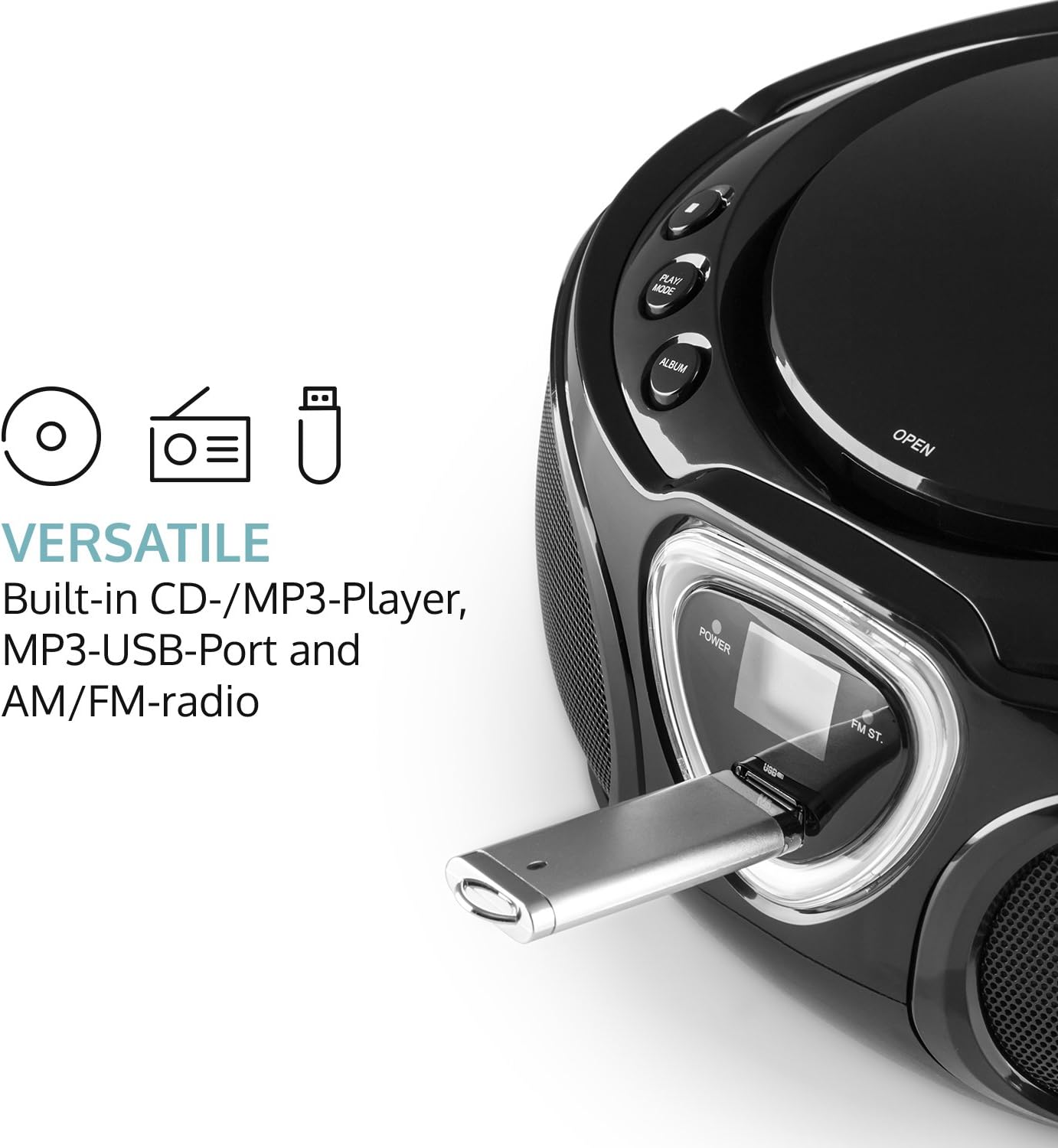
Figure 6: USB port with a flash drive inserted.
Ingresso AUX
- Collegare un'estremità di un cavo audio da 3.5 mm (non incluso) al AUX IN jack sullo stereo.
- Collegare l'altra estremità del cavo audio alla presa delle cuffie o all'uscita audio del dispositivo audio esterno (ad esempio, lettore MP3, smartphone).
- Cambia il MODALITÀ selettore per AUSILIARIO.
- Controlla la riproduzione e il volume direttamente dal tuo dispositivo audio esterno.
Funzionamento radio (AM/FM)
- Cambia il MODALITÀ selector to either AM or FM.
- Estendi l'antenna telescopica per una ricezione FM ottimale. Per la ricezione AM, ruota l'unità per una ricezione ottimale.
- Ruotare il ACCORDATURA dial on the side of the unit to scan for radio stations.

Figura 7: lato view with Tuning dial and Light switch.
Funzione luce a LED
The boombox features multi-color LED lights that illuminate the speakers.
- Utilizzare il LUCE ACCESA/SPENTA switch on the side of the unit to turn the LED lights on or off.
- The lights will typically pulse and change color with the rhythm of the music when active.

Figure 8: Boombox with active LED lights.
Uso delle cuffie
For private listening, connect any standard 3.5mm headphones (not included) to the CUFFIA jack. The main speakers will automatically mute when headphones are connected.
Manutenzione
Pulizia dell'unità
- Wipe the exterior of the boombox with a soft, dry cloth.
- Non utilizzare detergenti abrasivi, cere o solventi poiché potrebbero danneggiare la finitura.
- For the CD lens, use a specialized CD lens cleaning kit if necessary. Avoid touching the lens directly.
Magazzinaggio
- Conservare il boombox in un luogo fresco e asciutto, lontano dalla luce solare diretta e da temperature estreme.
- If storing for an extended period, remove the batteries to prevent leakage and damage to the unit.
Risoluzione dei problemi
If you encounter any issues with your AUNA Roadie KIDS Boombox, please refer to the following common problems and solutions:
| Problema | Possibile causa | Soluzione |
|---|---|---|
| Nessun potere | AC adapter not connected, batteries depleted or incorrectly inserted. | Check AC adapter connection. Replace or correctly insert batteries. |
| Nessun suono | Volume too low, incorrect mode selected, headphones connected. | Increase volume. Select correct mode (CD, BT, USB, AUX, AM/FM). Disconnect headphones if using speakers. |
| Il CD non viene riprodotto | CD inserted incorrectly, CD dirty/scratched, incompatible CD format. | Ensure CD is label-side up. Clean CD. Use compatible CD format. |
| Il Bluetooth non si connette | Boombox not in BT mode, device too far, already paired to another device. | Switch to BT mode. Ensure device is within 10 meters. Disconnect from other devices. |
| Scarsa ricezione radio | Antenna not extended/adjusted, weak signal. | Extend and adjust FM antenna. Rotate unit for AM. Try a different location. |
Specifiche
| Caratteristica | Dettaglio |
|---|---|
| Marca | AUNA |
| Tecnologia di connettività | Ausiliario, Bluetooth, USB |
| Colore | Nero |
| Tipo di altoparlante | Stereo |
| Dimensioni articolo (L x P x A) | 7.9 x 9.5 x 5.2 pollici |
| Fonte di alimentazione | AC (110-120V ~ / 50-60 Hz) or 6 x C-type batteries (9V DC) |
| Dispositivi compatibili | Computer portatile, smartphone, tablet |
| Cosatage | 3 watts (2 x 1.5W speakers) |
| Modalità di uscita audio | Stereo |
| Formati audio supportati | CD, MP3, WMA |
| Versione Bluetooth | 2.1 + EDR (Profiles: A2DP, AVRCP) |
| Compatible CD Formats | Audio CD, CD-R, CD-RW, MP3-CDs |
| Riproduzione programmabile | 20 tracks (CD), 99 tracks (MP3) |
| Peso dell'articolo | 3.4 libbre |
Garanzia e supporto
This product comes with a manufacturer's warranty. For detailed warranty information, please refer to the documentation included with your purchase or visit the official AUNA website. If you require technical assistance, troubleshooting beyond this manual, or have questions regarding your product, please contact AUNA customer support.