
1. Introduzione
Grazie per l'acquistoasing the Genius GX Wired Gaming Keyboard, Scorpion K220. This manual provides detailed instructions for setting up, operating, and maintaining your new gaming keyboard. Designed for PC gaming, the Scorpion K220 features a sleek design, compact construction, and vibrant backlighting for an enhanced gaming experience.

Figura 1.1: Fronte view of the Genius GX Wired Gaming Keyboard Scorpion K220, showcasing its design and colorful backlighting.
2. Informazioni sulla sicurezza
Please read the following safety precautions carefully before using the device to ensure optimal performance and prevent damage.
- Non esporre la tastiera all'acqua o ad altri liquidi.
- Avoid extreme temperatures (hot or cold) and high humidity.
- Non tentare di smontare o modificare la tastiera. Ciò invaliderà la garanzia.
- Tenere la tastiera lontana da forti campi magnetici.
- Use only a dry, soft cloth for cleaning.
- Ensure the USB cable is not pinched or damaged during setup and use.
3. Contenuto della confezione
Verificare che tutti gli articoli siano presenti nel pacco:
- Genius GX Wired Gaming Keyboard (Scorpion K220)
- Manuale dell'utente (questo documento)
4. Impostazione
4.1 Collegamento della tastiera
The Scorpion K220 keyboard uses a standard USB connection for compatibility with PCs and Laptops. No additional drivers are typically required for basic functionality.
- Individua una porta USB disponibile sul tuo computer (PC o laptop).
- Carefully insert the USB connector of the Scorpion K220 keyboard into the USB port.
- Il sistema operativo dovrebbe rilevare e installare automaticamente i driver necessari. Questo processo potrebbe richiedere alcuni istanti.
- Once installation is complete, the keyboard will be ready for use. The backlighting should illuminate.

Figure 4.1: The Genius GX Wired Gaming Keyboard Scorpion K220, ready for connection to a PC or laptop via its integrated USB cable.
5. Istruzioni per l'uso
5.1 Funzioni di base della tastiera
The Scorpion K220 functions as a standard QWERTY keyboard. All standard keys (alphanumeric, function keys, navigation keys, and numeric keypad) operate as expected.
5.2 Controllo della retroilluminazione
The Scorpion K220 features vibrant backlighting to enhance your gaming and typing experience. The backlighting is always on when the keyboard is connected and powered.
- Regolazione della luminosità: Look for dedicated keys or key combinations (often Fn + Scroll Lock or similar) to adjust backlight brightness. Refer to the keyboard's key legends for specific controls.
- Modalità di illuminazione: Some models may offer different lighting effects or static color modes. Experiment with function key combinations (e.g., Fn + F1-F12 or dedicated lighting keys) to cycle through available modes.
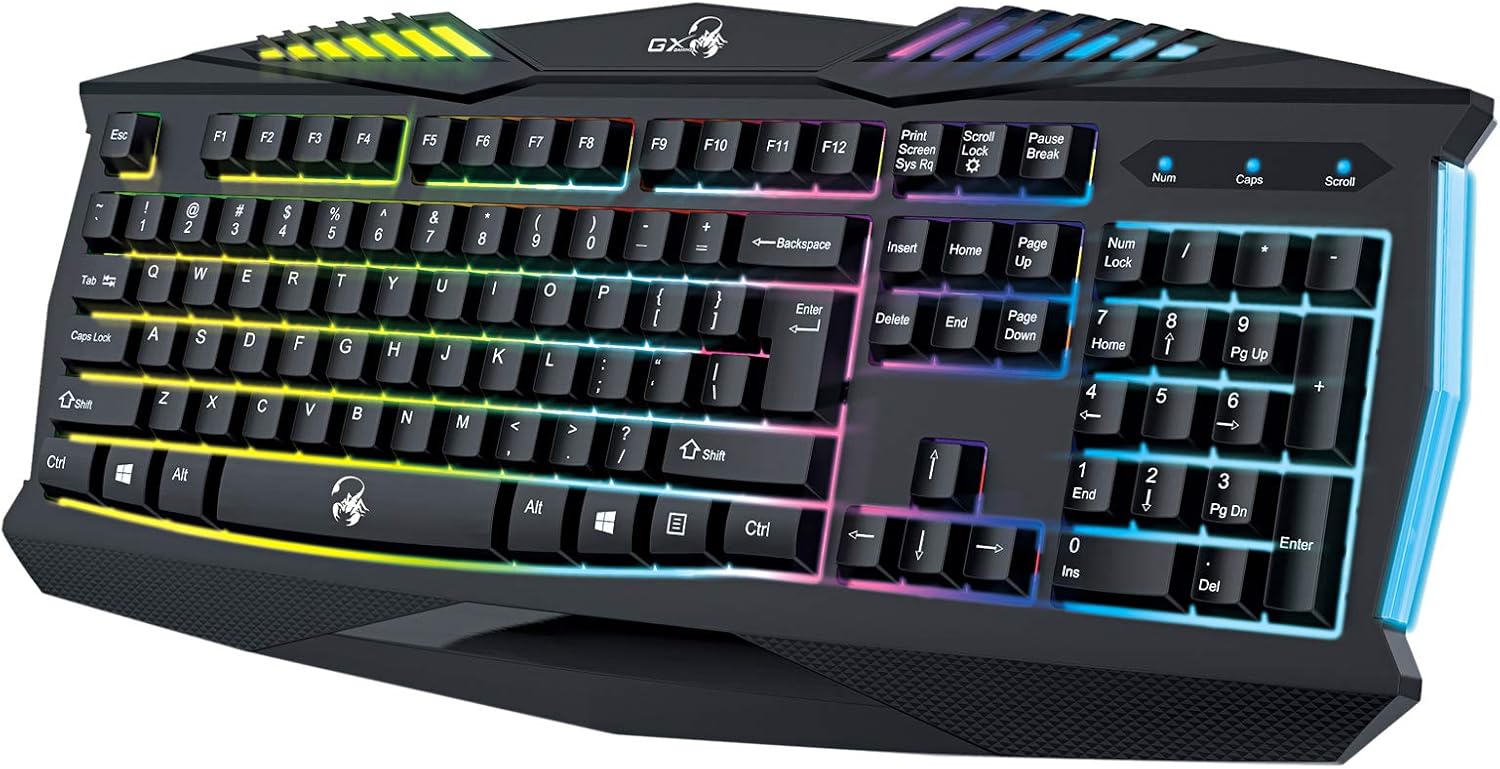
Figura 5.1: primo piano view of the Genius GX Wired Gaming Keyboard Scorpion K220, highlighting the illuminated keys and vibrant backlighting.
5.3 Caratteristiche di gioco
The Scorpion K220 is designed for gaming with a responsive membrane switch type and a comfortable layout. While it does not feature programmable macro keys, its robust design and anti-ghosting capabilities (where applicable) ensure reliable performance during intense gaming sessions.
6. Manutenzione
Una corretta manutenzione garantisce la longevità e le prestazioni ottimali della tastiera.
- Pulizia:
- Scollegare la tastiera dal computer prima di pulirla.
- Use a soft, dry, lint-free cloth to wipe down the surface of the keyboard.
- Per rimuovere polvere e detriti tra i tasti, utilizzare aria compressa.
- Non utilizzare prodotti chimici aggressivi, detergenti abrasivi o solventi.
- Magazzinaggio: Quando non viene utilizzata per lunghi periodi, conservare la tastiera in un luogo fresco e asciutto, lontano dalla luce solare diretta e da temperature estreme.
7. Risoluzione Dei Problemi
If you encounter issues with your Scorpion K220 keyboard, refer to the table below for common problems and solutions.
| Problema | Possibile causa | Soluzione |
|---|---|---|
| La tastiera non risponde | Connessione USB allentata, porta USB difettosa, problema con il driver. |
|
| La retroilluminazione non funziona | Keyboard not powered, specific lighting mode selected. |
|
| I tasti sono bloccati o non rispondono | Sporcizia o detriti sotto i tasti. |
|
8. Specifiche
Detailed technical specifications for the Genius GX Wired Gaming Keyboard Scorpion K220:
| Caratteristica | Dettaglio |
|---|---|
| Marca | Genio |
| Numero di modello | K220 |
| Dimensioni del prodotto | Dimensioni: 23 x 49 x 4 cm |
| Peso dell'articolo | 980 grammi |
| Produttore | Genio |
| Fonte di alimentazione | Elettrico con cavo |
| Batterie incluse | NO |
| Dispositivi compatibili | PC, laptop |
| Tecnologia di connettività | USB |
| Descrizione della tastiera | Gioco d'azzardo |
| Caratteristiche speciali | Retroilluminato |
| Materiale | Materiali misti |
| Tipo di interruttore | Membrana |
| Disposizione della tastiera | Tastiera QWERTY |
| Orientamento della mano | Ambidestro |
9. Garanzia e supporto
Genius products are manufactured to the highest quality standards. For information regarding warranty coverage, technical support, or service, please refer to the warranty card included with your product or visit the official Genius websito.
For further assistance, you may contact Genius customer support through their official channels. Please have your product model number (K220) and purchase details ready when contacting support.
Ufficiale Websito: www.geniusnet.com