
1. Introduzione
This manual provides essential information for the safe and efficient operation of the Keyence BL-601 Fixed Mount Barcode Scanner. Please read this manual thoroughly before using the product and keep it for future reference.
The BL-601 is an ultra-compact barcode scanner designed for high-speed and accurate data capture in various industrial applications. Its small footprint allows for integration into space-constrained environments.
2. Precauzioni di sicurezza
Observe the following safety precautions to prevent injury to personnel and damage to the product.
- Do not attempt to disassemble, repair, or modify the scanner. This may cause electric shock or damage.
- Garantire l'alimentazione voltage is within the specified range. Incorrect voltagpuò causare danni.
- Avoid exposing the scanner to direct sunlight, high temperatures, excessive humidity, or corrosive gases.
- Do not look directly into the scanning window while the device is operating, as it emits a laser light.
- Mount the device securely to prevent it from falling.
3. Contenuto della confezione
Verificare che tutti gli articoli siano presenti e integri al momento del disimballaggio.
- Keyence BL-601 Barcode Scanner Unit
- Connection Cable (specific type may vary)
- Mounting Bracket (optional, may be sold separately)
- Guida rapida
4. Prodotto finitoview
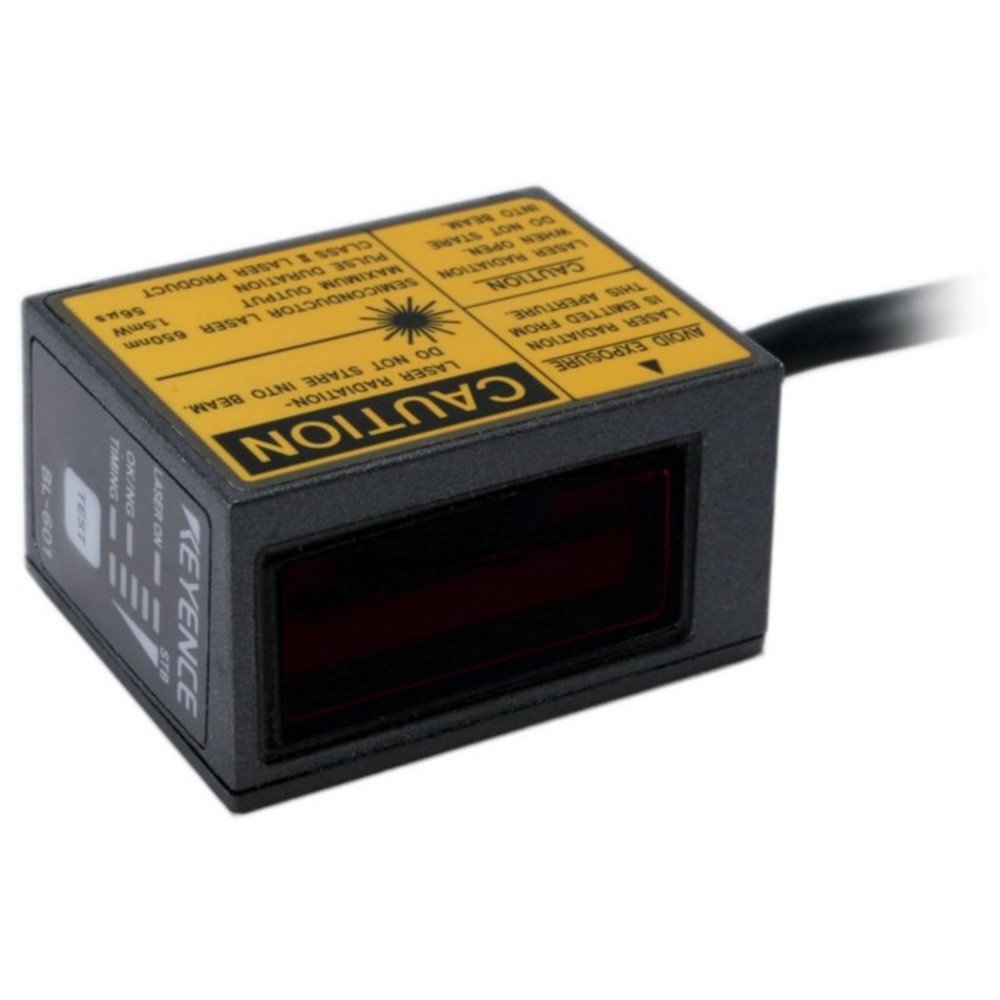
Figura 4.1: Davanti view of the Keyence BL-601 Barcode Scanner. This image shows the compact design and the scanning window.
The BL-601 features a robust housing, a high-performance scanning engine, and various interface options for seamless integration into existing systems. Key components include the scanning window, status indicators, and a connector port.
- Finestra di scansione: Area in cui vengono letti i codici a barre.
- Indicatori di stato: LEDs indicating power, scan status, and error conditions.
- Porta connettore: Per la comunicazione di energia e dati.
5. Impostazione
5.1 Mounting the Scanner
The BL-601 can be mounted using standard M3 screws or an optional mounting bracket. Ensure the scanner is positioned to provide a clear line of sight to the barcodes.
- Select a stable, vibration-free surface for mounting.
- Secure the scanner using appropriate screws, ensuring it is firmly attached.
- Adjust the angle to optimize reading performance.
5.2 Collegamento dei cavi
Connect the provided cable to the scanner's connector port and to the host device (e.g., PC, PLC).
- Ensure the host device is powered off before connecting.
- Connect the scanner cable to the designated port on the scanner.
- Connect the other end of the cable to the appropriate interface port (e.g., USB, RS-232) on your host system.
- Power on the host device and then the scanner. Observe the status indicators.
6. Istruzioni per l'uso
6.1 Operazioni di scansione di base
Once powered on and connected, the BL-601 is ready to scan. The scanner operates automatically or can be triggered externally depending on its configuration.
- Assicurarsi che il codice a barre sia all'interno del campo di lettura dello scanner view and focal range.
- The scanner will emit a laser beam to read the barcode.
- A successful read is typically indicated by a green LED and/or an audible beep (if configured).
- The decoded data is then transmitted to the host system via the connected interface.
6.2 Configurazione
The BL-601 can be configured using dedicated software provided by Keyence or via configuration barcodes. Refer to the detailed programming manual for advanced settings such as symbology enabling/disabling, data formatting, and trigger modes.
7. Manutenzione
7.1 Pulizia dello scanner
Regular cleaning ensures optimal performance and longevity of the scanner.
- Finestra di scansione: Gently wipe the scanning window with a soft, lint-free cloth dampened with a mild, non-abrasive cleaner or isopropyl alcohol. Do not use harsh chemicals or abrasive materials.
- Alloggiamento: Wipe the exterior housing with a soft, dry cloth.
- Ensure no liquid enters the scanner's interior.
7.2 Conservazione
Store the scanner in a clean, dry environment within the specified temperature and humidity ranges when not in use for extended periods.
8. Risoluzione Dei Problemi
| Problema | Possibile causa | Soluzione |
|---|---|---|
| Lo scanner non si accende | No power supply; loose cable connection | Check power source; ensure cable is securely connected. |
| Impossibile leggere i codici a barre | Barcode damaged; incorrect focal distance; dirty scanning window; symbology disabled | Check barcode quality; adjust scanner position; clean scanning window; enable required symbology in settings. |
| Data not transmitting to host | Incorrect interface settings; faulty cable; host software issue | Verify communication settings; try a different cable; check host application. |
9. Specifiche
| Caratteristica | Dettaglio |
|---|---|
| Modello | BL-601 |
| Produttore | KEYENCE |
| Dimensioni (L x P x A) | 31 x 40 x 21 mm (circa) |
| Metodo di scansione | Fixed Mount Laser Scanner |
| Interfaccia | RS-232C, USB (depending on model/cable) |
| Alimentazione elettrica | 5 VDC to 24 VDC (typical) |
| Temperatura di esercizio | da 0 a 50°C (da 32 a 122°F) |
| Temperatura di conservazione | Da -20 a 70°C (da -4 a 158°F) |
| Umidità | 35-85% RH (senza condensa) |
10. Garanzia e supporto
For information regarding product warranty, technical support, or service, please contact your local Keyence representative or visit the official Keyence websito. Tieni a portata di mano la ricevuta d'acquisto e il numero di serie del prodotto quando contatti l'assistenza.
Keyence Official Websito: www.keyence.com