
Introduzione
Thank you for choosing the T'nB MWTCBK Wireless USB-C Mouse. This compact and ergonomically designed mouse offers a comfortable user experience with its silent click feature and automatic power-saving mode. It is compatible with PC, Mac, and Linux systems, providing versatile connectivity for various computing environments. This manual provides detailed instructions for setup, operation, maintenance, and troubleshooting to ensure optimal performance of your device.

Figure 1: T'nB MWTCBK Wireless USB-C Mouse (Top View)
Contenuto della confezione
Si prega di controllare il contenuto della confezione per assicurarsi che siano presenti tutti gli articoli:
- 1 x T'nB MWTCBK Wireless USB-C Mouse
- 1 x Ultra-mini USB-C Receiver
- 2 x AAA Batteries (LR3)
Caratteristiche del prodotto
- Wireless USB-C Connectivity: Utilizes a 2.4 GHz wireless connection via a compact USB-C receiver.
- Design compatto ed ergonomico: Shaped for comfortable use over extended periods.
- Velvet Touch Finish: Provides a pleasant tactile experience.
- Clic silenzioso: Reduces clicking noise for a quieter work environment.
- Power Safe Saving: Automatically enters sleep mode when inactive to conserve battery life and instantly reactivates upon use.
- DPI regolabile: Switch between 800, 1000, and 1200 DPI for customized cursor sensitivity.
- Collega e usa: Non sono richiesti driver per l'installazione.
- Ampia compatibilità: Works with PC, Mac, and Linux operating systems.
- Design ambidestro: Adatto sia per utenti mancini che destrorsi.
Impostare
1. Installazione delle batterie
- Capovolgi il mouse.
- Individuare il coperchio del vano batteria sul lato inferiore del mouse.
- Per aprire il vano, far scorrere o sollevare delicatamente il coperchio.
- Insert the two supplied AAA (LR3) batteries, ensuring the correct polarity (+/-) as indicated inside the compartment.
- Chiudere saldamente il coperchio del vano batterie.
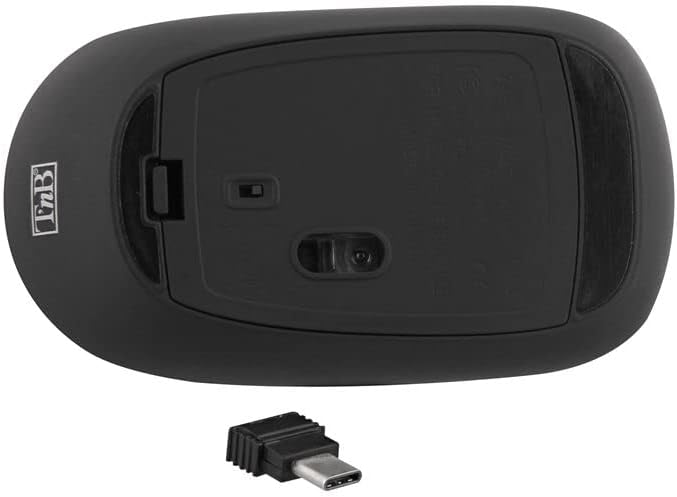
Figure 2: Battery Compartment and USB-C Receiver Slot
2. Connecting the USB-C Receiver
- The ultra-mini USB-C receiver is stored in a dedicated compartment under the mouse for convenience. Remove it from this slot.
- Plug the USB-C receiver into an available USB-C port on your computer (PC, Mac, or Linux device).
- Your computer should automatically detect and install the necessary drivers. This is a Plug & Play device, so no manual driver installation is typically required.
3. Accensione/Spegnimento
Locate the power switch on the underside of the mouse. Slide the switch to the "ON" position to activate the mouse. Slide it to "OFF" when not in use for extended periods to further conserve battery life.
4. Regolazione DPI
The mouse features a DPI switch button, usually located near the scroll wheel. Press this button to cycle through the available DPI settings: 800, 1000, and 1200 DPI. This allows you to adjust the cursor sensitivity to your preference.
Istruzioni per l'uso
Funzioni di base del mouse
- Clic sinistro: Pulsante principale per la selezione degli elementi, l'apertura files ed esecuzione di comandi.
- Clic destro: Pulsante secondario per accedere ai menu contestuali e alle opzioni aggiuntive.
- Rotella di scorrimento: Utilizzato per scorrere i documenti e web pages. The scroll wheel is also clickable, functioning as a middle button for various applications.
Modalità di risparmio energetico
The T'nB MWTCBK mouse is equipped with a "Power Safe Saving" feature. If the mouse is not used for a short period, it will automatically enter a sleep mode to conserve battery power. To reactivate the mouse, simply move it or click any button. It will instantly resume normal operation.
Manutenzione
Pulizia
To maintain the performance and appearance of your mouse, clean it regularly:
- Prima di procedere alla pulizia, assicurarsi che il mouse sia spento.
- Per pulire la superficie del mouse, utilizzare un panno morbido, asciutto e privo di lanugine.
- Per sporco ostinato, leggermente dampPulire il panno con acqua o con un detergente delicato e non abrasivo. Evitare l'eccessiva umidità.
- Do not use harsh chemicals, solvents, or abrasive cleaners, as these can damage the finish.
- Clean the optical sensor area on the bottom of the mouse with a cotton swab if cursor movement becomes erratic.
Sostituzione della batteria
When the mouse performance degrades or stops responding, it's time to replace the batteries:
- Spegnere il mouse utilizzando l'interruttore di alimentazione posto nella parte inferiore.
- Aprire il coperchio del vano batterie.
- Rimuovere le vecchie batterie AAA.
- Inserire due batterie AAA nuove, rispettando la polarità corretta.
- Chiudere il coperchio del vano batterie.
- Riaccendere il mouse.
Risoluzione dei problemi
If you encounter issues with your T'nB MWTCBK mouse, please refer to the following common solutions:
- Il mouse non risponde:
- Assicurati che il mouse sia acceso.
- Controllare che le batterie siano inserite correttamente e siano sufficientemente cariche. Sostituirle se necessario.
- Verify that the USB-C receiver is securely plugged into a working USB-C port on your computer.
- Try plugging the receiver into a different USB-C port.
- Riavvia il computer.
- Erratic or no cursor movement:
- Pulisci il sensore ottico sul lato inferiore del mouse.
- Assicurati di utilizzare il mouse su una superficie adatta. Superfici altamente riflettenti o trasparenti potrebbero influire sul tracciamento.
- Check for any obstructions between the mouse and the receiver.
- Ensure the mouse is within the effective operating range of the receiver (typically up to 10 meters).
- DPI switch not working:
- Assicurarsi che il mouse sia acceso e collegato.
- Premere con decisione il pulsante DPI. Se il problema persiste, provare a sostituire le batterie.
Specifiche
| Marca | T'nB |
| Nome del modello | MWTCBK |
| Colore | Nero/Argento |
| Tecnologia di connettività | Wireless (2.4 GHz, USB-C Receiver) |
| Tecnologia di rilevamento del movimento | Ottico |
| Impostazioni DPI | 800 / 1000 / 1200 DPI |
| Numero di pulsanti | 3 (Sinistra, Destra, Scorrimento) |
| Orientamento della mano | Ambidestro |
| Dispositivi compatibili | Personal Computer (PC, Mac, Linux) |
| Tipo di batteria | 2 x AAA (LR3) Alkaline Batteries |
| Caratteristiche speciali | Silent Click, Power Safe Saving, Ergonomic Design, Velvet Touch |
Garanzia e supporto
For warranty information and customer support, please refer to the documentation provided with your purchase or visit the official T'nB websito. Al momento non sono disponibili informazioni sulla disponibilità dei pezzi di ricambio e sugli aggiornamenti software.