
1. Introduzione
This manual provides essential information for the safe and efficient operation of your Roadstar TSPK-990CDBT Portable Stereo System. Please read these instructions thoroughly before using the device and retain them for future reference. The TSPK-990CDBT is a versatile multimedia tower speaker featuring CD playback, FM radio, Bluetooth connectivity, USB playback, and an AUX-in port.
2. Informazioni sulla sicurezza
- Fonte di energia: Garantire l'alimentazione voltage matches the requirements specified on the unit. Use only the provided power adapter.
- Ventilazione: Non ostruire le aperture di ventilazione. Mantenere uno spazio adeguato attorno all'unità per un corretto flusso d'aria.
- Acqua e umidità: Non esporre l'unità a pioggia, umidità o liquidi che gocciolano/spruzzano. Non posizionare oggetti contenenti liquidi, come vasi, sull'unità.
- Calore: Tenere l'unità lontana da fonti di calore quali radiatori, bocchette di riscaldamento, stufe o altri apparecchi (inclusi amplificatori) che producono calore.
- Pulizia: Scollegare l'unità dalla presa di corrente prima di pulirla. Utilizzare un panno morbido e asciutto. Non utilizzare detergenti liquidi o spray.
- Manutenzione: Non tentare di riparare questo prodotto da soli. Affidare tutte le operazioni di manutenzione a personale di assistenza qualificato.
- Lettore CD: This product utilizes a Class 1 laser. Do not open the CD compartment while a disc is playing.
3. Contenuto della confezione
Disimballare con cura la scatola e assicurarsi che tutti gli articoli siano presenti e in buone condizioni. Se alcuni articoli risultano mancanti o danneggiati, contattare il rivenditore.
- Roadstar TSPK-990CDBT Main Unit
- Telecomando
- Adattatore di alimentazione CA.
- Audio Cable (3.5mm to RCA)
- Mounting Screws for Base (if applicable)

Figura 3.1: Included accessories: remote control, power adapter, and audio cable.
4. Prodotto finitoview
4.1 Pannello frontale e superiore
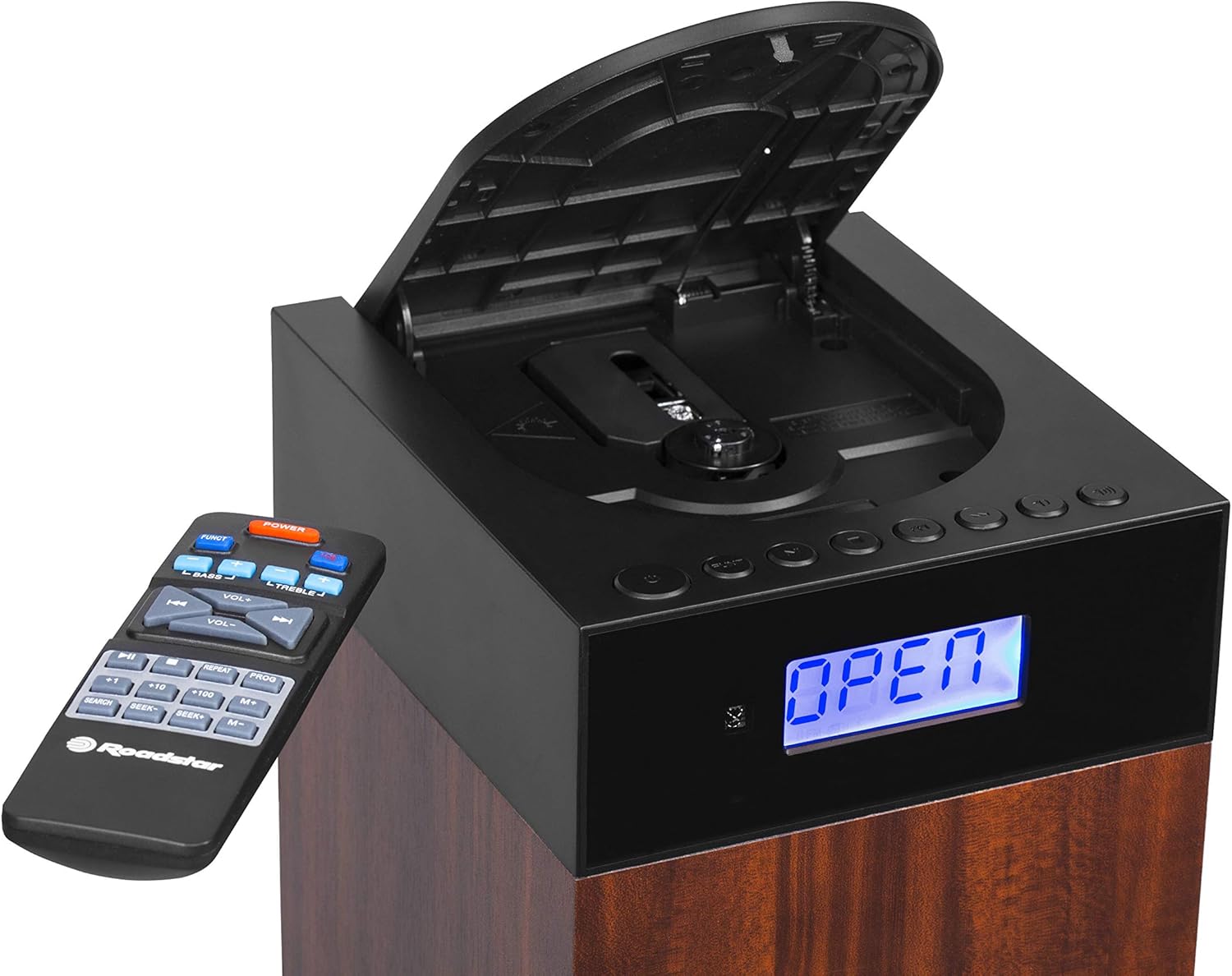
Figura 4.1: Davanti view showing the LCD display, control buttons, and open CD compartment.
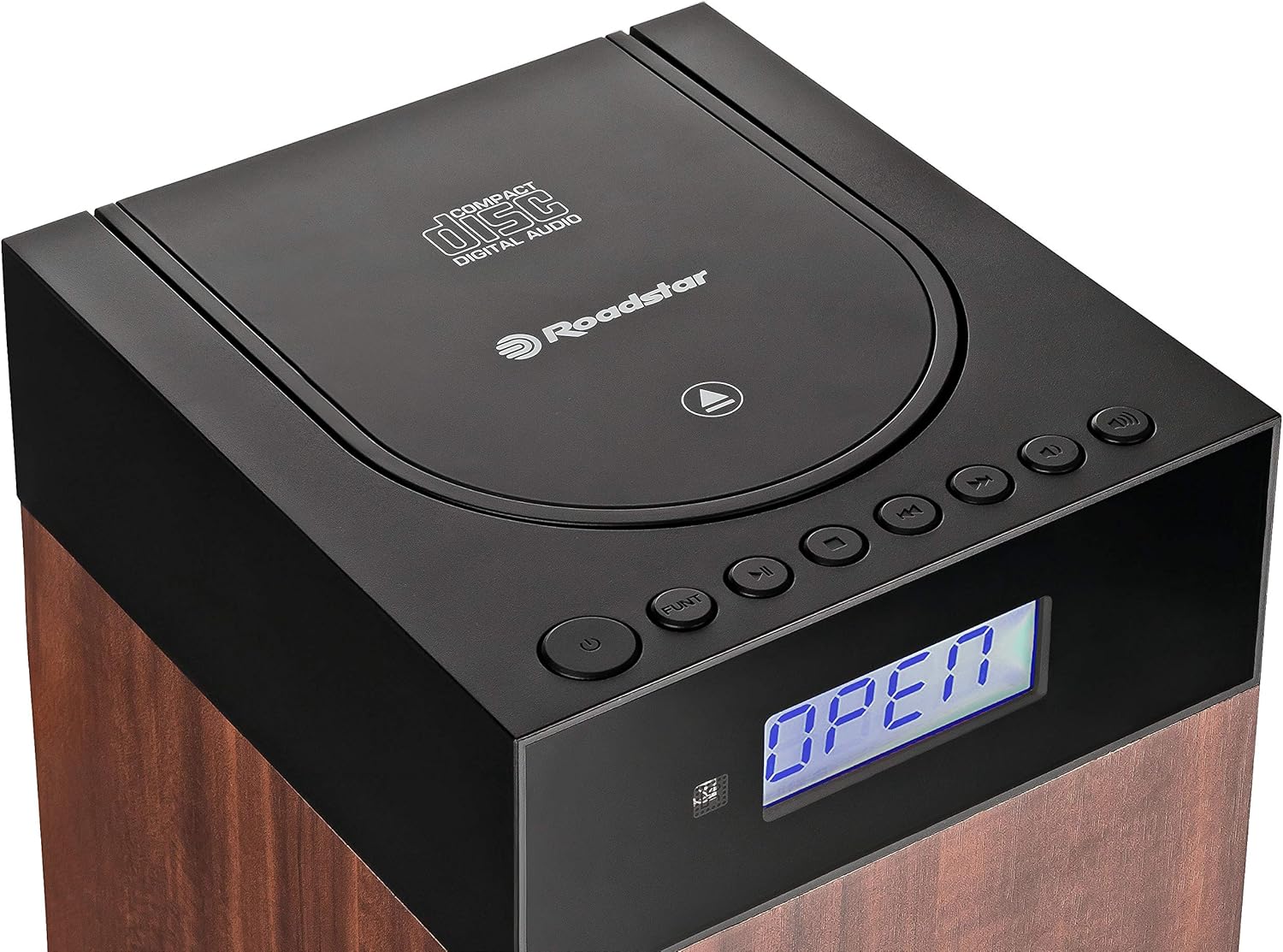
Figura 4.2: Superiore view showing the CD compartment lid and main controls.
The front panel features an LCD display for status information and mode indicators. The top section houses the CD player compartment and primary control buttons such as Power, Function, Play/Pause, Skip, and Volume.
4.2 Collegamenti del pannello posteriore

Figura 4.3: Rear panel connections: DC IN, Power ON/OFF switch, USB port, and AUX IN.
The rear panel includes the DC IN port for power, a master ON/OFF switch, a USB port for media playback, and an AUX IN port for connecting external audio devices.
5. Impostazione
5.1 Disimballaggio e posizionamento
- Estrarre l'unità e tutti gli accessori dall'imballaggio.
- Place the stereo system on a stable, flat surface. Ensure there is sufficient space around the unit for ventilation.
- Avoid placing the unit near heat sources, direct sunlight, or areas with high humidity or dust.
5.2 Collegamento di alimentazione
- Connect the supplied AC power adapter to the DC IN port on the rear of the unit.
- Collegare l'altra estremità dell'adattatore di alimentazione a una presa a muro standard.
- Ensure the master ON/OFF switch on the rear panel is in the 'ON' position.
5.3 Installazione della batteria del telecomando
- Aprire il coperchio del vano batterie sul retro del telecomando.
- Insert two AAA batteries (not included) according to the polarity markings (+ and -) inside the compartment.
- Chiudere saldamente il coperchio del vano batterie.
6. Istruzioni per l'uso
6.1 Accensione/spegnimento e selezione della modalità
- Premere il tasto ENERGIA pulsante sull'unità o sul telecomando per accendere o spegnere il sistema.
- Premere il tasto FUNZIONE button repeatedly to cycle through available modes: CD, FM, Bluetooth, USB, AUX. The selected mode will be displayed on the LCD.
6.2 Riproduzione CD
- Premere il tasto FUNZIONE per selezionare la modalità CD.
- Aprire delicatamente il coperchio del vano CD nella parte superiore dell'unità.
- Place a CD (CD-DA, CD-R, or CD-RW) with the label side facing up onto the spindle.
- Close the CD compartment lid. The unit will read the disc, and playback should begin automatically.
- Utilizzare il RIPRODUCI/PAUSA per mettere in pausa o riprendere la riproduzione.
- Premere il tasto SALTA AVANTI or SALTA INDIETRO pulsanti per navigare tra le tracce.
- Utilizzare il RIPETERE button to repeat the current track or the entire disc.
- Utilizzare il CASUALE button for shuffled playback.
6.3 Funzionamento della radio FM
- Premere il tasto FUNZIONE pulsante per selezionare la modalità FM.
- For automatic station search, press and hold the RIPRODUCI/PAUSA pulsante (o SCANSIONE on remote). The radio will scan and save available stations.
- Per sintonizzare manualmente, utilizzare il SALTA AVANTI or SALTA INDIETRO pulsanti per regolare la frequenza.
- To save a preset, tune to the desired station, then press the PROG pulsante, utilizzare SALTARE pulsanti per selezionare un numero preimpostato e premere PROG di nuovo per confermare.
- Per richiamare un preset, utilizzare il M+ or M- pulsanti sul telecomando.
6.4 Connessione Bluetooth

Figura 6.1: Connettività Bluetooth per lo streaming audio wireless.
- Premere il tasto FUNZIONE button to select Bluetooth mode. The LCD will display "BT" or a similar indicator, and the unit will enter pairing mode.
- Sul tuo dispositivo abilitato Bluetooth (ad esempio, smartphone), attiva il Bluetooth e cerca i dispositivi disponibili.
- Select "TSPK-990CDBT" from the list of devices.
- Una volta effettuato l'abbinamento, puoi riprodurre l'audio dal tuo dispositivo tramite l'impianto stereo.
- Control playback (Play/Pause, Skip) using your connected device or the remote control.
6.5 Riproduzione USB
- Insert a USB flash drive containing MP3, WMA, or WAV audio files nella porta USB sul pannello posteriore.
- Premere il tasto FUNZIONE per selezionare la modalità USB.
- Playback should begin automatically. If not, use the RIPRODUCI/PAUSA pulsante.
- Utilizzare il SALTA AVANTI or SALTA INDIETRO pulsanti per navigare tra le tracce.
6.6 Connessione AUX-in
- Connect one end of the supplied audio cable (or a standard 3.5mm audio cable) to the headphone jack or line-out port of your external audio device.
- Connect the other end of the cable to the AUX IN port on the rear panel of the stereo system.
- Premere il tasto FUNZIONE pulsante per selezionare la modalità AUX.
- Play audio from your external device. The sound will be output through the stereo system.
6.7 Utilizzo del telecomando
The remote control provides full functionality for the stereo system. Point the remote control towards the front of the main unit. Ensure there are no obstructions between the remote and the unit.
- ENERGIA: Accende/spegne l'unità.
- FUNZIONE: Selects the input source (CD, FM, BT, USB, AUX).
- VOL+/-: Regola il livello del volume.
- BASSO+/-: Regola il livello dei bassi.
- ACUTI+/-: Regola il livello degli acuti.
- RIPRODUCI/PAUSA (►/−): Play/Pause for CD/USB/BT. Scan for FM.
- SKIP (◀◀/►►): Salta le tracce/files. Tunes FM frequency.
- FERMARE): Interrompe la riproduzione del CD/USB.
- RIPETERE: Ripete la traccia corrente o tutte le tracce.
- PROG: Programs FM presets or CD playback order.
- M+/M-: Recalls saved FM presets.
- RICERCA: Initiates auto-scan for FM stations.
7. Manutenzione
7.1 Pulizia dell'unità
Pulire l'esterno dell'unità con un panno morbido e asciutto. Non utilizzare detergenti abrasivi, cere o solventi poiché potrebbero danneggiare la finitura. Assicurarsi che l'unità sia scollegata dalla presa di corrente prima di pulirla.
7.2 Cura del CD
Handle CDs by their edges. Keep them clean and free of scratches. If a CD is dirty, wipe it gently with a soft, lint-free cloth from the center outwards. Do not use harsh chemicals.
7.3 Conservazione
Se l'unità non verrà utilizzata per un periodo prolungato, scollegarla dalla presa di corrente e conservarla in un luogo fresco e asciutto, lontano dalla luce solare diretta e da temperature estreme.
8. Risoluzione Dei Problemi
If you encounter problems with your stereo system, refer to the following table for possible solutions.
| Problema | Possibile causa | Soluzione |
|---|---|---|
| Nessun potere | Power adapter not connected; Master switch OFF; Power outlet faulty. | Check power adapter connection; Ensure master ON/OFF switch is ON; Try a different power outlet. |
| Nessun suono | Volume too low; Mute activated; Incorrect input mode selected. | Increase volume; Check if mute is active; Select the correct input mode (CD, FM, BT, USB, AUX). |
| Il CD non viene riprodotto | CD inserito in modo errato; CD sporco o graffiato; scomparto CD non chiuso. | Insert CD with label side up; Clean or replace CD; Ensure CD lid is fully closed. |
| Il Bluetooth non si connette | Unità non in modalità Bluetooth; Dispositivo non in modalità di associazione; Dispositivo troppo lontano. | Select Bluetooth mode on the unit; Ensure your device's Bluetooth is on and discoverable; Move device closer to the unit. |
| Scarsa ricezione FM | Antenna non estesa o posizionata correttamente; interferenza. | Adjust the position of the FM antenna wire; Move the unit away from other electronic devices. |
| Il telecomando non funziona | Batterie scariche o inserite in modo errato; Ostruzione tra il telecomando e l'unità. | Replace batteries, ensuring correct polarity; Remove any obstructions; Point remote directly at the unit. |
9. Specifiche
| Caratteristica | Specificazione |
|---|---|
| Numero di modello | TSPK-990CDBT |
| Marca | Stella della strada |
| Dimensioni (L x P x A) | Dimensioni: 17 x 20 x 100 cm |
| Peso | 6.6 kg |
| Potenza in uscita | 55 Watt |
| Connettività | Bluetooth, USB, ausiliario (3.5 mm) |
| Tipo di altoparlante | Multimedia Tower |
| Fonte di alimentazione | AC (corrente alternata) |
| Dispositivi compatibili | Smartphone, CD players, USB drives |
| Formati di riproduzione CD | CD-DA, CD-R, CD-RW |
| Formati di riproduzione USB | Formato MP3, WMA, WAV |
| Sintonizzatore radio | Digital FM with PLL |
10. Garanzia e supporto
This product is covered by a manufacturer's warranty. Please refer to the warranty card included with your purchase or visit the official Roadstar website for detailed warranty terms and conditions. For technical support, service inquiries, or replacement parts, please contact Roadstar customer service through their official channels.
You can find more information and support on the official Roadstar websito: Roadstar Official Store