
WeMo 4T-T3X2-Y1HT
WeMo 4T-T3X2-Y1HT Smart Plug Instruction Manual
Model: 4T-T3X2-Y1HT
1. Introduzione
The WeMo 4T-T3X2-Y1HT Smart Plug allows you to control your lights and appliances from anywhere using your smartphone or voice commands. This device connects to your home Wi-Fi network, enabling remote management, scheduling, and integration with smart home assistants like Amazon Alexa and Google Home. This manual provides detailed instructions to help you set up and operate your smart plugs effectively.
2. Informazioni importanti sulla sicurezza
WARNING: DO NOT EXCEED CURRENT/WATTAGE RATINGS. PLEASE READ AND FOLLOW INSTRUCTIONS IN THE ENCLOSED MANUAL. EXCEEDING THE LIMITS CAN CAUSE AN ELECTRICAL FIRE.
- Ensure the smart plug is used within its specified electrical ratings (1875 watts).
- Do not use in wet locations or near water.
- Non smontare o tentare di riparare il dispositivo.
- Tenere fuori dalla portata dei bambini.
- Plug directly into an electrical outlet. Do not daisy-chain smart plugs.
3. Prodotto finitoview
The WeMo Smart Plug is designed for convenient control of your household devices. Its compact design allows for easy placement without obstructing adjacent outlets.
Caratteristiche principali:
- Telecomando: Turn devices on/off from anywhere using the WeMo app on your smartphone.
- Pianificazione: Create custom schedules for lights and appliances to automatically turn on or off at specific times, or sync with sunrise/sunset.
- Modalità fuori casa: Randomly turn lights on and off to simulate occupancy when you are away, enhancing home security.
- Controllo vocale: Compatibile con Amazon Alexa e Google Home per il funzionamento a mani libere.
- Design compatto: Sleek and small form factor allows for stacking or using multiple devices in the same outlet.
Componenti del prodotto:

Figura 1: Fronte view of two WeMo Smart Plugs.
The image above shows two WeMo Smart Plugs. Each plug features a standard three-prong outlet on the front and a power button with an indicator light. The compact design allows both plugs to fit into a standard duplex wall outlet without blocking each other.

Figura 2: lato view of a WeMo Smart Plug.
Questa immagine mostra il lato profile of a WeMo Smart Plug, highlighting its slim design and the two-prong plug for insertion into a wall outlet. This profile demonstrates how the device minimizes obstruction.
4. Istruzioni per l'installazione
Follow these steps to set up your WeMo Smart Plug and connect it to your home Wi-Fi network.
- Download the WeMo App: Cercare "WeMo" in your smartphone's app store (App Store for iOS or Google Play Store for Android) and download the official WeMo app.
- Plug in Your WeMo Smart Plug: Insert the WeMo Smart Plug into a standard electrical outlet. The indicator light on the plug should begin to blink.
- Connect to WeMo Wi-Fi: On your smartphone, go to your Wi-Fi settings and connect to the WeMo network (it will typically appear as "WeMo.Mini.xxx").
- Launch the WeMo App: Open the WeMo app. It should automatically detect your new smart plug and guide you through the remaining setup steps.
- Connettiti al Wi-Fi di casa: Follow the in-app instructions to connect your WeMo Smart Plug to your home 2.4 GHz Wi-Fi network. You will need your Wi-Fi network name (SSID) and password.
- Assegna un nome al tuo dispositivo: Assign a descriptive name to your smart plug (e.g., "Living Room Lamp," "Coffee Maker"). This name will be used for voice commands and app control.
- Configurazione completa: Once connected, the indicator light on the smart plug will turn solid white. Your WeMo Smart Plug is now ready for use.
Integrating with Amazon Alexa:
After setting up your WeMo Smart Plug with the WeMo app, you can enable voice control through Amazon Alexa.
- Open the Alexa App: Launch the Amazon Alexa app on your smartphone or tablet.
- Enable WeMo Skill: Go to the "Skills & Games" section, search for "WeMo," and enable the WeMo skill.
- Collega account: Follow the prompts to link your WeMo account with your Amazon account.
- Scopri i dispositivi: Once accounts are linked, Alexa will discover your WeMo Smart Plugs. You can also say, "Alexa, discover my devices."
- Assegna alle stanze (facoltativo): For easier control, assign your smart plugs to specific rooms within the Alexa app (e.g., "Bedroom," "Kitchen").

Figure 3: WeMo Smart Plug integrated with an Amazon Echo device.
This image illustrates a WeMo Smart Plug in use alongside an Amazon Echo device, signifying its compatibility with Amazon Alexa for voice-activated control of connected appliances.
Video: Smart Plugs and Outlets Overview
Questo video fornisce una panoramica generaleview of smart plugs and outlets, explaining their benefits and how they integrate with smart home systems like Amazon Alexa. It demonstrates basic setup steps and voice commands for controlling devices.
5. Istruzioni per l'uso
Controllo manuale:
Press the power button on the front of the WeMo Smart Plug to manually turn the connected device on or off. The indicator light will show the status (solid for on, off for off).
Controllo app:
Open the WeMo app on your smartphone. You will see a list of your connected WeMo devices. Tap on a device to toggle its power state (on/off).
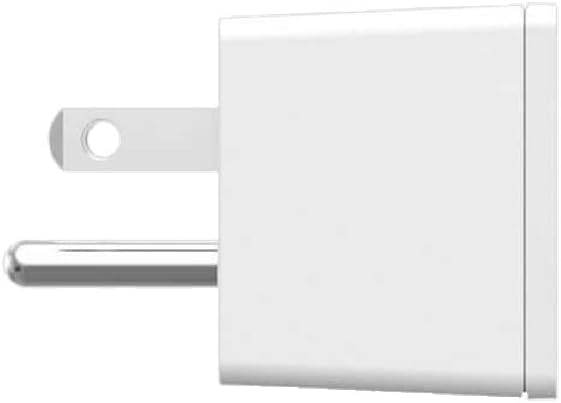
Figure 4: WeMo App interface for device control.
This image displays the WeMo app on a smartphone, showing a user interface with various lights and appliances listed, each with a toggle button for easy remote control.
Pianificazione:
Within the WeMo app, navigate to the "Rules" or "Schedules" section. You can:
- Set specific times for devices to turn on or off daily or on selected days.
- Create "Away Mode" rules to randomize light activity for security.
- Sync schedules with local sunrise and sunset times.
Controllo vocale:
Once integrated with Amazon Alexa or Google Home, use voice commands to control your devices. Examples:
- "Alexa, accendi il soggiorno lamp."
- "Ehi Google, spegni la macchina del caffè."
- "Alexa, set the bedroom light to 50%." (If connected to a dimmable light source via a compatible WeMo dimmer, not this specific plug)
6. Manutenzione
- Mantenere pulita la presa intelligente pulendola con un panno asciutto e morbido.
- Evitare di esporre il dispositivo a temperature o umidità estreme.
- Ensure the firmware of your WeMo Smart Plug is updated regularly through the WeMo app for optimal performance and security.
7. Risoluzione Dei Problemi
- Il dispositivo non risponde:
- Verificare che la spina intelligente sia inserita saldamente nella presa.
- Verificare che l'apparecchio collegato funzioni correttamente.
- Ensure your home Wi-Fi network is active and the smart plug is within range.
- Riavviare la presa intelligente scollegandola per 10 secondi e ricollegandola.
- Check the WeMo app for any error messages or connectivity issues.
- Impossibile connettersi al Wi-Fi:
- Ensure your Wi-Fi network is 2.4 GHz. WeMo Smart Plugs do not support 5 GHz networks.
- Controlla attentamente la password della tua rete Wi-Fi.
- Avvicina la presa intelligente al router Wi-Fi.
- Riavvia il router Wi-Fi.
- Problemi di controllo vocale:
- Confirm that your WeMo account is correctly linked in the Alexa or Google Home app.
- Ensure your smart plug has been discovered by your voice assistant.
- Use the exact name you assigned to the device in the WeMo app.
8. Specifiche
| Caratteristica | Dettaglio |
|---|---|
| Marca | Wemo |
| Modello | 4T-T3X2-Y1HT |
| Modalità di funzionamento | Automatico |
| Tipo di connettore | Collegare |
| Tipo di interruttore | Remoto |
| Materiale | Plastica |
| Dimensioni articolo (L x P x A) | 30.48 x 25.4 x 6.35 pollici |
| Tipo di controllore | Amazon Alexa, Assistente Google |
| Metodo di controllo | Voce |
| Protocollo di connettività | Wifi |
| Cosatage | 1875 watt |
| Colore | Bianco |
| Numero di articoli | 2 (per la variante da 2 confezioni) |
| Peso dell'articolo | 11.2 once |
| Valutazione internazionale di protezione | Grado di protezione IP00 |
| Certificazioni | FCC Part 15, UL Listed |
9. Garanzia e supporto
For warranty information and technical support, please refer to the official WeMo website or contact WeMo customer service. Keep your purchase receipt for warranty claims.
Supporto online: Visit the official WeMo support page for FAQs, troubleshooting guides, and contact options.
Ask a question about this manual
Ask about setup, troubleshooting, compatibility, parts, safety, or missing instructions. Manuals+ will review the question and use this page’s manual context to help answer it.