Introduzione
This manual provides essential instructions for the proper installation, operation, and maintenance of your Bosch MIC-9K-SNSHLD-W Sunshield. Designed specifically for the Bosch MIC9000 series cameras, this sunshield helps protect the camera lens from direct sunlight, reducing glare and improving image quality in bright conditions. Please read these instructions carefully before installation and retain them for future reference.
Impostare
1. Disimballaggio e ispezione
Carefully remove the sunshield from its packaging. Inspect the sunshield for any signs of damage that may have occurred during shipping. If any damage is found, do not proceed with installation and contact your supplier.
2. Strumenti necessari
- Appropriate screwdriver (if required for camera housing access)
- Panno pulito e morbido
3. Attachment Steps
- Ensure the Bosch MIC9000 series camera is powered off and securely mounted.
- Align the sunshield with the front housing of the MIC9000 camera. The sunshield is designed to fit snugly over the camera's existing structure.
- Gently push the sunshield into place until it is firmly seated. Some models may require securing with small screws; refer to your specific camera's manual for detailed attachment points if applicable.
- Verify that the sunshield is stable and does not obstruct the camera's field of view or any operational components.
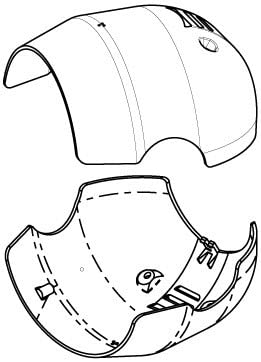
This image shows the Bosch MIC-9K-SNSHLD-W Sunshield, white in color, designed to fit the MIC9000 series camera. It is depicted from a slight angle, highlighting its protective shape and integration with a camera body.
Principi operativi
The Bosch MIC-9K-SNSHLD-W Sunshield operates passively by extending beyond the camera lens, creating a shaded area. This shading prevents direct sunlight from hitting the lens, which can cause lens flare, reduced contrast, and color distortion in video footage. It also offers a degree of protection against light rain and dust accumulation on the lens surface.
Considerazioni ambientali
While the sunshield is designed for outdoor use, extreme weather conditions such as heavy snowfall, ice accumulation, or strong winds may affect its performance or require additional maintenance. Ensure the sunshield remains clear of obstructions for optimal performance.
Manutenzione
1. Pulizia
Periodically inspect the sunshield for dirt, dust, or debris. Use a clean, soft, damp cloth to wipe the exterior surface. Avoid abrasive cleaners or solvents, as these may damage the finish. For stubborn dirt, a mild soap solution can be used, followed by a rinse with a damp stoffa.
2. Ispezione
Regularly check the sunshield for any signs of physical damage, such as cracks, chips, or loose attachment points. Ensure it remains securely fastened to the camera housing. If damage is observed, consider replacing the sunshield to maintain optimal protection for your camera.
Risoluzione dei problemi
Issue: Sunshield appears loose or detached.
- Soluzione: Re-seat the sunshield firmly onto the camera housing. If screws are used, ensure they are tightened appropriately. If the attachment mechanism is damaged, the sunshield may need replacement.
Issue: Camera image quality is still affected by glare despite sunshield installation.
- Soluzione: Verify the sunshield is correctly positioned and not partially obstructed. Ensure the camera lens itself is clean. In some extreme lighting conditions, additional measures such as camera repositioning or advanced camera settings may be required.
Specifiche
- Numero modello: MIC-9K-SNSHLD-W
- ASIN: B077BB7596
- Produttore: Bosch
- Compatibilità: Bosch MIC9000 Series Cameras
- Colore: Bianco
Informazioni sulla garanzia
For specific warranty terms and conditions related to the Bosch MIC-9K-SNSHLD-W Sunshield, please refer to the documentation provided with your original camera purchase or contact Bosch customer service directly. Warranty coverage typically addresses manufacturing defects and does not cover damage resulting from improper installation, misuse, or environmental factors.
Supporto
If you require technical assistance, have questions regarding installation, or need to report an issue with your Bosch MIC-9K-SNSHLD-W Sunshield, please contact Bosch customer support or your authorized Bosch dealer. You can find contact information on the official Bosch website or through your product's original purchase documentation.
Per maggiori informazioni visita il negozio ufficiale Bosch: Negozio Bosch su Amazon