
Introduzione
The KLIM Pulse Bluetooth 4.1 In-Ear Earphones are designed to provide a high-quality audio experience with wireless convenience. Featuring Bluetooth 4.1 connectivity, noise insulation, and a comfortable fit, these earphones are suitable for various activities including sports, music listening, and making calls. The magnetic tips offer easy storage, and the included memory foam ear tips ensure a secure and comfortable fit for extended use.

Image: The KLIM Pulse Bluetooth 4.1 In-Ear Earphones, showcasing their sleek black design and magnetic earbud feature.
Contenuto della confezione
Upon opening your KLIM Pulse earphone package, you should find the following items:
- KLIM Pulse Bluetooth 4.1 In-Ear Earphones
- Cavo di ricarica USB
- Manuale d'uso
- Various sizes and types of ear tips (including memory foam), totaling 12 pieces.
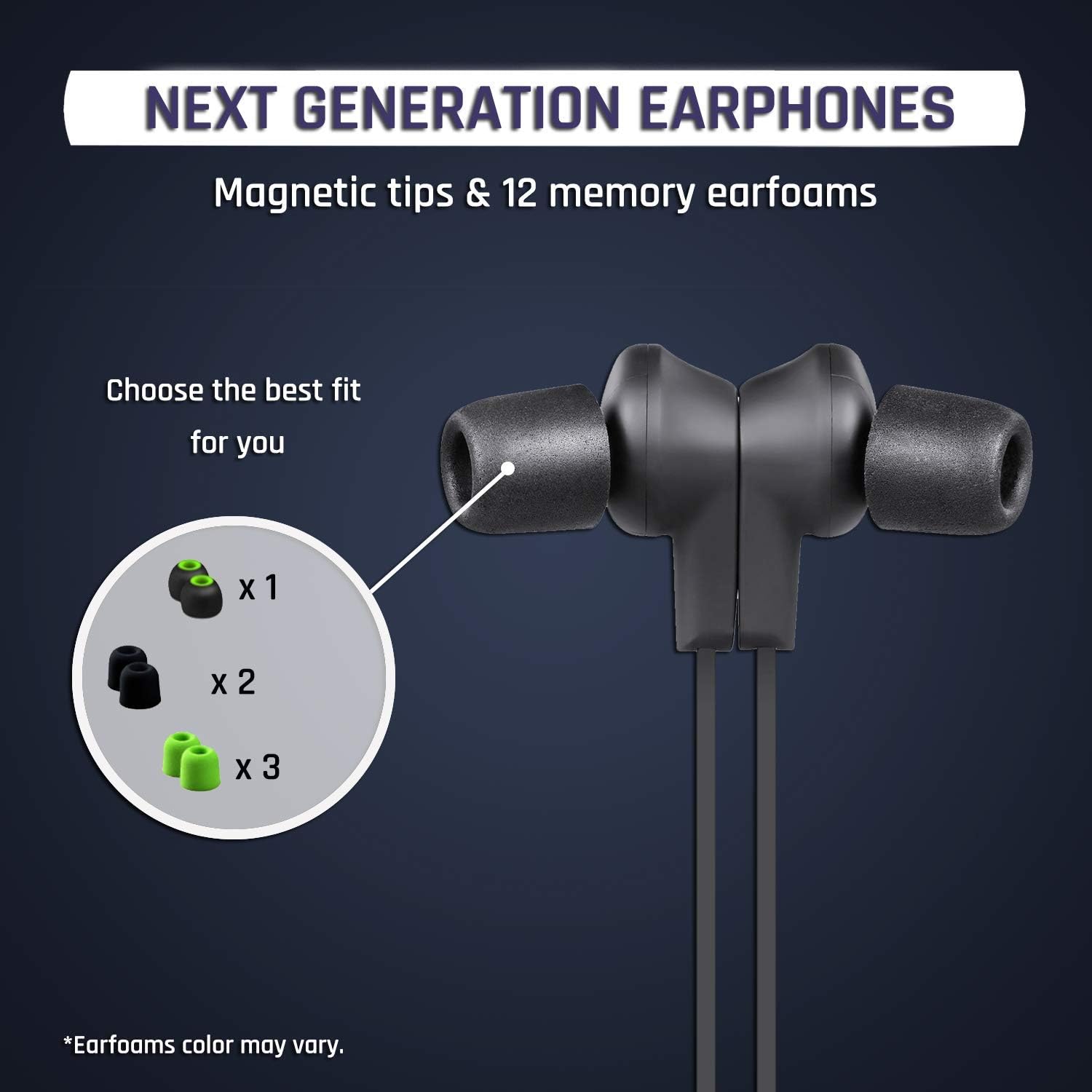
Immagine: un primo piano view of the KLIM Pulse earphones with various ear tip options, highlighting the magnetic tips and different earfoam colors.
Impostare
1. Ricarica degli auricolari
Before initial use, fully charge your KLIM Pulse earphones. A full charge typically takes approximately 2 hours and provides up to 6 hours of uninterrupted listening time.
- Connect the micro-USB end of the charging cable to the charging port on the earphone control unit.
- Collegare l'estremità USB-A del cavo di ricarica a una fonte di alimentazione USB compatibile (ad esempio, una porta USB del computer, un adattatore da parete USB).
- The LED indicator on the control unit will illuminate during charging and change color or turn off when charging is complete.

Image: The KLIM Pulse earphones with glowing blue circles, illustrating the charging process and battery life.
2. Selezione degli auricolari
The KLIM Pulse earphones come with 12 different ear tips, including memory foam options, to ensure a comfortable and secure fit. Experiment with different sizes and materials to find the best fit for your ears. A proper fit is crucial for optimal sound quality and noise insulation.
- Rimuovere delicatamente i gommini auricolari preinstallati.
- Select a pair of ear tips that feel comfortable and create a good seal in your ear canal.
- Attach the chosen ear tips firmly to the earphone nozzles.
3. Accoppiamento Bluetooth
The KLIM Pulse earphones are compatible with all Bluetooth-enabled devices (phones, laptops, tablets, etc.).
- Assicurarsi che gli auricolari siano carichi e spenti.
- Press and hold the multi-function button (usually the power button) on the control unit until the LED indicator flashes red and blue, indicating pairing mode.
- Attiva il Bluetooth sul tuo dispositivo e cerca i dispositivi disponibili.
- Select "KLIM Pulse" from the list of found devices.
- Una volta effettuata l'associazione, l'indicatore LED solitamente lampeggerà lentamente in blu o diventerà blu fisso.

Image: The KLIM Pulse earphones alongside icons for a laptop, phone, and tablet, illustrating their broad compatibility with Bluetooth devices.
Istruzioni per l'uso
Controlli di base
The control unit on your KLIM Pulse earphones allows for easy management of audio playback and calls.
| Pulsante/Azione | Funzione |
|---|---|
| Pulsante di accensione (multifunzione) |
|
| Volume su (+) |
|
| Volume basso (-) |
|
Effettuare e ricevere chiamate
- Risposta a una chiamata: Premere una volta il pulsante di accensione.
- Terminare una chiamata: Premere una volta il pulsante di accensione durante una chiamata.
- Rifiutare una chiamata: Tenere premuto il pulsante di accensione per 2 secondi.
- Ricomposizione: Double-press the Power Button to redial the last number.
Caratteristica magnetica
The KLIM Pulse earphones feature magnetic tips. When not in use, you can snap the earbuds together around your neck to prevent them from falling off and for convenient storage.

Image: A woman wearing KLIM Pulse earphones, demonstrating their comfortable fit and suitability for active use.
Manutenzione
To ensure the longevity and optimal performance of your KLIM Pulse earphones, follow these maintenance guidelines:
- Pulizia: Regularly wipe the earphones and ear tips with a soft, dry, lint-free cloth. For ear tips, you can gently clean them with a damp panno e sapone neutro, assicurandosi che siano completamente asciutti prima di riattaccarli.
- Magazzinaggio: When not in use, store the earphones in a clean, dry place, away from extreme temperatures and direct sunlight. The magnetic tips help keep them tangle-free.
- Evitare l'umidità: While the earphones have some water resistance, avoid submerging them in water or exposing them to heavy rain.
- Maneggiare con cura: Do not pull on the cable excessively or apply undue force to the earbuds or control unit.
Risoluzione dei problemi
If you encounter issues with your KLIM Pulse earphones, refer to the following common solutions:
| Problema | Possibile soluzione |
|---|---|
| Gli auricolari non si accendono. | Ensure the earphones are fully charged. Connect them to a power source and check the charging indicator. |
| Impossibile associare il dispositivo. |
|
| Nessun suono o scarsa qualità del suono. |
|
| Earphones keep disconnecting. |
|
Specifiche
| Caratteristica | Dettaglio |
|---|---|
| Nome del modello | KLPB |
| Marca | CLIMA |
| Tecnologia di connettività | Senza fili (Bluetooth 4.1) |
| Fattore di forma | Nell'orecchio |
| Colore | Nero |
| Materiale | Memory Foam (ear tips) |
| Peso dell'articolo | 18.1 g (0.04 libbre) |
| Dimensioni del prodotto | Dimensioni: 60 x 1.9 x 2.3 cm |
| Gamma di frequenza | 20 Hz - 20,000 Hz |
| Durata della batteria | Fino a 6 ore (circa) |
| Tempo di ricarica | Circa 2 ore |
| Dispositivi compatibili | Mobile Phones, Laptops, Tablets, Smart Speakers, TVs, Car Audio Systems, Game Consoles, Music Production Equipment, Motorcycles |

Image: An infographic displaying various features of the KLIM Pulse earphones, including Bluetooth dual connectivity, magnetic design, voice calls, Hi-Fi sound quality, and compatibility with multiple operating systems.
Informazioni sulla garanzia
The KLIM Pulse earphones come with a Garanzia di 2 anno dalla data di acquisto. Questa garanzia copre i difetti di fabbricazione e garantisce prestazioni affidabili. Si prega di conservare la prova d'acquisto per eventuali reclami in garanzia.
For any warranty-related inquiries or issues, please contact KLIM customer support.
Assistenza clienti
If you require further assistance or have questions not covered in this manual, please contact KLIM customer support. Our European team aims to provide a response within 24 hours.
- E-mail: contact@klimtechs.com
- Websito: www.klimtechs.com