
Introduzione
This manual provides essential information for the safe and effective installation, use, and maintenance of your Vulcan 34886 TRUPER Steel Replacement Tray. This tray is specifically designed as a direct replacement for the TRUPER TS6-2W-OR wheelbarrow model. Please read these instructions thoroughly before proceeding with installation or use.
Informazioni sulla sicurezza
- Always wear appropriate personal protective equipment (PPE), such as work gloves and safety glasses, when handling the steel tray and tools.
- Ensure the wheelbarrow is stable and secured before attempting to remove the old tray or install the new one.
- Be aware of sharp edges on the steel tray during handling.
- Durante l'installazione, tenere bambini e animali domestici lontani dall'area di lavoro.
- Do not overload the wheelbarrow after installation; adhere to the original wheelbarrow's weight capacity.
Contenuto della confezione
Prima di iniziare l'installazione, verificare che tutti i componenti siano presenti e integri.
- 1 x Vulcan 34886 TRUPER Steel Replacement Tray
- Note: Mounting hardware is typically reused from the original wheelbarrow or purchased separately if needed.
Configurazione e installazione
This section details the steps for replacing your old wheelbarrow tray with the new Vulcan 34886 steel tray.
Strumenti necessari (non inclusi):
- Chiave regolabile o set di chiavi a bussola
- Screwdriver (if applicable for existing fasteners)
- Guanti da lavoro
- Occhiali di sicurezza
Fasi di installazione:
- Preparare la carriola: Place the wheelbarrow on a flat, stable surface. If possible, elevate the wheelbarrow slightly to allow easier access to the underside.
- Rimuovere il vecchio vassoio: Carefully locate and remove all bolts, nuts, and washers securing the old tray to the wheelbarrow frame. Keep all hardware organized as it will likely be reused.
- Pulisci il telaio: Once the old tray is removed, inspect the wheelbarrow frame for any dirt, rust, or damage. Clean the frame as necessary.
- Position the New Tray: Carefully lift the Vulcan 34886 replacement tray and align it with the mounting holes on the wheelbarrow frame. It may be helpful to have a second person assist with this step.
- Fissare il vassoio: Insert the original bolts through the tray and frame holes. Hand-tighten the nuts and washers. Ensure all bolts are in place before fully tightening.
- Serraggio finale: Systematically tighten all nuts and bolts using your wrench or socket set. Do not overtighten, but ensure all connections are secure to prevent wobbling during use.
- Ispezionare: After installation, gently shake the wheelbarrow to confirm the tray is securely attached and stable.
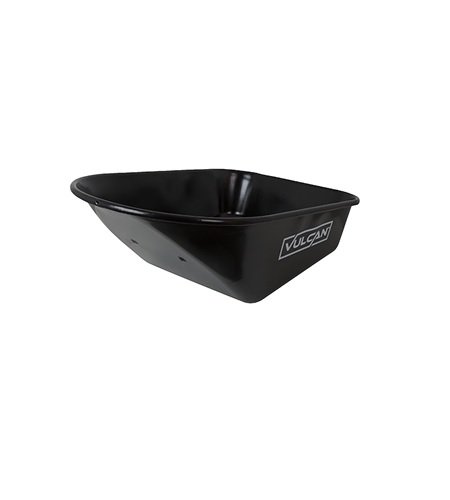
Image: Vulcan 34886 TRUPER Steel Replacement Tray. This image shows the steel tray, highlighting its robust construction and design suitable for wheelbarrow replacement.
Istruzioni per l'uso
Once the replacement tray is securely installed, the wheelbarrow can be used as intended. Follow these guidelines for optimal performance and safety:
- Distribuzione del carico: Distribute loads evenly within the tray to maintain balance and prevent tipping. Place heavier items towards the axle.
- Capacità di peso: Do not exceed the original manufacturer's recommended weight capacity for your TRUPER TS6-2W-OR wheelbarrow. Overloading can damage the wheelbarrow frame, wheels, or cause injury.
- Manovra: Use caution when moving the wheelbarrow over uneven terrain or inclines.
- Pulizia: The steel tray is designed for quick and easy cleanup. After each use, especially with wet or corrosive materials, rinse the tray with water and wipe it dry to prevent rust and material buildup.
Manutenzione
Regular maintenance will extend the life of your replacement tray and wheelbarrow.
- Pulizia: Clean the tray thoroughly after each use. For stubborn dirt, use a stiff brush and mild detergent. Rinse completely.
- Ispezione: Periodically inspect the tray for any signs of damage, dents, or rust. Check all bolts and nuts for tightness and re-tighten if necessary.
- Prevenzione della ruggine: While the steel tray is durable, prolonged exposure to moisture can lead to rust. Store the wheelbarrow in a dry area when not in use. If rust spots appear, clean them and apply a rust-inhibiting primer and paint.
- Hardware: If any mounting hardware becomes corroded or damaged, replace it with suitable, high-quality fasteners.
Risoluzione dei problemi
Problemi comuni e relative soluzioni.
- Tray does not fit:
- Ensure you have the correct model (Vulcan 34886) for your TRUPER TS6-2W-OR wheelbarrow.
- Check for any obstructions on the wheelbarrow frame.
- Verify that the tray is oriented correctly.
- Tray is wobbly after installation:
- Re-check all mounting bolts and nuts to ensure they are fully tightened.
- Inspect the wheelbarrow frame for any bends or damage that might prevent a secure fit.
- Rust appearing on the tray:
- Ensure the tray is cleaned and dried after each use.
- Store the wheelbarrow in a dry, covered area.
- For existing rust, clean the area thoroughly and apply a rust-inhibiting paint.
Specifiche
| Caratteristica | Dettaglio |
|---|---|
| Numero di modello del prodotto | 34886 |
| Materiale | Acciaio |
| Compatibilità | TRUPER TS6-2W-OR Wheelbarrow |
| Dimensioni del prodotto | 38.5 x 25.5 x 16 pollici |
| Peso dell'articolo | 17.65 libbre |
| Produttore | Vulcano |
Informazioni sulla garanzia
This Vulcan replacement tray is manufactured to high-quality standards. For specific warranty details, please refer to the original purchase documentation or contact Vulcan customer support. Keep your proof of purchase for any warranty claims.
Assistenza clienti
If you have any questions regarding the installation, operation, or maintenance of your Vulcan 34886 TRUPER Steel Replacement Tray, please contact Vulcan customer support through their official websito o rivenditore presso cui è stato acquistato il prodotto.
Please have your model number (34886) ready when contacting support.