
Prodotto finitoview
The Master Lock 5422D Push Lock Box is a robust and convenient solution for securing keys or other small valuables. Designed for durability and ease of use, it features a push-button combination for keyless access, making it ideal for real estate, property management, or personal use.
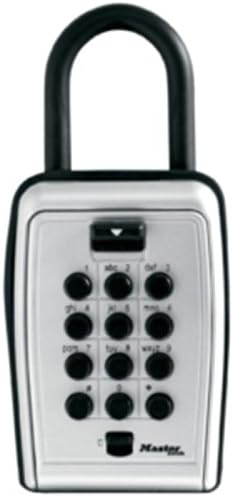
The Master Lock 5422D Push Lock Box is shown with its black shackle at the top, a silver-colored main body, and a black push-button keypad on the front. The keypad has ten circular buttons arranged in a 3x3 grid with a single button below, labeled with numbers 0-9 and corresponding letters. A small black lever is visible above the keypad, and the Master Lock logo is at the bottom right.
Caratteristiche principali:
- Comodità senza chiave: Set your own combination for easy access.
- Costruzione durevole: Metal body for enhanced security.
- Design portatile: Shackle allows for easy attachment to doorknobs, fences, or railings.
- Interni spaziosi: Accommodates multiple keys.
Specifiche
| Marca | Lucchetto principale |
| Numero di modello | 5422D |
| Tipo di blocco | Lucchetto a combinazione |
| Caratteristica speciale | Senza chiave |
| Materiale | Metallo |
| Dimensioni articolo (L x P x A) | 2.2 x 5.3 x 7.2 pollici |
| Peso dell'articolo | 1.89 libbre |
| Componenti inclusi | Mounting hardware, combination reset tool |
Impostare
Impostazione della combinazione
The Master Lock 5422D comes with a factory-set combination (usually 0-0-0-0 or a specific code indicated on packaging). It is highly recommended to change this to a personal, memorable combination immediately.
Configurazione iniziale (primo utilizzo):
- Open the lock box using the factory-set combination.
- Inside the lock box, locate the reset lever on the back of the door.
- Move the reset lever from position A to position B (or from the current position to the alternate position, typically indicated by an arrow).
- Enter your new desired combination on the keypad. Ensure the buttons are fully depressed.
- Move the reset lever back to position A (or its original position).
- Close the lock box door and scramble the buttons to lock it.
- Test your new combination before securing the lock box to ensure it opens correctly.
Changing the Combination (After Initial Setup):
- Aprire la cassetta di sicurezza utilizzando la combinazione attuale.
- Locate the reset lever on the back of the door.
- Move the reset lever from position A to position B.
- Enter your new desired combination on the keypad.
- Move the reset lever back to position A.
- Close the lock box door and scramble the buttons.
- Test your new combination before securing the lock box to ensure it opens correctly.
Importante: Remember your combination. There is no master key or override code if the combination is lost.
Istruzioni per l'uso
Opening the Lock Box:
- Enter your current combination by pressing the corresponding buttons. Each button should click when pressed.
- Once the combination is entered, push down the black lever located above the keypad.
- The door of the lock box will spring open.
Closing and Securing the Lock Box:
- Place the items securely inside the lock box.
- Chiudere bene la porta finché non scatta in posizione.
- Scramble the combination buttons by pressing random buttons to ensure the lock box is secured and the combination is hidden.
Manutenzione
Regular maintenance helps ensure the longevity and smooth operation of your Master Lock 5422D Push Lock Box.
- Pulizia: Pulisci l'esterno con un panno morbido eamp panno. Evitare detergenti abrasivi o solventi che potrebbero danneggiare la finitura o i meccanismi interni.
- Lubrificazione: Periodically, apply a small amount of silicone-based lubricant to the shackle and the internal locking mechanism to ensure smooth operation. Do not use oil-based lubricants as they can attract dirt.
- Esposizione ambientale: While designed for outdoor use, prolonged exposure to extreme weather conditions (e.g., heavy rain, freezing temperatures) may affect performance. Consider placing it in a sheltered location if possible.
- Controllare l'usura: Regularly inspect the shackle and body for any signs of damage or wear that might compromise security.
Risoluzione dei problemi
| Problema | Possibile causa | Soluzione |
|---|---|---|
| Lock box will not open after entering combination. | Incorrect combination entered; buttons not fully depressed; mechanism stuck. |
|
| Shackle is difficult to open or close. | Dirt or debris in the shackle mechanism; lack of lubrication. |
|
| Combination reset lever is stuck. | Il meccanismo è rigido o sporco. |
|
Garanzia e supporto
Master Lock products are manufactured to demanding quality standards. For specific warranty information regarding your Master Lock 5422D Push Lock Box, please refer to the warranty documentation included with your purchase or visit the official Master Lock websito.
For further assistance, technical support, or to inquire about replacement parts, please contact Master Lock customer service directly. You can often find contact information on the Master Lock official websito o tramite il Negozio Master Lock su Amazon.