
Walfront HA-4012
Walfront Islamic Azan Alarm Clock User Manual
Modello: HA-4012
Introduzione
The Walfront Islamic Azan Alarm Clock is a digital prayer clock designed to assist Muslims with daily prayer times. It features automatic Azan time calculation for various cities, multiple alarm functions including a special Fajr alarm, temperature display, and a full-screen light for visibility in the dark. This manual provides instructions for setting up, operating, and maintaining your clock.

Immagine: Frontale view of the Walfront Islamic Azan Alarm Clock, displaying time, date, and prayer times.
Caratteristiche principali
- Automatic Azan Times: Pre-programmed Azan times for over 1500 cities worldwide, with five daily prayer times.
- Special Fajr Alarm: A unique alarm that adjusts daily relative to the Fajr Azan time, ensuring you wake up consistently after Fajr.
- Funzione snooze da 5 minuti: Consente un breve ritardo prima che l'allarme suoni di nuovo.
- Full Screen Light: Fornisce illuminazione per una facile viewin condizioni di scarsa illuminazione.
- Multi-Display: Shows current time, date, week, and daylight saving time status.
- Visualizzazione della temperatura: Visualizza la temperatura in gradi Celsius o Fahrenheit.
- Volume regolabile: Azan volume can be controlled via a dial switch or set to a beep sound.
- Makkah Music: Includes Makkah music for prayer.
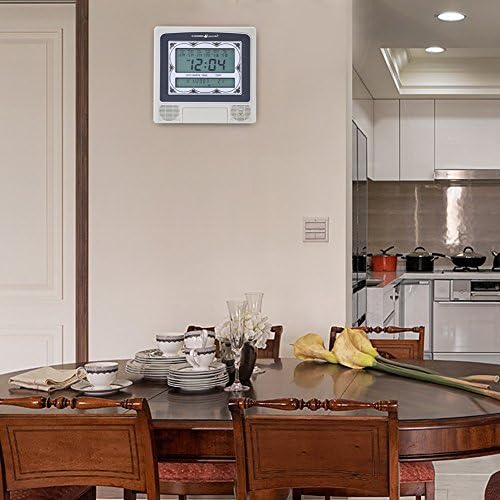
Image: The Walfront Islamic Azan Alarm Clock mounted on a wall, highlighting its function as a Muslim prayer clock.
Impostare
Before using your clock, ensure it is powered correctly. The clock operates on battery power (batteries not included) or via a DC 6V 300mA power adapter (if applicable, check product packaging for power adapter inclusion).
1. Accensione iniziale e impostazioni di base
- Insert batteries into the designated compartment or connect the power adapter.
- The clock display should illuminate.
- Individuare il IMPOSTATO button, typically on the back or side of the unit.
- Premere IMPOSTATO per accedere alla modalità di impostazione.
- Utilizzare il UP (▲) E GIÙ (▼) buttons to adjust values (e.g., hour, minute, year, month, day).
- Premere IMPOSTATO nuovamente per confermare ogni impostazione e passare al parametro successivo.
2. Setting Your City for Azan Times
The clock has pre-programmed Azan times for 1500 cities. You need to select your current city for accurate prayer times.
- In setting mode, navigate to the city selection option (this may be indicated by a city code or name on the display).
- Utilizzare il UP E GIÙ buttons to scroll through the available city codes or names until you find your location. Refer to the included city code list if provided with your product.
- Once your city is selected, press IMPOSTATO to confirm. The clock will automatically calculate the Azan times for your chosen city.
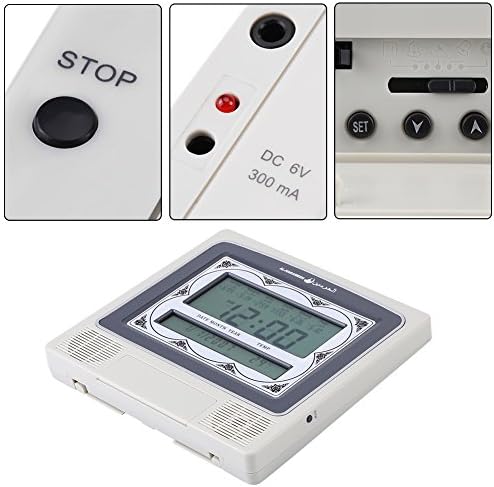
Immagine: dettagliata view of the clock's control buttons (STOP, SET, Y, A) and the DC 6V 300mA power input port.
Istruzioni per l'uso
1. Daily Alarm and Fajr Alarm
- The clock provides five daily Azan times automatically based on your selected city.
- To set a specific daily alarm (non-Azan related), navigate to the alarm setting mode using the IMPOSTATO button. Adjust the desired alarm time using the UP E GIÙ pulsanti.
- The special Fajr alarm function allows you to set an alarm relative to the Fajr Azan. For example, if you set it for "5 minutes after Fajr," the alarm time will automatically adjust each day to maintain this interval.
2. Funzione snooze
Quando suona un allarme, premere il tasto FERMARE button (or a designated snooze button if available) to activate the 5-minute snooze function. The alarm will sound again after 5 minutes.
3. Controllo del volume
The Azan volume can be adjusted using the dial switch, typically located on the side or back of the clock. You can also set the clock to beep 3 times instead of playing the full Azan by adjusting this setting in the menu or via the dial.
4. Visualizzazione della temperatura
The clock displays the current room temperature. You can switch between Celsius and Fahrenheit units through the settings menu (refer to the setup section for navigating settings).
5. Full Screen Light
The full screen light activates to improve visibility of the display in dark environments. This feature is typically automatic or can be toggled via a dedicated button.
Manutenzione
- Pulizia: Pulire l'orologio con un panno morbido e asciutto. Non utilizzare detergenti abrasivi o solventi, poiché potrebbero danneggiare il display o laasing.
- Sostituzione della batteria: If the display dims or functions become erratic, replace the batteries. Ensure correct polarity when inserting new batteries.
- Posizionamento: Place the clock on a stable surface or mount it securely on a wall. Avoid direct sunlight, extreme temperatures, or high humidity.
Risoluzione dei problemi
| Problema | Possibile causa | Soluzione |
|---|---|---|
| Il display è vuoto o poco luminoso. | Batterie scariche o esaurite; adattatore di alimentazione non collegato o difettoso. | Replace batteries or ensure power adapter is securely connected and functional. |
| Gli orari dell'Azan sono errati. | Incorrect city selected; incorrect date/time set. | Verify and re-select your city. Ensure the current date and time are set accurately. |
| L'allarme non suona. | Alarm is turned off; volume is too low or muted. | Check alarm settings to ensure it is enabled. Adjust the volume dial. |
| I pulsanti non rispondono. | Problema software temporaneo; batteria scarica. | Remove and re-insert batteries (power cycle). Replace batteries if low. |
Specifiche
| Marca | Walfront |
| Modello | HA-4012 |
| Tipo di visualizzazione | Digitale |
| Colore | Grigio, Bianco |
| Dimensioni del prodotto | 8.8"L x 8.4"A |
| Peso dell'articolo | 1.25 libbre (0.57 chilogrammi) |
| Fonte di alimentazione | Alimentato a batteria (batterie non incluse) |
| Materiale | Plastica |
| Tipo di montaggio | Montaggio a parete |
| Caratteristiche speciali | Alarm, Daylight Saving, Temperature Display |
| Codice UPC | 663862629408 |
Garanzia e supporto
This Walfront product is protected by a Garanzia a vita. Walfront is committed to customer satisfaction. If you encounter any issues with the product quality or functionality, please contact Walfront customer support for assistance.
For support, please refer to the contact information provided with your product packaging or visit the official Walfront websito.
Ask a question about this manual
Ask about setup, troubleshooting, compatibility, parts, safety, or missing instructions. Manuals+ will review the question and use this page’s manual context to help answer it.