
Gru EE-5622
Crane EE-5622 Digital LED Display Tower Fan User Manual
Modello: EE-5622
Introduzione
This manual provides detailed instructions for the safe and efficient use of your Crane EE-5622 Digital LED Display Tower Fan. Please read all instructions carefully before operation and retain this manual for future reference.

Image: Crane EE-5622 Tower Fan with its packaging, highlighting key features like digital LED display, 12-hour timer, 70-degree oscillation, and 3 adjustable speed settings.
Importanti istruzioni di sicurezza
- Always place the fan on a firm, level surface.
- Non utilizzare il ventilatore con un cavo o una spina danneggiati.
- Tenere il ventilatore lontano dall'acqua o da altri liquidi.
- Ensure the fan is unplugged before cleaning or maintenance.
- Non inserire dita o oggetti estranei nelle aperture.
- Questo ventilatore è destinato esclusivamente all'uso in ambienti interni.
- Sorvegliare i bambini quando il ventilatore è in uso.
Contenuto della confezione
Verificare che tutti gli articoli siano presenti nel pacco:
- 1 x Crane EE-5622 Tower Fan
- 1 x Wireless Remote Control (batteries included)
- 1 x Manuale utente (questo documento)
Impostare
- Disimballaggio: Estrarre con cautela il ventilatore e tutti gli accessori dalla confezione.
- Posizionamento: Place the fan on a stable, flat surface, ensuring there is adequate space around it for air circulation. Avoid placing it near curtains or objects that could obstruct airflow.
- Collegamento elettrico: Collegare il cavo di alimentazione a una presa elettrica standard.

Immagine: Completa view of the Crane EE-5622 Tower Fan, showing its base and power cord connection point.
Istruzioni per l'uso
The Crane EE-5622 Tower Fan can be operated using the control panel on top of the unit or the wireless remote control.
Pannello di controllo
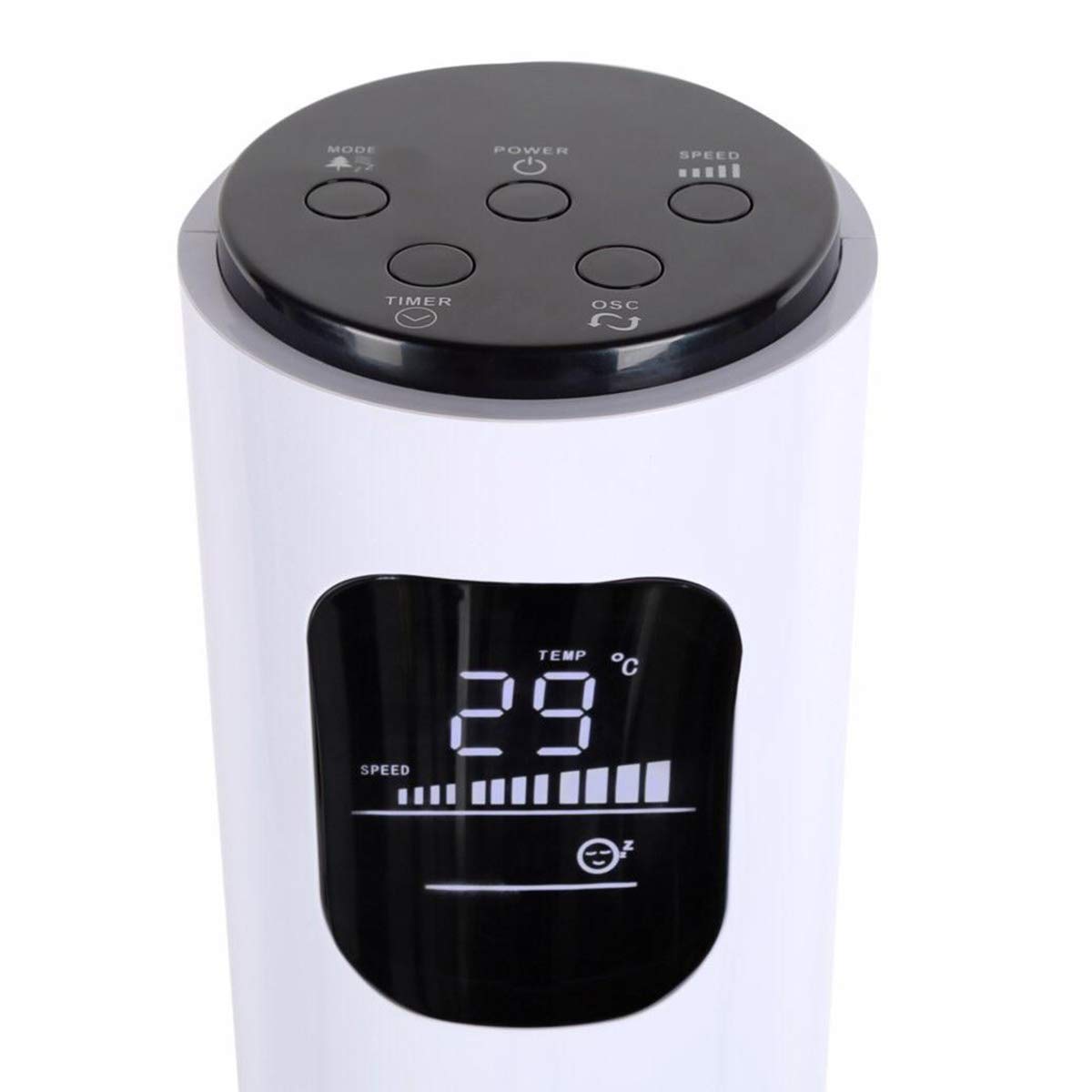
Image: Close-up of the fan's top control panel and digital LED display, showing buttons for Power, Speed, Oscillation, Timer, and Mode.
- Pulsante di accensione (⏻): Premere per accendere o spegnere la ventola.
- Pulsante di velocità (█████): Press to cycle through 3 speed settings (Low, Medium, High). The current speed is indicated on the LED display.
- Pulsante di oscillazione (↻): Press to activate or deactivate the 70° oscillation function.
- Pulsante Timer (⏱): Premere per impostare il timer di spegnimento automatico da 1 a 12 ore. Ogni pressione aumenta il timer di un'ora.
- Pulsante Modalità (☼): Press to cycle through different operating modes:
- Modalità normale: Flusso d'aria costante alla velocità selezionata.
- Modalità Brezza Naturale: Simula il vento naturale variando la velocità della ventola.
- Modalità risparmio: Riduce gradualmente la velocità della ventola per un funzionamento silenzioso durante la sospensione.
Controllo remoto senza fili
The remote control provides convenient operation from a distance. Ensure the remote is pointed towards the fan's receiver.
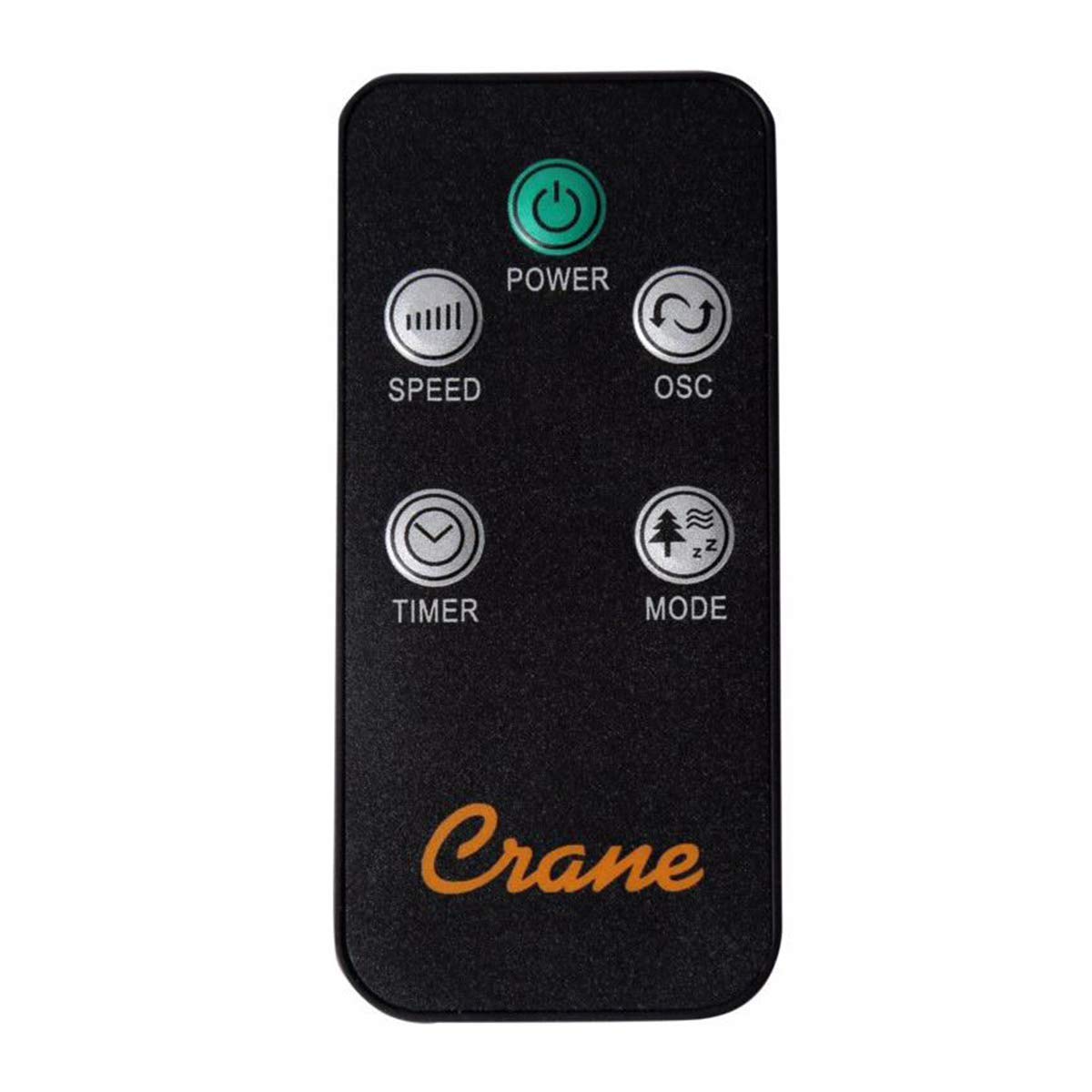
Image: The wireless remote control for the Crane EE-5622 Tower Fan, showing buttons for Power, Speed, Oscillation, Timer, and Mode.
The remote control features the same buttons as the control panel for Power, Speed, Oscillation, Timer, and Mode. It requires batteries (included).

Immagine: in alto view of the Crane EE-5622 Tower Fan, illustrating the integrated slot for storing the remote control.
Manutenzione
Una manutenzione regolare garantisce prestazioni ottimali e longevità del ventilatore.
- Pulizia: Scollegare sempre il ventilatore prima di pulirlo. Utilizzare un panno morbido eamp cloth to wipe the exterior surfaces. Do not use abrasive cleaners or allow water to drip into the fan's interior.
- Rimozione della polvere: Utilizzare un aspirapolvere con spazzola o aria compressa per rimuovere la polvere dalle griglie di aspirazione e di scarico dell'aria.
- Magazzinaggio: If storing the fan for an extended period, clean it thoroughly, place it back in its original packaging, and store it in a cool, dry place.
Risoluzione dei problemi
| Problema | Possibile causa | Soluzione |
|---|---|---|
| La ventola non si accende. | Nessuna alimentazione; cavo di alimentazione non collegato; pulsante di accensione non premuto. | Controllare la presa di corrente; assicurarsi che il cavo di alimentazione sia collegato saldamente; premere il pulsante di accensione. |
| Flusso d'aria debole. | Fan speed set too low; Air intake/exhaust blocked; Dust accumulation. | Increase fan speed; Clear any obstructions; Clean the fan grilles. |
| La ventola è rumorosa. | Fan not on a level surface; Foreign object inside; Dust accumulation. | Place fan on a flat, stable surface; Unplug and check for obstructions; Clean the fan. |
| Telecomando non funzionante. | Batteries depleted; Obstruction between remote and fan; Remote not pointed correctly. | Replace remote control batteries; Remove obstructions; Point remote directly at the fan's receiver. |
Specifiche
| Marca | Gru |
| Numero di modello | EE-5622 |
| Fonte di alimentazione | AC Powered (Remote Control: Battery Powered) |
| Cosatage | 45 Watt |
| Numero di velocità | 3 |
| Angolo di oscillazione | 70° |
| Timer | Da 1 a 12 ore |
| Altezza | Circa 115 cm (44 pollici) |
| Peso dell'articolo | 5.1 libbre |
| Metodo di controllo | Telecomando, pulsanti sull'unità |
| Caratteristiche speciali | Digital LED Display, Room Temperature Display, Natural Breeze Mode, Sleep Mode, Auto Shut-off |
| Materiale | Acrylonitrile Butadiene Styrene (ABS), Plastic Blades |
| Uso interno/esterno | Solo per uso interno |
Garanzia e supporto
For warranty information or technical support, please refer to the warranty card included with your product or contact Crane customer service directly. Contact details are typically available on the manufacturer's official websito o confezione del prodotto.
Nota: il cliente reviews indicate potential challenges with service support. It is recommended to retain your purchase receipt for warranty claims.
Ask a question about this manual
Ask about setup, troubleshooting, compatibility, parts, safety, or missing instructions. Manuals+ will review the question and use this page’s manual context to help answer it.