
1. Introduzione e oltreview
This manual provides essential information for the proper use and care of your Oticon HIT D BTE (Behind-The-Ear) fully digital programmable hearing aid. Please read these instructions carefully to ensure optimal performance and longevity of your device. The Oticon HIT D is designed to enhance hearing for individuals with hearing loss, offering advanced features for a personalized listening experience.
Caratteristiche principali:
- Fully digital programmable technology.
- Fitting range up to 85dBHL.
- 04 adjustable bands for precise crossover frequency adjustment.
- Adaptation Manager for comfortable acclimatization to new sound levels.
- Advanced Feedback Cancellation to minimize whistling.
- Effective Noise Management for clearer speech in noisy environments.
- Automatic Compression for comfortable listening across varying sound intensities.
- Automatic Dual Mode for seamless transition between listening environments.
- Uses Battery No. 13 with an approximate life of 220 hours.
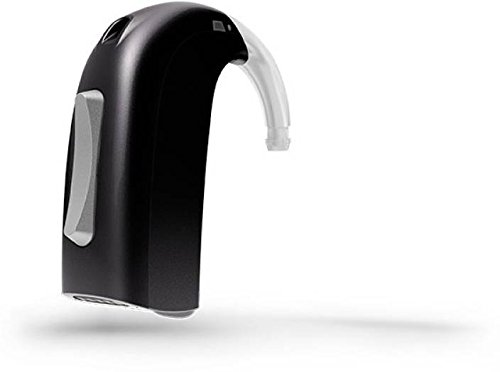
Figura 1: Oticon HIT D BTE Digital Programmable Hearing Aid. This image shows the compact design of the hearing aid, typically worn behind the ear.
2. Impostazione
2.1 Installazione della batteria
- Aprire delicatamente lo sportello del vano batteria.
- Remove the protective tab from a new Battery No. 13. Wait for 1-2 minutes after removing the tab to allow the battery to fully activate.
- Insert the battery into the compartment with the positive (+) side facing the correct orientation, usually indicated by a symbol inside the compartment.
- Chiudere saldamente lo sportello del vano batteria finché non scatta in posizione.
Nota: A fresh Battery No. 13 provides approximately 220 hours of operation. Always use new batteries and dispose of old ones responsibly.
2.2 Initial Fitting and Professional Programming
The Oticon HIT D BTE hearing aid requires professional fitting and programming by a qualified hearing care specialist. This ensures the device is optimally configured for your specific hearing loss and preferences, utilizing its 04 adjustable bands and other advanced features.
- Your specialist will adjust the fitting range, which supports up to 85dBHL.
- They will program features such as Adaptation Manager, Feedback Cancellation, Noise Management, Automatic Compression, and Automatic Dual Mode to suit your individual needs.
- Follow your hearing care specialist's instructions for inserting the hearing aid comfortably and securely behind your ear.
3. Istruzioni per l'uso
3.1 Accensione/Spegnimento
- To turn on: Close the battery compartment door completely.
- To turn off: Open the battery compartment door slightly. For longer storage, remove the battery entirely.
3.2 Controllo del volume
Your hearing aid may have a manual volume control or be set to automatic. Consult your hearing care specialist for details on how to adjust the volume, if applicable, or how the Automatic Compression feature manages sound levels.
3.3 Program Changes
If your hearing aid is programmed with multiple listening programs (e.g., for quiet environments, noisy environments, music), your hearing care specialist will instruct you on how to switch between them. The Automatic Dual Mode feature may also manage transitions between different sound environments automatically.
3.4 Understanding Features in Use
- Responsabile dell'adattamento: This feature helps you gradually adjust to the new sound experience provided by your hearing aid, making the transition more comfortable.
- Feedback Cancellation: Designed to prevent the annoying whistling sound (feedback) that can occur when sound from the hearing aid microphone leaks back into the microphone.
- Gestione del rumore: Works to reduce background noise, making it easier to focus on speech in challenging listening situations.
- Automatic Compression: Regola automaticamente il amplification of sounds to ensure loud sounds are not too loud and soft sounds are audible, providing a comfortable listening experience.
- Automatic Dual Mode: Allows the hearing aid to automatically detect and adapt to different listening environments, optimizing settings for clarity and comfort without manual intervention.
4. Manutenzione
4.1 Pulizia giornaliera
- Use a soft, dry cloth to wipe your hearing aid daily to remove earwax and moisture.
- Use the small brush or pick provided by your hearing care specialist to clean the ear mold or dome and microphone openings.
- Do not use water, solvents, or cleaning fluids as these can damage the electronic components.
4.2 Sostituzione della batteria
Replace the Battery No. 13 when you notice a decrease in sound quality, intermittent operation, or when the low battery indicator (if present) activates. Refer to Section 2.1 for installation instructions.
4.3 Conservazione
- Quando non lo usi, riponi l'apparecchio acustico nella sua custodia protettiva.
- Always open the battery compartment or remove the battery to conserve battery life and prevent moisture buildup.
- Keep the hearing aid in a cool, dry place, away from direct sunlight and extreme temperatures.
- Tenere fuori dalla portata dei bambini e degli animali domestici.
5. Risoluzione Dei Problemi
If you experience issues with your Oticon HIT D BTE hearing aid, please refer to the common troubleshooting steps below. If the problem persists, contact your hearing care specialist.
| Problema | Possibile causa | Soluzione |
|---|---|---|
| No sound or very weak sound |
|
|
| Whistling (feedback) |
|
|
| Il suono è distorto o poco chiaro |
|
|
For any issues not covered here, or if troubleshooting steps do not resolve the problem, please contact your authorized Oticon hearing care specialist for assistance.
6. Specifiche
| Specificazione | Dettaglio |
|---|---|
| Modello | HIT D |
| Tipo | BTE (Behind-The-Ear), Fully Digital Programmable Hearing Aid |
| Gamma di montaggio | Up to 85dBHL |
| Tipo di batteria | N. 13 |
| Durata approssimativa della batteria | 220 ore |
| Adjustable Bands | 04 (for crossover frequency) |
| Caratteristiche principali | Adaptation Manager, Feedback Cancellation, Noise Management, Automatic Compression, Automatic Dual Mode |
| Produttore | Oticon |
| ASIN | B078VC6JJ5 |
| Data prima disponibilità | 6 gennaio 2018 |
7. Garanzia e supporto
For specific warranty information regarding your Oticon HIT D BTE hearing aid, please refer to the documentation provided at the time of purchase or contact your authorized Oticon hearing care specialist or retailer. Warranty terms and conditions may vary by region and point of sale.
For technical support, service, or further assistance with your hearing aid, please contact the hearing care professional from whom you purchased the device. They are equipped to provide personalized support and adjustments.
You can also visit the official Oticon website for general product information and to locate a service provider in your area.


