
1. Prodotto finitoview
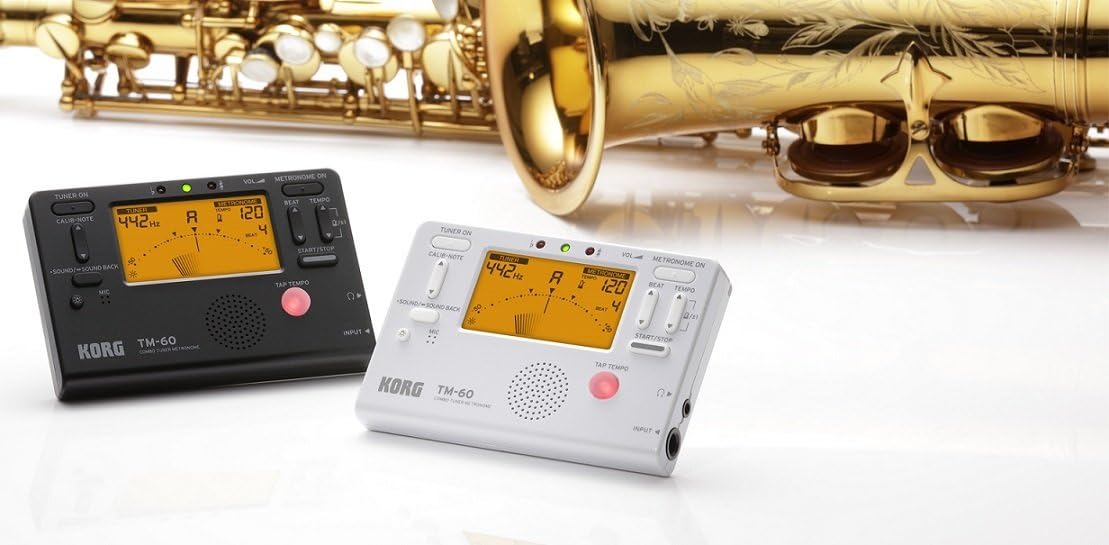
The KORG TM60CBK is a versatile combo tuner and metronome designed for musicians. It features a high-precision tuner function and a metronome function that can be used simultaneously. This model includes a CM-200 Contact Clip-on Microphone for enhanced tuning accuracy, especially in noisy environments. The large screen displays both tuner and metronome functions clearly, making it an essential tool for practicing.
- Doppia funzionalità: High-precision tuner and metronome functions can be used concurrently.
- Microfono incluso: Comes with a CM-200 Contact Clip-on Microphone for direct instrument tuning.
- Visualizzazione chiara: Features a new, larger screen for simultaneous display of tuner and metronome.
- Colore: Nero.
2. Impostazione
2.1 Installazione della batteria
The KORG TM60CBK operates on AAA batteries. To install or replace batteries:
- Aprire il coperchio del vano batterie situato sul retro dell'unità.
- Inserire le batterie AAA, assicurandosi della corretta polarità (+/-).
- Chiudere saldamente il coperchio del vano batterie.
2.2 Connecting the CM-200 Contact Clip-on Microphone
For precise tuning, especially with acoustic instruments or in loud settings, connect the included clip-on microphone:
- Plug the microphone's 1/4-inch (6.35mm) jack into the INPUT jack on the side of the TM60CBK unit.
- Attach the clip to the headstock or bell of your instrument. Ensure the clip is securely fastened and the microphone is positioned to pick up vibrations effectively.
3. Istruzioni per l'uso
3.1 Modalità sintonizzatore
To use the tuner function:
- Press the 'TUNER ON' button to activate the tuner.
- Select the desired instrument mode (Chromatic, Guitar, Bass, Violin, Ukulele) using the 'ITEM' button.
- Adjust the A4 calibration pitch (default 440Hz) using the 'CALIB./NOTE' buttons if needed.
- Play a single note on your instrument. The display will show the detected note and indicate if it is sharp, flat, or in tune using the needle-style meter and LED indicators.
3.2 Modalità metronomo
To use the metronome function:
- Press the 'METRONOME ON' button to activate the metronome.
- Set the desired tempo (BPM) using the 'TEMPO' buttons.
- Adjust the beat (time signature) using the 'BEAT' buttons.
- Select different rhythm patterns using the 'RHYTHM' button.
- Press 'START/STOP' to begin or pause the metronome.
- Adjust the volume using the 'VOL' slider on the side of the unit.
- For private practice, plug headphones into the 3.5mm headphone jack.
- Use the 'TAP TEMPO' button to set the tempo by tapping along to a desired rhythm.
3.3 Generatore di toni
The TM60CBK can also generate reference tones:
- In Tuner Mode, press the 'SOUND/SOUND BACK' button to activate the tone generator.
- Use the 'CALIB./NOTE' buttons to select the desired reference note.
- Listen to the generated tone and tune your instrument by ear.
4. Immagini del prodotto



5. Specifiche
| Caratteristica | Dettaglio |
|---|---|
| Nome del modello | TM60 |
| Numero di modello | TM60C-BK |
| Colore | Nero |
| Dimensioni articolo (L x P x A) | 4.37 x 2.91 x 0.71 pollici |
| Peso dell'articolo | 0.16 grammi |
| Componenti inclusi | Borsa |
| Tipo di connettore | USB (for power, not data) |
6. Manutenzione
To ensure the longevity and optimal performance of your KORG TM60CBK:
- Pulizia: Pulire l'unità con un panno morbido e asciutto. Evitare l'uso di detergenti abrasivi o solventi.
- Cura della batteria: Rimuovere le batterie se l'unità non verrà utilizzata per un periodo prolungato per evitare perdite.
- Magazzinaggio: Conservare l'unità in un luogo fresco e asciutto, lontano dalla luce solare diretta e da temperature estreme.
7. Risoluzione Dei Problemi
- L'unità non si accende: Controllare l'installazione delle batterie e assicurarsi che non siano scariche.
- Tuner is inaccurate: Ensure the CM-200 microphone is securely attached to the instrument. Verify the correct instrument mode is selected. Check the A4 calibration pitch.
- Nessun suono dal metronomo: Check the volume level. Ensure headphones are not plugged in if you intend to use the internal speaker.
8. Garanzia e supporto
For warranty information, technical support, or service inquiries, please refer to the official KORG website or contact KORG customer service directly. Keep your purchase receipt as proof of purchase for warranty claims.