
Introduzione
This manual provides essential instructions for the Jam Audio Out There Active Noise Cancelling On-Ear Bluetooth Headphones. Please read this guide thoroughly to ensure proper use, maintenance, and to maximize your listening experience. These headphones offer active noise cancellation, Bluetooth connectivity, hands-free calling, and a comfortable on-ear design.
Cosa c'è nella scatola
Verificare che tutti gli articoli siano presenti nella confezione:
- Out There Headphones
- Cavo AUX (3.5 mm)
- Cavo di ricarica USB
- Guida rapida (fare riferimento a questo manuale per istruzioni dettagliate)

Image: Contents of the Jam Audio Out There headphone package, including the headphones, AUX cable, and USB charging cable.
Prodotto finitoview e controlli
Familiarize yourself with the headphone's layout and controls for optimal use.
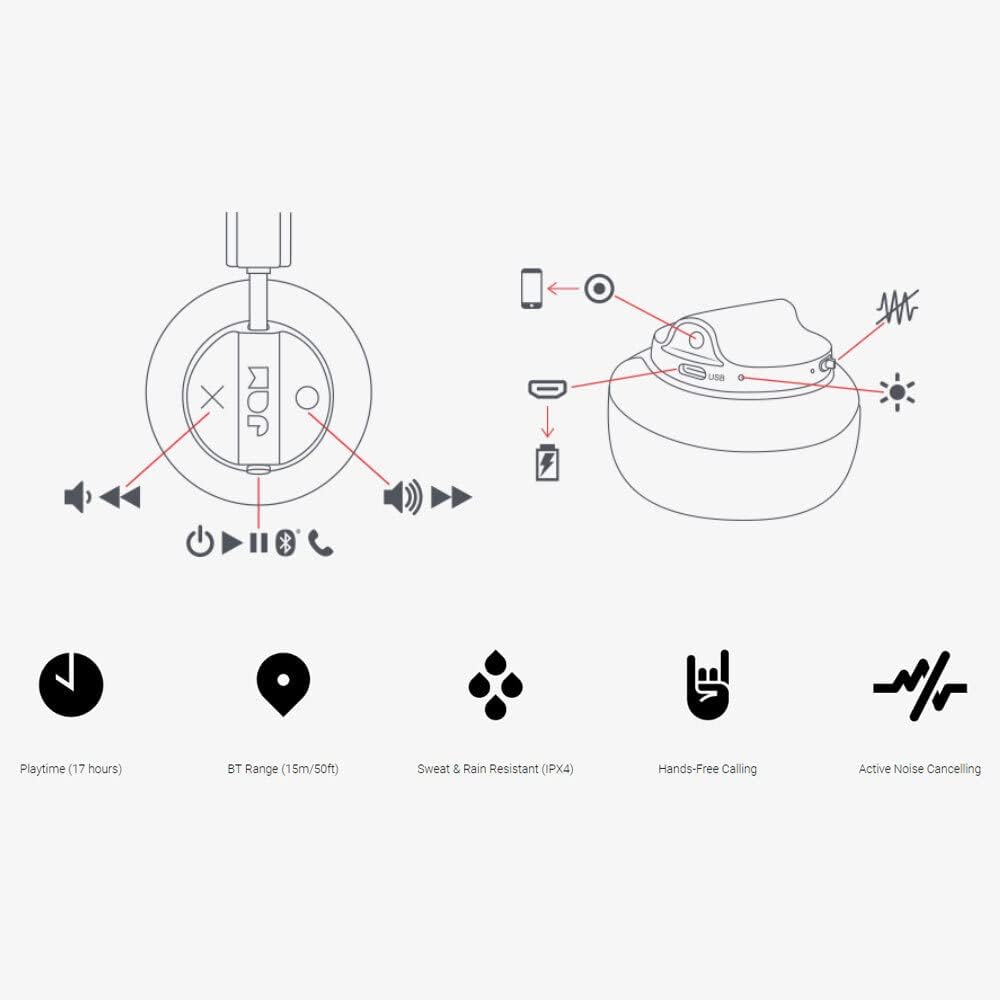
Image: Detailed diagram illustrating the control buttons and ports on the Jam Audio Out There headphones, including power, volume, track navigation, call management, and the charging port.
- Pulsante di accensione: Tenere premuto per accendere/spegnere.
- Volume su/traccia successiva: Pressione breve per aumentare il volume, pressione prolungata per passare alla traccia successiva.
- Volume giù/Traccia precedente: Pressione breve per abbassare il volume, pressione prolungata per passare alla traccia precedente.
- Riproduci/Metti in pausa/Rispondi alla chiamata: Premere una volta per riprodurre/mettere in pausa la musica o rispondere/terminare una chiamata.
- Active Noise Cancelling (ANC) Switch: Toggle to activate or deactivate noise cancellation.
- Porta di ricarica: Porta micro USB per la ricarica.
- Porta AUX-in: Jack da 3.5 mm per connessione audio cablata.
Impostare
1. Carica delle cuffie
Before first use, fully charge your headphones. Connect the provided USB charging cable to the charging port on the headphones and the other end to a USB power source. The LED indicator will show charging status and turn off when fully charged. A full charge takes approximately 2 hours and provides up to 17 hours of playtime.

Image: The Jam Audio Out There headphones provide up to 17 hours of playtime on a single charge.
2. Accensione/Spegnimento
- To power on: Press and hold the Power button for 3 seconds. The LED indicator will flash.
- Per spegnere: tenere premuto il pulsante di accensione per 3 secondi. L'indicatore LED si spegnerà.
3. Accoppiamento Bluetooth
- Assicurati che le cuffie siano spente.
- Press and hold the Power button for 5 seconds until the LED indicator flashes red and blue, indicating pairing mode.
- Sul tuo dispositivo (smartphone, tablet, computer), attiva il Bluetooth e cerca i dispositivi disponibili.
- Select "JAM Out There" from the list of devices.
- Una volta effettuata l'associazione, l'indicatore LED sulle cuffie diventerà blu fisso.
- Le cuffie hanno una portata Bluetooth fino a 15 metri (50 piedi).

Image: The Jam Audio Out There headphones offer Bluetooth compatibility, allowing a range of up to 15 meters or 50 feet from your connected device.
Istruzioni per l'uso
Riproduzione musicale
- Riproduci/Pausa: Premi una volta il pulsante Riproduci/Pausa.
- Traccia successiva: Premere a lungo il pulsante Volume su.
- Traccia precedente: Premere a lungo il pulsante Volume giù.
- Regolazione del volume: Premere brevemente i pulsanti Volume su o Volume giù.
Chiamata a mani libere
- Rispondi/Termina chiamata: Premi una volta il pulsante Riproduci/Pausa.
- Rifiuta chiamata: Tieni premuto il pulsante Riproduci/Pausa per 2 secondi.
- Effettuare una chiamata: Initiate the call from your connected device. The audio will automatically transfer to the headphones.
- Music will automatically pause during a call and resume after the call ends.
Cancellazione attiva del rumore (ANC)
- To activate ANC: Slide the ANC switch to the ON position. The ANC indicator light will illuminate.
- To deactivate ANC: Slide the ANC switch to the OFF position. The ANC indicator light will turn off.
- Using ANC can reduce ambient noise, enhancing your listening experience. Note that ANC can be used independently or with Bluetooth audio.
Wired Connection (AUX-in)
For a wired connection, use the provided 3.5mm AUX cable. Plug one end into the headphone's AUX-in port and the other into your audio device. This allows you to continue listening even if the headphone battery is depleted or if Bluetooth is not available.
Manutenzione
- Pulizia: Pulisci le cuffie con un panno morbido e asciutto. Non utilizzare prodotti chimici aggressivi o materiali abrasivi.
- Magazzinaggio: Conservare le cuffie in un luogo fresco e asciutto, lontano da temperature estreme.
- Resistenza all'acqua: These headphones are IPX4 rated, meaning they are resistant to sweat and light splashes of water. Do not submerge them in water or expose them to heavy rain. Ensure the charging port cover is securely closed when not charging to maintain water resistance.
- Cura della batteria: Per prolungare la durata della batteria, evitare di scaricare completamente le cuffie frequentemente. Ricaricarle regolarmente, anche se non vengono utilizzate per periodi prolungati.
Risoluzione dei problemi
| Problema | Soluzione |
|---|---|
| Le cuffie non si accendono | Assicurati che le cuffie siano cariche. Collegale a una fonte di alimentazione tramite il cavo USB. |
| Impossibile effettuare l'associazione tramite Bluetooth |
|
| Nessun suono o volume basso |
|
| Active Noise Cancelling not working | Ensure the ANC switch is in the ON position and the ANC indicator light is illuminated. |
| Headphones falling apart or breaking | While the product is designed for durability, excessive force or improper handling can cause damage. Handle with care. If issues persist, refer to warranty information. |
Specifiche
- Nome modello: Là fuori
- Numero modello: HX-HP303BK
- Connettività: Bluetooth, 3.5 mm Jack (AUX-in)
- Portata wireless: Fino a 15 metri (50 piedi)
- Durata della batteria: Fino a 17 ore
- Controllo del rumore: Cancellazione attiva del rumore
- Resistenza all'acqua: IPX4 Rated (Sweat and Rain Resistant)
- Posizionamento dell'orecchio: Sull'orecchio
- Materiale: Gomma, silicone
- Peso dell'articolo: 5.1 once (0.32 libbre)
- Dimensioni del prodotto: 8.58 x 3.19 x 8.66 pollici
- Componenti inclusi: Headphones, Charging Cord, AUX Cable
Video del prodotto finitoview
Guarda questo video ufficiale del prodotto per una panoramica visivaview of the Jam Audio product line, including the Out There headphones.
Video: An official Jam Audio sizzle video showcasing various products, including the Out There headphones, highlighting their design and features.
Garanzia e supporto
For warranty information, product registration, or technical support, please refer to the official Jam Audio websito o contattare il servizio clienti. Conservare la prova d'acquisto per eventuali reclami in garanzia.