
1. Introduzione
Thank you for choosing the Mount-It! MI-430 Lockable RV TV Wall Mount. This full-motion bracket is designed to provide a secure and versatile viewing experience for your television in mobile environments such as RVs, campers, motorhomes, trailers, and boats. Its robust construction and locking mechanism ensure your TV remains stable during travel, while the full-motion capabilities allow for optimal viewangoli di inclinazione.
2. Informazioni sulla sicurezza
ATTENZIONE: la mancata lettura e osservanza di queste istruzioni può causare gravi lesioni personali, danni alla proprietà o l'annullamento della garanzia.
- Ensure the mounting surface can safely support the combined weight of the mount and your TV.
- Non superare la capacità di peso massima di 77 libbre (35 kg).
- Questo supporto è progettato per TV da 23 a 55 pollici.
- Always use the provided hardware and follow all installation steps carefully.
- Before moving your vehicle, ensure the TV is securely locked into its travel position to prevent damage.
- Tenere bambini e animali domestici lontani dall'area di installazione.
3. Contenuto della confezione
Verify that all components are present and undamaged before beginning installation. If any parts are missing or defective, contact Mount-It! customer support.


The package typically includes the wall plate, articulating arm, VESA TV plate, mounting hardware (screws, anchors, washers), and an instruction manual.
4. Specifiche
| Caratteristica | Specificazione |
|---|---|
| Numero di modello | MI-430 |
| Compatibilità con le dimensioni della TV | 23 - 55 pollici |
| Capacità di peso | 77 libbre (35 kg) |
| Compatibilità VESA | 75x75mm, 100x100mm, 200x100mm, 200x200mm, 300x300mm, 400x200mm, 400x400mm |
| Angolo di inclinazione | +10° / -15° |
| Angolo di rotazione | ±90° |
| Gamma di estensione | Da 2.3" a 15.7" |
| Materiale | Acciaio legato |
| Colore | Nero |

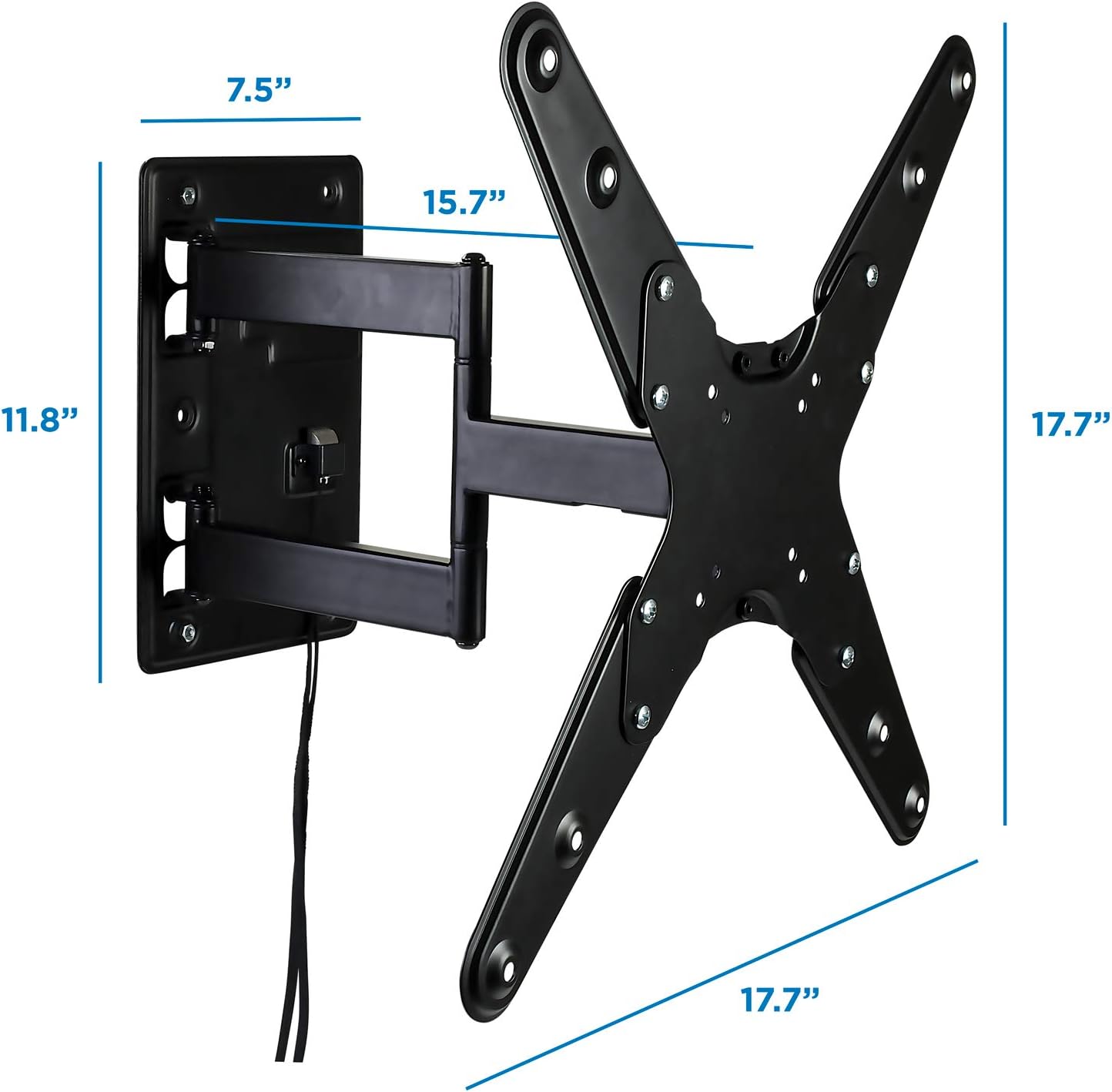
5. Configurazione e installazione
The Mount-It! MI-430 is designed for easy installation. Ensure you have the necessary tools (e.g., drill, screwdriver, stud finder) and follow these steps:
- Preparare la piastra a muro:
Locate a suitable mounting spot on a sturdy surface (e.g., a wooden stud in an RV). The wall plate includes a built-in bubble level to assist with accurate positioning. Mark the pilot holes. - Montare la piastra a parete:
Drill pilot holes at the marked locations. Secure the wall plate to the surface using the appropriate screws and washers. Ensure it is firmly attached and level. - Fissare la piastra VESA alla TV:
Identify your TV's VESA pattern (the spacing of the mounting holes on the back of your TV). Attach the VESA TV plate to the back of your television using the provided screws that match your TV's specifications. The quick-release design allows for easy attachment and detachment. - Appendere la TV al supporto a parete:
Carefully lift your TV with the attached VESA plate and slide it onto the articulating arm's receiver. The quick-release mechanism will secure it in place. - Sicuro per il viaggio:
For travel, push the TV arm fully back towards the wall plate until the locking mechanism engages. Use the pull rope to release the lock when you want to adjust the TV.


Videoguida all'installazione
Video: A detailed installation guide for the Mount-It! MI-432 Camper/RV TV Mount, demonstrating the steps to securely install the mount and attach the TV.
6. Istruzioni per l'uso
The MI-430 mount offers full motion capabilities for optimal viewing.
- Adjusting Swivel: Gently push or pull the TV to swivel it left or right up to ±90 degrees, depending on your TV size and wall clearance.
- Regolazione dell'inclinazione: Loosen the tilt adjustment knobs on the VESA plate, adjust the TV to your desired +10°/-15° tilt angle, and then tighten the knobs to secure.
- Estensione/retrazione: Pull the TV away from the wall to extend the arm up to 15.7 inches, or push it back to retract it to a minimum of 2.3 inches.
- Locking for Travel: Before driving, ensure the TV is fully retracted and pushed against the wall, engaging the locking mechanism. This prevents movement and potential damage.


Video sulle caratteristiche del prodotto
Video: Un oltreview of the Mount-It! Lockable RV TV Wall Mount, highlighting its key features and benefits for mobile use.
7. Manutenzione
To ensure the longevity and safe operation of your Mount-It! MI-430 TV Wall Mount, follow these maintenance guidelines:
- Ispezione regolare: Periodically check all screws and bolts to ensure they are tight. Vibrations during travel can loosen fasteners over time.
- Pulizia: Pulisci il supporto con un panno morbido e asciutto per rimuovere polvere e detriti. Evita di utilizzare detergenti abrasivi o solventi.
- Lubrificazione: If the articulating arm becomes stiff, apply a small amount of silicone-based lubricant to the moving joints.
- Meccanismo di bloccaggio: Ensure the locking mechanism functions smoothly. If the pull string shows signs of wear, consider replacing it to prevent breakage.
8. Risoluzione Dei Problemi
Ecco le soluzioni ai problemi più comuni che potresti riscontrare:
- La TV non è in piano: Use the built-in bubble level on the wall plate during installation. If already installed, some mounts allow for minor post-installation leveling adjustments. Otherwise, re-adjust the wall plate.
- Il supporto sembra allentato: Tighten all mounting screws on both the wall plate and the VESA plate. Ensure the wall surface is sturdy enough.
- Locking mechanism not engaging/releasing: Ensure the TV is fully pushed back against the wall for the lock to engage. If the pull string is stuck or broken, gently inspect for obstructions or replace the string.
- Arm is stiff: Apply a small amount of silicone lubricant to the joints of the articulating arm.
- TV shakes during travel: Ensure the locking mechanism is fully engaged. For added stability, some users place soft bumpers or foam blocks between the TV and the wall.
9. Garanzia e supporto
The Mount-It! MI-430 Lockable RV TV Wall Mount is backed by Mount-It!'s manufacturer lifetime warranty, ensuring long-term reliability. For technical assistance, missing parts, or warranty claims, please contact our US-based technical support team. Refer to the contact information provided in your product packaging or visit the official Mount-It! websito per ulteriori dettagli.