
1. Prodotto finitoview
The Sharp EL-531TG-GY is a scientific calculator designed for students and professionals requiring advanced mathematical functions. It features a 2-line display and Multi-Line Playback, facilitating the input and review of complex equations. This model is suitable for general math, algebra, geometry, trigonometry, statistics, biology, chemistry, and general science applications.
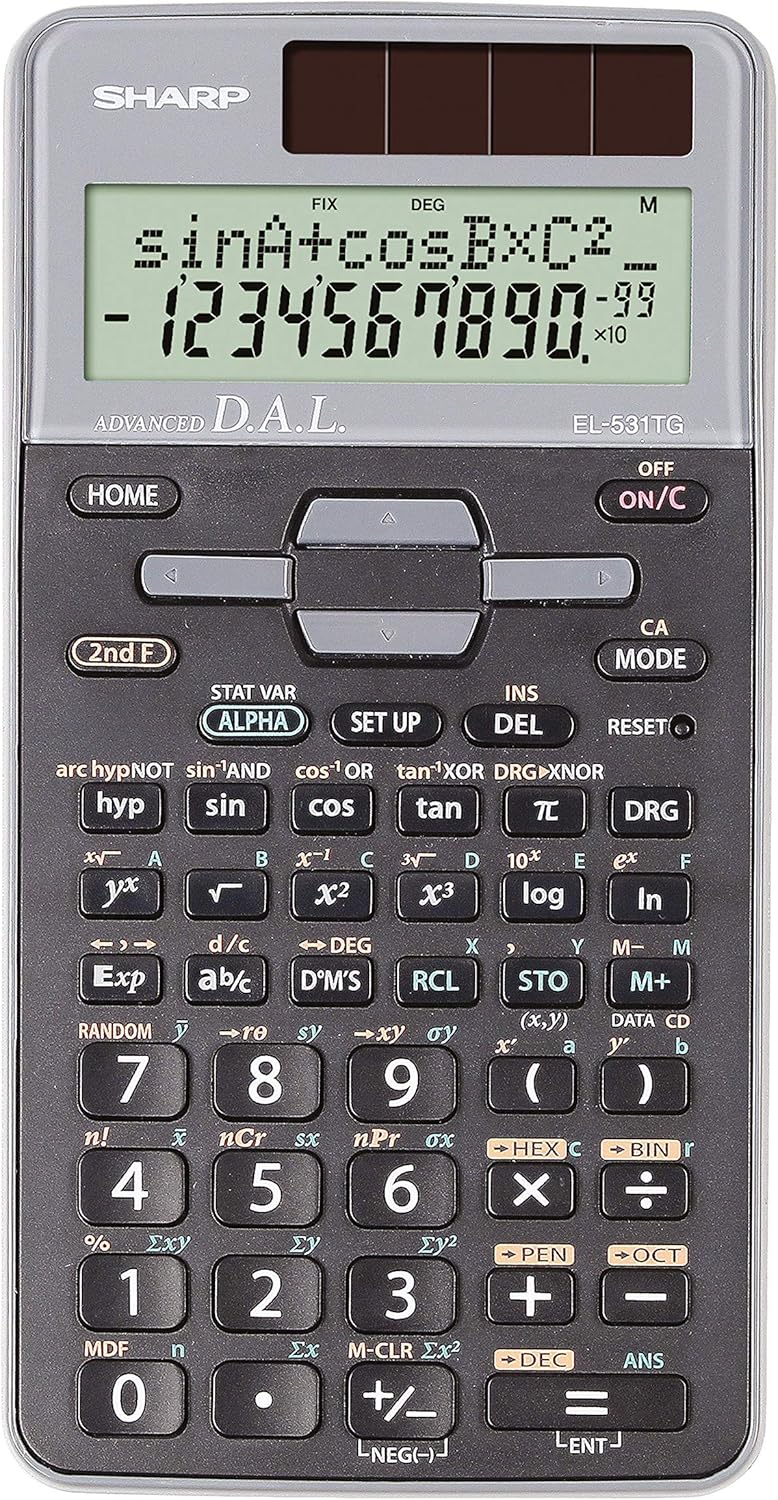
Figura 1: Fronte view of the Sharp EL-531TG-GY Scientific Calculator, showing the display, keypad, and solar panel.
2. Configurazione e utilizzo iniziale
2.1 Fonte di alimentazione
The EL-531TG-GY calculator operates using both solar power and a single LR44 button cell battery. The solar panel provides power in well-lit environments, while the battery ensures operation in low-light conditions or when solar power is insufficient. An LR44 battery is included with the calculator.
2.2 Accensione/Spegnimento
- To turn the calculator ON, premere il tasto ACCESO/C chiave.
- To turn the calculator SPENTO, premere il tasto 2° piano tasto seguito dal SPENTO key (which is typically the same as ACCESO/C).
2.3 Initial Display Settings
Upon first use or after a reset, the calculator will typically default to certain settings (e.g., DEG for angle units). Refer to Section 3.3 for details on changing mode settings.
3. Istruzioni per l'uso
3.1 Operazioni aritmetiche di base
Inserire i numeri utilizzando il tastierino numerico. Utilizzare il +, -, ×, E ÷ keys for addition, subtraction, multiplication, and division, respectively. Press = per ottenere il risultato.
3.2 Funzioni scientifiche
The calculator performs over 273 advanced scientific functions. Many functions are accessed by pressing the 2° piano key before the desired function key.
- Funzioni trigonometriche: Utilizzo peccato, così, abbronzatura. Inverse functions (sin⁻¹, cos⁻¹, tan⁻¹) are accessed via 2° piano.
- Funzioni logaritmiche: Utilizzo tronco d'albero (base 10) e ln (logaritmo naturale).
- Poteri e radici: Utilizzo x², √, x³, ³√.
- frazioni: Utilizzare il corrente continua key for fraction input and conversion.
3.3 Mode Settings (DEG/RAD/GRAD)
To change the angle unit mode (Degrees, Radians, Gradians):
- Premere il tasto DOGANA chiave.
- Premere ripetutamente DOGANA to cycle through DEG (Degrees), RAD (Radians), and GRAD (Gradians). The current mode is indicated on the display.
3.4 Funzioni di memoria
La calcolatrice è dotata di funzioni di memoria per memorizzare e richiamare i valori.
- STO (Negozio): Premere STO followed by a variable key (e.g., A, B) to store the displayed value.
- RCL (Richiamo): Premere RCL followed by the variable key to recall the stored value.
- M+ (Memoria Plus): Aggiunge il valore visualizzato alla memoria indipendente.
- M- (Memoria meno): Sottrae il valore visualizzato dalla memoria indipendente.
3.5 Multi-Line Playback
The 2-line display allows for Multi-Line Playback, enabling users to review previous calculations and expressions. Use the directional arrow keys (up/down) to scroll through past entries and results. This feature is useful for checking work or re-using parts of previous calculations.
4. Manutenzione
4.1 Pulizia
To clean the calculator, wipe the surface gently with a soft, dry cloth. Do not use abrasive cleaners, solvents, or excessive moisture, as these can damage the display or internal components.
4.2 Sostituzione della batteria
The calculator uses one LR44 button cell battery. If the display becomes dim or erratic in low-light conditions, the battery may need replacement. To replace the battery:
- Assicurarsi che la calcolatrice sia spenta.
- Individuare il vano batterie sul retro della calcolatrice.
- Aprire con cautela il coperchio del vano.
- Rimuovere la vecchia batteria LR44 e inserirne una nuova, assicurandosi della corretta polarità (+/-).
- Chiudere saldamente il coperchio del vano batterie.
4.3 Conservazione
When not in use, store the calculator in a cool, dry place away from direct sunlight and extreme temperatures. The hard cover included with the calculator provides protection from scratches and minor impacts.
5. Risoluzione Dei Problemi
5.1 Problemi di visualizzazione
- Schermo vuoto o poco luminoso: Ensure sufficient light for the solar panel. If the issue persists, replace the LR44 battery.
- Erratic Display: This may indicate a low battery. Replace the LR44 battery.
5.2 Risultati errati
- Controlla le impostazioni della modalità: Verify that the angle unit (DEG, RAD, GRAD) is set correctly for trigonometric calculations.
- Input Error: Review your input using the Multi-Line Playback feature to ensure the expression was entered correctly.
- Memory Contents: If using memory functions, ensure the stored values are correct.
5.3 La calcolatrice non risponde
Se la calcolatrice non risponde, provare a eseguire un ripristino. Individuare il RESET button (often a small recessed button requiring a thin object like a paperclip to press). Pressing this button will clear all memory and return the calculator to its factory default settings.
6. Specifiche

Figura 2: Fronte view of the Sharp EL-531TG-GY Scientific Calculator, illustrating its dimensions.
| Caratteristica | Descrizione |
|---|---|
| Numero di modello | SH-EL531TGGY |
| Tipo di visualizzazione | 2-line LCD with Multi-Line Playback |
| Funzioni | Over 273 advanced scientific functions |
| Fonte di alimentazione | Solar and 1 x LR44 battery (included) |
| Materiale | Plastica |
| Dimensioni (L x P x A) | 16.1 x 8 x 1.5 cm (circa) |
| Peso | 100 g (circa) |

Figura 3: lato view of the Sharp EL-531TG-GY Scientific Calculator, showing its slim profile.
7. Garanzia e supporto
7.1 Informazioni sulla garanzia
This product is covered by a manufacturer's warranty. Please refer to the warranty card included with your purchase or visit the official Sharp websito per termini e condizioni di garanzia dettagliati specifici per la tua regione.
7.2 Assistenza clienti
For technical assistance, troubleshooting not covered in this manual, or service inquiries, please contact Sharp customer support. Contact information can typically be found on the Sharp official websito o sulla confezione del prodotto.