
1. Introduzione
Grazie per l'acquistoasing the Sharp HT-SB140MT 2.0 150W Soundbar. This soundbar is designed to enhance your audio experience, providing clear and powerful sound for your television, music, and other media. With its sleek design and versatile connectivity options, including Bluetooth, HDMI ARC/CEC, Optical, and Auxiliary inputs, it integrates seamlessly into any home entertainment setup. This manual provides essential information for safe and effective use, including setup, operation, maintenance, and troubleshooting.
2. Informazioni sulla sicurezza
- Fonte di energia: Garantire l'alimentazione voltage matches the requirements specified on the soundbar. Use only the provided power cable.
- Ventilazione: Do not block any ventilation openings. Maintain adequate space around the soundbar for proper airflow.
- Acqua e umidità: Do not expose the soundbar to dripping or splashing water. Do not place objects filled with liquids, such as vases, on the apparatus.
- Calore: Do not place the soundbar near heat sources such as radiators, heat registers, stoves, or other apparatus (including amplificatori) che producono calore.
- Pulizia: Unplug the soundbar from the power outlet before cleaning. Use a dry, soft cloth for cleaning. Do not use liquid cleaners or aerosol cleaners.
- Manutenzione: Non tentare di riparare questo prodotto da soli. Affidare tutte le operazioni di manutenzione a personale di assistenza qualificato.
- Batterie: The remote control uses a CR2 battery. Ensure correct polarity when inserting batteries. Do not mix old and new batteries.
3. Contenuto della confezione
Si prega di verificare che tutti gli articoli siano presenti nel pacco:
- Sharp HT-SB140MT Soundbar
- Telecomando
- Cavo di alimentazione
- Manuale dell'utente (questo documento)
4. Prodotto finitoview

Figura 4.1: Fronte View
The front of the soundbar features the Sharp logo and LED indicators for source selection and status. Control buttons for power, input, and volume are located on the top panel.
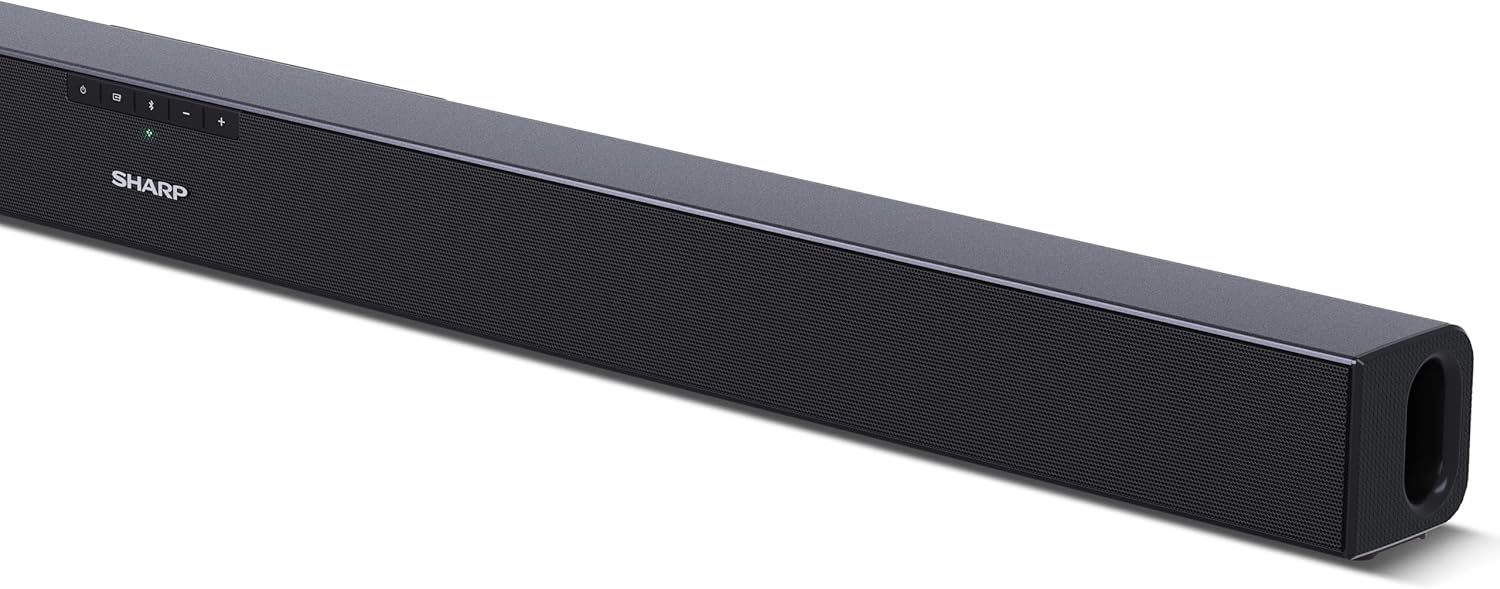
Figura 4.2: Posteriore View (Connessioni)
The rear panel provides all necessary connection ports: HDMI ARC, Optical (S/PDIF), and Auxiliary (3.5mm) input, along with the power input.

Figura 4.3: telecomando
The included remote control allows for convenient operation of the soundbar, including power, input selection, volume, bass, and treble adjustments.
5. Impostazione
5.1 Posizionamento
The Sharp HT-SB140MT Soundbar can be placed on a flat surface, such as a TV stand, or wall-mounted. Its slim profile of 6 cm allows it to fit easily under most TV screens without obstructing the view.

Figure 5.1: Soundbar Placement
The soundbar is ideally positioned directly in front of your television for optimal sound projection.
5.2 Collegamento alla TV
Scegli uno dei seguenti metodi di connessione:
- HDMI ARC/CEC (consigliato): Connect an HDMI cable (not included) from the HDMI ARC port on your TV to the HDMI ARC port on the soundbar. This allows your TV remote to control the soundbar's volume and power. Ensure HDMI ARC/CEC is enabled in your TV's settings.
- Digital Optical Audio (S/PDIF): Connect an optical cable (not included) from the Optical Out port on your TV to the OPTICAL IN port on the soundbar. Select the Optical input on the soundbar.
- Auxiliary (AUX): Connect a 3.5mm audio cable (not included) from the headphone jack or AUX Out port on your TV to the AUX IN port on the soundbar. Select the AUX input on the soundbar.
5.3 Collegamento di alimentazione
After connecting the audio cable, plug the power cable into the soundbar's power input and then into a wall outlet (220-240V / 50Hz).
6. Istruzioni per l'uso
6.1 Accensione/spegnimento
Premere il pulsante di accensione sulla soundbar o sul telecomando per accendere o spegnere l'unità.
6.2 Selezione della sorgente
Press the Input button on the soundbar or the remote control repeatedly to cycle through the available input sources: HDMI ARC, Optical, AUX, and Bluetooth. The LED indicator on the soundbar will change to reflect the selected source.
6.3 Regolazione del volume
Use the Volume Up (+) and Volume Down (-) buttons on the soundbar or the remote control to adjust the sound level.
6.4 Associazione Bluetooth
Per connettere un dispositivo Bluetooth:
- Select Bluetooth input on the soundbar. The Bluetooth LED indicator will flash, indicating pairing mode.
- On your smart device (smartphone, tablet, etc.), enable Bluetooth and search for available devices.
- Select "SHARP HT-SB140MT" from the list of devices.
- Once connected, the Bluetooth LED indicator will stop flashing and remain solid. You can now stream audio wirelessly to the soundbar.
6.5 Modalità audio (equalizzatore)
The soundbar features an equalizer with different sound modes to optimize audio for various content types. Use the EQ button on the remote control to cycle through these modes (e.g., Movie, Music, News). You can also adjust Bass and Treble levels using dedicated buttons on the remote.
7. Manutenzione
7.1 Pulizia
To clean the soundbar, unplug it from the power outlet. Use a soft, dry, lint-free cloth to wipe down the surfaces. Do not use abrasive cleaners, waxes, or solvents as they may damage the finish.
7.2 Conservazione
If you plan to store the soundbar for an extended period, disconnect it from the power supply and store it in a cool, dry place, away from direct sunlight and extreme temperatures.
8. Risoluzione Dei Problemi
Se riscontri problemi con la soundbar, fai riferimento ai seguenti problemi comuni e alle relative soluzioni:
| Problema | Possibile causa | Soluzione |
|---|---|---|
| Nessun suono dalla soundbar. | La soundbar è spenta o disattivata. È stata selezionata una sorgente di input errata. I cavi non sono collegati correttamente. Le impostazioni di uscita audio della TV non sono corrette. | Ensure the soundbar is powered on and not muted. Select the correct input source (HDMI ARC, Optical, AUX). Check all cable connections (HDMI, Optical, AUX). Verify your TV's audio output settings are set to external speakers or the correct digital output. |
| Il dispositivo Bluetooth non riesce a connettersi. | Soundbar is not in pairing mode. Il dispositivo è fuori portata. Interferenze da altri dispositivi. | Ensure the soundbar is in Bluetooth input mode and the LED is flashing. Avvicina il tuo dispositivo Bluetooth alla soundbar (entro 10 metri). Disattiva gli altri dispositivi Bluetooth nelle vicinanze. Prova a disaccoppiarli e riassociarli. |
| Il telecomando non funziona. | Battery is low or inserted incorrectly. Ostruzione tra il telecomando e la soundbar. Il telecomando è difettoso. | Replace the CR2 battery and ensure correct polarity. Remove any obstructions between the remote and the soundbar's sensor. Se i problemi persistono, contatta l'assistenza clienti. |
9. Specifiche
| Nome del modello | HT-SB140 (MT) |
| Tipo di altoparlante | Barra audio |
| Configurazione del canale audio surround | 2.0 |
| Potenza massima di uscita dell'altoparlante | 150 Watt |
| Risposta in frequenza | Frequenza 60 Hz |
| Tecnologia di connettività | Bluetooth, HDMI ARC/CEC, Digital Optical Audio (S/PDIF), 3.5mm Auxiliary (AUX) |
| Tecnologia di comunicazione wireless | Bluetooth |
| Portata massima (Bluetooth) | 10 metri |
| Metodo di controllo | Telecomando |
| Fonte di alimentazione | AC (Mains) |
| Ingresso volumetage | 220-240 Volt |
| Colore | Nero |
| Materiale | Plastica, Metallo |
| Tipo di montaggio | Montaggio a parete, da tavolo |
| Dimensioni del prodotto (L x P x A) | Dimensioni: 95 x 6 x 6 cm |
| Peso dell'articolo | 1.5 chilogrammi |
| Componenti inclusi | Telecomando |
| Batteria richiesta | 1 batteria CR2 |
| Impermeabile | NO |
| Disponibilità dei pezzi di ricambio | 5 anni |
| Aggiornamenti software garantiti fino al | Informazioni non disponibili |
10. Garanzia e supporto
The Sharp HT-SB140MT Soundbar comes with a Limited Warranty. Please refer to the warranty card included in your package for specific terms and conditions. Spare parts are available for up to 5 years from the date of purchase.
For technical support, service, or warranty claims, please contact Sharp customer service through their official website or the contact information provided in your product documentation. When contacting support, please have your product model number (HT-SB140(MT)) and purchase details ready.