
REVO RTCB30-1
Manuale utente della telecamera Bullet IR per interni/esterni REVO America RTCB30-1 Aero HD 1080p
Model: RTCB30-1
Introduzione
The REVO America RTCB30-1 Aero HD 1080p Indoor/Outdoor IR Bullet Camera is designed to provide high-definition video surveillance for both indoor and outdoor environments. Featuring a 2.1 Megapixel sensor, 1080p resolution, and 30 IR LEDs for night vision up to 100 feet, this camera offers reliable monitoring capabilities. Its IP66 weather-resistant rating ensures durability in various conditions, and the 3D rotary bracket simplifies installation and positioning.
Contenuto della confezione
- 1x REVO America Aero HD 1080p Indoor/Outdoor IR Bullet Camera (White)
- 1x 60' Premium Quality BNC Cable
Caratteristiche principali
- Risoluzione video Full HD 1080p
- Indoor/Outdoor Usage with IP66 Weather Resistance
- Obiettivo fisso 3.6mm
- 30 IR LEDs for up to 100' Night Vision
- Automatic IR Cut Filter Removal (ICR) for enhanced day/night performance
- 3D Rotary Bracket for easy mounting and positioning
- Wired Connectivity via BNC Cable
Configurazione e installazione
1. Montaggio della fotocamera
The REVO Aero Bullet Camera is designed for wall mounting. The integrated 3D rotary bracket allows for flexible positioning to achieve the desired viewing angle. Ensure the mounting surface is stable and can support the camera's weight. The camera is rated IP66 weather resistant, making it suitable for outdoor installation.
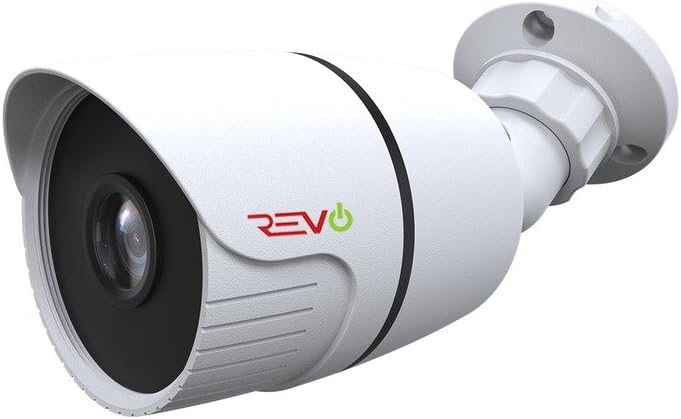
Figura 1: Fronte view of the REVO America RTCB30-1 Aero HD 1080p Bullet Camera, showing the lens and IR LEDs.
2. Collegamento della fotocamera
This camera uses a wired BNC connection for video transmission and a separate power connection. Connect the included 60' BNC cable to the camera's BNC port and to your compatible DVR/NVR system. Ensure all connections are secure to prevent signal loss. Power the camera using a compatible 12V DC power adapter (not included unless part of a kit).

Figura 2: lato view of the REVO America RTCB30-1 Aero HD 1080p Bullet Camera, illustrating the mounting bracket and cable entry point.
For optimal video quality, it is recommended to use high-quality BNC cables. After installation, ensure no wires are exposed to maintain safety and reliability.
Istruzioni per l'uso
1. Accensione
Once the camera is securely mounted and connected to your DVR/NVR system and power source, it will automatically power on. The camera will begin transmitting video feed to your recording device.
2 Monitoraggio remoto
To access live feed, review passato pippotage, and manage settings remotely, utilize the REVO Aero Mobile App or Browser Login. These platforms allow you to receive instant notifications, adjust camera settings, set alarms, check motion events, and view più telecamere contemporaneamente.
3. Visione notturna
The camera is equipped with 30 IR LEDs, providing night vision capabilities up to 100 feet in low-light conditions. The automatic IR Cut Filter Removal (ICR) function ensures optimal image clarity by switching between day and night modes as ambient light changes.
Manutenzione
Una manutenzione regolare contribuisce a garantire prestazioni ottimali e longevità della fotocamera.
- Pulizia: Pulire periodicamente l'obiettivo e l'alloggiamento della fotocamera con un panno morbido eamp panno. Evitare detergenti abrasivi che potrebbero graffiare la lente.
- Ispezione dei cavi: Regularly check BNC and power cable connections for any signs of wear, damage, or corrosion, especially for outdoor installations.
- Aggiornamenti del firmware: Check the REVO America website for any available firmware updates for your DVR/NVR system, which may improve camera compatibility and performance.
Risoluzione dei problemi
If you encounter issues with your REVO America RTCB30-1 camera, refer to the following common troubleshooting steps:
- Nessun segnale video:
- Assicurarsi che la telecamera sia correttamente alimentata.
- Verify that the BNC cable is securely connected at both the camera and DVR/NVR ends.
- Check the BNC cable for any damage or breaks.
- Confirm that your DVR/NVR system is compatible with 1080p HD analog cameras.
- Scarsa qualità dell'immagine:
- Pulisci l'obiettivo della fotocamera per rimuovere sporco o macchie.
- Ensure the camera's protective film (if any) has been removed.
- Controllare che non vi siano fonti di luce intensa rivolte direttamente verso la telecamera, che potrebbero causare abbagliamento.
- Verify the BNC cable quality; a damaged or low-quality cable can degrade video.
- Visione notturna non funzionante:
- Ensure there is sufficient power to the camera for the IR LEDs to activate.
- Check for obstructions in front of the camera that might block the IR light.
- Confirm that the camera is in a dark environment, as the IR LEDs only activate in low light.
Specifiche tecniche
| Numero di modello | RTCB30-1 |
| Marca | REVOAmerica |
| Risoluzione di acquisizione video | 1080p (2.1 Megapixel) |
| Lente | Obiettivo fisso 3.6mm |
| Visione notturna | Up to 100' (30 IR LEDs) |
| Uso interno/esterno | SÌ |
| Valutazione internazionale di protezione | IP66 (resistente alle intemperie) |
| Tecnologia di connettività | Cablato (BNC) |
| Fonte di alimentazione | Elettrico con cavo (12 V CC) |
| Tipo di montaggio | Montaggio a parete |
| Colore | Bianco |
| Dimensioni articolo (L x P x A) | 9 x 9 x 9 pollici |
| Peso dell'articolo | 16 once |
| Codice UPC | 045924597953 |
Supporto e garanzia
For technical assistance, product support, or warranty information, please refer to the official REVO America website or contact their customer service department. Warranty terms and conditions may vary and are typically provided with your purchase documentation or available on the manufacturer's websito.
REVO America provides necessary materials such as videos and manuals to assist with self-installation and setup. For further assistance, please consult these resources or contact their support team directly.
Documenti correlati - RTCB30-1
 |
REVO Wave Vibration Plate User Manual (REVO-2368) Comprehensive user manual for the REVO Wave vibration plate (Model REVO-2368). Includes setup instructions, operating modes, safety precautions, and product features. |
 |
REVO Titan Tilt 10 Stand Mixer User Manual and Guide Official user manual and guide for the REVO Titan Tilt 10 stand mixer, detailing product overview, operation, safety, cleaning, and specifications. Learn how to use your REVO Titan Tilt 10 for optimal baking results. |
 |
Manuale utente del massaggio con coppettazione intelligente REVO Manuale utente completo per il dispositivo REVO Smart Cupping Massage, che descrive in dettaglio l'introduzione, le specifiche, le linee guida per l'uso, le precauzioni di sicurezza, la pulizia, la manutenzione, la risoluzione dei problemi e le domande frequenti. |
 |
Manuale utente REVO Face Genie: caratteristiche, utilizzo e sicurezza Manuale utente completo per REVO Face Genie, che descrive in dettaglio componenti, funzioni, istruzioni per l'uso, precauzioni di sicurezza e risoluzione dei problemi. Scopri come utilizzare il dispositivo per rassodare, illuminare e lenire la pelle. |
 |
Manuale del prodotto del kit NVR wireless REVO RW4NVR1 Manuale completo del prodotto per il kit NVR wireless REVO RW4NVR1, che descrive in dettaglio caratteristiche, specifiche, installazione, funzionamento, configurazione di rete e manutenzione per la sicurezza domestica e aziendale. |
 |
Manuale d'uso della radio Revo SUPERSIGNAL: configurazione, funzionalità e risoluzione dei problemi Questa guida completa per l'utente fornisce istruzioni dettagliate per la radio Revo SUPERSIGNAL. Scopri di più sulla configurazione, sulle modalità radio DAB e FM, sulla connettività Bluetooth, sulle funzioni della sveglia, sulle impostazioni di sistema e sulla risoluzione dei problemi più comuni. |
Ask a question about this manual
Ask about setup, troubleshooting, compatibility, parts, safety, or missing instructions. Manuals+ will review the question and use this page’s manual context to help answer it.