
Introduzione
Thank you for choosing the MeeTion K9310 Gaming Keyboard. This manual provides detailed instructions for setting up, operating, and maintaining your new keyboard. The K9310 is designed for an enhanced gaming experience with features such as multicolor backlighting, anti-ghosting, and dedicated shortcut keys.
Contenuto della confezione
- MeeTion K9310 Gaming Keyboard
- Manuale dell'utente (questo documento)
Impostare
Follow these steps to connect your MeeTion K9310 Gaming Keyboard to your computer:
- Estrarre la tastiera dalla confezione.
- Individua una porta USB disponibile sul tuo computer.
- Collegare il connettore USB della tastiera alla porta USB.
- Your operating system (Windows XP/Vista/7/8/10) will automatically detect and install the necessary drivers. No additional software installation is typically required.
- The keyboard is ready for use once the drivers are installed.

Immagine: in alto view of the MeeTion K9310 Gaming Keyboard with its USB cable, ready for connection.
Istruzioni per l'uso
Caratteristiche principali
- Multicolor Key Backlit: The keyboard features vibrant multicolor backlighting for enhanced visibility and aesthetic appeal, especially in low-light conditions.
- Comfortable and Soft Keys: Designed with membrane keys offering tactile feedback, providing a comfortable typing and gaming experience.
- 19 chiavi anti-ghosting: This feature ensures that up to 19 keys can be pressed simultaneously without any input loss, crucial for complex gaming commands.
- Win Lock Function with LED Indication: Prevents accidental presses of the Windows key during gameplay, which can interrupt your game. An LED indicator shows when this function is active.
- 12 FN Shortcut Buttons: Access various multimedia and system functions quickly using the Function (FN) key in combination with the F1-F12 keys.
Controllo della retroilluminazione
The K9310 keyboard features a multicolor backlight. Specific key combinations may be used to adjust brightness or switch lighting modes. Refer to the keyboard's markings for dedicated backlight control keys, often indicated by a sun or light bulb icon, or through FN key combinations.
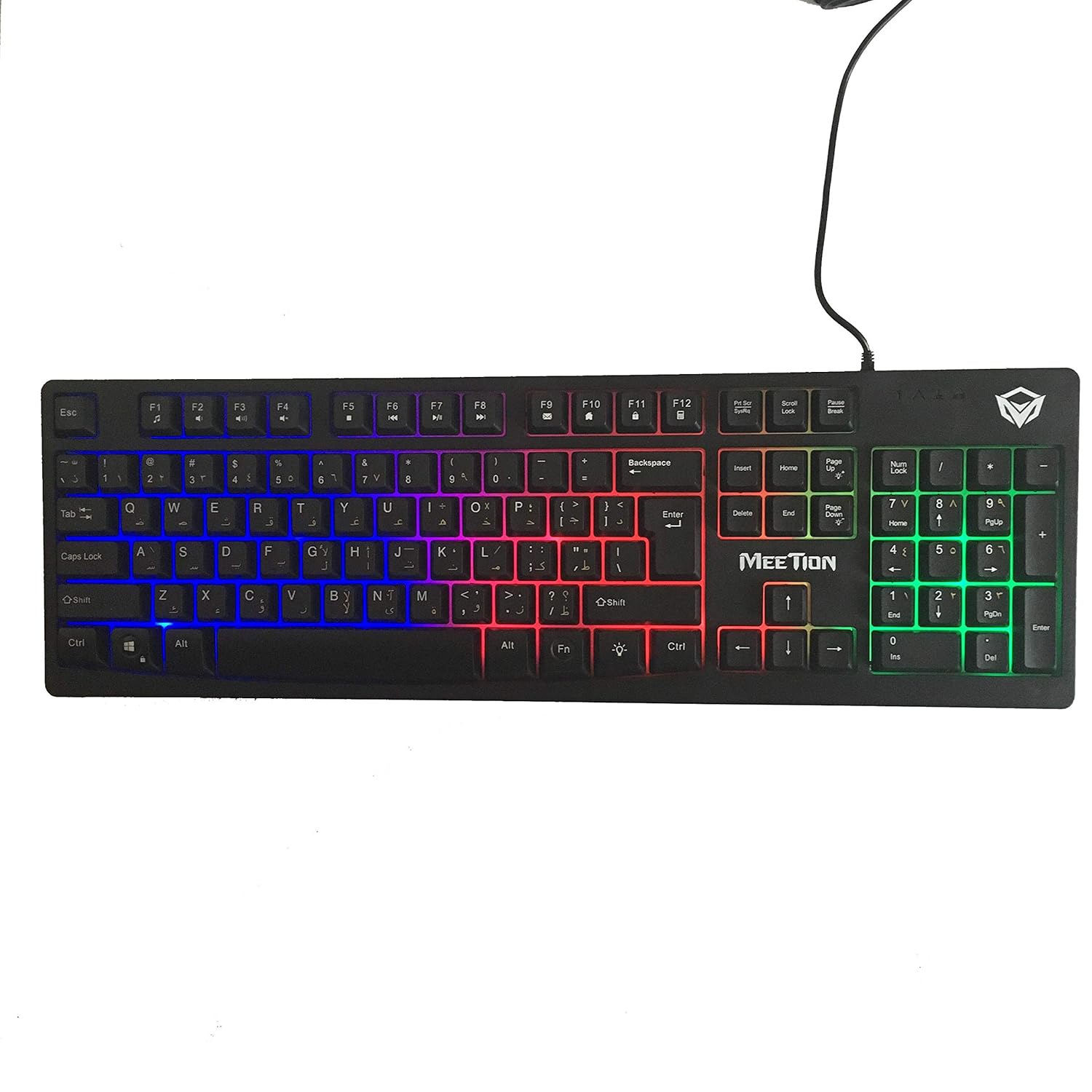
Immagine: in alto view of the MeeTion K9310 Gaming Keyboard with its multicolor backlighting illuminated.
FN Shortcut Functions
The keyboard includes 12 FN (Function) shortcut buttons. To activate these functions, press and hold the FN key, then press the desired F-key (F1-F12).
| Combinazione di tasti | Funzione |
|---|---|
| Tasto F1 | Lettore multimediale |
| Tasto F2 | Abbassa il volume |
| Tasto F3 | Alza il volume |
| Tasto F4 | Muto |
| Tasto F5 | Fermare |
| Tasto F6 | Traccia precedente |
| Tasto F7 | Riproduci/Pausa |
| Tasto F8 | Traccia successiva |
| Tasto F9 | |
| Tasto F10 | Web Navigatore |
| Tasto F11 | Il mio computer |
| Tasto F12 | Calcolatrice |
Win Lock Function
To activate or deactivate the Windows key lock function, press FN + Tasto Win. When active, the Windows key will be disabled, preventing accidental presses during gaming. An LED indicator on the keyboard will typically illuminate to show the Win Lock status.
Manutenzione
Una corretta manutenzione garantisce la longevità e le prestazioni ottimali della tastiera.
- Pulizia: Utilizzare un panno morbido e asciutto per pulire la superficie della tastiera. Per una pulizia più profonda, utilizzare un panno leggermenteamp è possibile utilizzare un panno imbevuto di sapone neutro, assicurandosi che nessun liquido penetri negli interruttori a chiave o nei componenti interni.
- Rimozione della polvere: Utilizzare aria compressa per rimuovere polvere e detriti dagli spazi tra i tasti.
- Evitare i liquidi: Do not spill liquids on the keyboard. If a spill occurs, immediately disconnect the keyboard from the computer and allow it to dry completely before reconnecting.
- Magazzinaggio: Quando non viene utilizzata per lunghi periodi, conservare la tastiera in un luogo fresco e asciutto, lontano dalla luce solare diretta e da temperature estreme.

Immagine: In basso view of the MeeTion K9310 Gaming Keyboard, showing the product label and rubber feet.
Risoluzione dei problemi
If you encounter issues with your MeeTion K9310 Gaming Keyboard, refer to the following troubleshooting steps:
- La tastiera non risponde:
- Assicurati che il cavo USB sia collegato saldamente a una porta USB funzionante del tuo computer.
- Prova a collegare la tastiera a una porta USB diversa.
- Riavvia il computer.
- Prova la tastiera su un altro computer per determinare se il problema riguarda la tastiera o il computer.
- Keys Not Working (e.g., 'W' key):
- Check for any debris or foreign objects lodged under the affected key. Use compressed air to clear it.
- If only specific keys are not responding, and the keyboard is otherwise functional, it might indicate a hardware issue.
- Retroilluminazione non funzionante o tremolante:
- Assicurarsi che la tastiera sia collegata correttamente.
- Check if the backlight brightness is set to minimum or turned off via FN key combinations.
- If the issue persists, it may indicate a hardware malfunction.
- Win Lock Function Not Working:
- Ensure you are using the correct key combination (FN + Win Key) to toggle the function.
- Check the LED indicator for Win Lock status.
Specifiche
| Caratteristica | Dettaglio |
|---|---|
| Marca | INCONTRO |
| Modello | K9310 |
| Tipo di tastiera | Tastiera da gioco |
| Contatto chiave | Membrane with tactile feedback |
| Disposizione | Cyrillic alphabet layout (Windows Keys) |
| Anti-ghosting | 19 chiavi |
| Retroilluminazione | Tasto multicolor retroilluminato |
| Win Lock Function | Sì, con indicazione LED |
| FN Shortcut Buttons | 12 |
| Error-Free Running Time | More than 10 million strokes |
| Compatibilità del sistema operativo | Windows XP/Vista/7/8/10 |
| Dimensioni | 17.5 × 5.5 x 1.5 inches (approximate) |
| Peso | 1.2 libbre (circa) |
| Dispositivi compatibili | Laptop (e PC desktop) |
Garanzia e supporto
For warranty information or technical support, please refer to the documentation provided at the time of purchase or visit the official MEETION websito. Conservare la prova d'acquisto per eventuali reclami in garanzia.