
1. Introduzione
This manual provides essential information for the safe and effective operation of your Pioneer DDJ-SB3 DJ Controller. Please read this manual thoroughly before use and retain it for future reference.
The DDJ-SB3 is a 2-channel performance DJ controller designed for use with Serato DJ Lite software. It features an intuitive layout, durable construction, and responsive controls for an engaging DJ experience.
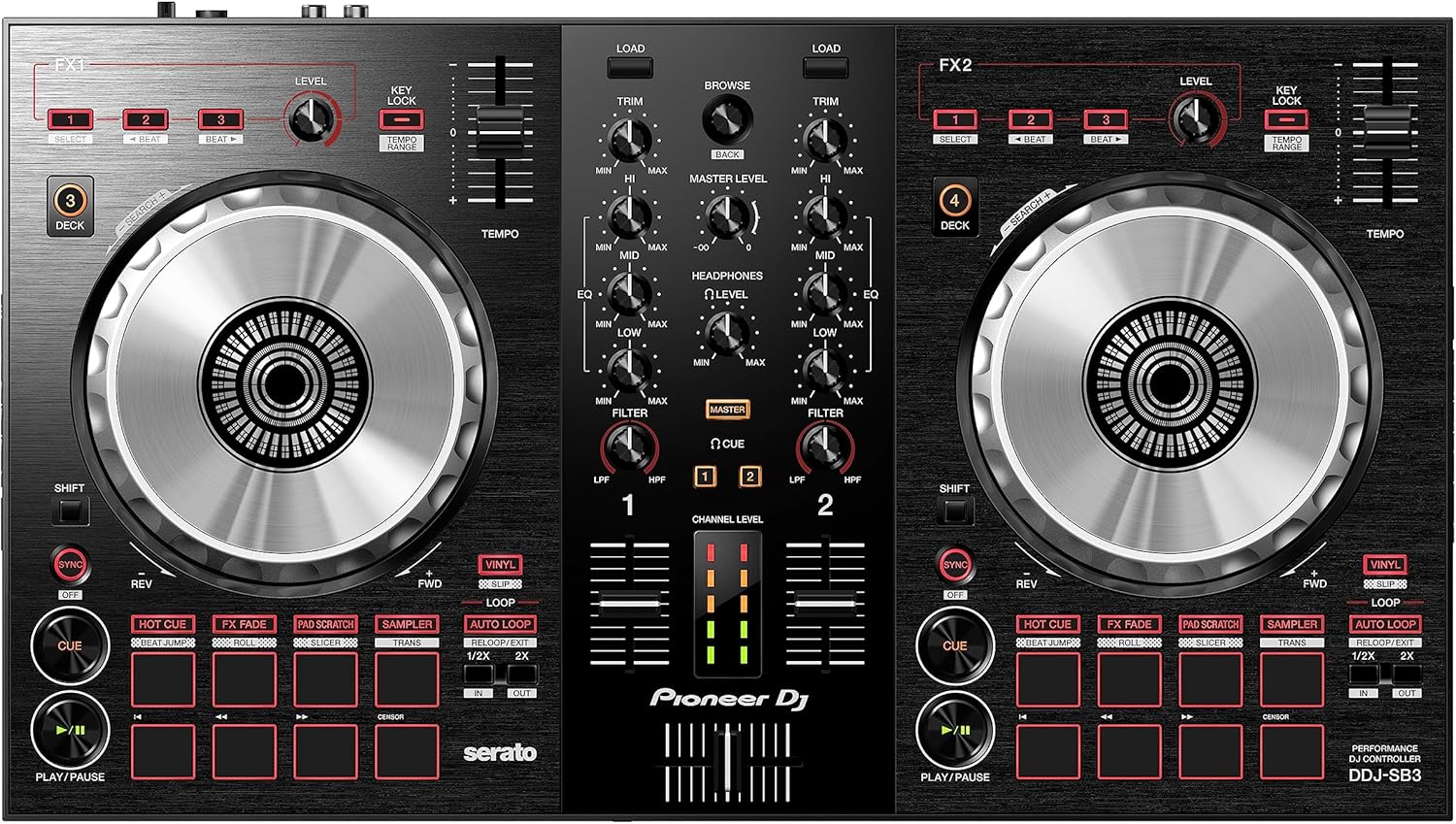
Figura 1: Fronte view of the Pioneer DDJ-SB3 DJ Controller, showcasing its intuitive layout with two large jog wheels, mixer section, and performance pads.
2. Impostazione
2.1. Disimballaggio e ispezione iniziale
Rimuovere con cautela tutti i componenti dall'imballaggio. Assicurarsi che siano presenti i seguenti elementi:
- Pioneer DDJ-SB3 DJ Controller
- Cavo USB
- Istruzioni per l'uso (questo manuale)
- Serato DJ Lite Voucher (if applicable)
2.2. Connessioni
Connect the DDJ-SB3 to your computer and audio system as follows:
- Connessione USB: Connect the supplied USB cable from the DDJ-SB3's USB port to an available USB port on your computer. This provides power and data communication.
- Audio Output (Master): Connect RCA cables from the DDJ-SB3's MASTER OUT (RCA) terminals to the input terminals of your ampdiffusori acustici, altoparlanti amplificati o sistemi PA.
- Ingresso microfono: If using a microphone, connect it to the MIC input (1/4-inch jack) on the rear panel. Adjust the MIC LEVEL knob as needed.
- Uscita cuffie: Connect your headphones to the HEADPHONES output (1/8-inch stereo mini jack) on the front panel for monitoring.

Figura 2: Posteriore view of the DDJ-SB3, showing USB, Master RCA outputs, and Microphone input.
2.3. Installazione del software
The DDJ-SB3 is designed to work seamlessly with Serato DJ Lite. Download and install the latest version from the official Serato websito. Seguire le istruzioni sullo schermo per l'installazione.
3. Istruzioni per l'uso
3.1. Controlli di base suview
The DDJ-SB3 features two deck sections, each with a large jog wheel, tempo slider, and performance pads, flanking a central mixer section.
3.2. Jog Wheels
The large, low-latency jog wheels are central to controlling your tracks. They can be used for:
- Graffiare: In Vinyl mode, touching the top surface allows for scratching.
- Spinta: Touching the side of the jog wheel allows for fine adjustments to the track's speed.
- Ricerca: Hold the SHIFT button and rotate the jog wheel to quickly scroll through a track.
3.3. Tempo Control
Use the TEMPO slider to adjust the playback speed (BPM) of the track. The KEY LOCK button can be engaged to maintain the track's original key even when the tempo is changed.
3.4. Sezione Mixer
The central mixer section allows you to blend and manipulate audio from both decks:
- TAGLIO: Regola il guadagno di ingresso per ciascun canale.
- Manopole EQ (HI, MID, LOW): Adjust the high, mid, and low frequencies for each channel. These are total kill EQs, meaning turning them fully counter-clockwise will completely cut the frequency band.
- Manopola FILTRO: Applies a high-pass or low-pass filter to the channel.
- Fader di canale: Control the volume of each individual channel.
- Crossfader: Blends the audio output between Channel 1 and Channel 2.
3.5. Performance Pad
The 8 performance pads on each deck offer various functions:
- HOT CUE: Set and trigger cue points instantly.
- FX FADE: Apply various effects for smooth transitions.
- PAD SCRATCH: Emulate professional scratch techniques with the push of a pad.
- SAMPLER: Trigger precaricato sampmeno.
3.5.1. Hot Cue Techniques
Hot Cues allow you to jump to specific points in a track instantly. You can set up to 8 Hot Cues per track. To set a Hot Cue, navigate to the desired point in the track using the jog wheel or transport buttons, ensure HOT CUE mode is selected, and press an unlit pad. The pad will light up, indicating a Hot Cue is set. To delete, hold SHIFT and press the lit Hot Cue pad.
Video 1: Tutorial on using Hot Cue techniques with the DDJ-SB3.
3.5.2. Pad Scratch Function
The Pad Scratch feature, developed with DJ Jazzy Jeff, allows beginners to perform various scratch patterns by simply pressing the performance pads. This automates jog wheel and crossfader movements for popular scratch techniques. Ensure your tracks are beat-matched for optimal results.
Video 2: Tutorial demonstrating how to use the Pad Scratch feature on the DDJ-SB3.
3.5.3. FX Fade and Long Mixes
FX Fade provides various effects to facilitate smooth transitions between tracks, especially useful for long mixes where two beat-matched tracks are blended over an extended period. This allows for greater control over levels and the blend.
Video 3: Tutorial on performing a Hip Hop Long Mix using the DDJ-SB3's FX Fade feature.
3.6. Headphone Cueing
The headphone section allows you to monitor tracks independently of the master output:
- CUE Buttons (1, 2, MASTER): Press to select which channel (Deck 1, Deck 2, or Master output) you want to hear in your headphones.
- HEADPHONES LEVEL: Regola il volume generale delle cuffie.
4. Manutenzione
To ensure the longevity and optimal performance of your DDJ-SB3, follow these maintenance guidelines:
- Pulizia: Per pulire il controller, utilizzare un panno morbido e asciutto. Evitare detergenti abrasivi o solventi.
- Magazzinaggio: Conservare il controller in un luogo fresco e asciutto, lontano dalla luce solare diretta, da temperature estreme e da polvere eccessiva.
- Cura del cavo: Handle all cables with care. Avoid bending or twisting them sharply, which can damage internal wires.
5. Risoluzione Dei Problemi
If you encounter issues with your DDJ-SB3, refer to the following common solutions:
- Nessuna alimentazione/connessione: Assicurati che il cavo USB sia collegato saldamente sia al controller che al computer. Prova una porta USB o un cavo diverso.
- Nessuna uscita audio: Check all audio cable connections (MASTER OUT to speakers/amplifier). Verify that TRIM, channel faders, and the MASTER LEVEL knob are not set to minimum. Ensure your computer's audio output is correctly configured for the DDJ-SB3.
- Il software non riconosce il controller: Ensure Serato DJ Lite is the latest version. Restart both the software and your computer. Reinstall the software if necessary.
- Problemi di latenza: Adjust the buffer size in your Serato DJ Lite audio settings. A lower buffer size reduces latency but requires more CPU power.
6. Specifiche
| Caratteristica | Specificazione |
|---|---|
| Marca | PIONEER |
| Modello | DDJ-SB3 |
| Numero di canali | 2 |
| Peso dell'articolo | 4.63 libbre |
| Tecnologia di connettività | USB or 1/4 inch Jack |
| Fonte di alimentazione | Elettrico con cavo |
| Tipo di connettore di uscita | RCA |
| Ingresso audio | RCA or USB |
| Livello di rumore | 103 decibel |
| Codice UPC | 841300101260 |
| Componenti inclusi | Compact SERATO DJ CONTROLLER - 2 Channel |
7. Garanzia e supporto
7.1. Informazioni sulla garanzia
Questo prodotto viene fornito con un Garanzia di 1 annoSi prega di conservare la prova d'acquisto per eventuali reclami in garanzia.
7.2. Assistenza clienti
For further assistance, technical support, or to download the latest drivers and software, please visit the official Pioneer DJ websito: www.pioneerdj.com