
1. Introduzione
The ZEBRONICS ZEB-DB250JP is a versatile Bluetooth wireless gamepad designed for an enhanced gaming experience across multiple platforms. It features 17 buttons, dual analog sticks, dual vibration motors, and quad front triggers for precise control. This gamepad is compatible with Android smartphones, tablets, Android TV boxes, Android TVs, and PCs running Windows 98 / 2000 / ME / XP / NT / VISTA / 7 / 8 / 10. It also supports PS3 consoles. The ergonomic design ensures comfortable use, and a phone mount is included for mobile gaming.
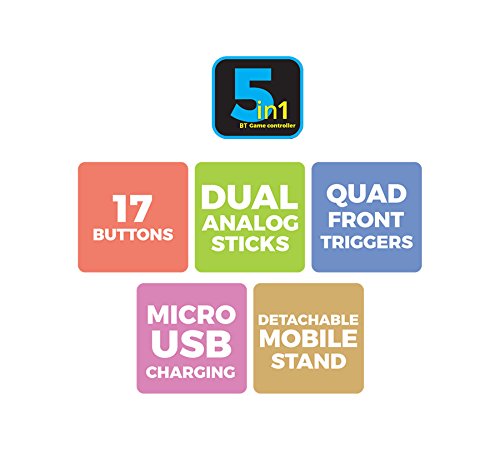
Immagine 1: Passoview of ZEB-DB250JP key features including 17 buttons, dual analog sticks, quad front triggers, micro USB charging, and a detachable mobile stand.
2. Cosa c'è nella scatola
- 1 x ZEB-DB250JP Joypad
- 1 x Cavo di ricarica micro USB
- 1 x supporto per telefono staccabile
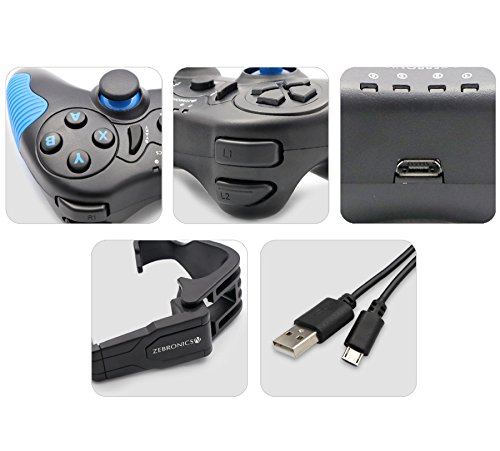
Image 2: A collage showing the ZEB-DB250JP gamepad, its triggers, micro USB port, detachable phone mount, and charging cable.
3. Impostazione
3.1 Ricarica del gamepad
Before initial use, fully charge the gamepad. Connect the provided Micro USB cable to the gamepad's charging port and the other end to a USB power source (e.g., computer USB port, USB wall adapter). The built-in 300mAh battery provides extended playtime.

Immagine 3: In alto view of the ZEB-DB250JP gamepad, highlighting the Micro USB charging port located between the L1/R1 and L2/R2 triggers.
3.2 Bluetooth Pairing (Android Devices & PS3)
- Assicurarsi che il gamepad sia carico.
- Premere e tenere premuto il tasto CASA pulsante insieme al X button simultaneously until the indicator lights on the gamepad begin to flash, indicating it is in pairing mode.
- On your Android smartphone, tablet, Android TV box, or Android TV, navigate to the Bluetooth settings.
- Cercare available devices and select "ZEB-DB250JP" (or similar name) from the list.
- Once connected, the indicator light on the gamepad will become solid. The Bluetooth range is approximately 8 meters.
- For PS3, connect the gamepad via USB cable first, then follow the console's instructions for pairing a new controller.
3.3 Connessione PC
For PC gaming, the ZEB-DB250JP can be connected via the provided USB cable. Simply plug the Micro USB end into the gamepad and the USB-A end into an available USB port on your computer. The gamepad is compatible with Windows 98 / 2000 / ME / XP / NT / VISTA / 7 / 8 / 10 and should be recognized automatically.
3.4 Attaching the Phone Mount
To use the gamepad with your smartphone, attach the included phone mount to the designated slot on the gamepad. Secure your smartphone firmly into the mount.
4. Istruzioni per l'uso
Disposizione dei 4.1 pulsanti
The ZEB-DB250JP features a standard gamepad layout with 17 buttons, including:
- Doppi stick analogici: Per movimenti precisi e controllo della telecamera.
- Tasto direzionale: Tastierino direzionale per la navigazione nei menu e per input di gioco specifici.
- Pulsanti di azione (A, B, X, Y): Per le azioni di gioco.
- Quad Front Triggers (L1, L2, R1, R2): Per azioni aggiuntive, spesso utilizzato per sparare o accelerare.
- Tasto CASA: For power on/off and system functions.
- SELECT/BACK and START/MENU Buttons: For game menus and options.


Image 4: Left side of the ZEB-DB250JP gamepad showing the D-pad and left analog stick. Image 5: Right side of the ZEB-DB250JP gamepad showing the action buttons (A, B, X, Y) and right analog stick.
4.2 Accensione/spegnimento
- Per accendere, premere il CASA pulsante.
- Per spegnere, tenere premuto il pulsante CASA button for a few seconds until the gamepad shuts down.
4.3 Gioco
Once connected, the gamepad should be recognized by compatible games. Refer to your game's settings for controller configuration and button mapping. The dual vibration motors provide haptic feedback for an immersive gaming experience.
5. Manutenzione
- Pulizia: Per pulire il gamepad, utilizzare un panno morbido e asciutto. Evitare l'uso di prodotti chimici aggressivi o materiali abrasivi.
- Magazzinaggio: Conservare il gamepad in un luogo fresco e asciutto, lontano dalla luce solare diretta e da temperature estreme.
- Cura della batteria: Per prolungare la durata della batteria, evitare di scaricarla completamente frequentemente. Caricare regolarmente il gamepad, anche se non lo si utilizza per lunghi periodi.
6. Risoluzione Dei Problemi
- Il gamepad non si connette tramite Bluetooth:
- Ensure the gamepad is charged.
- Make sure the gamepad is in pairing mode (HOME + X).
- Disattiva e riattiva il Bluetooth sul tuo dispositivo.
- Forget the device from your Bluetooth settings and try pairing again.
- Ensure your device is within the 8-meter Bluetooth range. - Buttons unresponsive or delayed input:
- Controllare il livello della batteria e caricarla se è bassa.
- Ensure there are no obstructions between the gamepad and the connected device.
- For PC, try connecting via USB cable to rule out wireless interference.
- Restart the gamepad and the connected device. - Il gamepad non si carica:
- Verify the Micro USB cable is securely connected to both the gamepad and the power source.
- Try a different Micro USB cable or power adapter.
- Ensure the power source is functional. - Vibrazione non funzionante:
- Check if the game supports vibration feedback.
- Ensure vibration settings are enabled in the game or device settings.
7. Specifiche
| Marca | ZEBRONICI |
| Nome del modello | Levetta analogica |
| Dispositivi compatibili | Android, PC, PS3 |
| Tipo di controllore | Controllo di gioco |
| Tecnologia di connettività | Bluetooth (v3.0) |
| Caratteristiche del prodotto | Wireless, Dual Vibration Motors |
| Quantità del pulsante | 17 |
| Tipo di fonte di alimentazione | Alimentato a batteria |
| Batteria | 300mAH integrati |
| Portata Bluetooth | 8m |
| Peso dell'articolo | 370 grammi |
| Dimensioni dell'articolo | 17 x 12 x 6 centimetri |
| Colore | Red (as per product details, though main image shows black/red) |
| Numero di modello | DB250JP |
8. Garanzia e supporto
The ZEBRONICS ZEB-DB250JP Bluetooth Gamepad Joystick comes with a Garanzia di 1 anni. For any warranty claims or service, please carry the product to an authorized ZEBRONICS Service Center. For a list of service centers, refer to the product information provided at the time of purchase or visit the official ZEBRONICS websito.
For further assistance or technical support, please contact ZEBRONICS customer service.