
Bytech BCAUBS134BK
Bytech Massive Bluetooth Long Bar Speaker-BK User Manual
Model: BCAUBS134BK
1. Introduzione
Grazie per l'acquistoasing the Bytech Massive Bluetooth Long Bar Speaker-BK. This manual provides essential information for the proper setup, operation, and maintenance of your new speaker. Please read this manual thoroughly before using the product to ensure optimal performance and longevity.
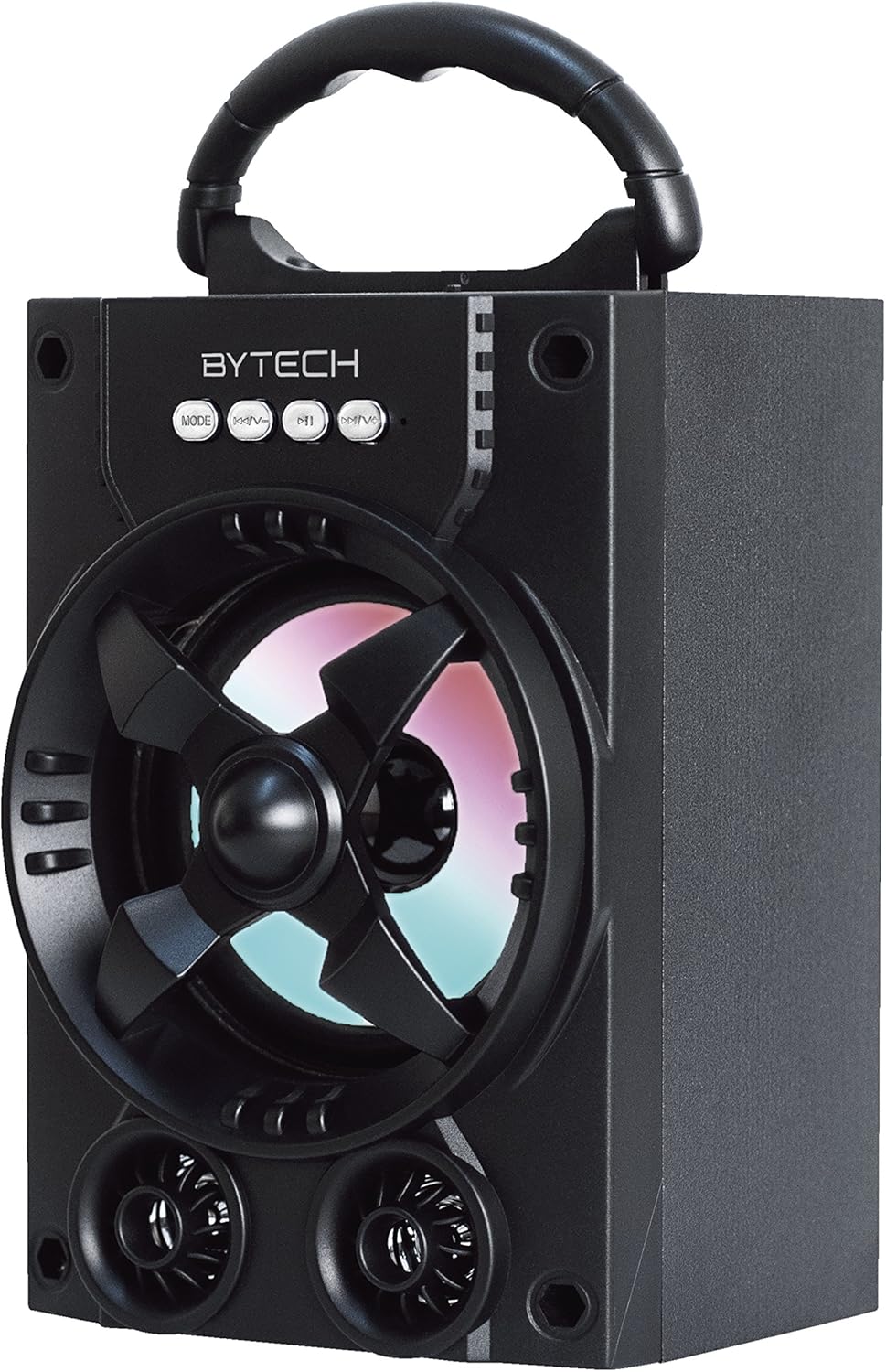
Figura 1.1: Fronte view of the Bytech Massive Bluetooth Long Bar Speaker-BK, showcasing its design, handle, and speaker grille with LED lights.
2. Contenuto della confezione
Si prega di controllare la confezione per verificare la presenza dei seguenti elementi:
- Bytech Massive Bluetooth Long Bar Speaker-BK
- Cavo di ricarica USB
- Manuale dell'utente (questo documento)
Se qualche articolo risulta mancante o danneggiato, contattare l'assistenza clienti.
3. Caratteristiche del prodotto
- LED Performance Lights: Dynamic LED lights that synchronize with your music for an enhanced audio-visual experience.
- Convenient Carrying Handle: Integrated handle for easy portability, allowing you to take your music anywhere.
- Universal Bluetooth Connectivity: Seamlessly connect wirelessly to your smartphone, tablet, or other Bluetooth-enabled devices.
- Suono surround: Designed to deliver a high-quality surround sound experience.
- Design portatile: Ideal for various settings, including parties, outdoor gatherings, and personal use.

Figure 1.2: The speaker shown with its retail packaging, illustrating its key features such as multi-color LED lights, Bluetooth connectivity, and surround sound capability.
4. Controlli e indicatori
The speaker features intuitive controls and indicators for easy operation:
- Pulsante MODE: Press to switch between available input modes (e.g., Bluetooth).
- Pulsante V: Press to decrease volume. Long press to skip to the previous track.
- Tasto V+: Premere per aumentare il volume. Premere a lungo per passare alla traccia successiva.
- Pulsante M: (Function not explicitly detailed, typically for mode or mute)
- Luci LED: Indicate power status, charging status, and provide dynamic light effects during audio playback.
5. Guida all'installazione
5.1 Ricarica dell'altoparlante
- Collegare l'estremità piccola del cavo di ricarica USB alla porta di ricarica dell'altoparlante.
- Collegare l'estremità grande del cavo di ricarica USB a un adattatore di alimentazione USB (non incluso) o alla porta USB di un computer.
- L'indicatore LED mostrerà lo stato di carica (ad esempio, rosso per la carica, spento quando la carica è completa).
- Prima del primo utilizzo, attendere circa 3-4 ore per una carica completa.
5.2 Accensione/Spegnimento
- To power on, press and hold the Power button (location not specified, typically near charging port or on control panel) for a few seconds until you hear an audible prompt or see the LED lights activate.
- Per spegnere, tenere premuto nuovamente il pulsante di accensione finché l'altoparlante non si spegne.
5.3 Associazione Bluetooth
- Ensure the speaker is powered on and in Bluetooth pairing mode (indicated by a flashing LED light or audible prompt).
- Sul tuo smartphone o tablet, vai alle impostazioni Bluetooth.
- Cercare available devices. The speaker will appear as "BYTECH" or a similar name.
- Selezionare l'altoparlante dall'elenco per avviare l'associazione.
- Once successfully paired, the LED indicator will typically become solid, and you may hear a confirmation tone.
6. Istruzioni per l'uso
6.1 Riproduzione audio tramite Bluetooth
- Dopo aver eseguito correttamente l'associazione Bluetooth, apri l'applicazione musicale preferita sul dispositivo connesso.
- Select and play your desired audio. The sound will be streamed wirelessly to the speaker.
- Use the V+ and V- buttons on the speaker or your connected device to adjust the volume.
- Long press V+ or V- to skip tracks.
6.2 LED Performance Lights
The speaker features integrated LED lights that enhance your listening experience. These lights typically activate automatically when the speaker is powered on and playing audio. Specific controls for light modes are not detailed, but they are designed to provide dynamic visual effects.
6.3 Cambio di modalità
Premere il tasto MODALITÀ button to cycle through available input modes. While Bluetooth is the primary connectivity, other modes (if available, such as FM radio or AUX input) can be accessed via this button.
7. Manutenzione e cura
- Pulizia: Utilizzare un panno morbido e asciutto per pulire l'esterno dell'altoparlante. Non utilizzare detergenti abrasivi, cere o solventi.
- Magazzinaggio: Quando non viene utilizzato per lunghi periodi, conservare l'altoparlante in un luogo fresco e asciutto, lontano dalla luce solare diretta e da temperature estreme.
- Cura della batteria: Per prolungare la durata della batteria, evitare di scaricarla completamente frequentemente. Ricaricare regolarmente l'altoparlante, anche se non in uso, per preservare la salute della batteria.
- Resistenza all'acqua: Questo prodotto è NON waterproof. Avoid exposure to water, rain, or excessive moisture to prevent damage.
8. Risoluzione Dei Problemi
Se riscontri problemi con l'altoparlante, fai riferimento ai seguenti problemi comuni e alle relative soluzioni:
| Problema | Possibile causa | Soluzione |
|---|---|---|
| L'altoparlante non si accende. | Batteria scarica. | Caricare completamente l'altoparlante. |
| Nessun suono dall'altoparlante. | Volume troppo basso; Non associato; Modalità errata. | Increase volume on speaker and device; Ensure successful Bluetooth pairing; Press MODE button to select correct input. |
| La connessione Bluetooth è instabile o non funziona. | Device too far; Interference; Pairing issue. | Move device closer to speaker (within 33 ft/10m); Avoid obstacles; Forget device on your phone and re-pair. |
| Le luci LED non funzionano. | Speaker not powered on or playing audio. | Ensure speaker is on and audio is playing. |
9. Specifiche
| Caratteristica | Dettaglio |
|---|---|
| Marca | Tecnologia Bytech |
| Nome del modello | BYTECH |
| Numero modello articolo | BCAUBS134BK |
| Tipo di altoparlante | Suono Surround |
| Tecnologia di connettività | Bluetooth |
| Tecnologia di comunicazione wireless | Bluetooth |
| Dispositivi compatibili | Smartphone |
| Potenza massima in uscita dell'altoparlante | 20 Watt |
| Risposta in frequenza | 20KHz |
| Impedenza | 1 Ohm |
| Dimensioni dell'altoparlante | 5 pollici |
| Fonte di alimentazione | Elettrico con cavo (per la ricarica) |
| Tipo di batteria | 1 batteria agli ioni di litio richiesta |
| Colore | Nero |
| Dimensioni del prodotto | 4.75 x 5.5 x 8.5 pollici |
| Peso dell'articolo | 1.3 libbre |
| È impermeabile | NO |
| Paese di origine | Cina |
| Codice UPC | 805112038121 |
10. Informazioni sulla garanzia
Bytech products are manufactured to the highest quality standards. For specific warranty terms and conditions, please refer to the warranty card included with your purchase or visit the official Bytech websito. Conservare la prova d'acquisto per eventuali reclami in garanzia.
11. Assistenza clienti
For technical assistance, troubleshooting, or general inquiries, please contact Bytech customer support. Contact information can typically be found on the product packaging, the official Bytech websito o la ricevuta d'acquisto.
Nota: in base ai dati forniti, non erano disponibili video ufficiali del prodotto del venditore da incorporare.
Ask a question about this manual
Ask about setup, troubleshooting, compatibility, parts, safety, or missing instructions. Manuals+ will review the question and use this page’s manual context to help answer it.