
Introduzione
This manual provides essential information for the safe and effective use of your Hubei B21N1329 Li-ion laptop battery. It includes product specifications, installation instructions, safety guidelines, and maintenance advice. Please read this manual thoroughly before installing or using the battery.
Informazioni sulla sicurezza
- Do not attempt to disassemble or reassemble the battery pack. Unauthorized modifications can lead to hazards.
- Keep the battery away from extreme heat or cold. High temperatures (above 60°C/140°F) or freezing temperatures can damage the battery and pose a fire risk.
- Evitare di cortocircuitare i terminali della batteria. This can cause severe damage to the battery and potentially lead to fire or explosion.
- Non smaltire la batteria nel fuoco o nell'acqua. Per uno smaltimento corretto delle batterie, attenersi alle normative locali.
- Utilizzare solo con caricabatterie compatibili. Using an incompatible charger may damage the battery or the laptop.
- Se la batteria mostra segni di danneggiamento, rigonfiamento o perdite, interromperne immediatamente l'uso.
The battery is CE-, FCC-, and RoHS-Certified for safety.
Specifiche del prodotto
| Tipo di batteria | Agli ioni di litio |
| Numero di modello | B21N1329 |
| Voltage | 7.6V |
| Capacità | 30 Wh |
| Colore | Nero |
| Compatible Part NO. | B21N1329, 0B200-00840000 |
| Serie di laptop compatibili | Asus X403, X403M, X403MA, X503M, X502CA, X453, X453MA, X553, X553M, F453, F453MA, F553M, P553, D553M, P553MA |
The battery features high-quality materials and an upgraded Battery Management System (BMS) for intelligent protection, ensuring safety and efficiency.
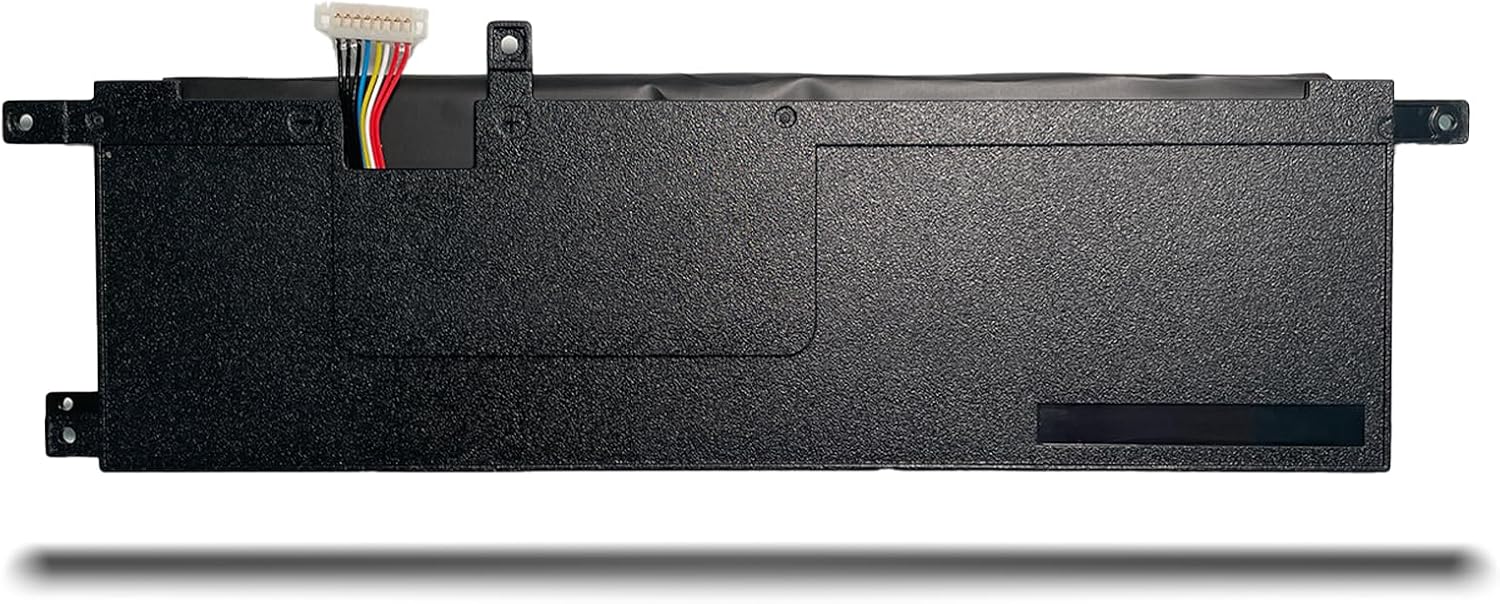
Figure 1: Product information label on the battery.
Guida all'installazione
Replacing a laptop battery can vary depending on whether your laptop uses an external or internal battery. Always ensure your laptop is powered off and disconnected from the power adapter before beginning any installation.
External Battery Replacement
- Turn off your laptop and disconnect the AC adapter.
- Locate the battery release latches on the underside of your laptop.
- Push all battery clasps to the unlocked state.
- Gently slide the old battery out of its compartment.
- Insert the new Hubei B21N1329 battery into the compartment until it clicks into place.
- Ensure all latches are in the locked state to secure the battery.
Sostituzione della batteria interna
For internal batteries, the process involves opening the laptop casing. If you are not comfortable performing this, seek professional assistance. The following steps are a general guide; specific laptop models may have slight variations.
- Turn off your laptop and disconnect the AC adapter.
- Carefully unfix the screws on the back cover of your laptop. Use appropriate tools to avoid damage.
- Gently open the back cover to expose the internal components.
- Locate the old battery. It will typically be secured with screws and connected via a cable to the motherboard.
- Unfix any screws securing the old battery.
- Carefully disconnect the laptop battery cable from the motherboard. Apply gentle pressure to release the connector.
- Rimuovere la vecchia batteria.
- Place the new Hubei B21N1329 battery into position.
- Connect the new battery cable to the motherboard, ensuring a secure fit.
- Secure the new battery with the screws previously removed.
- Carefully close the back cover and tighten all screws.
Video 1: General guide on how to replace an internal laptop battery. While the video features a B31N1912 battery, the installation steps are broadly applicable to many internal laptop batteries like the B21N1329.

Figura 2: in alto view of the Hubei B21N1329 battery.

Figure 3: Interface and connection details of the battery.

Figura 4: lato view of the battery, showing its structural elements.
Istruzioni per l'uso
- Utilizzo iniziale: For optimal performance, fully charge the new battery before its first use.
- Ricarica: Charge the battery using your laptop's original or a certified compatible AC adapter.
- Scaricamento: It is generally recommended to allow the battery to discharge to a low level (e.g., 10-20%) before recharging, but avoid complete discharge to 0% frequently.
- Temperatura: Operate your laptop in moderate temperatures. Extreme heat or cold can affect battery life and performance.
Manutenzione
- Calibrazione regolare: Periodically (every 2-3 months) allow the battery to fully discharge and then fully recharge to recalibrate the battery meter.
- Magazzinaggio: If storing the battery for an extended period, ensure it is charged to about 50-70% and stored in a cool, dry place. Avoid storing a fully charged or completely discharged battery.
- Pulizia: Mantenere i contatti della batteria puliti e privi di polvere o detriti. Utilizzare un panno asciutto e morbido per la pulizia.
- Aggiornamenti software: Keep your laptop's operating system and drivers updated, as power management features can impact battery efficiency.
Risoluzione dei problemi
- Batteria non in carica:
- Ensure the AC adapter is properly connected to both the laptop and a working power outlet.
- Verify that the battery is correctly seated in its compartment (for external batteries) or properly connected internally (for internal batteries).
- Check if the AC adapter itself is functioning correctly.
- Update or reinstall battery drivers in your operating system.
- Durata breve della batteria:
- Adjust power settings in your operating system to optimize for battery life.
- Chiudere le applicazioni non necessarie in esecuzione in background.
- Ridurre la luminosità dello schermo.
- Ensure the laptop's cooling system is clean and functioning to prevent overheating, which can degrade battery performance.
- Batteria non riconosciuta:
- Remove and reinsert the battery (if external) or check internal connections (if internal).
- Riavvia il tuo computer portatile.
- Update your laptop's BIOS/UEFI firmware.
Garanzia e supporto
Your Hubei B21N1329 laptop battery comes with a Garanzia del produttore di 12 mesi. For any questions, technical assistance, or warranty claims, please contact the seller or manufacturer directly. We are committed to 100% satisfaction.