
1. Introduzione
Grazie per l'acquistoasing the Homtime D2qi Bluetooth Speaker with Wireless Charging and Alarm Clock. This device is designed to provide a versatile audio experience with convenient features for your daily life. Please read this manual carefully before use to ensure proper operation and to maximize the product's lifespan.
2. Informazioni sulla sicurezza
- Non esporre il dispositivo a temperature estreme, umidità o luce solare diretta.
- Tenere lontano da acqua e altri liquidi.
- Non smontare o tentare di riparare il dispositivo autonomamente. Per qualsiasi intervento di assistenza, rivolgersi a personale qualificato.
- Utilizzare solo l'adattatore di alimentazione fornito o consigliato.
- Evitare di far cadere o sottoporre il dispositivo a forti impatti.
3. Contenuto della confezione
Si prega di controllare la confezione per verificare la presenza dei seguenti elementi:
- Homtime D2qi Bluetooth Speaker
- Adattatore di alimentazione
- Manuale d'uso
4. Prodotto finitoview
The Homtime D2qi combines a high-quality Bluetooth speaker with a digital alarm clock and a convenient wireless charging pad. It features intuitive controls for easy operation.

Figura 4.1: Fronte view of the Homtime D2qi speaker with a smartphone placed on its top surface for wireless charging.

Figure 4.2: The Homtime D2qi speaker positioned on a book, showcasing its compact design and the digital clock display.

Figure 4.3: The Homtime D2qi speaker in a home setting, demonstrating wireless charging functionality.
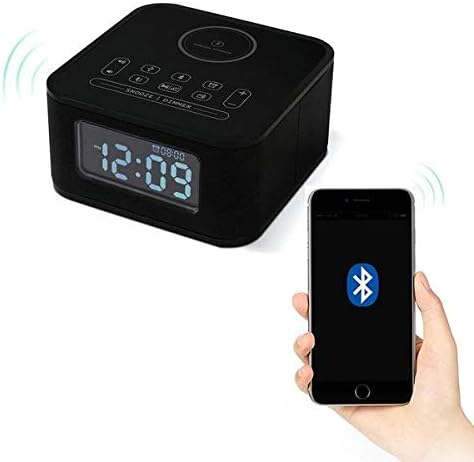
Figure 4.4: The Homtime D2qi speaker connected via Bluetooth to a smartphone.
5. Impostazione
5.1 Collegamento di alimentazione
- Connect the provided power adapter to the DC input port on the back of the Homtime D2qi.
- Collegare l'alimentatore a una presa a muro standard.
- Il display si illuminerà, indicando che il dispositivo è acceso.
5.2 Impostazione iniziale dell'ora
Alla prima accensione o dopo uno spegnimentotage, you may need to set the time. Refer to the 'Operating Instructions' section for detailed steps on setting the clock.
6. Istruzioni per l'uso
6.1 Connessione Bluetooth
- Premere il tasto Pulsante Bluetooth on the top panel to enter Bluetooth pairing mode. The Bluetooth indicator will flash.
- Sul tuo smartphone o dispositivo audio, attiva il Bluetooth e cerca i dispositivi disponibili.
- Select "Homtime D2qi" from the list.
- Once connected, the Bluetooth indicator will stop flashing and remain solid. You can now play audio through the speaker.
6.2 Ricarica wireless
- Place your Qi-compatible smartphone centrally on the wireless charging pad located on the top surface of the speaker.
- Ensure the phone is properly aligned with the charging coil.
- L'indicatore di carica sul telefono indicherà che la ricarica è iniziata.
6.3 Funzione sveglia
- Premere il tasto Pulsante di allarme per accedere alla modalità di impostazione della sveglia.
- Utilizzare il Pulsanti +/- per regolare l'ora e i minuti.
- Premere il tasto Pulsante di allarme nuovamente per confermare ogni impostazione.
- Per attivare/disattivare l'allarme, premere il tasto Pulsante di allarme briefly when not in setting mode.
- To snooze, press the Pulsante snooze/dimmer quando suona la sveglia.
6.4 Funzione radio
- Premere il tasto Pulsante modalità per passare alla modalità radio FM.
- Premere e tenere premuto il tasto Pulsante di riproduzione/pausa to auto-scan and save available stations.
- Utilizzare il Pulsanti precedente/successivo per navigare tra le stazioni salvate.
6.5 Risposta alle chiamate
Se connesso tramite Bluetooth, l'altoparlante può essere utilizzato per chiamate in vivavoce.
- Per rispondere a una chiamata in arrivo, premere il tasto Pulsante di riproduzione/pausa.
- Per terminare una chiamata, premere il Pulsante di riproduzione/pausa Ancora.
7. Manutenzione
- Pulire il dispositivo con un panno morbido e asciutto. Non utilizzare detergenti abrasivi o solventi.
- Keep the charging pad free of dust and debris to ensure efficient wireless charging.
- Conservare il dispositivo in un luogo fresco e asciutto quando non viene utilizzato per lunghi periodi.
8. Risoluzione Dei Problemi
| Problema | Possibile causa | Soluzione |
|---|---|---|
| Nessun potere | Adattatore di alimentazione non collegato o presa difettosa. | Assicurarsi che l'adattatore di alimentazione sia collegato saldamente al dispositivo e a una presa a muro funzionante. |
| Nessun suono dall'altoparlante | Bluetooth not connected; volume too low; incorrect mode. | Ensure Bluetooth is paired. Increase volume on both the speaker and your device. Check if the speaker is in the correct mode (Bluetooth/Radio). |
| Ricarica wireless non funzionante | Phone not Qi-compatible; phone not aligned; phone case too thick. | Verify phone supports Qi wireless charging. Realign phone on the charging pad. Remove thick phone cases. |
| Buttons difficult to locate in the dark | Buttons are flush with the surface. | Familiarize yourself with button layout during daylight. Use the dimmer function to adjust display brightness. |
| Bluetooth disconnects automatically | Power saving feature; device out of range. | Reconnect Bluetooth manually. Keep devices within Bluetooth range (approx. 10 meters). |
9. Specifiche
| Caratteristica | Dettaglio |
|---|---|
| Marca | Orario di casa |
| Numero di modello | D2qi |
| Colore | Nero |
| Tipo di altoparlante | Altoparlanti Bluetooth |
| Connettività | Senza fili |
| Dispositivi compatibili | Smartphone |
| Potenza di uscita | 5 - 10 Watt |
| Peso del prodotto | 0.5 kg |
| Dimensioni del pacco | Dimensioni: 19.6 x 18.8 x 14.8 cm |
| Interfaccia Hardware | Audio/Video Port |
10. Garanzia e supporto
Homtime products are manufactured to the highest quality standards. For warranty information and customer support, please refer to the warranty card included in your package or visit the official Homtime websito. Conserva la ricevuta d'acquisto come prova d'acquisto.