
1. Introduzione
This manual provides essential instructions for the proper use and care of your Yamaha RAV536 (Part # ZP601100) OEM remote control. This remote is designed to operate specific Yamaha A/V receiver models, ensuring seamless control over your audio and video system. Please read this manual thoroughly before use to ensure optimal performance and longevity of your remote control.
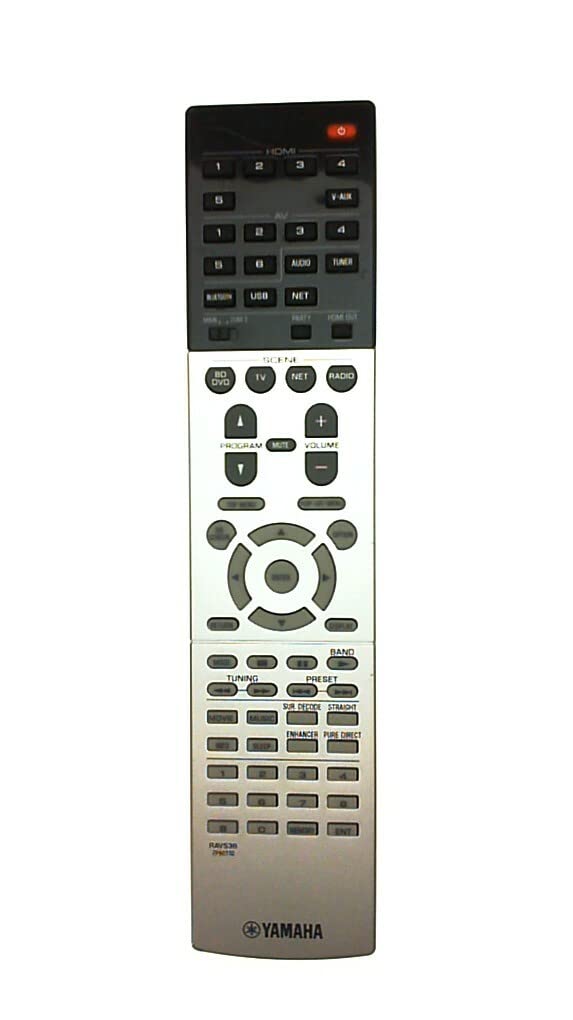
Figure 1: Yamaha RAV536 Remote Control. This image displays the front view of the remote, highlighting its button layout and ergonomic design.
2. Modelli compatibili
The Yamaha RAV536 (ZP601100) remote control is specifically designed for use with the following Yamaha A/V receiver models:
- TSR-7790
- RX-V679BL
- L'HTR-6068
- TSR-7790BL
- RX-A750
- RX-V679
- RX-V779
Importante: This is an OEM remote control and is not universal. It is intended to replace the original remote supplied with the listed models only. Compatibility with other models is not guaranteed.
3. Configurazione: installazione della batteria
To begin using your Yamaha RAV536 remote control, you must install batteries. The remote requires two (2) AAA batteries (not included).
- Aprire il vano batteria: Individuare il coperchio del vano batterie sul retro del telecomando. Far scorrere il coperchio verso il basso o premere il fermo e sollevarlo per aprirlo.
- Inserire le batterie: Insert two new AAA batteries into the compartment. Ensure that the positive (+) and negative (-) terminals of the batteries align correctly with the polarity indicators inside the compartment. Incorrect installation can prevent the remote from functioning.
- Chiudere il vano batteria: Richiudere il coperchio del vano batteria facendolo scorrere in posizione finché non scatta in posizione.
Nota: Always use new batteries for optimal performance. Do not mix old and new batteries, or different types of batteries, as this can lead to leakage or malfunction.
4. Funzionamento
Once batteries are installed, the Yamaha RAV536 remote control is ready for use with your compatible Yamaha A/V receiver. No additional programming is typically required for OEM remotes.
- Puntamento del telecomando: Point the remote control directly towards the infrared (IR) sensor on your Yamaha A/V receiver. Obstructions between the remote and the receiver can block the signal.
- Funzioni dei pulsanti: Each button on the remote corresponds to a specific function on your A/V receiver (e.g., Power, Volume, Input Selection, Menu Navigation). Refer to the owner's manual of your specific Yamaha A/V receiver model for a detailed explanation of each button's function and how to operate your system.
- Allineare: The remote operates effectively within a range of approximately 10 meters (33 feet) from the receiver, provided there are no significant obstructions.
For advanced features and specific operational procedures, consult the comprehensive owner's manual that came with your Yamaha A/V receiver.
5. Manutenzione
Una corretta manutenzione garantisce la longevità e l'affidabilità delle prestazioni del telecomando.
- Sostituzione della batteria: Sostituisci le batterie quando la risposta del telecomando diventa lenta o smette di funzionare. Sostituisci sempre entrambe le batterie contemporaneamente con batterie nuove dello stesso tipo (AAA).
- Pulizia: Per pulire il telecomando, strofinarlo delicatamente con un panno morbido e asciutto. Per lo sporco ostinato, strofinare leggermenteampPulisci il panno con acqua o un detergente delicato e non abrasivo. Evita di utilizzare prodotti chimici aggressivi, solventi o materiali abrasivi, poiché potrebbero danneggiare la superficie del telecomando o i componenti interni.
- Magazzinaggio: If the remote will not be used for an extended period, remove the batteries to prevent potential leakage and damage. Store the remote in a cool, dry place away from direct sunlight and extreme temperatures.
- Evitare cadute e urti: Protect the remote from physical shocks, drops, and impacts, which can damage internal circuitry.
6. Risoluzione Dei Problemi
If you experience issues with your Yamaha RAV536 remote control, refer to the following common troubleshooting steps:
- Il telecomando non risponde:
- Check if the batteries are inserted correctly, observing polarity (+/-).
- Sostituisci le vecchie batterie con nuove batterie AAA.
- Ensure there are no obstructions between the remote's IR emitter and the receiver's IR sensor.
- Verify that you are pointing the remote directly at the receiver.
- Raggio d'azione limitato o funzionamento intermittente:
- Sostituisci le batterie con altre nuove.
- Ensure the remote's IR emitter and the receiver's IR sensor are clean and free from dust or smudges.
- Reduce the distance between the remote and the receiver.
- Verificare la presenza di fonti luminose intense (ad esempio, luce solare diretta, luci fluorescenti) che potrebbero interferire con il segnale IR.
- Funzioni specifiche non funzionanti:
- Confirm that your A/V receiver is powered on and functioning correctly.
- Refer to your A/V receiver's owner's manual to ensure you are using the correct buttons for the desired functions.
If the problem persists after trying these steps, contact Yamaha customer support or refer to your receiver's manual for further assistance.
7. Specifiche
| Marca | Yamaha |
| Nome del modello | RAV536 |
| Numero di parte | Numero di modello: ZP601100 |
| Colore | Nero |
| Tecnologia di connettività | Infrarossi (IR) |
| Portata massima | 10 metri (circa 33 piedi) |
| Tipo di batteria | 2 x AAA (non incluso) |
| Tipo di controllore | Controllo dei pulsanti |
| Caratteristica speciale | Design ergonomico |
| Compatibilità con la casa intelligente | Not Smart Home Compatible |
8. Supporto e garanzia
For detailed support regarding the functions of your Yamaha A/V receiver, please refer to the owner's manual provided with your original receiver unit. This remote control is an OEM replacement part.
Warranty information for this replacement remote control is typically covered under the terms of purchase from your retailer. Please retain your proof of purchase for any warranty claims. For direct support, you may visit the official Yamaha websito o contattare il loro servizio clienti.
Puoi trovare maggiori informazioni e risorse di supporto su Negozio Yamaha su Amazon.