
Introduzione
This manual provides essential information for the safe and proper operation of your VTech Switch & Go Dinos 2-Pack, featuring T-Don the Pteranodon and Tonn the Stegosaurus. Please read these instructions thoroughly before use and retain them for future reference.
The VTech Switch & Go Dinos are 2-in-1 toys that transform between a dinosaur and a vehicle. They feature an LCD screen for customizable animations and play various sounds and phrases.
Contenuto della confezione
- 1 x VTech Switch & Go Dino - T-Don the Pteranodon
- 1 x VTech Switch & Go Dino - Tonn the Stegosaurus
- 4 batterie AAA (preinstallate)

Image: T-Don (red Pteranodon) and Tonn (yellow Stegosaurus) in their dinosaur forms.
Impostare
Installazione e sostituzione della batteria
Each Switch & Go Dino requires 2 AAA batteries. Batteries are pre-installed for demonstration purposes. For optimal performance, it is recommended to replace them with new alkaline batteries.
- Individuare il vano batterie sul lato inferiore del giocattolo.
- Using a screwdriver, loosen the screw on the battery cover.
- Remove the old batteries (if any) and dispose of them properly.
- Inserire 2 batterie AAA nuove, assicurandosi della corretta polarità (+/-).
- Riposizionare il coperchio della batteria e serrare la vite.
Informazioni importanti sulla batteria:
- Use only new AAA alkaline batteries.
- Non mischiare batterie vecchie e nuove.
- Non mischiare batterie alcaline, standard (zinco-carbone) o ricaricabili (nichel-cadmio).
- Rimuovere le batterie scariche dal giocattolo.
- Rimuovere le batterie se il giocattolo non verrà utilizzato per un lungo periodo.
Istruzioni per l'uso
Accensione/spegnimento
To turn the toy on, locate the On/Off switch, usually on the underside or side of the toy, and slide it to the "On" position. To turn off, slide the switch to "Off".
Transformation: Dinosaur to Vehicle and Vice Versa
Each Switch & Go Dino is designed for easy transformation. Follow these general steps:
- From Dinosaur to Vehicle: Carefully fold and tuck away the dinosaur's limbs, head, and tail. Extend the wheels and vehicle body panels until the vehicle shape is complete.
- From Vehicle to Dinosaur: Extend the dinosaur's limbs, head, and tail from the vehicle body. Fold in the wheels and vehicle panels until the dinosaur shape is complete.
The transformation process is intuitive and designed for repeated use. Refer to the specific toy's molded details for guidance.

Image: Tonn the Stegosaurus (yellow) shown in both dinosaur and vehicle modes, with an arrow indicating transformation.
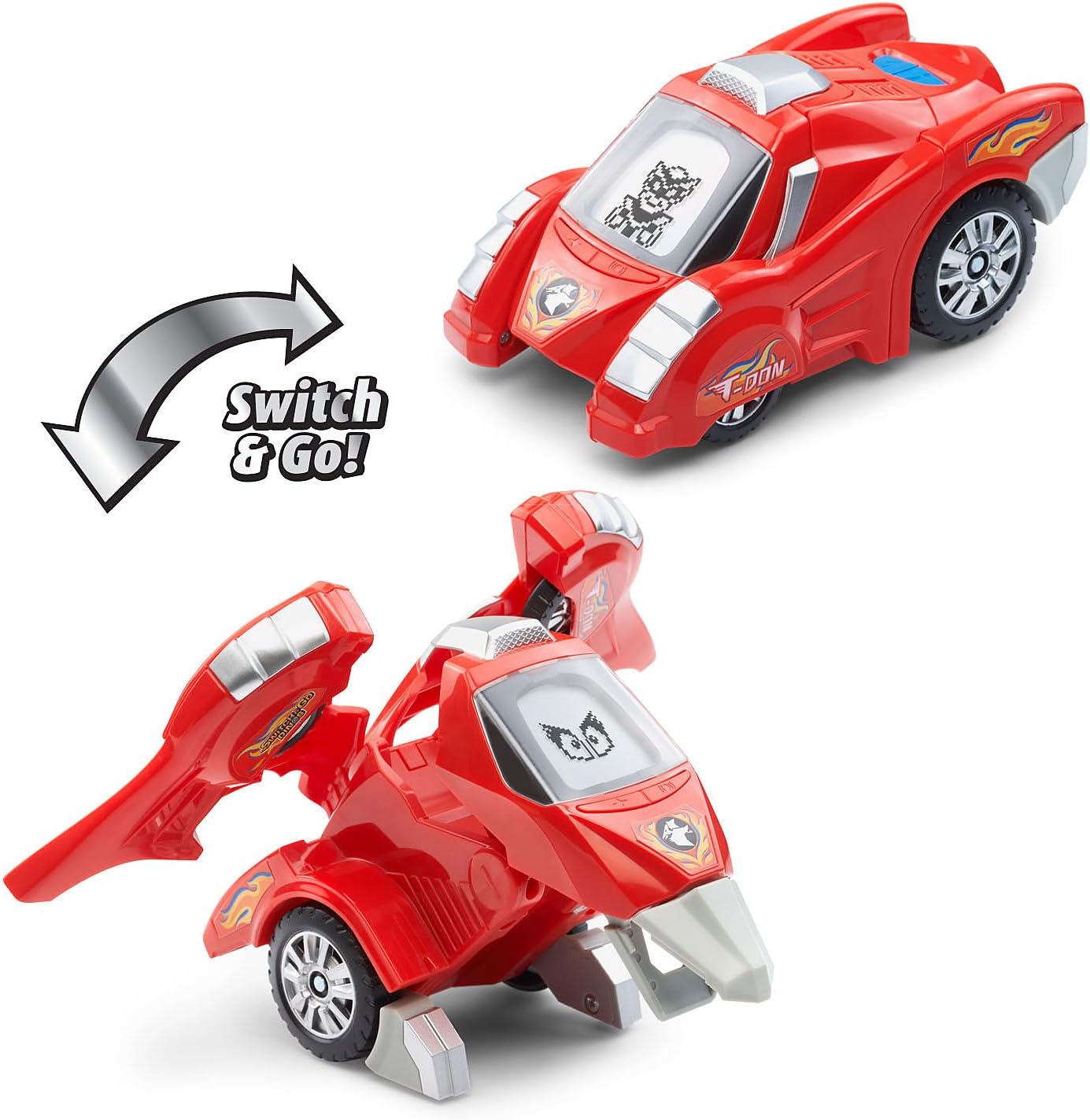
Image: T-Don the Pteranodon (red) shown in both dinosaur and vehicle modes, with an arrow indicating transformation.
Funzioni dello schermo LCD
Each dino features an LCD screen that displays various animations:
- Dinosaur Mode: Displays customizable dinosaur eyes.
- Modalità veicolo: Displays driver animations.
The animations change dynamically with play and button presses.

Image: A finger pressing a button on Tonn the Stegosaurus, demonstrating how the LCD screen displays different eye animations.
Funzioni dei pulsanti
Press the various buttons on the dino to activate different features:
- Dinosaur Facts: Learn interesting facts about each dinosaur.
- Effetti sonori: Hear realistic dinosaur roars, vehicle sounds, and other sound effects.
- Phrases: Listen to over 50 unique sounds and phrases.
Experiment with different buttons and modes to discover all the interactive elements.
Controllo del volume
Some models may include a volume control switch, typically located near the battery compartment or power switch. Adjust to your preferred sound level.
Manutenzione
Pulizia
To clean the toy, wipe it with a slightly damp cloth. Do not use harsh chemicals or abrasive cleaners. Ensure the toy is completely dry before storage or further use.
Attenzione:
- Do not immerse the toy in water or any other liquid.
- Keep the toy away from direct sunlight and direct heat sources.
Magazzinaggio
When not in use for extended periods, store the toy in a cool, dry place. Remove batteries if storing for several months to prevent leakage.
Risoluzione dei problemi
| Problema | Possibile causa | Soluzione |
|---|---|---|
| Il giocattolo non si accende o non risponde. | Le batterie sono scariche o installate in modo errato. | Check battery polarity. Replace with new AAA alkaline batteries. Ensure the On/Off switch is in the "On" position. |
| Il suono è distorto o troppo basso. | Batterie scariche o impostazione del volume bassa. | Replace batteries. Adjust the volume switch if available. |
| Lo schermo LCD è vuoto o tremolante. | Batterie scariche o malfunzionamento interno. | Replace batteries. If the issue persists, contact VTech customer support. |
| Difficulty transforming the toy. | Incorrect manipulation. | Refer to the transformation steps in the Operating Instructions. Ensure all parts are aligned correctly. Do not force parts. |
Specifiche
| Caratteristica | Dettaglio |
|---|---|
| Numero di modello del prodotto | 80-204750 |
| Dimensioni del prodotto | 7.5 x 7.3 x 3.7 pollici |
| Peso dell'articolo | 1.13 libbre |
| Età consigliata dal produttore | 36 mesi - 8 anni |
| Batterie richieste | 4 x AAA batteries (2 per dino, included) |
| Produttore | VTech |
| Data di rilascio | 2 maggio 2018 |
Informazioni sulla garanzia
VTech products are manufactured with high-quality materials and undergo rigorous testing. For specific warranty details, please refer to the warranty card included with your product or visit the official VTech websito. Conserva la ricevuta d'acquisto come prova d'acquisto.
Assistenza clienti
If you have any questions, require assistance, or encounter issues not covered in this manual, please contact VTech Customer Support. Contact information can typically be found on the VTech official websito o sulla confezione del prodotto.
Online resources and FAQs may also be available on the VTech websito.