
1. Introduzione
Grazie per l'acquistoasing the MASUNN T2 Portable Bluetooth Stereo Speaker. This manual provides essential information for setting up, operating, and maintaining your device. Please read it carefully before use and retain it for future reference.
Contenuto della confezione:
- 1 x MASUNN T2 Bluetooth Speaker
- 1 cavo di ricarica USB
- 1 x Moschettone
- 1 x Manuale utente
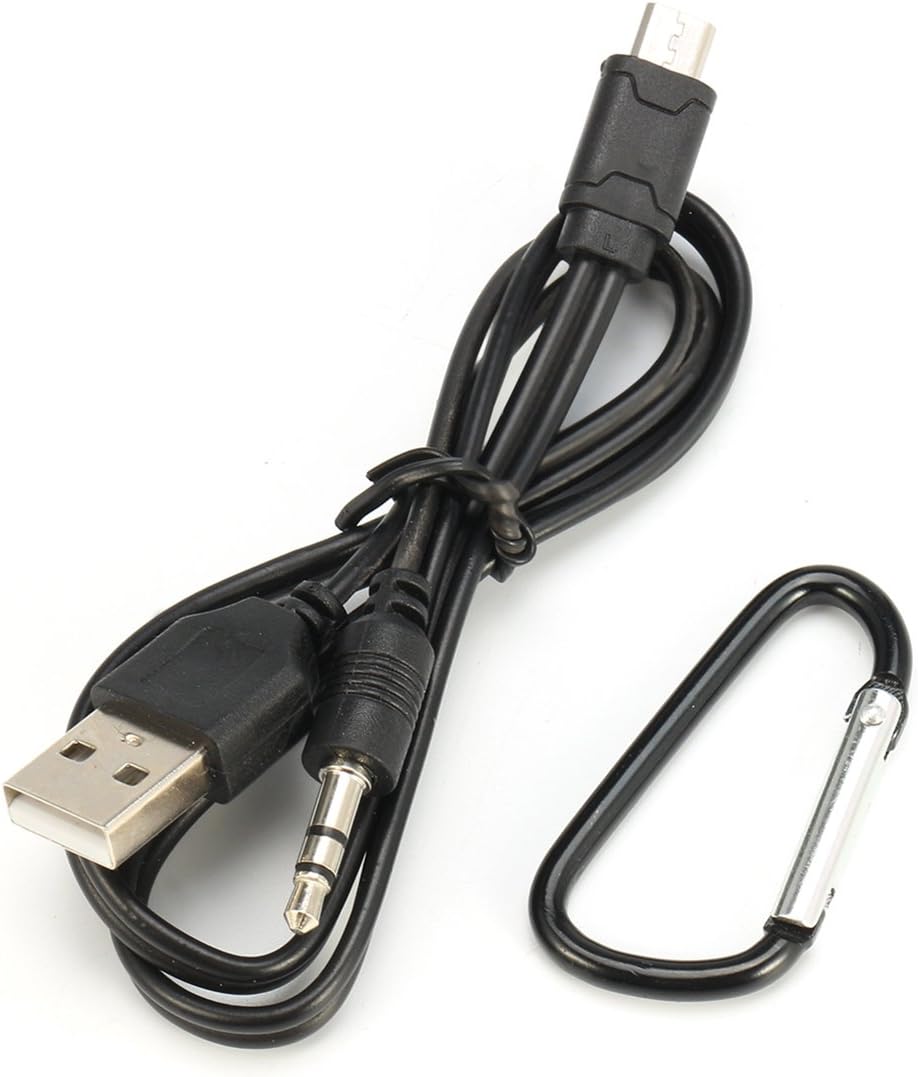
Image: The USB charging cable and carabiner included with the speaker.
2. Prodotto finitoview
Familiarizzare con i componenti e i controlli dell'altoparlante.
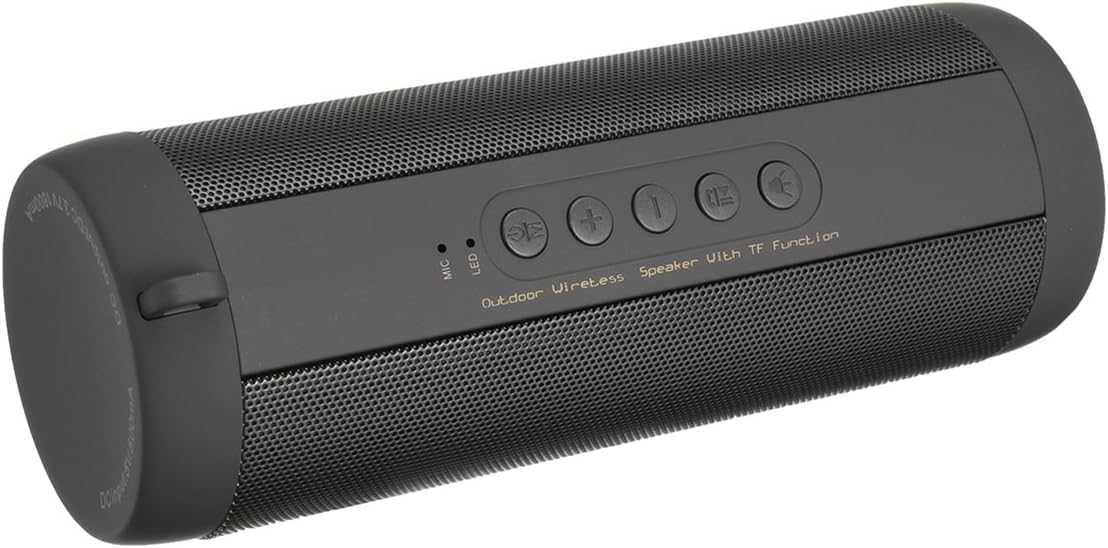
Immagine: in alto view of the MASUNN T2 speaker, highlighting the control panel.
Pannello di controllo:
- Pulsante di accensione: Press and hold to power on/off. Short press to play/pause in Bluetooth/TF mode, answer/end calls.
- Pulsante modalità (M): Short press to switch between Bluetooth, TF Card, and FM Radio modes.
- Volume su / Traccia successiva (+): Short press for next track (Bluetooth/TF), long press for volume up.
- Volume giù / Traccia precedente (-): Short press for previous track (Bluetooth/TF), long press for volume down.
- Pulsante luce: Controls the integrated LED light.
- Microfono: Built-in microphone for hands-free calls.
- Indicatore LED: Mostra lo stato di alimentazione, carica e Bluetooth.
Ports (under protective flap):

Immagine: dettagliata view of the charging and TF card ports.
- Porta micro USB: Per caricare l'altoparlante.
- Slot per schede TF: Insert a MicroSD card (up to 32GB) for local music playback.
3. Impostazione
3.1 Ricarica dell'altoparlante
- Open the protective rubber flap on the side of the speaker.
- Connect the supplied USB charging cable to the speaker's Micro USB port.
- Connect the other end of the USB cable to a 5V 500mA USB power adapter (not included) or a computer's USB port.
- Durante la ricarica, l'indicatore LED si illuminerà.
- Charging typically takes approximately 4 hours for a full charge. The LED indicator will change or turn off once charging is complete.
Nota: Ensure the protective flap is securely closed after charging to maintain the speaker's IPX5 waterproof rating.
3.2 Accensione/spegnimento
- Per accendere: tenere premuto il tasto Pulsante di accensione for a few seconds until you hear an audible prompt and the LED indicator lights up.
- Per spegnere: tenere premuto il tasto Pulsante di accensione for a few seconds until you hear an audible prompt and the LED indicator turns off.
3.3 Associazione Bluetooth
- Assicurarsi che l'altoparlante sia acceso e in modalità Bluetooth. In caso contrario, premere brevemente il pulsante Pulsante modalità (M) to switch to Bluetooth mode. The LED indicator will flash, indicating it's ready for pairing.
- Sul tuo dispositivo mobile (smartphone, tablet, ecc.), attiva il Bluetooth e cerca i dispositivi disponibili.
- Select "T2" from the list of found devices.
- Una volta effettuato l'accoppiamento, l'altoparlante emetterà un segnale acustico di conferma e l'indicatore LED smetterà di lampeggiare e rimarrà fisso.
- L'altoparlante si connetterà automaticamente all'ultimo dispositivo associato quando viene acceso, se il dispositivo si trova nel raggio d'azione e il Bluetooth è abilitato.
Riproduzione della scheda TF da 3.4
- With the speaker powered off, open the protective rubber flap.
- Insert a TF (MicroSD) card (up to 32GB) with MP3 audio files nello slot per schede TF.
- Close the protective flap.
- Power on the speaker. It should automatically switch to TF card mode and begin playing music. If not, short press the Pulsante modalità (M) per selezionare la modalità scheda TF.
3.5 Funzionamento della radio FM
- Accendi l'altoparlante.
- Premere brevemente il tasto Pulsante modalità (M) ripetutamente fino a quando non si entra in modalità Radio FM.
- In modalità FM, premere brevemente il tasto Pulsante di accensione to automatically scan and save available FM stations. The speaker will then play the first saved station.
- Utilizzare il Volume su / Traccia successiva (+) E Volume giù / Traccia precedente (-) pulsanti per passare da una stazione salvata all'altra.
- Long press these buttons to adjust the volume.
4. Istruzioni per l'uso
4.1 Music Playback (Bluetooth/TF Card)
- Riproduci/Pausa: Premere brevemente il Pulsante di accensione.
- Traccia successiva: Premere brevemente il Volume su (+) pulsante.
- Traccia precedente: Premere brevemente il Volume basso (-) pulsante.
- Alza il volume: Premere a lungo il Volume su (+) pulsante.
- Abbassa il volume: Premere a lungo il Volume basso (-) pulsante.
4.2 Chiamate in vivavoce
Quando connesso tramite Bluetooth allo smartphone:
- Rispondi alla chiamata: Premere brevemente il Pulsante di accensione quando squilla una chiamata in arrivo.
- Termina chiamata: Premere brevemente il Pulsante di accensione durante una chiamata.
- Rifiuta chiamata: Premere a lungo il Pulsante di accensione quando squilla una chiamata in arrivo.
- Richiama l'ultimo numero: Double-press the Pulsante di accensione (functionality may vary by phone model).
4.3 Controllo della luce a LED
- Premere brevemente il tasto Pulsante luce to turn the integrated LED light on or off.
5. Manutenzione
- Pulizia: Utilizzare un panno morbido e asciutto per pulire la superficie dell'altoparlante. Non utilizzare detergenti abrasivi o solventi.
- Resistenza all'acqua: The speaker is IPX5 waterproof, meaning it is protected against low-pressure water jets from any direction. Do not submerge the speaker in water. Ensure the protective rubber flap covering the ports is securely closed when near water or in damp ambienti.
- Magazzinaggio: Conservare l'altoparlante in un luogo fresco e asciutto, lontano dalla luce solare diretta e da temperature estreme.
- Cura della batteria: To prolong battery life, fully charge the speaker before first use and at least once every three months if not used regularly.
6. Risoluzione Dei Problemi
| Problema | Possibile causa | Soluzione |
|---|---|---|
| L'altoparlante non si accende. | Batteria scarica. | Caricare l'altoparlante per almeno 4 ore. |
| Impossibile effettuare l'associazione tramite Bluetooth. | Altoparlante non in modalità di associazione; Bluetooth del dispositivo disattivato; troppo lontano dall'altoparlante. | Assicurati che l'altoparlante sia in modalità Bluetooth (LED lampeggiante). Attiva il Bluetooth sul tuo dispositivo. Avvicina il dispositivo all'altoparlante (entro 10 metri). |
| Nessun suono. | Volume too low; incorrect mode; paused playback. | Increase speaker and device volume. Check if speaker is in correct mode (Bluetooth/TF/FM). Press Power button to play. |
| La ricezione della radio FM è scarsa. | Segnale debole. | Move the speaker to a location with better reception. Re-scan for stations. |
| Scheda TF non riconosciuta. | Card not inserted correctly; unsupported format; card corrupted. | Re-insert TF card. Ensure card is formatted correctly and contains supported audio files (e.g., MP3). Try a different TF card. |
7. Specifiche
| Modello | T2 |
| Versione Bluetooth | v3.0 + EDR Class 2 |
| Campo di lavoro | Fino a 10 metri (33 piedi) |
| Uscita altoparlante | 2 x 3 W (6 W totali) |
| Dimensioni dell'altoparlante | 40mm |
| Risposta in frequenza | 280 Hz - 16 kHz |
| Signal-to-Noise Ratio | ≥ 95 dB |
| Distorsione | ≤ 0.5% |
| Capacità della batteria | 3.7 V 1800 mAh |
| Tempo di carica della batteria | Circa 4 ore |
| Tempo di riproduzione | Circa 10 ore |
| Tempo di standby | Circa 200 ore |
| Ingresso DC | 5V 500mA |
| Grado di impermeabilità | Grado di protezione IPX5 |
| Supporto per schede TF | Fino a 32 GB |
| Materiale del guscio | Plastica |
| Dimensioni | Circa 18 cm x 6 cm |
8. Informazioni sulla sicurezza
- Non esporre l'altoparlante a temperature estreme, alla luce solare diretta o a elevata umidità.
- Do not disassemble, repair, or modify the device yourself. This will void the warranty and may cause damage.
- Tenere l'altoparlante lontano da bambini e animali domestici.
- Utilizzare solo il cavo USB in dotazione per la ricarica.
- Smaltire il prodotto e la batteria in modo responsabile, nel rispetto delle normative locali.
- Evitare l'ascolto ad alto volume per periodi prolungati per evitare danni all'udito.
9. Garanzia e supporto
MASUNN products are designed and manufactured to the highest quality standards. For warranty information and customer support, please refer to the documentation provided at the time of purchase or contact your retailer. Please have your model number (T2) and purchase details ready when contacting support.
For further assistance, please visit the MASUNN official websito o contattare il loro servizio clienti.