
1. Introduzione
Grazie per l'acquistoasing the MASUNN JY-29C. This device is a versatile 3-in-1 unit, combining a Qi wireless charger, a Bluetooth speaker, and an alarm clock. This manual provides essential information for the safe and efficient operation of your new device. Please read it thoroughly before use and retain it for future reference.
2. Caratteristiche del prodotto
- Funzionalità 3 in 1: Integrates an alarm clock, Qi wireless charger, and Bluetooth speaker.
- Bluetooth 3.0 + NFC: Enables quick and convenient wireless audio streaming and pairing.
- Ricarica wireless Qi: Effortlessly charge compatible smartphones without cables.
- Ingressi audio multipli: Supports Bluetooth, TF Card (up to 16GB), and 3.5mm AUX input.
- Chiamate in vivavoce: Microfono integrato per rispondere alle chiamate.
- Ampio display digitale: Clear display for time and alarm settings.
3. Contenuto della confezione
Si prega di controllare la confezione per verificare la presenza dei seguenti elementi:
- 1 x MASUNN JY-29C Wireless Charger Bluetooth Speaker
- 1 cavo di ricarica USB
Se qualche articolo risulta mancante o danneggiato, contattare il rivenditore.
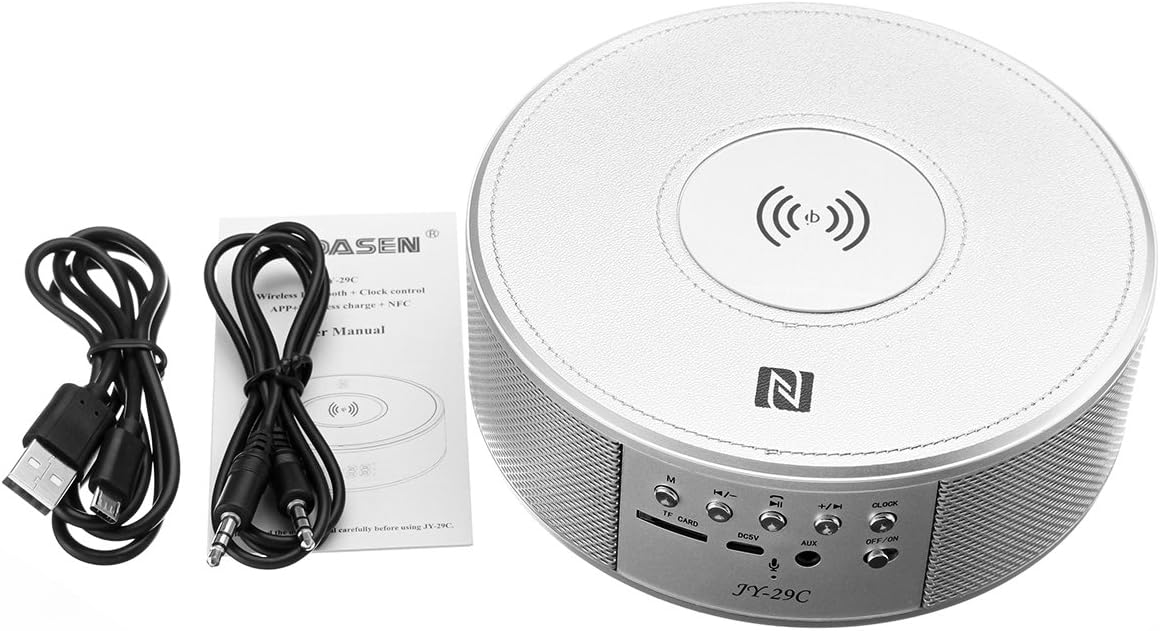
Image: The MASUNN JY-29C unit shown with its accompanying USB charging cable, 3.5mm AUX cable, and a small instruction manual.
4. Controlli e indicatori
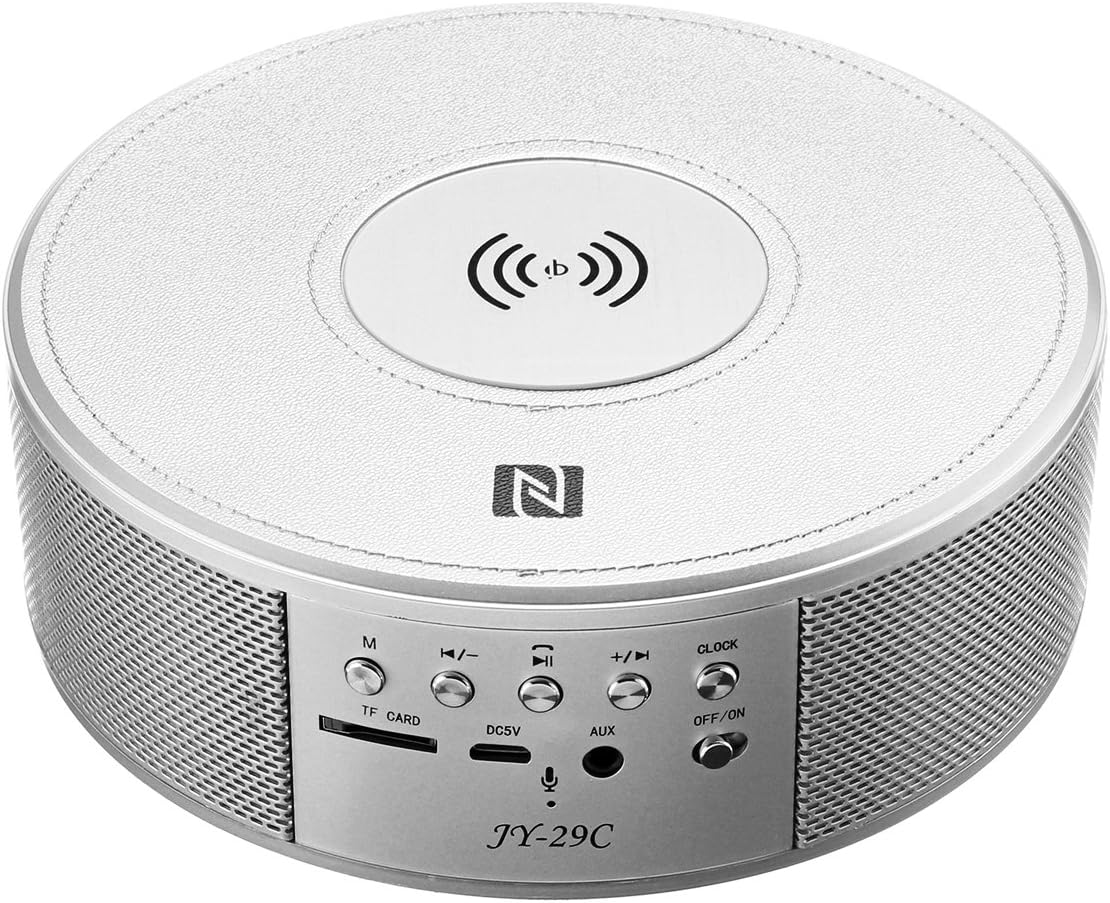
Immagine: dall'alto verso il basso view of the MASUNN JY-29C device, highlighting the control panel at the front. The panel includes buttons for mode (M), volume down/previous track, play/pause/call, volume up/next track, and clock settings. It also features a TF card slot, DC5V charging port, AUX input, and an ON/OFF switch. The top surface shows the Qi wireless charging pad and NFC logo.
Controlli del pannello frontale:
- Pulsante M (Modalità): Passa tra le modalità Bluetooth, scheda TF e AUX.
- Pulsante Volume giù / Traccia precedente: Premere brevemente per diminuire il volume, premere e tenere premuto per passare alla traccia precedente.
- Pulsante Riproduci/Pausa/Chiama: Press to play/pause music. Press to answer/end calls. Press and hold to reject a call.
- Pulsante Volume su / Traccia successiva: Press briefly to increase volume, press and hold to go to the next track.
- Pulsante OROLOGIO: Used for setting the time and alarm.
- Interruttore ON/OFF: Accende o spegne il dispositivo.
Porte e indicatori:
- Slot per schede TF: Inserire una scheda TF (MicroSD) per la riproduzione musicale.
- Porta DC5V: Connect the USB charging cable here to power the device.
- Ingresso AUX: Collegare dispositivi audio esterni tramite un cavo audio da 3.5 mm.
- Pad di ricarica wireless: Located on the top surface, indicated by the wireless charging symbol.
- Area NFC: Located on the top surface, indicated by the NFC logo.
5. Impostazione
5.1 Carica iniziale
- Connect the supplied USB charging cable to the DC5V port on the back of the JY-29C.
- Connect the other end of the USB cable to a standard USB power adapter (5V 500mA recommended, not included) or a computer USB port.
- L'indicatore di carica si illuminerà. Una carica completa richiede circa 4 ore.
- Una volta caricata completamente, scollegare il cavo di ricarica.
5.2 Accensione/Spegnimento
- Per accendere il dispositivo, far scorrere l'interruttore ON/OFF in posizione 'ON'.
- Per spegnere il dispositivo, far scorrere l'interruttore ON/OFF in posizione 'OFF'.
6. Istruzioni per l'uso
6.1 Associazione Bluetooth
- Ensure the JY-29C is powered on and in Bluetooth mode (press the 'M' button if necessary). The display will show 'BT' and an indicator light will flash, indicating it's ready for pairing.
- Sul tuo smartphone o dispositivo abilitato Bluetooth, attiva il Bluetooth e cerca i dispositivi disponibili.
- Select 'JY-29C' from the list of found devices.
- Once paired, the device will confirm the connection, and the indicator light will stop flashing.
6.2 NFC Pairing (for NFC-enabled devices)
- Ensure NFC is enabled on your smartphone and the JY-29C is powered on.
- Gently tap your NFC-enabled smartphone on the NFC area of the JY-29C (indicated by the 'N' logo).
- Your phone will prompt you to confirm the Bluetooth pairing. Accept the connection.
6.3 Riproduzione di musica
- Modalità Bluetooth: After successful pairing, play music from your connected device. Use the volume buttons on the JY-29C or your device to adjust volume. Use the track buttons to skip tracks.
- Modalità scheda TF: Inserire una scheda TF (MicroSD) con audio MP3 files into the TF card slot. The device will automatically switch to TF card mode and begin playback. Use the track buttons to navigate.
- Modalità AUX: Connect an external audio device (e.g., MP3 player) to the AUX input using a 3.5mm audio cable. Press the 'M' button until 'AUX' is displayed. Control playback from your external device.
Ricarica wireless Qi da 6.4
The JY-29C features a Qi wireless charging pad on its top surface.
- Place your Qi-compatible smartphone directly onto the center of the wireless charging pad.
- Ensure the phone is properly aligned with the charging coil. Charging will begin automatically.
- The phone's screen or indicator will show that it is charging.

Image: A smartphone placed on the top surface of the MASUNN JY-29C, indicating active wireless charging with a battery icon on the phone screen.
Compatible Wireless Charging Models (No Receiver Needed):
- iPhone 8, 8 Plus, X
- Samsung Galaxy S8, S7, S7 Edge, S6, S6 Edge, Note 5, Note 5 Edge, Note 7, Note 7 Edge, Note 8
- LG G2/G3/G Pro
- Google Nexus 4/Nexus 5/Nexus 6/Nexus 7
- Nokia Lumia 822/Lumia 830/Lumia 1020/Lumia 1520
- HTC Droid DNA/One mini2/One M8 Eye, HTC 8x/Incredible 4G LTE/Butterfly/One E9 Butterfly 3
- Sony Z3V/Z4V
- GEAK Mars, Hiking X1, Philips X732
- And other Qi-compatible devices.
Compatible Wireless Charging Models (Qi-Compatible Receiver Needed):
- iPhone 7/7 Plus/SE/6S Plus/6S/6 Plus/6/5/5C/5S/4/4S
- Samsung Galaxy S3/S4/S5/Note 2/Note 3/Note 4
- BlackBerry Z30
- HTC Rzound
- Nokia Lumia 1020/535
- And other devices requiring a Qi receiver.
6.5 Impostazione della sveglia
- Tempo di presa: In clock mode, press and hold the 'CLOCK' button until the hour digits flash. Use the '+' and '-' buttons to adjust the hour. Press 'CLOCK' again to set minutes, then use '+' and '-' to adjust. Press 'CLOCK' a third time to confirm.
- Impostazione allarme: In clock mode, press the 'CLOCK' button briefly to enter alarm setting mode (an alarm icon may appear). The hour digits will flash. Use '+' and '-' to adjust the alarm hour. Press 'CLOCK' again to set minutes, then use '+' and '-' to adjust. Press 'CLOCK' a third time to confirm.
- Attivazione/disattivazione dell'allarme: After setting, press the 'CLOCK' button briefly to toggle the alarm on or off. An alarm icon on the display indicates it is active.
6.6 Chiamate in vivavoce
When connected via Bluetooth, the JY-29C can be used for hands-free calls.
- Rispondi alla chiamata: When an incoming call rings, press the 'Play/Pause/Call' button briefly to answer.
- Termina chiamata: During a call, press the 'Play/Pause/Call' button briefly to end the call.
- Rifiuta chiamata: When an incoming call rings, press and hold the 'Play/Pause/Call' button to reject the call.
7. Specifiche
| Caratteristica | Specificazione |
|---|---|
| Versione Bluetooth | versione 3.0 |
| Capacità della batteria | 2000 mAh (interna) |
| Tempo di ricarica | Circa 4 ore |
| Volume di caricatage | 5V 500mA |
| Supporto per schede TF | Max. 16GB |
| Interfaccia audio | Porta AUX da 3.5 mm |
| Connettività | USB (per la ricarica) |
| Dispositivi compatibili | Altoparlanti, Smartphone |
8. Risoluzione Dei Problemi
| Problema | Possibile causa | Soluzione |
|---|---|---|
| Il dispositivo non si accende. | Batteria scarica. | Caricare il dispositivo per almeno 4 ore. |
| Impossibile effettuare l'associazione tramite Bluetooth. | Device not in pairing mode; Bluetooth disabled on phone; too far from device. | Ensure JY-29C is in Bluetooth mode and flashing. Enable Bluetooth on your phone. Move phone closer to the speaker (within 10 meters). |
| La ricarica wireless non funziona. | Phone not Qi-compatible; phone not aligned; phone case too thick. | Ensure your phone supports Qi wireless charging or has a receiver. Realign phone on the charging pad. Remove thick phone cases. |
| Nessun suono dall'altoparlante. | Volume too low; incorrect mode selected; audio cable loose. | Increase volume on both the speaker and your connected device. Ensure correct mode (BT, TF, AUX) is selected. Check AUX cable connection. |
9. Manutenzione
- Pulire il dispositivo con un panno morbido e asciutto. Non utilizzare detergenti abrasivi o solventi.
- Tenere il dispositivo lontano da acqua, umidità e temperature estreme.
- Evitare di far cadere il dispositivo o di sottoporlo a forti impatti.
- Conservare in luogo fresco e asciutto quando non si utilizza per lunghi periodi.
10. Garanzia e supporto
MASUNN products are designed for reliability and performance. For warranty information or technical support, please refer to the documentation provided at the point of purchase or contact your retailer. Please note that availability of spare parts and software updates is not specified.