
MASUNN DY21L
MASUNN DY21L Wireless Stereo Bluetooth Speaker User Manual
Model: DY21L
Introduzione
The MASUNN DY21L is a versatile wireless stereo Bluetooth speaker designed for portable audio playback. It supports multiple input sources including Bluetooth, TF card, U disk, and AUX line-in, and features an integrated FM radio. This manual provides detailed instructions for setup, operation, and maintenance of your DY21L speaker.
Contenuto della confezione
Si prega di selezionare la casella per i seguenti elementi:
- 1 x MASUNN DY21L Wireless Stereo Bluetooth Speaker
- 1 cavo di ricarica USB
- 1 x Cavo audio AUX
- 1 x Manuale utente

Image: Included USB charging cable and AUX audio cable.
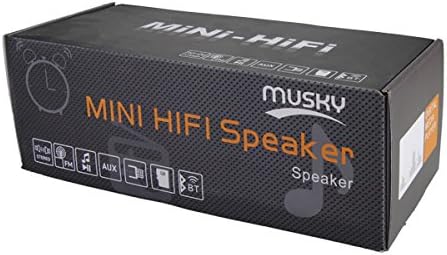
Image: The MASUNN DY21L speaker packaging box, indicating "MINI HIFI Speaker" and various features like stereo, FM, AUX, USB, and Bluetooth.
Prodotto finitoview
Davanti View e visualizzare

Immagine: Frontale view of the MASUNN DY21L speaker, featuring a central LED display that shows time (e.g., 10:38) and an active USB icon, indicating playback from a USB drive. The speaker grille is visible.
Controlli superiori

Image: Angled top view of the MASUNN DY21L speaker, highlighting the row of control buttons on the glossy black surface. These buttons include controls for playback, mode selection, and volume.

Immagine: Primo piano view of the top control buttons on the MASUNN DY21L speaker. From left to right, the buttons are: Play/Pause/Call, Mode, Previous Track, Next Track, Volume Down, and Volume Up.
Side Ports and Power Switch
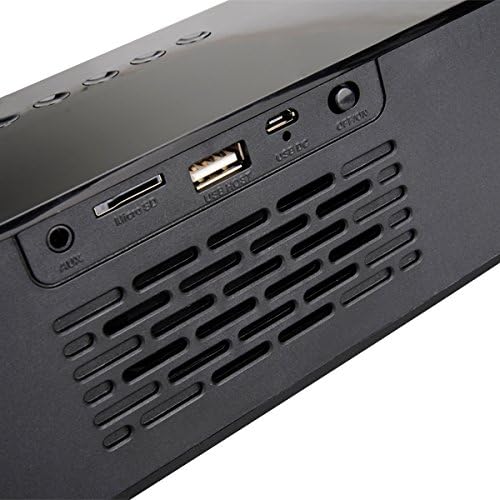
Immagine: Lato view of the MASUNN DY21L speaker, clearly showing the various input ports and the power switch. From left to right, these include an AUX input, a Micro SD card slot, a USB HOST port, a USB DC charging port, and an ON/OFF toggle switch.
Impostare
Caricamento dell'altoparlante
Before first use, fully charge the speaker. Connect the supplied USB charging cable to the "USB DC" port on the speaker and the other end to a USB power adapter (not included) or a computer's USB port. The LED display may indicate charging status. A full charge provides approximately 3.5 to 6 hours of playback, depending on volume level.
Accensione/spegnimento
Locate the ON/OFF switch on the side of the speaker. Slide the switch to the "ON" position to power on the device. The LED display will show "HI" and the speaker will enter Bluetooth mode by default. To power off, slide the switch to the "OFF" position.
Istruzioni per l'uso
The speaker cycles through functions in the following order: Bluetooth → Time → Alarm → Music Playback (MP3) → Audio In (Line In) → FM. Use the MODALITÀ pulsante per passare da una funzione all'altra.
Modalità Bluetooth
Upon powering on, the speaker automatically enters Bluetooth mode. The LED display will indicate Bluetooth readiness (e.g., a flashing Bluetooth icon). On your mobile device or computer, enable Bluetooth and search for "DY21L" (or similar). Select it to pair. Once paired, the speaker will confirm the connection, and you can play audio wirelessly.
Riproduzione musicale (scheda TF / disco U)
Insert a TF (Micro SD) card or a USB flash drive (U Disk) containing MP3/WMA/APE/FLAC/WAV audio files into the respective slot/port. Press the MODALITÀ button until the speaker enters music playback mode. The speaker will automatically detect and play the audio fileS. Utilizzare il ◀◀ (Previous Track) and ▶▶ (Next Track) buttons to navigate tracks. Press the ▶▶ Pulsante (Riproduci/Pausa) per mettere in pausa o riprendere la riproduzione.
Modalità radio FM
Premere il tasto MODALITÀ button until the speaker enters FM radio mode. To auto-scan and save available stations, press and hold the ▶▶ (Play/Pause) button. Use the ◀◀ (Previous Track) and ▶▶ (Next Track) buttons to switch between saved stations.
AUX (Line-In) Mode
Connect an external audio device (e.g., smartphone, MP3 player, computer) to the "AUX" port on the speaker using the supplied 3.5mm AUX audio cable. Press the MODALITÀ button until the speaker enters AUX mode. Audio from the connected device will now play through the speaker. Volume control can be managed on both the speaker and the connected device.
Time and Alarm Functions
The speaker features a clock and alarm function. Press the MODALITÀ button to cycle to Time mode, then to Alarm mode. Refer to the on-screen prompts or experiment with the control buttons (e.g., long press MODE or Play/Pause) to set the time and alarm. Specific button combinations for setting time/alarm are not detailed in the provided product description, but typically involve holding the MODE button or using the track navigation buttons to adjust values.
Controllo del volume
Utilizzare il Vol- E Volume+ buttons on the top panel to adjust the speaker's volume.
Manutenzione
- Pulizia: Utilizzare un panno morbido e asciutto per pulire la superficie dell'altoparlante. Non utilizzare detergenti abrasivi, cere o solventi.
- Magazzinaggio: Conservare l'altoparlante in un luogo fresco e asciutto, lontano dalla luce solare diretta e da temperature estreme.
- Cura della batteria: Per prolungare la durata della batteria, evitare di scaricarla completamente frequentemente. Caricare regolarmente l'altoparlante, anche se non lo si utilizza per lunghi periodi.
- Resistenza all'acqua: Questo altoparlante non è resistente all'acqua. Evitare l'esposizione ai liquidi.
Risoluzione dei problemi
| Problema | Possibile causa | Soluzione |
|---|---|---|
| Nessuna alimentazione/L'altoparlante non si accende. | La batteria è scarica. L'interruttore di alimentazione è spento. | Charge the speaker using the USB cable. Ensure the ON/OFF switch is in the "ON" position. |
| Nessun suono. | Il volume è troppo basso. È stata selezionata la modalità errata. Il dispositivo non è collegato correttamente. | Increase volume using Vol+ button. Press MODE button to select correct input source (Bluetooth, AUX, TF/U Disk, FM). Reconnect Bluetooth device or AUX cable. |
| L'associazione Bluetooth non riesce. | Altoparlante non in modalità di associazione. Dispositivo troppo lontano. Interferenza. | Ensure speaker is in Bluetooth mode. Keep devices within 10 meters. Turn off other Bluetooth devices nearby. Try restarting both speaker and device. |
| La ricezione della radio FM è scarsa. | Weak signal. No antenna. | Reposition the speaker for better reception. The AUX cable can sometimes act as an antenna when plugged in. Perform an auto-scan again. |
Specifiche
| Modello | DY21L |
| Marca | MASUNN |
| Colore | Nero |
| Tecnologia di connettività | Bluetooth, Auxiliary, Wireless |
| Caratteristiche speciali | High-resolution audio, USB port |
| Display | GUIDATO |
| Tipo di batteria | Batteria al litio ricaricabile integrata |
| Tempo di gioco | Max 3.5-6 hours (volume dependent) |
| Ingresso audio (AUX) | Max. Input: (L) 300 mV + (R) 300 mA |
| Potenza di uscita | 2 x 4W |
| Rapporto segnale / rumore (SNR) | 70 dB |
| Distorsione del segnale | <0.55% |
| Formati musicali supportati | MP3 / WMA / APE / FLAC / WAV |
| Temperatura di esercizio | -5 a 40 gradi Celsius |
| Frequency (from spec) | 320KHz |
Garanzia e supporto
Specific warranty information for the MASUNN DY21L speaker is not provided in the product details. Please refer to the retailer or manufacturer's website for warranty terms and conditions. For technical support or further assistance, please contact MASUNN customer service through their official channels.
Nota: non sono disponibili informazioni sulla disponibilità dei pezzi di ricambio e sugli aggiornamenti software.