
Introduzione
Thank you for choosing the Auna TT-30 BT Turntable. This manual provides essential information for the safe and efficient operation of your new device. Please read it thoroughly before use and keep it for future reference.
The Auna TT-30 BT is a belt-driven turntable designed for playing vinyl records, featuring an integrated Bluetooth receiver for wireless audio streaming from compatible devices.
Istruzioni di sicurezza
- Leggere attentamente tutte le istruzioni prima di utilizzare il dispositivo.
- Conservare il manuale per riferimento futuro.
- Non esporre il dispositivo alla pioggia o all'umidità per evitare incendi o scosse elettriche.
- Assicurare una ventilazione adeguata. Non ostruire le aperture di ventilazione.
- Posizionare il dispositivo su una superficie piana e stabile.
- Utilizzare solo gli accessori specificati dal produttore.
- Scollegare il dispositivo durante i temporali o quando non viene utilizzato per lunghi periodi.
- Affidare tutti gli interventi di assistenza a personale qualificato.
Contenuto della confezione
Si prega di verificare che tutti gli articoli elencati di seguito siano presenti nella confezione:
- Auna TT-30 BT Turntable Unit
- Platter (Metal)
- Copertura antipolvere
- Adattatore di alimentazione
- Istruzioni per l'uso (questo manuale)
Prodotto finitoview
The Auna TT-30 BT Turntable features a robust design with a metal platter for stable playback. Key components include the tonearm with cartridge and stylus, speed selector, cueing lever, and an integrated Bluetooth receiver.
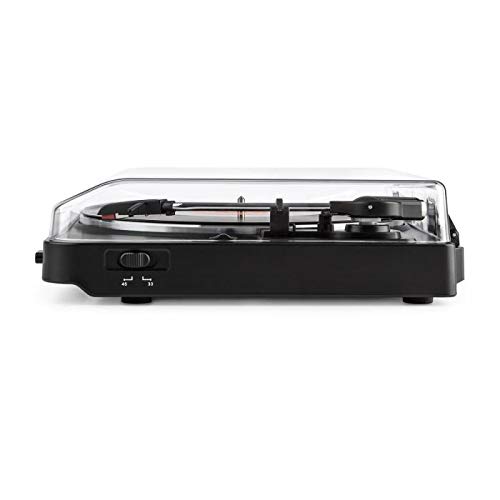
Image of the Auna TT-30 BT Turntable, showcasing il suo design e i suoi componenti.
Impostare
1. Posizionamento
Place the turntable on a flat, stable, and vibration-free surface away from direct sunlight, heat sources, and strong magnetic fields. Ensure there is enough space around the unit for proper ventilation and operation of the dust cover.
2. Platter Assembly
- Carefully place the metal platter onto the center spindle.
- Locate the drive belt (usually pre-installed or found separately). Stretch the belt around the motor pulley and the inner rim of the platter.
- Place the felt mat (if included) on top of the platter.
3. Collegamento elettrico
Connect the power adapter to the DC input on the rear of the turntable, then plug the adapter into a suitable wall outlet.
4. Stylus Protection
Remove the stylus protector from the cartridge before playing any records. Ensure the tonearm is properly balanced and the tracking force is set according to the cartridge manufacturer's recommendations (if adjustable).
Istruzioni per l'uso
1. Riproduzione di dischi
- Aprire il coperchio antipolvere.
- Metti un disco sul piatto.
- Select the correct speed (33 1/3 or 45 RPM) using the speed selector switch. For 45 RPM records, place the 45 RPM adapter over the spindle if needed.
- Rilasciare il blocco del braccio.
- Sollevare il braccio utilizzando la leva di regolazione.
- Spostare il braccio sul solco iniziale desiderato del disco.
- Abbassare delicatamente il braccio utilizzando la leva di avanzamento. La puntina entrerà in contatto con il disco e la riproduzione avrà inizio.
- At the end of the record, the turntable may feature an auto-stop function, which will stop the platter rotation. Lift the tonearm and return it to its rest, then engage the tonearm lock.
2. Bluetooth Playback (Receiving Audio)
The Auna TT-30 BT Turntable features an integrated Bluetooth receiver, allowing you to stream audio wirelessly from your smartphone, tablet, or other Bluetooth-enabled devices to the turntable's output (e.g., connected speakers).
- Assicurarsi che il giradischi sia acceso.
- Activate Bluetooth on your external audio device (e.g., smartphone).
- Cercare available Bluetooth devices. The turntable should appear as "Auna TT-30 BT" or similar.
- Select the turntable from the list to pair. Once paired, audio from your device will be routed through the turntable's audio output.
Nota: The turntable acts as a Bluetooth receiver, meaning it receives audio from other devices. It does not transmit audio wirelessly to Bluetooth headphones or speakers.
Manutenzione
1. Pulizia del giradischi
- Prima di pulire il giradischi, scollegarlo sempre dalla presa di corrente.
- Utilizzare un panno morbido e asciutto per pulire le superfici esterne. Non utilizzare detergenti abrasivi o solventi.
- Per la copertura antipolvere, utilizzare un panno morbido e, se necessario, un detergente delicato e non abrasivo.
- Regularly dust the stylus with a soft brush, moving from back to front.
2. Sostituzione dello stilo
The stylus (needle) is a delicate component and will wear out over time, typically after 300-500 hours of playback. A worn stylus can damage your records and degrade sound quality. Consult your retailer or Auna support for information on replacement styli compatible with your TT-30 BT turntable.
Risoluzione dei problemi
| Problema | Possibile causa | Soluzione |
|---|---|---|
| Nessun potere | Adattatore di alimentazione non collegato; presa non attiva. | Controllare i collegamenti elettrici; provare una presa diversa. |
| Nessun suono o volume basso | Esterno amplifier/speakers not connected or turned on; volume too low; stylus dirty or damaged. | Ensure audio cables are connected; turn on amplifier/speakers and adjust volume; clean or replace stylus. |
| Suono saltato o distorto | Record dirty or damaged; stylus dirty or worn; turntable not level; excessive vibration. | Clean record; clean or replace stylus; ensure turntable is on a level, stable surface; reduce vibrations. |
| Errore di accoppiamento Bluetooth | Giradischi non in modalità di associazione; dispositivo troppo lontano; interferenza. | Ensure turntable is discoverable; move device closer; restart both devices. |
Specifiche
| Marca | Auna |
| Numero di modello | TTS10-2300-plat |
| Dimensioni (L x P x A) | Dimensioni: 45.5 x 43 x 16.5 cm |
| Peso | 3.7 kg |
| Materiale | Metallo |
| Caratteristica speciale | Ricevitore Bluetooth integrato |
| Tipo di connettore | USB (for connectivity, not necessarily for audio output) |
Nota: le specifiche sono soggette a modifiche senza preavviso.
Garanzia e supporto
For warranty information, please refer to the warranty card included with your product or contact your retailer. For technical support or service inquiries, please visit the official Auna webo contattare il servizio clienti. Conservare la prova d'acquisto per eventuali reclami in garanzia.
Auna Official Websito: www.auna.de (Exampil collegamento (il collegamento effettivo può variare in base alla regione)