
Prodotto finitoview
The JENSEN JCR-315 Digital AM/FM Dual Alarm Clock Radio is designed for convenience and functionality. It features a classic wooden exterior with a blue backlit digital LCD display. Key features include dual alarms, selectable wake-up options (radio or alarm), calendar display, sleep/snooze functions, and a built-in 1-amp USB charging port. The unit also offers a 3-setting dimmer switch for display brightness adjustment and a digital tuner with 10 AM and 10 FM station presets. An auxiliary input jack allows connection of external audio devices.

Immagine: Frontale view of the Jensen JCR-315 Digital AM/FM Dual Alarm Clock Radio, showcasing its wooden finish, fabric speaker grille, blue LCD display, and control buttons.
Configurazione e utilizzo iniziale
Collegamento di potenza
Connect the AC power cord to a standard 120-volt AC wall outlet. The unit is designed to operate on AC power.
Installazione della batteria di backup
For battery backup, install 2 AAA batteries (not included) into the battery compartment located on the bottom of the unit. This ensures that your time and alarm settings are retained during a power outage.
Configurazione dell'antenna
Extend the telescopic antenna fully for optimal FM radio reception. For AM reception, the unit has a built-in antenna; try rotating the unit for better signal.
Impostazione dell'ora
- Premere e tenere premuto il tasto IMPOSTATO finché il display dell'ora non lampeggia.
- Utilizzare il UP or GIÙ pulsanti per regolare l'ora. Premere IMPOSTATO per confermare.
- Utilizzare il UP or GIÙ pulsanti per regolare i minuti. Premere IMPOSTATO per confermare.
- Continua a premere IMPOSTATO to cycle through and set the year, month, and date using the UP or GIÙ pulsanti.
- Premere IMPOSTATO di nuovo per uscire dalla modalità di impostazione di ora/data.

Immagine: Frontale view of the Jensen JCR-315 showing the digital display with the time set to 1:04, indicating the clarity of the blue backlit LCD.
Istruzioni per l'uso
Accensione/spegnimento e controllo del volume
- Premere il tasto ACCESO/SPENTO pulsante per accendere o spegnere l'unità.
- Ruotare il VOLUME manopola per regolare il livello del suono.
Funzionamento radio (AM/FM)
- Premere il tasto AM/FM pulsante per passare dalla banda AM a quella FM.
- Utilizzare il TUNA + or MELODIA - pulsanti per sintonizzarsi manualmente sulla frequenza desiderata.
- Per eseguire la scansione automatica della prossima stazione disponibile, tenere premuto TUNA + or MELODIA -.
Impostazione delle preimpostazioni radio
- Sintonizzati sulla stazione desiderata.
- Premere e tenere premuto il tasto M+ finché il numero preimpostato non lampeggia.
- Utilizzare il UP or GIÙ pulsanti per selezionare il numero preimpostato desiderato (1-10 per AM, 1-10 per FM).
- Premere M+ di nuovo per salvare la stazione nella preimpostazione selezionata.
- Per richiamare una stazione preimpostata, premere brevemente il tasto M+ pulsante per scorrere le stazioni salvate.
Impostazione di doppi allarmi
- Premere il tasto ALLARME button once for Alarm 1, or twice for Alarm 2. The alarm time will flash.
- Utilizzare il UP or GIÙ buttons to set the alarm hour, then press ALLARME per confermare.
- Utilizzare il UP or GIÙ buttons to set the alarm minute, then press ALLARME per confermare.
- Select wake mode (Radio or Alarm Tone) using UP or GIÙ, quindi premere ALLARME per confermare e attivare la sveglia. Sul display apparirà l'icona della sveglia.
Funzioni snooze e sleep
- Quando suona la sveglia, premere il tasto SLEEP / SNOOZE / DIMMER button to activate snooze, which will silence the alarm for approximately 9 minutes.
- Per impostare il timer di spegnimento, premere il SLEEP / SNOOZE / DIMMER button repeatedly while the radio is playing to cycle through sleep times (e.g., 90, 60, 30, 15 minutes, OFF). The radio will turn off automatically after the selected time.
Dimmer del display
- Premere il tasto SLEEP / SNOOZE / DIMMER button (when the unit is off or not in snooze/sleep mode) to cycle through the display brightness settings: Hi, Mid, Low.
Porta di ricarica USB
Connect your smartphone or other USB-powered device to the built-in 1-amp USB charging port on the back of the unit to charge it while you sleep or use the radio.

Immagine: Lato view of the Jensen JCR-315 showing a smartphone connected to its USB charging port, illustrating the charging capability.
Ingresso ausiliario
Connect an external audio device (e.g., MP3 player, smartphone) to the AUX IN jack on the back of the unit using a 3.5mm audio cable (not included). The unit will automatically switch to AUX mode when a cable is inserted. Control playback from your connected device.
Manutenzione
Pulizia dell'unità
Pulire l'esterno dell'unità con un panno morbido, damp panno. Non utilizzare detergenti abrasivi o solventi. Assicurarsi che l'unità sia scollegata prima di pulirla.
Sostituzione della batteria
If the unit experiences frequent power interruptions or if the time/alarm settings are not retained during power outages, replace the 2 AAA backup batteries. Ensure correct polarity when inserting new batteries.
Risoluzione dei problemi
| Problema | Possibile causa | Soluzione |
|---|---|---|
| L'unità non si accende. | Cavo di alimentazione non collegato correttamente. | Assicurarsi che il cavo di alimentazione CA sia collegato saldamente a una presa funzionante. |
| Il display è scuro o difficile da leggere. | Dimmer setting is too low. | Premere il tasto SLEEP / SNOOZE / DIMMER button repeatedly to adjust brightness (Hi/Mid/Low). |
| Ricezione radiofonica scadente. | Antenna non estesa o posizione dell'unità. | Fully extend the telescopic antenna for FM. For AM, rotate the unit for better signal. |
| L'allarme non suona. | Sveglia non impostata o volume troppo basso. | Verify alarm is set and activated (alarm icon visible). Ensure volume is not at minimum if waking to radio. |
| Ora/impostazioni perse dopo lo spegnimentotage. | Backup batteries are dead or missing. | Installare o sostituire 2 batterie di riserva AAA. |
Specifiche
| Caratteristica | Dettaglio |
|---|---|
| Numero di modello | JCR-315 |
| Fonte di alimentazione | 120V AC 60Hz |
| Batteria di backup | 2 x 'AAA' size batteries (not included) |
| Bande radio supportate | AM, FM |
| Tecnologia sintonizzatore | PLL digitale |
| Stazioni preimpostate | 10 AM, 10 FM |
| Connettività | Auxiliary Input, USB Charging Port (1 Amp) |
| Dimensioni del prodotto (L x P x A) | 7.68" x 4.53" x 4.53" (19.5 cm x 11.5 cm x 11.5 cm) |
| Peso dell'articolo | 2.1 libbre (0.95 kg) |
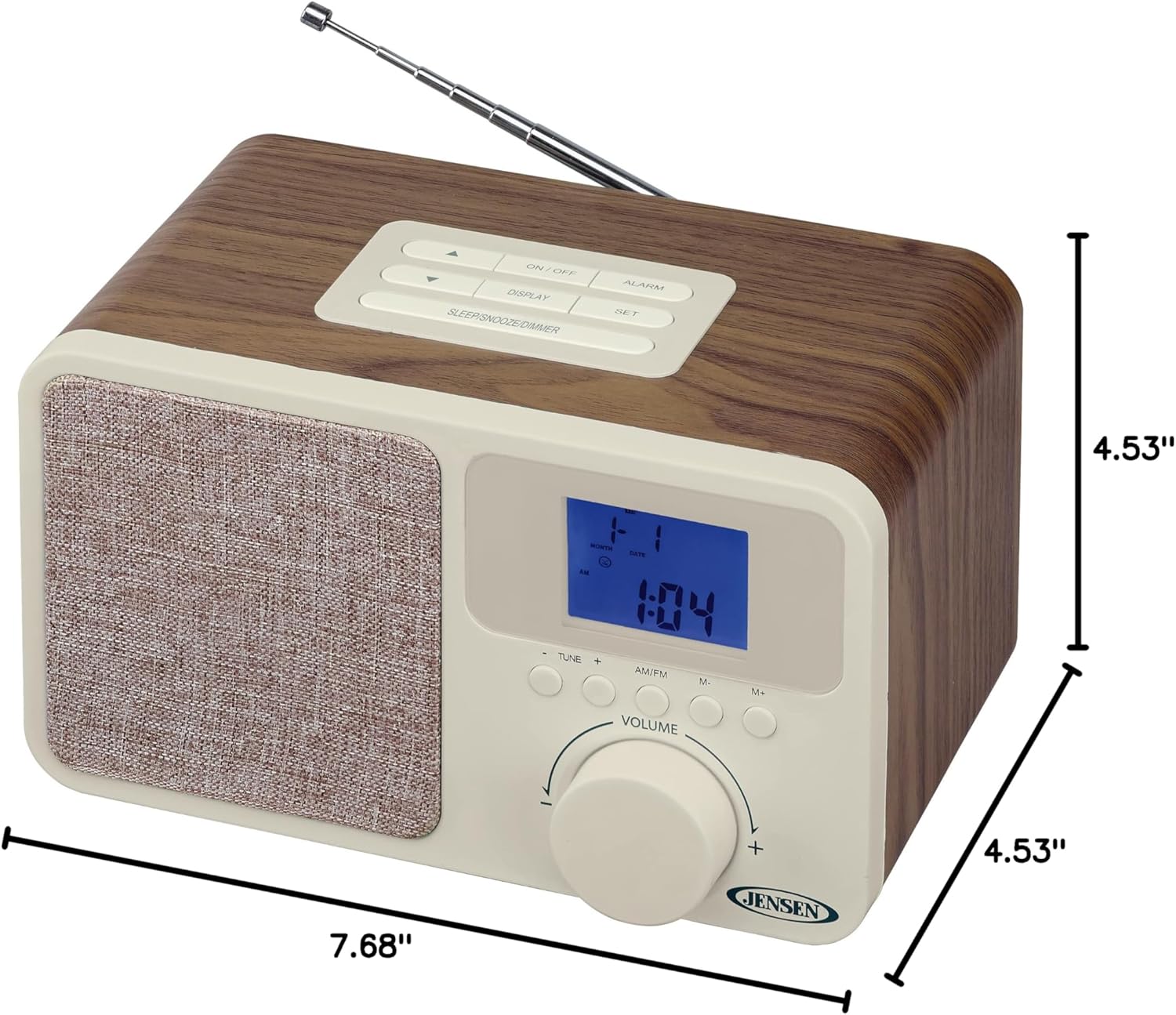
Image: The Jensen JCR-315 shown with its length (7.68"), width (4.53"), and height (4.53") dimensions clearly indicated.
Garanzia e supporto
For warranty information, technical support, or service inquiries regarding your Jensen JCR-315 Digital AM/FM Dual Alarm Clock Radio, please refer to the warranty card included with your product or visit the official Jensen website. You may also find additional support resources by visiting the Negozio Jensen su Amazon.
Conservare la ricevuta d'acquisto come prova d'acquisto per eventuali reclami in garanzia.