
1. Introduzione
The Canon PowerShot G5 X is a compact digital camera featuring a 1.0-inch, 20.2 Megapixel High-Sensitivity CMOS sensor and a built-in 2.36 million dot electronic viewfinder. This camera is designed for advanced photographers seeking high-quality stills and video with comprehensive control. It includes Wi-Fi and NFC capabilities for easy sharing and remote operation.
Le caratteristiche principali includono:
- 1.0-inch, 20.2 Megapixel High-Sensitivity CMOS sensor.
- Canon DIGIC 6 Image Processor for enhanced image quality and fast operation.
- Built-in 2.36 million dot electronic viewcercatore.
- Multi-angle capacitive 3.0-inch touch panel LCD with 1.04 million dots.
- Full HD 1080p video recording at 60p/30p/24p.
- Integrated Wi-Fi and NFC for wireless connectivity.
2. Cosa c'è nella scatola
Verificare che tutti gli elementi siano presenti prima dell'uso iniziale:
- Canon PowerShot G5 X Camera Body
- Pacco batteria
- Caricabatterie
- Cinghia da collo

Figure 2.1: Included items with the Canon PowerShot G5 X camera.
3. Configurazione iniziale
3.1 Caricamento della batteria
- Inserire la batteria nel caricabatteria.
- Collegare il caricabatterie a una presa di corrente. La spia di carica si illuminerà.
- Una volta completata la ricarica, la spia cambierà colore o si spegnerà. Rimuovere la batteria.
3.2 Inserimento della batteria e della scheda di memoria
- Aprire il coperchio del vano batteria/scheda nella parte inferiore della fotocamera.
- Insert the charged battery into the compartment, ensuring correct orientation.
- Insert a compatible SD, SDHC, or SDXC memory card into the card slot until it clicks into place.
- Chiudere saldamente il coperchio del vano.
3.3 Accensione della fotocamera
Premere il tasto ACCESO/SPENTO button located on the top of the camera to power it on. The lens will extend, and the LCD screen will activate.

Figura 3.1: Fronte view of the Canon PowerShot G5 X.
4. Utilizzo della fotocamera
4.1 Modalità di scatto di base
La ghiera delle modalità sulla parte superiore della fotocamera consente di selezionare diverse modalità di scatto:
- Modalità automatica: For automatic settings.
- P (Programma AE): La fotocamera imposta l'apertura e la velocità dell'otturatore, ma consente altre regolazioni.
- Av (Aperture Priority AE): Tu imposti l'apertura, la macchina fotografica imposta la velocità dell'otturatore.
- Tv (Shutter Priority AE): Tu imposti la velocità dell'otturatore, la fotocamera imposta l'apertura.
- M (Manuale): Puoi controllare sia l'apertura che la velocità dell'otturatore.
- Custom Modes (C1/C2): Save and recall your preferred settings.
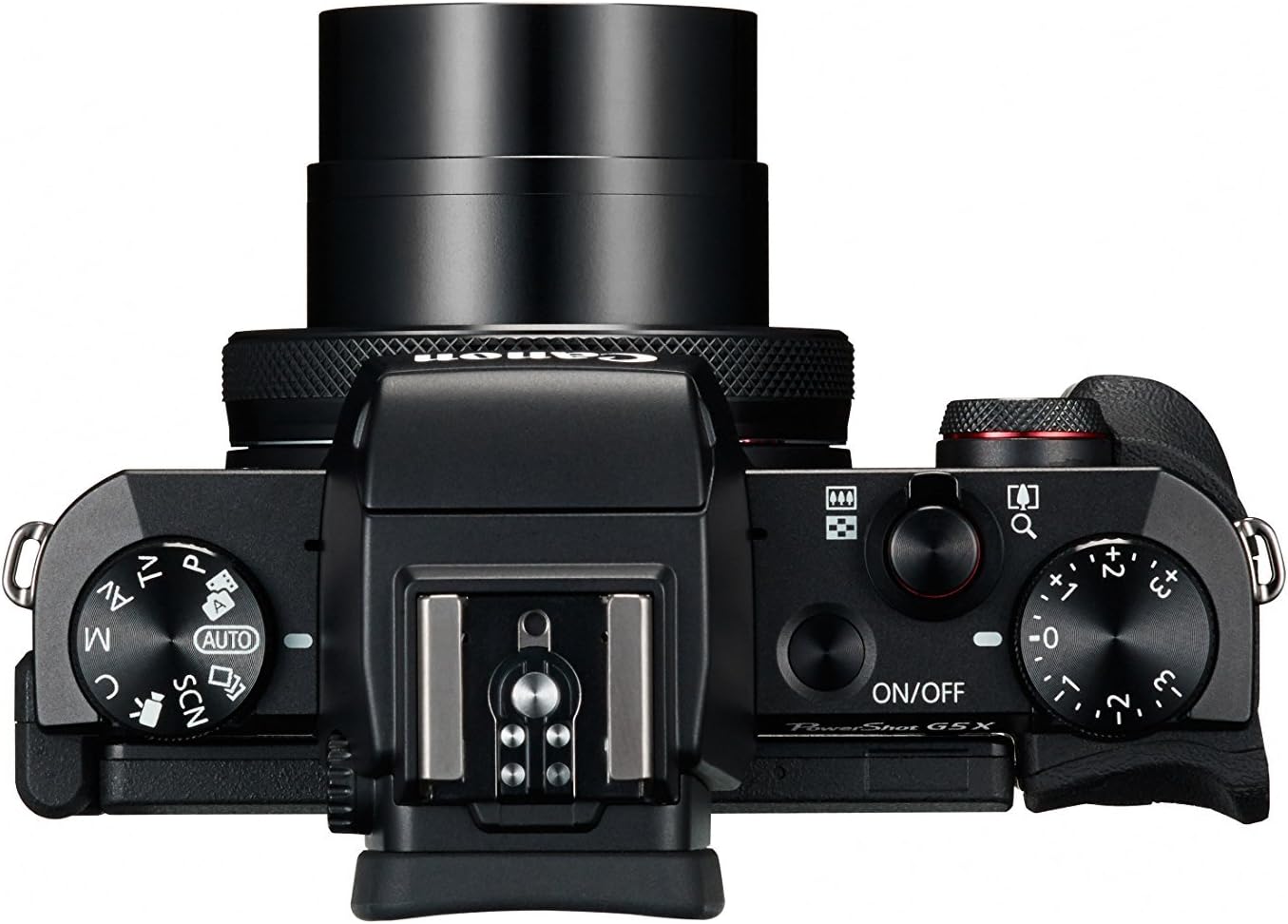
Figure 4.1: Top controls of the Canon PowerShot G5 X.
4.2 Usando il Viewmirino e schermo LCD
The camera features both an electronic viewfinder (EVF) and a multi-angle touch panel LCD. You can switch between them or use the EVF for composing shots in bright conditions. The LCD screen can be articulated for various shooting angles and touch operations.

Figure 4.2: Canon PowerShot G5 X with articulated LCD screen.

Figura 4.3: Posteriore view of the Canon PowerShot G5 X.
4.3 Registrazione di video
To record video, set the mode dial to the movie mode icon. Press the dedicated movie button to start and stop recording. The camera supports 1080p Full HD video at various frame rates (60p/30p/24p).
4.4 Connettività Wi-Fi e NFC
The camera's built-in Wi-Fi and NFC functions allow for wireless transfer of images and videos to compatible smart devices or computers. Refer to the camera's menu for detailed instructions on setting up these connections.
5. Manutenzione e cura
5.1 Pulizia della fotocamera
- Lente: Use a lens brush or blower to remove dust, then gently wipe with a microfiber lens cloth. Avoid touching the lens surface directly.
- Schermo LCD: Wipe gently with a soft, dry cloth. For stubborn smudges, use a screen cleaner specifically designed for electronics.
- Corpo macchina fotografica: Pulire con un panno morbido e asciutto. Non utilizzare solventi organici o detergenti aggressivi.
5.2 Conservazione
Quando non in uso, conservare la fotocamera in un luogo fresco e asciutto, lontano dalla luce solare diretta e da temperature estreme. Rimuovere la batteria se la fotocamera non viene utilizzata per un periodo prolungato.
6. Risoluzione Dei Problemi
This section addresses common issues you might encounter with your Canon PowerShot G5 X camera.
| Problema | Possibile causa/soluzione |
|---|---|
| La fotocamera non si accende. | Battery is depleted. Charge the battery. Ensure battery is inserted correctly. |
| Le immagini sono sfocate. | Lens is dirty. Clean the lens. Shutter speed is too slow. Increase shutter speed or use image stabilization. Camera shake. Hold the camera steady or use a tripod. |
| Impossibile connettersi al Wi-Fi/NFC. | Ensure Wi-Fi/NFC is enabled in camera settings. Check device compatibility and network settings. Refer to the camera's connectivity guide in the menu. |
| Errore della scheda di memoria. | La scheda di memoria è piena. Eliminare i dati non necessari files or replace card. Card is corrupted. Format the card (this will erase all data). Card is incompatible. Use a supported SD, SDHC, or SDXC card. |
| Il flash non si attiva. | Flash is set to OFF. Change flash mode to Auto or On. Subject is too far. Check flash range. |
7. Specifiche
| Caratteristica | Dettaglio |
|---|---|
| Tipo di sensore | 1.0-inch High-Sensitivity CMOS |
| Risoluzione fissa efficace | 20.2 MP |
| Processore di immagini | DIGIC 6 |
| Zoom ottico | 4.2x |
| Apertura lente | f/1.8-2.8 |
| Lunghezza focale (equivalente a 35 mm) | 24-100mm |
| Stabilizzazione dell'immagine | Digitale |
| Viewcercatore | Built-in Electronic Viewfinder (2.36 million dots) |
| Schermo LCD | 3.0-inch Multi-angle Capacitive Touch Panel (1.04 million dots) |
| Risoluzione video | 1080p Full HD (60p/30p/24p) |
| Connettività | Wi-Fi, NFC, HDMI, USB |
| Supporti di memorizzazione | Schede di memoria SD, SDHC, SDXC |
| Peso dell'articolo | 1.8 libbre |
| Numero di modello | 0510C001 |
| Codice UPC | 748926548632 |
8. Garanzia e supporto
8.1 Informazioni sulla garanzia
This Canon PowerShot G5 X camera comes with a 90-day limited warranty from the date of purchase. This warranty covers manufacturing defects under normal use. Please retain your proof of purchase for warranty claims.
8.2 Assistenza clienti
For technical assistance, service, or further inquiries, please refer to the official Canon support websito o contattare il servizio clienti. Le informazioni di contatto sono in genere reperibili sul sito web del produttore. websito.