
1. Introduzione
This manual provides comprehensive instructions for the proper setup, operation, and maintenance of your Nady HT-1KU Wireless Handheld Microphone Transmitter. The HT-1KU is designed as a replacement or additional handheld transmitter for the Nady W-1KU series wireless systems, operating on Band 3 (520.000 - 544.975MHz). Please read this manual thoroughly before use to ensure optimal performance and longevity of your device.
2. Prodotto finitoview
The Nady HT-1KU is a robust and reliable handheld microphone transmitter, engineered for clear and powerful audio transmission within the W-1KU wireless system. Its design focuses on user-friendliness and durability, featuring an all-metal housing and an intuitive LCD display.

Figure 2.1: Nady HT-1KU Wireless Handheld Microphone Transmitter. This image displays the complete handheld microphone transmitter, highlighting its sleek, all-metal construction and the Nady branding.
Caratteristiche principali:
- Compatibilità: Specifically designed as a replacement or additional transmitter for Nady W-1KU series wireless systems.
- Qualità audio: Features a superior unidirectional neodymium cartridge for clear, powerful audio, excellent feedback rejection, and minimal handling noise.
- Costruzione: Durable all-metal housing ensures longevity and reliability.
- Display: Integrated LCD display shows essential information such as battery status and selected channel/group.
- Energia: Economical operation using two (2) AA alkaline batteries.
- Banda di frequenza: Operates on Band 3 (520.000 - 544.975MHz).
3. Contenuto della confezione
Dopo aver aperto la confezione, verificare che tutti i componenti siano presenti e in buone condizioni:
- Nady HT-1KU Wireless Handheld Microphone Transmitter
4. Impostazione
4.1 Installazione della batteria
- Unscrew the lower section of the microphone body to reveal the battery compartment.
- Insert two (2) fresh AA alkaline batteries, observing the correct polarity (+/-) as indicated inside the compartment.
- Carefully screw the lower section back onto the microphone body until secure.
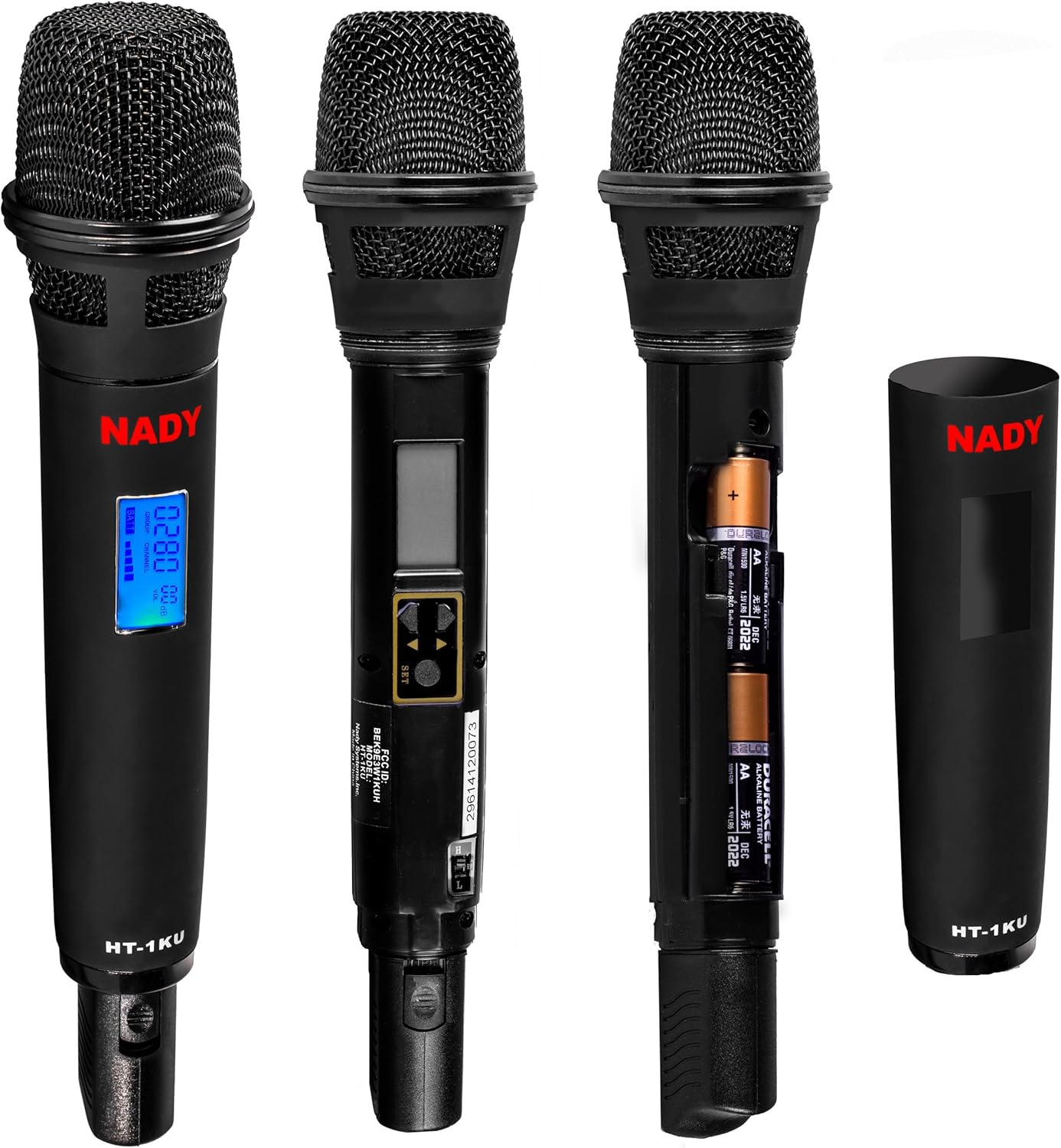
Figure 4.1: Battery compartment and LCD display. This image illustrates the open battery compartment for inserting AA batteries and the LCD screen for channel and battery status.
4.2 System Pairing and Frequency Synchronization
The HT-1KU transmitter must be synchronized with a compatible Nady W-1KU series receiver. Refer to your W-1KU receiver's manual for detailed instructions on how to initiate the synchronization process. Generally, this involves:
- Ensure both the HT-1KU transmitter and the W-1KU receiver are powered on.
- Access the frequency synchronization function on your W-1KU receiver.
- Follow the receiver's instructions to scan for available frequencies or to manually set the desired channel/group.
- The HT-1KU's LCD display will show the selected channel/group and battery status, confirming successful synchronization.
5. Istruzioni per l'uso
5.1 Accensione/Spegnimento
- To power on the transmitter, locate the power button (often integrated with the channel selection controls) and press and hold it until the LCD display illuminates.
- To power off, press and hold the power button again until the LCD display turns off.
5.2 Selezione del canale
The HT-1KU transmitter allows for channel selection to match your W-1KU receiver. Use the control buttons, typically located near the LCD display, to navigate through available channels or groups. The LCD will show the current selection. Ensure the transmitter's channel matches the receiver's channel for proper operation.
5.3 Usage Best Practices
- Microphone Holding: Hold the microphone firmly, typically 2-6 inches from your mouth, for optimal sound capture.
- Linea di vista: Maintain a clear line of sight between the transmitter and the receiver whenever possible to minimize signal dropouts.
- Interferenza: Avoid placing the transmitter near other wireless devices, large metal objects, or strong electromagnetic fields that could cause interference.
- Durata della batteria: Monitor the battery status on the LCD display and replace batteries promptly when low to prevent unexpected power loss during use.
6. Manutenzione
6.1 Pulizia
To clean the exterior of the microphone, use a soft, dry cloth. For stubborn dirt, a slightly damp cloth with mild soap can be used, ensuring no moisture enters the microphone grille or electronic components. Do not use abrasive cleaners or solvents.
6.2 Sostituzione della batteria
Replace batteries when the low battery indicator appears on the LCD display or when audio quality degrades. Always use fresh AA alkaline batteries. Refer to Section 4.1 for battery installation instructions.
6.3 Conservazione
When not in use for extended periods, remove the batteries from the transmitter to prevent leakage and damage. Store the microphone in a cool, dry place, away from direct sunlight and extreme temperatures.
7. Risoluzione Dei Problemi
If you encounter issues with your Nady HT-1KU transmitter, consult the following table:
| Problema | Possibile causa | Soluzione |
|---|---|---|
| Nessun suono dal microfono |
|
|
| Suono intermittente o statico |
|
|
| Il display LCD non funziona |
|
|
8. Specifiche
The following are the technical specifications for the Nady HT-1KU Wireless Handheld Microphone Transmitter:
| Caratteristica | Dettaglio |
|---|---|
| Numero di modello | HT-1KU-TX-HT-NEUS |
| Banda di frequenza | Band 3 (520.000 - 544.975MHz) |
| Tipo di microfono | Trasmettitore wireless portatile |
| Modello polare | Unidirezionale |
| Sensibilità Audio | 65 decibel |
| Fonte di alimentazione | Alimentato a batteria |
| Tipo di batteria | 2 x AA Alkaline batteries (required) |
| Materiale | Metallo |
| Dimensioni (L x P x A) | 3.5 x 2.5 x 1 pollici (8.9 x 6.4 x 2.5 cm) |
| Peso | 13.4 once (380 grammi) |
| Codice UPC | 634343305913 |
9. Garanzia e supporto
For warranty information, technical support, or service inquiries regarding your Nady HT-1KU Wireless Handheld Microphone Transmitter, please refer to the warranty card included with your original Nady W-1KU wireless system or visit the official Nady website. You may also contact Nady customer support directly for assistance.