
Introduzione
The iDance Cyclone 400 is a versatile portable karaoke speaker designed to provide a complete audio entertainment experience. Featuring Bluetooth connectivity, MP3 playback from USB and SD cards, FM radio, and an integrated RGB LED light system, this speaker is perfect for parties, gatherings, or personal enjoyment. This manual provides essential information for safe operation, setup, and maintenance of your device.
Informazioni sulla sicurezza
- Leggere attentamente tutte le istruzioni prima di utilizzare il dispositivo.
- Tenere l'altoparlante lontano da acqua, umidità e luce solare diretta.
- Non tentare di smontare o modificare l'unità. Per qualsiasi intervento di manutenzione, rivolgersi a personale qualificato.
- Use only the specified charging cable and power adapter (if applicable) to avoid damage.
- Avoid exposing the battery to extreme temperatures or direct heat.
- Assicurare una ventilazione adeguata e non ostruire le aperture di ventilazione.
- Tenere fuori dalla portata dei bambini.
Contenuto della confezione
Si prega di verificare che tutti gli articoli siano presenti nel pacco:
- iDance Cyclone 400 Portable Speaker
- Microfono
- Cavo del microfono
- Cavo di ricarica USB
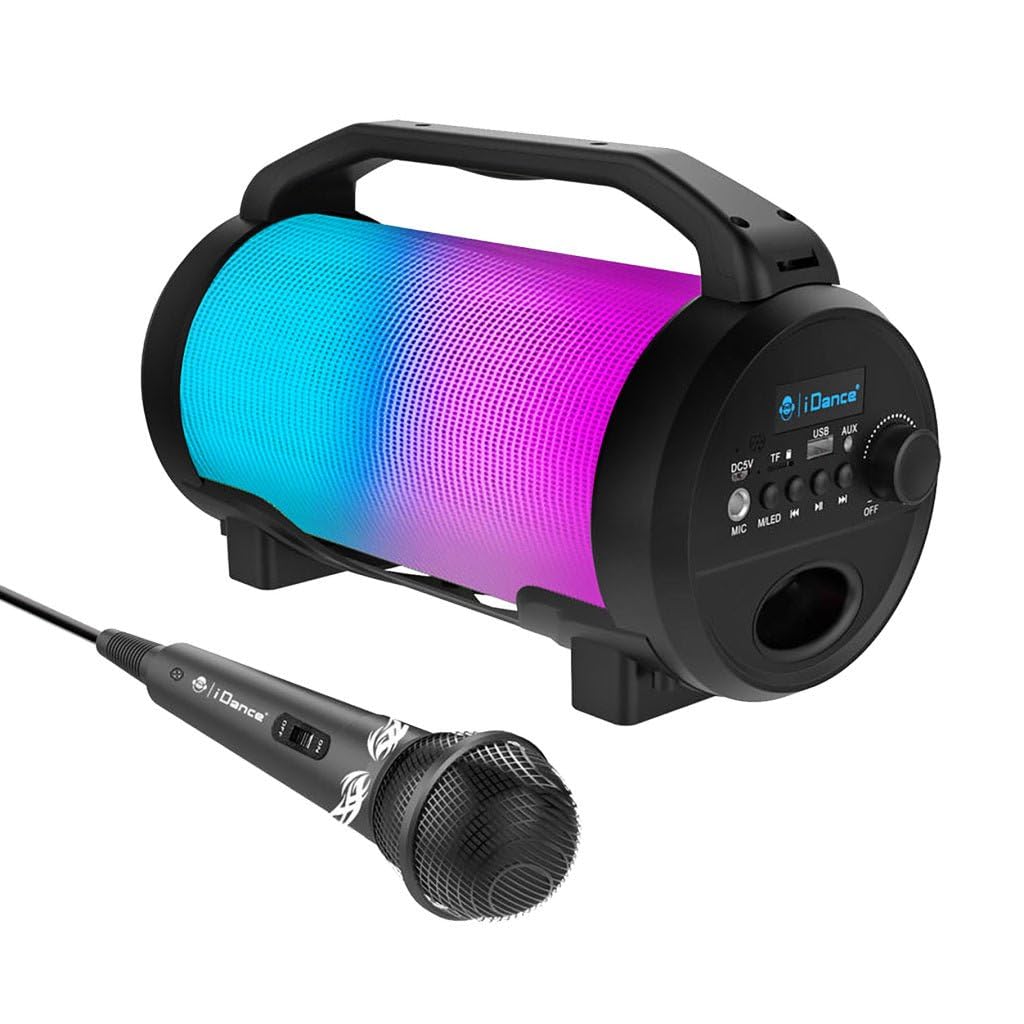
Image: The iDance Cyclone 400 speaker shown with its wired microphone. The speaker features a cylindrical design with a handle and a colorful LED light panel.
Caratteristiche del prodotto
- Funzione karaoke: Includes a wired microphone for singing along.
- Connettività Bluetooth: Riproduci musica in streaming wireless dal tuo smartphone, tablet o altri dispositivi abilitati Bluetooth.
- Radio FM integrata: Sintonizzati sulle tue stazioni radio preferite.
- Riproduzione MP3: Play music directly from USB drives or SD cards (via TF slot).
- RGB LED Light Show: Dynamic multi-color LED lights with party mode to enhance your audio experience.
- Batteria a lunga durata: Goditi fino a 8 ore di riproduzione continua con una singola carica.
- Design portatile: Leggero e dotato di una comoda maniglia per un facile trasporto.
Controlli e connessioni
Familiarize yourself with the control panel located on the side of the speaker:

Immagine: dettagliata view of the speaker's control panel, showing ports for DC5V charging, TF card, USB, AUX, and MIC, along with buttons for mode/LED control, track navigation, play/pause, and a rotary knob for power and volume.
- Porta DC5V: Per caricare l'altoparlante tramite il cavo USB in dotazione.
- Slot per schede TF: Inserire una scheda MicroSD per la riproduzione di MP3.
- Porta USB: Inserire una chiavetta USB per la riproduzione di file MP3.
- Ingresso AUX: Collegare dispositivi audio esterni tramite un cavo audio da 3.5 mm.
- Ingresso MIC: Collega il microfono cablato.
- M.LED Button: Press to cycle through different playback modes (Bluetooth, FM, USB, SD, AUX) and to control the LED lights.
- Pulsante traccia precedente: Short press for previous track; long press for fast rewind (in USB/SD mode).
- Pulsante Play/Pausa: Play or pause audio playback. In FM mode, long press to auto-scan and save stations.
- Pulsante traccia successiva: Short press for next track; long press for fast forward (in USB/SD mode).
- OFF/ON/Volume Knob: Rotate to turn the speaker ON/OFF and adjust the volume.
Impostare
1. Ricarica dell'altoparlante
Before first use, fully charge the speaker. Connect the provided USB charging cable to the DC5V port on the speaker and the other end to a 5V USB power adapter (not included) or a computer USB port. The charging indicator will illuminate. Once fully charged, the indicator may change color or turn off.
2. Accensione/Spegnimento
Ruotare il OFF/ON/Volume Knob clockwise to turn the speaker ON. Rotate it counter-clockwise until it clicks to turn the speaker OFF.
3. Collegamento del microfono
Inserire il cavo del microfono nel Ingresso MIC port on the control panel. The microphone is ready for use once connected.
Istruzioni per l'uso
Modalità Bluetooth
- Accendi l'altoparlante. Entrerà automaticamente in modalità di associazione Bluetooth, indicata da una scritta "BLU" lampeggiante sul display e da un segnale acustico.
- Abilita il Bluetooth sul tuo dispositivo mobile (smartphone, tablet, ecc.).
- Cercare "iDance Cyclone 400" (or similar) in your device's Bluetooth list and select it to pair.
- Once successfully paired, you will hear a confirmation sound, and "BLUE" will stop flashing.
- You can now play music from your device through the speaker. Use the speaker's or your device's controls for playback.
Modalità radio FM
- Premere il tasto M.LED Button ripetutamente finché sul display non appare "FM".
- Premere a lungo il tasto Pulsante di riproduzione/pausa to initiate an automatic scan for FM stations. The speaker will scan and save available stations.
- Utilizzare il Traccia precedente E Next Track Buttons to navigate between saved FM stations.
Riproduzione USB/scheda SD
- Inserisci un'unità flash USB nel Porta USB or a MicroSD card into the Slot per schede TF.
- The speaker will automatically switch to USB or SD mode and begin playing MP3 files. If it doesn't, press the M.LED Button per selezionare la modalità corretta.
- Utilizzare il Traccia precedente, Riproduci/Pausa, E Next Track Buttons per controllare la riproduzione.
Modalità ingresso AUX
- Collegare un'estremità di un cavo audio da 3.5 mm (non incluso) al Ingresso AUX porta sull'altoparlante.
- Collegare l'altra estremità del cavo audio alla presa delle cuffie o all'uscita audio del dispositivo esterno.
- Premere il tasto M.LED Button until "AUX" appears on the display.
- Controlla la riproduzione e il volume dal tuo dispositivo esterno.
Funzione karaoke
With the microphone connected to the Ingresso MIC, simply speak or sing into the microphone. The sound will be amplified through the speaker. Adjust the main volume using the OFF/ON/Volume Knob. Note that there is no separate volume control for the microphone on the speaker itself.
Controllo della luce a LED
The speaker features dynamic RGB LED lights. The lights typically activate automatically when the speaker is on. Use the M.LED Button to cycle through different light modes or to turn the lights off/on (if supported by the specific firmware version).

Image: The iDance Cyclone 400 speaker displaying its vibrant, multi-colored LED light effects during operation.
Manutenzione
- Pulizia: Utilizzare un panno morbido e asciutto per pulire l'esterno dell'altoparlante. Non utilizzare detergenti abrasivi o solventi.
- Magazzinaggio: Quando non si utilizza l'altoparlante per lunghi periodi, conservarlo in un luogo fresco e asciutto.
- Cura della batteria: Per prolungare la durata della batteria, evitare di scaricarla completamente frequentemente. Caricare regolarmente l'altoparlante, anche se non in uso, per preservare la salute della batteria.
Risoluzione dei problemi
| Problema | Possibile causa | Soluzione |
|---|---|---|
| L'altoparlante non si accende. | La batteria è scarica. | Carica l'altoparlante utilizzando il cavo USB in dotazione. |
| Nessun suono. | Il volume è troppo basso; è stata selezionata la modalità errata; il dispositivo non è associato (Bluetooth). | Increase volume; press M.LED to select correct mode; re-pair Bluetooth device. |
| Il dispositivo Bluetooth non riesce ad associarsi. | Altoparlante non in modalità di associazione; dispositivo troppo lontano; interferenza. | Ensure speaker is in Bluetooth mode (flashing "BLUE"); move device closer; turn off other Bluetooth devices. |
| Il microfono non funziona. | Microphone not properly connected; speaker volume too low. | Ensure microphone cable is fully inserted into the MIC input; increase speaker volume. |
| La scheda USB/SD non funziona. | Non corretto file formato; scheda/unità non inserita correttamente; altoparlante non nella modalità corretta. | Garantire files are MP3 format; reinsert card/drive; press M.LED to select USB/SD mode. |
Specifiche
| Marca | iDance |
| Nome del modello | CI 400 |
| Tecnologia di connettività | Bluetooth, USB |
| Supporto per tipo di supporto | USB, SD, Bluetooth |
| Fonte di alimentazione | Alimentato a batteria |
| Componenti inclusi | Microphone, Microphone Cable |
| Caratteristiche speciali | Portable, RGB LED Light Show |
| Numero di altoparlanti | 1 |
| Voltage (for charger) | 220 Volt (CA) (Note: This refers to the input voltage for the charging adapter, not the speaker's internal voltage.) |
| Durata della batteria | Fino a 8 ore |
Garanzia e supporto
For warranty information and customer support, please refer to the documentation provided with your purchase or contact your retailer. You may also visit the official iDance websito per ulteriore assistenza.


