
1. Prodotto finitoview
The Zerone Multi-Language Translator Bluetooth Earphone is a portable wireless device designed for real-time language translation and audio playback. It features Bluetooth 4.1 connectivity, high-fidelity audio output, and a compact in-ear design for comfortable use during various activities.

Immagine 1.1: Principale view of the Zerone Multi-Language Translator Bluetooth Earphone.
2. Contenuto della confezione
Si prega di verificare che tutti gli articoli elencati di seguito siano inclusi nel pacchetto:
- Zerone Multi-Language Translator Bluetooth Earphone
- Cavo di ricarica USB
- Gommini auricolari aggiuntivi (varie misure)
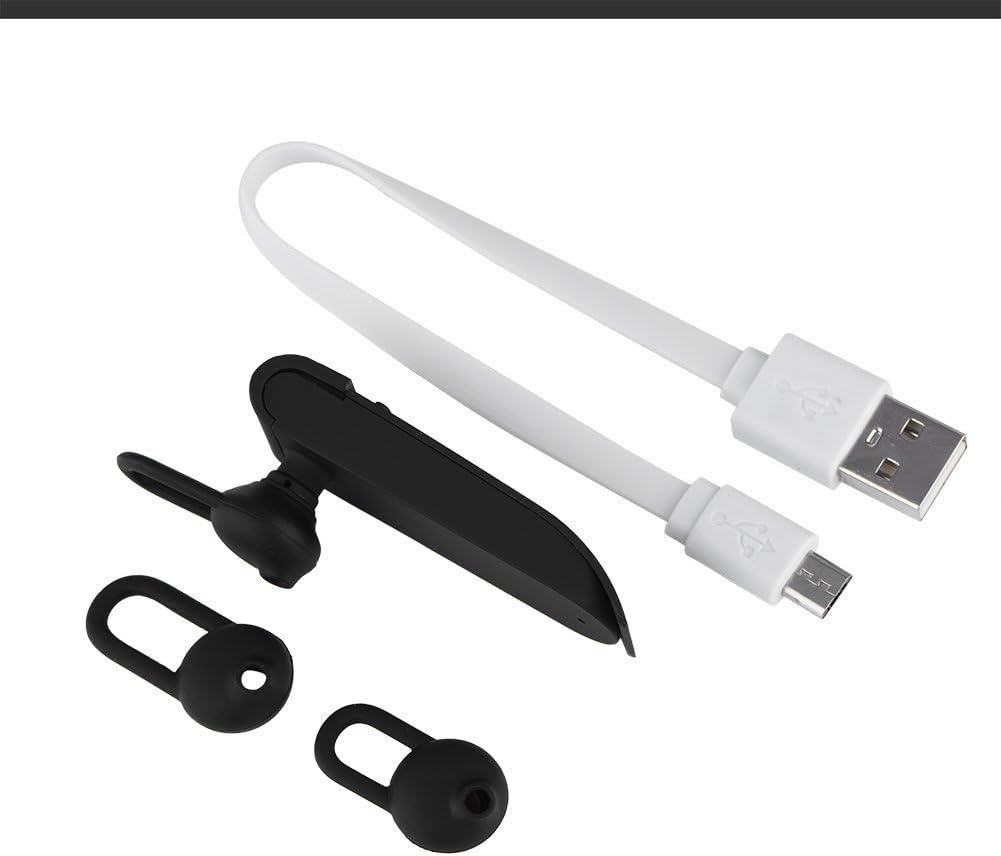
Image 2.1: The earphone with its charging cable and two additional ear tips.
3. Caratteristiche del prodotto
- Traduzione multilingue: Supports up to 16 languages for real-time translation. Speak into the earphone, and it will translate into the desired language.
- Uscita audio ad alta fedeltà: Equipped with an 8mm moving coil speaker for clear, smooth audio and enhanced bass.
- True Wireless In-Ear Design: Mini and compact, offering a stable and comfortable fit without tangled wires, suitable for various activities.
- Connettività Bluetooth 4.1: Optimized Bluetooth 4.1 version ensures a stable and fast wireless connection with a range of up to 10 meters.
- Durata prolungata della batteria: Built-in 90mAh rechargeable lithium battery provides approximately 5-8 hours of playback time and up to 13 hours of talk time.

Image 3.1: Visual representation of the 16 languages translation feature.

Image 3.2: Illustration of the high fidelity audio output with an 8mm moving coil speaker.

Image 3.3: Visual representation of the Bluetooth true wireless connection with a 10-meter transmission range.

Image 3.4: Details on the earphone's 90mAh rechargeable lithium battery and extended usage times.
4. Impostazione
4.1 Ricarica dell'auricolare
Before initial use, fully charge the earphone. Connect the provided USB charging cable to the earphone's charging port and the other end to a USB power source (e.g., computer, wall adapter). The charging time is approximately 2 hours.
4.2 Associazione Bluetooth
- Ensure the earphone is fully charged and powered off.
- Press and hold the multi-function button on the earphone until the indicator light flashes red and blue alternately, indicating pairing mode.
- Sul tuo smartphone o dispositivo abilitato Bluetooth, vai alle impostazioni Bluetooth.
- Cercare available devices and select "Zerone Translator Earphone" (or similar name) from the list.
- Una volta effettuata la connessione, la spia luminosa in genere diventa blu fissa o lampeggia lentamente in blu.
4.3 Companion Application (for Translation)
To utilize the multi-language translation feature, you will need to download and install a compatible companion application on your smartphone. Refer to the packaging or product documentation for the specific app name and download instructions. Ensure your phone is connected to the internet for translation services.
5. Istruzioni per l'uso
5.1 Accensione/spegnimento
- Accensione: Press and hold the multi-function button for approximately 3 seconds until the indicator light turns blue.
- Spegni: Tenere premuto il pulsante multifunzione per circa 5 secondi finché la spia luminosa non diventa rossa.
5.2 Riproduzione di musica
- Riproduci/Pausa: Premere brevemente il pulsante multifunzione.
- Traccia successiva: Premere due volte il pulsante multifunzione.
- Traccia precedente: Premere tre volte il pulsante multifunzione.
5.3 Gestione delle chiamate
- Rispondi/Termina chiamata: Premere brevemente il pulsante multifunzione.
- Rifiuta chiamata: Tieni premuto il pulsante multifunzione per 2 secondi.
5.4 Utilizzo della funzione di traduzione
After successfully pairing the earphone with your device and setting up the companion application:
- Open the translation application on your smartphone.
- Seleziona la lingua di origine e quella di destinazione all'interno dell'app.
- Activate the translation mode as instructed by the application (this may involve pressing a button on the earphone or within the app).
- Speak clearly into the earphone's microphone. Your speech will be translated and played back through the earphone or your phone's speaker, depending on the app's settings.

Image 5.1: A conceptual image demonstrating the earphone's translation capability between two languages.
6. Manutenzione
- Pulizia: Use a soft, dry cloth to clean the earphone. Do not use abrasive cleaners or immerse the device in water.
- Magazzinaggio: Conservare gli auricolari in un luogo fresco e asciutto, lontano dalla luce solare diretta e da temperature estreme.
- Cura della batteria: Per prolungare la durata della batteria, evitare di scaricare completamente gli auricolari frequentemente. Caricarli regolarmente, anche se non vengono utilizzati per periodi prolungati.
7. Risoluzione Dei Problemi
| Problema | Possibile causa | Soluzione |
|---|---|---|
| L'auricolare non si accende | Batteria scarica | Charge the earphone for at least 30 minutes. |
| Impossibile associare il dispositivo | Earphone not in pairing mode; Bluetooth off on device; device too far | Ensure earphone is in pairing mode (flashing red/blue). Turn on Bluetooth on your device. Move device closer to earphone (within 10m). |
| No sound during playback/calls | Volume too low; earphone not connected; media output not selected | Increase volume on both earphone and connected device. Re-pair the earphone. Check device's audio output settings. |
| La funzione di traduzione non funziona | Companion app not open/configured; no internet connection; microphone blocked | Ensure the companion app is open and correctly configured. Verify internet connectivity. Check if the earphone's microphone is clear. |
8. Specifiche
| Caratteristica | Dettaglio |
|---|---|
| Numero di modello | 4351510494 |
| Tecnologia di connettività | Wireless (Bluetooth) |
| Versione Bluetooth | 4.1 |
| Portata Bluetooth | Fino a 10 metri |
| Capacità della batteria | Batteria al litio da 90 mAh |
| Tempo di gioco | 5-8 ore |
| Tempo di conversazione | Fino a 13 ore |
| Tempo di ricarica | Circa 2 ore |
| Presa per cuffie | USB (per la ricarica) |
| Materiale | Plastica |
| Posizionamento dell'orecchio | Nell'orecchio |
| Fattore di forma | Nell'orecchio |
| Tipo di controllo | Controllo multimediale, tocco |
| Controllo del rumore | Cancellazione attiva del rumore |
| Peso dell'articolo | 2.39 once |
9. Garanzia e supporto
For warranty information and technical support, please refer to the documentation included with your purchase or visit the official Zerone websito. Conservare la prova d'acquisto per eventuali reclami in garanzia.