
1. Introduzione
Thank you for choosing the Zerone LP-838 Small Power Amplifier. This manual provides essential information for the safe and efficient operation of your device. Please read these instructions thoroughly before use and retain them for future reference.
2. Prodotto finitoview
2.1 Caratteristiche principali
- Design compatto e portatile.
- RCA and 3.5mm audio input compatibility.
- High-power audio amplifier chip for 2.1 channel output.
- Adjustable Treble, Bass, and Volume controls.
- Durable all-aluminum alloy shell for electromagnetic interference reduction.
2.2 Identificazione dei componenti
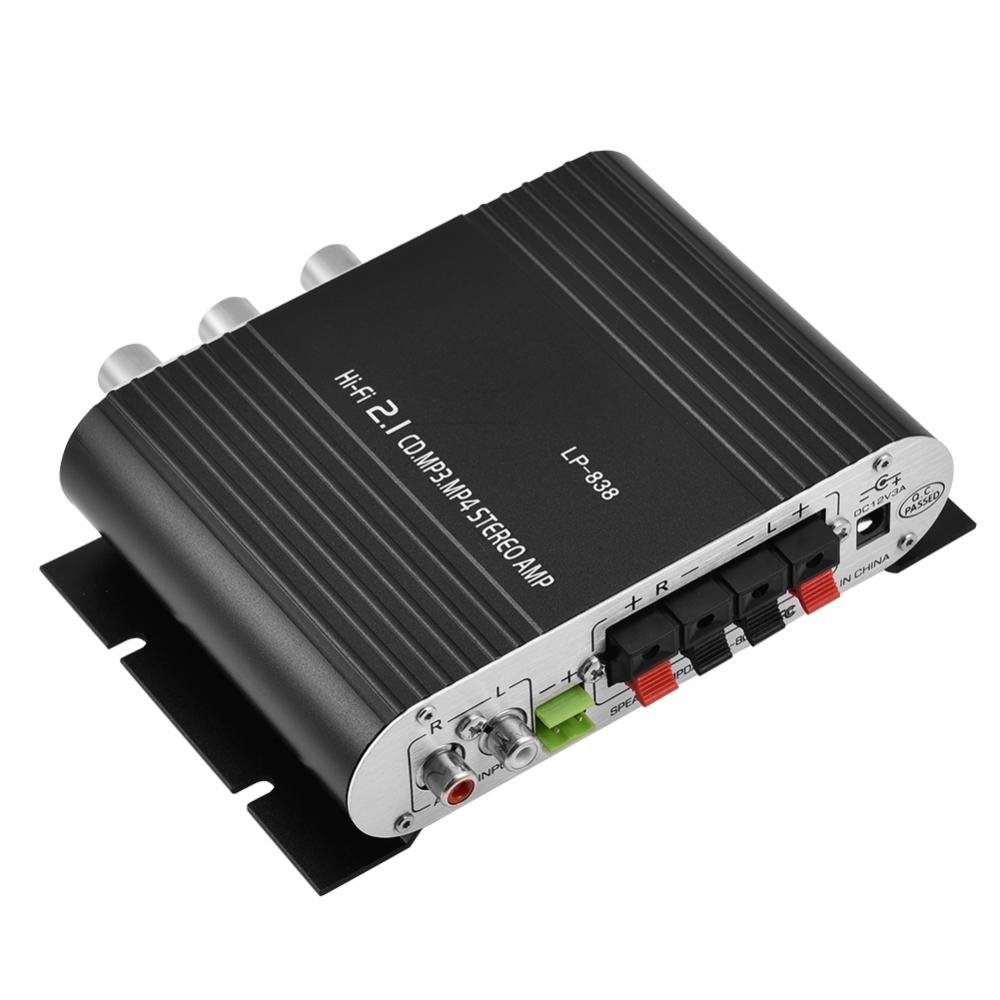
Figura 1: Controlli e ingressi del pannello frontale
This image displays the front panel of the LP-838 amplifier. From left to right, it features a power switch, a bass volume knob, a 3.5mm MP3 input jack, and three rotary knobs for Treble, Bass, and Master Volume control. The unit also supports RCA audio input, as indicated by the text overlay.
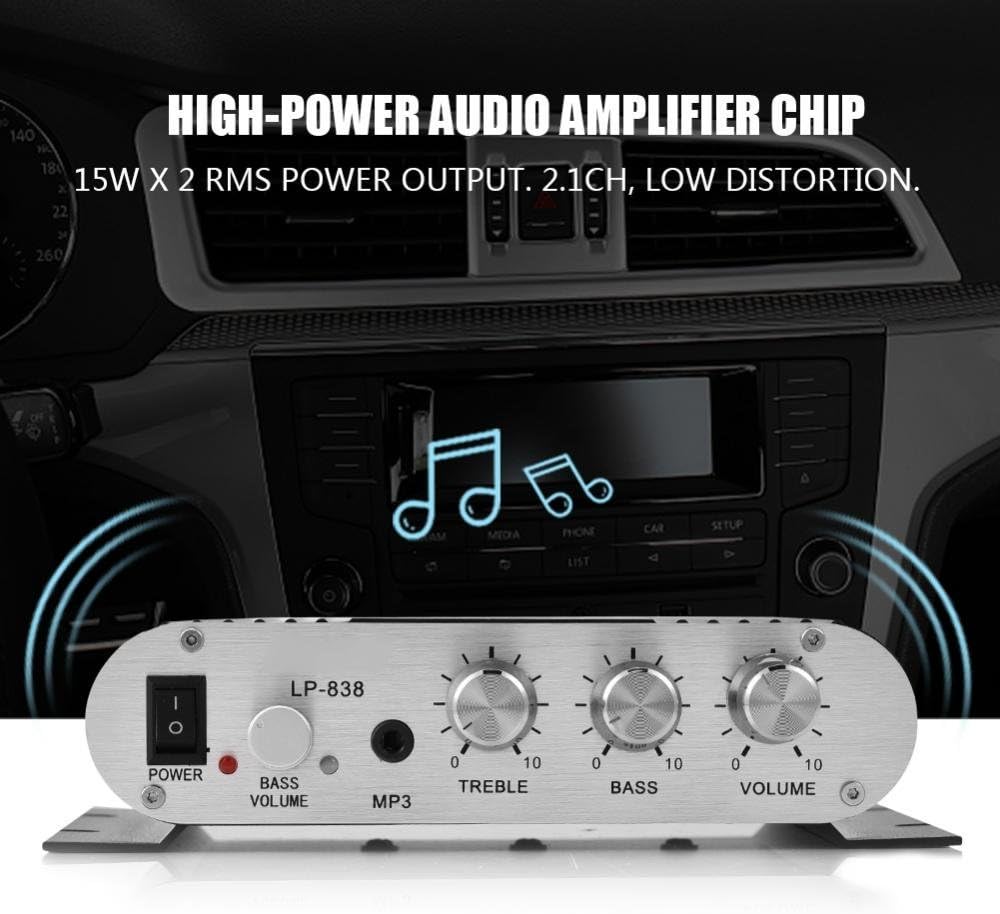
Figura 2: Collegamenti del pannello posteriore
This image shows the rear panel of the LP-838 amplifier. On the left are the RCA audio input jacks (red for right, white for left). In the center are the spring-clip speaker terminals for connecting left and right speakers. On the right is the DC 12V/3A power input jack and a 'Q.C. PASSED' stamp, che indica il controllo di qualità.
Pannello frontale:
- Interruttore di ALIMENTAZIONE: Attiva o disattiva il ampacceso/spento.
- BASS VOLUME Knob: Regola il livello dei bassi dell'uscita audio.
- Ingresso MP3: 3.5mm jack for connecting portable audio devices.
- Manopola TREBLE: Regola la risposta alle alte frequenze.
- Manopola BASSO: Regola la risposta alle basse frequenze.
- Manopola VOLUME: Controlla il volume di uscita complessivo.
Pannello posteriore:
- INGRESSO AUDIO (RCA): Red and white RCA jacks for connecting audio sources (e.g., DVD players, computers).
- SPEAKER OUTPUTS (+R -R +L -L): Spring-clip terminals for connecting passive speakers. Ensure correct polarity (+ to + and - to -).
- Ingresso CC 12 V/3 A: Power input jack for connecting the external power adapter (not included).
3. Impostazione
- Collegare gli altoparlanti: Connect your passive speakers to the SPEAKER OUTPUT terminals on the rear panel. Ensure the positive (+) terminal of the amplifier si collega al terminale positivo (+) dell'altoparlante e al terminale negativo (-) dell' amplifier si collega al terminale negativo (-) dell'altoparlante. Il amplifier supporta altoparlanti con un'impedenza di 4-8 Ohm.
- Collega la sorgente audio:
- For RCA input: Connect your audio source (e.g., CD player, TV, computer) to the RCA AUDIO INPUT jacks on the rear panel using an RCA cable.
- For 3.5mm input: Connect your portable audio device (e.g., smartphone, MP3 player) to the MP3 input jack on the front panel using a 3.5mm audio cable.
- Connetti alimentazione: Connect a compatible DC 12V/3A power adapter (not included) to the DC 12V/3A input jack on the rear panel. Plug the power adapter into a wall outlet.
Important: Ensure all connections are secure before powering on the amppiù vivace.
4. Istruzioni per l'uso
- Accensione: Portare l'interruttore POWER sul pannello frontale in posizione 'ON'. La spia di alimentazione si illuminerà.
- Seleziona ingresso: IL amplifier automatically uses the active input. If both RCA and 3.5mm inputs are connected, the 3.5mm input may take precedence.
- Regola volume: Start with the VOLUME knob set to a low level. Begin playing audio from your source, then slowly increase the VOLUME knob to your desired listening level.
- Regola tono: Use the TREBLE and BASS knobs to fine-tune the high and low frequencies according to your preference. The BASS VOLUME knob provides additional control over the bass output.
- Spegni: When finished, turn the VOLUME knob down to its minimum setting, then flip the POWER switch to the 'OFF' position.
5. Manutenzione
- Pulizia: Utilizzare un panno morbido e asciutto per pulire la parte esterna del amplificatore. Non utilizzare detergenti liquidi o solventi.
- Ventilazione: Assicurare il ampPosizionare il generatore in un'area ben ventilata per evitare il surriscaldamento. Non ostruire le fessure di ventilazione.
- Magazzinaggio: Quando non in uso per lunghi periodi, scollegare l'adattatore di alimentazione e riporre il amplificatore in un luogo fresco e asciutto.
6. Risoluzione Dei Problemi
| Problema | Possibile causa | Soluzione |
|---|---|---|
| Nessun potere | Adattatore di alimentazione non collegato o difettoso; interruttore di alimentazione spento. | Ensure power adapter is securely connected and functional. Flip power switch to ON. |
| Nessuna uscita audio | Incorrect audio input connection; speaker wires loose or incorrect polarity; volume too low; audio source issue. | Check audio input cables and connections. Verify speaker wire connections and polarity. Increase volume. Test audio source with another device. |
| Suono distorto | Volume too high; incorrect tone settings; faulty audio source or cable. | Reduce volume. Adjust Treble and Bass knobs. Test with a different audio source or cable. |
| Rumore di ronzio o ronzio | Ground loop issue; interference from other electronics; faulty cables. | Assicurarsi che tutti i componenti siano correttamente collegati a terra. Spostare amplifier away from other electronic devices. Try different audio cables. |
7. Specifiche
- Marca: Zerone
- Numero modello: Zeroneq8ae3d902g-02 (LP-838)
- Voltage: 14.4 Volt (in funzione)
- Numero di canali: 2
- Impedenza dell'altoparlante: 4-8 Ohm
- Tipo di montaggio: Montaggio in superficie
- Peso dell'articolo: 7.8 once
- ASIN: B07DM4QJGX
- Codice UPC: 763741184919
- Data prima disponibilità: 4 luglio 2019
8. Informazioni sulla garanzia
For specific warranty terms and conditions, please refer to the documentation provided at the time of purchase or contact your retailer. Warranty coverage typically includes defects in materials and workmanship under normal use.
9. Supporto
If you encounter issues that cannot be resolved using the troubleshooting guide, please contact the retailer or manufacturer for assistance. Provide your product model number (LP-838) and a detailed description of the problem when seeking support.