Introduzione
The BOYA BY-DMR7 is a broadcast-quality supercardioid condenser microphone designed for use with DSLR cameras and camcorders. It features an integrated flash recorder capable of capturing 24-bit/48 kHz WAV audio files directly to a MicroSDHC card (up to 32 GB, sold separately). This manual provides comprehensive instructions for setting up, operating, and maintaining your BY-DMR7 microphone to ensure optimal performance.

Image: The BOYA BY-DMR7 microphone with its foam windscreen, showcasingrazie al suo design compatto e ai controlli integrati.
Cosa c'è nella scatola
Si prega di controllare il contenuto della confezione per assicurarsi che siano presenti tutti gli articoli:
- BOYA BY-DMR7 Shotgun Microphone
- Parabrezza in schiuma
- 3.5mm Gold-Plated Audio Cable
- Manuale dell'utente (questo documento)

Image: All components included with the BY-DMR7: the microphone unit, the foam windscreen, and the coiled 3.5mm audio cable.
Prodotto finitoview
Familiarize yourself with the various parts and controls of the BY-DMR7 microphone:
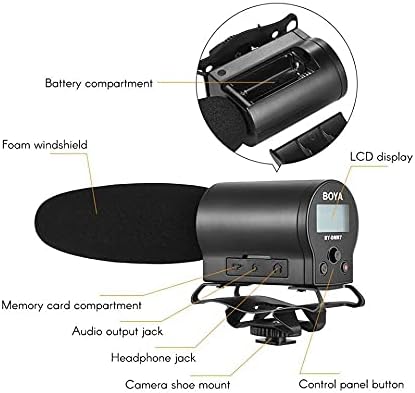
Image: Detailed diagram highlighting key components of the BY-DMR7, including the battery compartment, LCD display, control panel, and various input/output jacks.
- Parabrezza in schiuma: Reduces wind noise and plosives.
- Microphone Barrel: Houses the supercardioid condenser microphone element.
- Schermo LCD: Mostra lo stato di registrazione, il livello della batteria e le opzioni del menu.
- Pulsanti del pannello di controllo: Per la navigazione nei menu, la registrazione e la riproduzione.
- Jack per cuffie (3.5 mm): Per il monitoraggio audio in tempo reale.
- Audio Output Jack (3.5mm): Connects to camera's audio input.
- Memory Card Compartment: For MicroSDHC card insertion.
- Vano batteria: Contiene 2 batterie AA.
- Integrated Shockmount: Reduces handling noise.
- Attacco per fotocamera: Attaches to standard camera hot/cold shoe.
Impostare
1. Installazione della batteria
The BY-DMR7 requires two (2) AA batteries for operation.
- Locate the battery compartment on the side of the microphone unit.
- Far scorrere per aprire il coperchio del vano batterie.
- Inserire due batterie AA, assicurandosi che la polarità (+/-) sia corretta, come indicato all'interno del vano.
- Chiudere saldamente il coperchio del vano batterie.
2. MicroSDHC Card Installation
A MicroSDHC card (up to 32 GB) is required for recording audio.
- Locate the memory card compartment.
- Gently insert a MicroSDHC card into the slot until it clicks into place. Ensure the card is oriented correctly.
- Per rimuoverla, spingere leggermente la scheda finché non scatta fuori.
3. Montaggio del microfono
The BY-DMR7 can be mounted on a camera's hot/cold shoe.
- Slide the camera shoe mount of the microphone onto your camera's hot/cold shoe.
- Stringere la rotella di bloccaggio sul supporto a slitta per fissare il microfono in posizione.

Image: The BY-DMR7 microphone securely attached to a DSLR camera, ready for use.

Image: The BY-DMR7 microphone mounted on a different camera body, demonstrating its versatility.

Image: The BY-DMR7 microphone attached to a camcorder, illustrating its compatibility with various video recording devices.
4. Collegamento alla fotocamera
Use the supplied 3.5mm audio cable to connect the microphone to your camera's audio input.
- Collega un'estremità del cavo audio da 3.5 mm al Jack di uscita audio on the BY-DMR7.
- Collegare l'altra estremità del cavo al Ingresso microfono jack on your camera or camcorder.
5. Attaching Foam Windscreen
Slide the foam windscreen over the microphone barrel to reduce unwanted wind noise during outdoor recordings or plosives from close-up speech.
Istruzioni per l'uso
1. Accensione/Spegnimento
- To power on the device, press and hold the power button (usually part of the control panel) until the LCD display illuminates.
- Per spegnere, tenere premuto nuovamente il pulsante di accensione finché il display non si spegne.
2. Registrazione dell'audio
The BY-DMR7 features one-button recording for ease of use.
- Ensure a MicroSDHC card is inserted and batteries are charged.
- Premere il tasto dedicato Documentazione button (often marked with a red dot or 'REC'). The recording indicator on the LCD will show that recording is active.
- Per interrompere la registrazione, premere il pulsante Documentazione di nuovo il pulsante. file will be saved automatically to the MicroSDHC card.
3. Monitoraggio audio
Use the 3.5mm headphone output to monitor your audio in real-time.
- Connect a pair of headphones to the Presa per cuffie sul microfono.
- Adjust the monitoring volume if available through the menu system.
4. Using the Low-Cut Filter
The low-cut filter helps reduce unwanted low-frequency noise such as rumble or air conditioning hum.
- Access the menu system via the control panel buttons.
- Navigate to the audio settings or filter options.
- Enable or disable the low-cut filter as needed for your recording environment.
5. Navigazione nel menu e impostazioni
The LCD display and control panel buttons allow you to adjust various settings.
- Use the navigation buttons (e.g., up/down arrows, 'Menu', 'OK') to browse through options on the LCD.
- Common settings include input gain, headphone volume, low-cut filter, and file gestione.
6. Riproduzione e File Trasferire
- Riproduzione: Use the control panel buttons to navigate to recorded files and initiate playback directly on the device through the headphone jack.
- File Trasferimento: To transfer recorded WAV files, remove the MicroSDHC card from the BY-DMR7 and insert it into a compatible card reader connected to a computer. The files can then be copied like any other data.
Manutenzione
- Pulizia: Utilizzare un panno morbido e asciutto per pulire l'esterno del microfono. Non utilizzare detergenti liquidi o solventi.
- Magazzinaggio: When not in use for extended periods, remove the batteries to prevent leakage. Store the microphone in a cool, dry place, away from direct sunlight and extreme temperatures.
- Parabrezza in schiuma: The foam windscreen can be gently cleaned with mild soap and water if it becomes dirty. Ensure it is completely dry before reattaching.
Risoluzione dei problemi
| Problema | Possibile causa | Soluzione |
|---|---|---|
| Il microfono non si accende. | Batterie scariche o inserite in modo errato. | Sostituire le batterie con batterie AA nuove, assicurandosi della corretta polarità. |
| Nessuna registrazione audio. | No MicroSDHC card inserted, card full, or card error. | Insert a MicroSDHC card, check available space, or try formatting the card (this will erase all data). |
| Scarsa qualità audio/rumore eccessivo. | Wind noise, low-cut filter off, incorrect gain settings, or environmental noise. | Ensure foam windscreen is used. Enable low-cut filter. Adjust input gain. Record in a quieter environment. |
| No audio monitoring through headphones. | Headphones not connected properly, headphone volume too low, or faulty headphones. | Check headphone connection. Increase headphone volume. Test with another pair of headphones. |
| Microphone not recognized by camera. | Audio cable not connected properly, or camera audio input settings. | Ensure 3.5mm audio cable is securely connected to both microphone and camera. Check camera's audio input settings (e.g., external mic enabled). |
Specifiche
| Caratteristica | Dettaglio |
|---|---|
| Fattore di forma del microfono | Fucile da caccia |
| Modello polare | Supercardioid (Unidirectional) |
| Sensibilità Audio | 45 dB |
| Signal-to-Noise Ratio | 78 dB |
| Livello di rumore | 110 dB |
| Formato di registrazione | 24-bit/48 kHz WAV audio files |
| Supporti di memorizzazione | MicroSDHC card (up to 32 GB) |
| Uscita cuffie | Jack stereo da 3.5 mm |
| Uscita audio | Presa da 3.5 mm |
| Fonte di alimentazione | 2 batterie AA |
| Dimensioni articolo (L x P x A) | 9.8 x 3.86 x 1.97 pollici |
| Peso dell'articolo | 5.3 once (circa 150 grammi) |
| Materiale | Schiuma (parabrezza) |
| Dispositivi compatibili | DSLR cameras, camcorders, MiniSDHC cards |
Garanzia e supporto
Information regarding product warranty and customer support is not provided within this manual. Please refer to the manufacturer's official website or contact your retailer for details on warranty coverage, technical support, and service options for your BOYA BY-DMR7 microphone.
Per ulteriore assistenza, puoi visitare il Negozio BOYA su Amazon.