
1. Introduzione
This manual provides instructions for the setup, operation, and maintenance of the Avaya 1616 IP Telephone (Model 700450190). The Avaya 1616 is designed for users who require a robust and feature-rich communication device, supporting 16 line appearances and a high-quality speakerphone. This guide will help you maximize the functionality of your IP telephone.
2. Impostazione
Follow these steps to properly set up your Avaya 1616 IP Telephone.
2.1 Disimballaggio e identificazione dei componenti
Carefully remove all components from the packaging. Ensure all parts are present before proceeding with the setup.
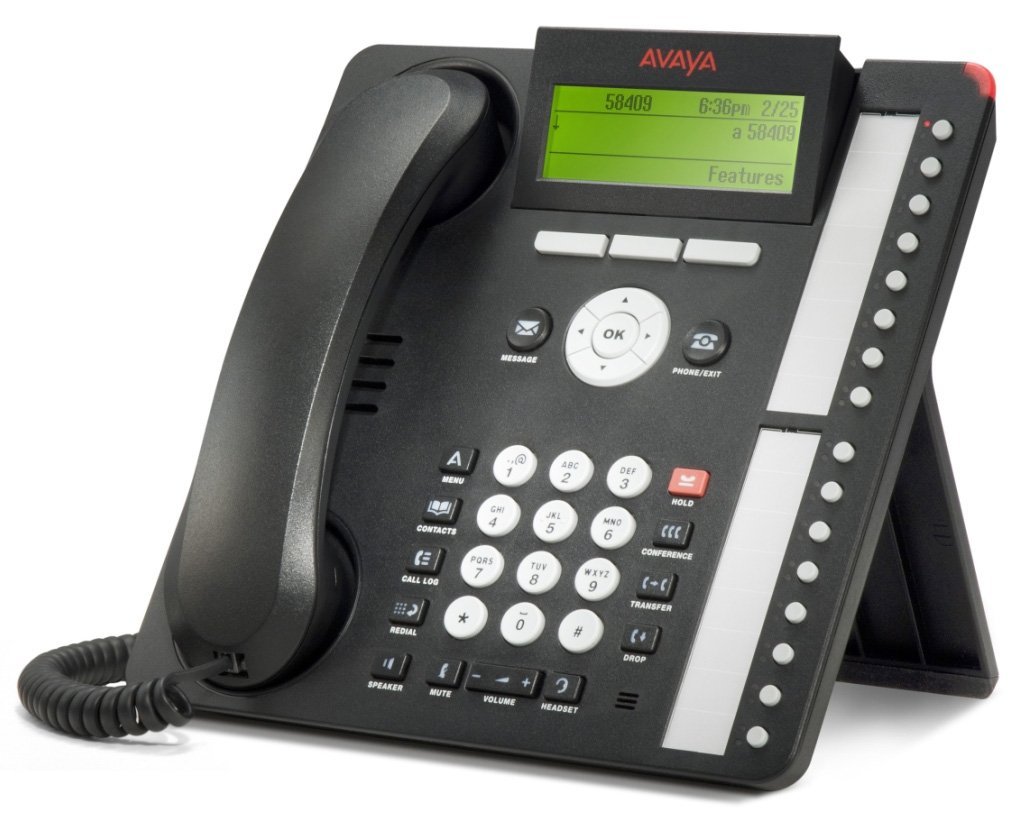
Figura 1: Avaya 1616 IP Telephone components. This image displays the main telephone unit, the handset, the coiled handset cord, an Ethernet cable, and the desk stand. The main unit features a display screen, a numeric keypad, and various function buttons. The desk stand is designed to elevate the phone for easier viewing e funzionamento.
- Telephone Base Unit: The main body of the phone with keypad, display, and function buttons.
- portatile: The receiver for voice communication.
- Cavo del ricevitore: Coiled cord connecting the handset to the base unit.
- Cavo Ethernet: Per la connessione di rete.
- Supporto da scrivania: For positioning the phone on a desk.
- Power Adapter (Sold Separately): A 5V local power supply may be required if Power over Ethernet (PoE) is not available.
2.2 Connessioni fisiche
- Fissare il supporto da scrivania: Securely attach the desk stand to the bottom of the telephone base unit.
- Collegare il portatile: Plug one end of the coiled handset cord into the handset and the other end into the designated handset port on the side or back of the telephone base unit.
- Connetti alla rete: Insert one end of the Ethernet cable into the "LAN" port on the back of the telephone and the other end into a network switch or router. The phone supports dual Ethernet ports for connection of the phone and a collocated PC with VLAN separation.
- Connetti alimentazione:
- Alimentazione su Ethernet (PoE): If your network switch supports 802.3af PoE, the phone will receive power through the Ethernet cable. No separate power adapter is needed.
- Local Power Supply: If PoE is not available, connect a 5V local power supply (sold separately) to the power port on the back of the telephone and then to an electrical outlet.
Once connected, the phone will power on and begin its boot sequence. This may take a few moments.
3. Istruzioni per l'uso
This section covers the basic operation of your Avaya 1616 IP Telephone.
3.1 Caratteristiche principali
- 16 Line Appearances/Feature Keys: Programmable buttons with dual LEDs for line status and feature access.
- High-Quality 2-Way Speakerphone: Per comunicazioni a mani libere.
- ID chiamante: Visualizza le informazioni sul chiamante in arrivo.
- Operazione multilinea: Supports multiple active lines.
- Funzionalità di chiamata in conferenza: Basic conferencing features.
3.2 Funzioni di chiamata di base
- Effettuare una chiamata:
- Sollevare il microtelefono o premere il pulsante Altoparlante.
- Comporre il numero desiderato utilizzando la tastiera.
- Press the "Call" or "Dial" softkey, or wait for automatic dialing.
- Risposta a una chiamata:
- Lift the handset, or press the Speaker button, or press the flashing line appearance button.
- Terminare una chiamata:
- Replace the handset, or press the Speaker button again if using speakerphone, or press the "End Call" softkey.
- Mettere una chiamata in attesa:
- During an active call, press the "Hold" button. The line appearance LED will flash.
- Per riprendere la chiamata, premere il pulsante lampeggiante di comparsa linea.
- Trasferimento di una chiamata:
- During an active call, press the "Transfer" button. The current call is put on hold.
- Dial the number of the party to whom you wish to transfer the call.
- Wait for the party to answer (consulted transfer) or press "Transfer" again to complete the transfer (blind transfer).
- Avvio di una conference call:
- During an active call, press the "Conference" button. The current call is put on hold.
- Comporre il numero della terza persona.
- Once the third party answers, press the "Conference" button again to join all parties.
4. Manutenzione
Proper maintenance ensures the longevity and optimal performance of your Avaya 1616 IP Telephone.
4.1 Pulizia
- Utilizzare una pasta morbida e leggermenteamp panno per pulire le superfici esterne del telefono.
- Avoid using abrasive cleaners, solvents, or strong chemicals, as these can damage the finish and electronic components.
- Do not spray cleaning liquids directly onto the phone. Apply to the cloth first.
- Ensure the phone is disconnected from power before cleaning.
4.2 Cura generale
- Tenere il telefono lontano da fonti di calore eccessivo, dalla luce solare diretta e dall'umidità.
- Evitare di far cadere il telefono o di sottoporlo a forti urti.
- Ensure cables are not pinched or strained.
5. Risoluzione Dei Problemi
This section provides solutions to common issues you might encounter with your Avaya 1616 IP Telephone.
| Problema | Possibile causa | Soluzione |
|---|---|---|
| Il telefono non si accende. | Nessuna alimentazione o collegamento difettoso. |
|
| Nessun segnale di linea. | Network connectivity issue or service problem. |
|
| Impossibile effettuare o ricevere chiamate. | Network configuration, service issue, or phone registration problem. |
|
| Qualità audio scadente. | Congestione della rete, cavo difettoso o problema con il ricevitore. |
|
If the problem persists after attempting these solutions, please contact your IT department or Avaya support for further assistance.
6. Specifiche
Key technical specifications for the Avaya 1616 IP Telephone (700450190).
| Caratteristica | Dettaglio |
|---|---|
| Numero di modello | 700450190 |
| Aspetto della linea | 16 with dual LEDs |
| Vivavoce | High-quality 2-way |
| Opzioni di montaggio | Desk or wall mountable (with optional adapter) |
| Porte Ethernet | Dual (for phone and collocated PC w/VLAN separation) |
| Fonte di alimentazione | 802.3af Power over Ethernet (PoE) or optional 5V local power supply |
| Tipo di combinatore | Tastiera singola |
| Tipo di sistema di risposta | Digitale |
| Dispositivi compatibili | Computers, Telephone Networks, VoIP Services |
| Capacità di teleconferenza | Di base |
| Operazione multilinea | Funzionamento multilinea |
| ID chiamante | SÌ |
| Colore | Nero |
| Dimensioni del prodotto | 9.8 x 7.9 x 2.8 pollici (circa) |
| Dimensioni del pacco | 16.8 x 10 x 3.3 pollici |
| Peso | 2.9 libbre (peso del pacco) |
7. Informazioni sulla garanzia
This Avaya 1616 IP Telephone (700450190) is typically offered with a Garanzia limitata di 90 giorni. This warranty covers defects in materials and workmanship under normal use. For specific terms and conditions, please refer to the warranty documentation provided at the time of purchase or contact your vendor.
Note: As a renewed product, warranty terms may vary from new products. Always confirm warranty details with your supplier.
8. Supporto
For technical assistance, further troubleshooting, or inquiries regarding your Avaya 1616 IP Telephone, please contact your system administrator or the vendor from whom you purchased the device. Avaya's official support channels can also provide resources and documentation for their products.
For general information about Avaya products, you may visit the official Avaya websito.


