
Importanti istruzioni di sicurezza
Please read these instructions carefully before operating the unit. Keep this manual for future reference.
- Non ostruire le aperture di ventilazione.
- Non installare vicino a fonti di calore.
- Proteggere il cavo di alimentazione per evitare che venga calpestato o schiacciato.
- Utilizzare solo accessori/componenti specificati dal produttore.
- Scollegare l'apparecchio durante i temporali o quando non viene utilizzato per lunghi periodi di tempo.
- Affidare tutti gli interventi di assistenza a personale qualificato.
- AVVERTIMENTO: Per ridurre il rischio di incendi o scosse elettriche, non esporre questo apparecchio alla pioggia o all'umidità.
Prodotto finitoview
The Victrola VS-120 is a versatile microsystem offering multiple audio playback options. It includes Bluetooth connectivity, a CD player, USB playback, an Aux-in port, and an FM radio.
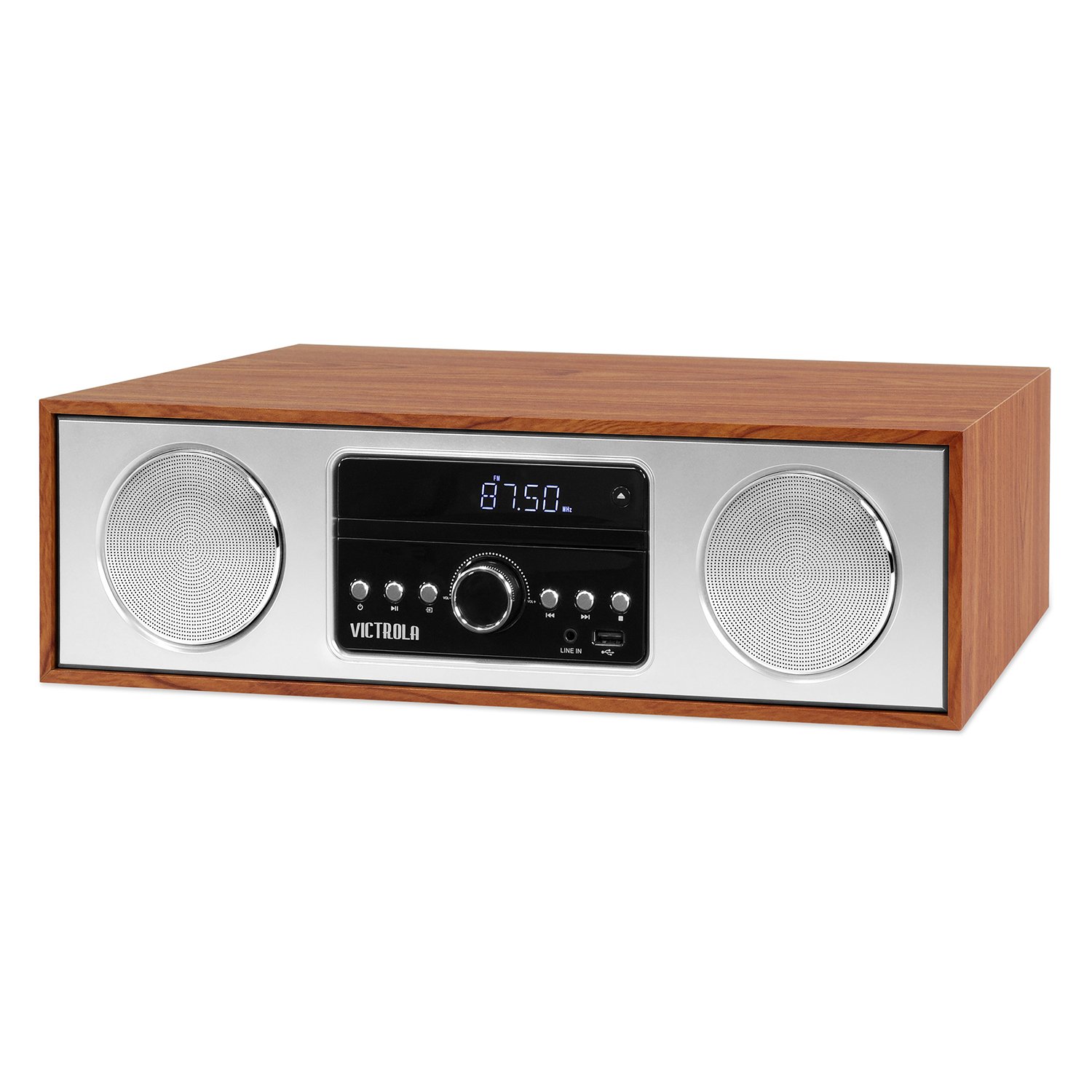
Davanti view of the Victrola VS-120 Bluetooth Microsystem, showing the speaker, display, and control panel.

The Victrola VS-120 microsystem with its CD tray open, revealing a disc, and the included remote control positioned in the foreground.
Guida all'installazione
Disimballaggio
Carefully remove the unit from its packaging. Ensure all accessories are present:
- Victrola VS-120 Microsystem
- Telecomando
- Adattatore di alimentazione
- Manuale dell'utente (questo documento)
Collegamento di potenza
- Insert the small end of the power adapter into the DC IN jack on the rear of the unit.
- Collegare l'altra estremità dell'adattatore di alimentazione a una presa a muro standard (CA 100-240 V, 50/60 Hz).
- The unit will enter standby mode, and the LED clock display will illuminate.
Antenna Connection (FM Radio)
For optimal FM radio reception, extend the FM wire antenna fully. Adjust its position for the best signal.
Istruzioni per l'uso
Accensione/spegnimento
Premere il tasto ENERGIA pulsante sull'unità o sul telecomando per accendere o spegnere il sistema (modalità standby).
Selezione della modalità
Premere il tasto MODALITÀ button on the unit or remote control repeatedly to cycle through available functions: Bluetooth, CD, USB, AUSILIARIO, E Radio FM.
Funzionamento Bluetooth
- Selezionare Bluetooth mode. The display will show "BT" and flash, indicating pairing mode.
- On your Bluetooth-enabled device (smartphone, tablet, etc.), enable Bluetooth and search for "Victrola VS-120".
- Select "Victrola VS-120" to pair. Once connected, the "BT" indicator will stop flashing and a confirmation tone will sound.
- You can now stream audio from your device to the microsystem.
- Use your device or the microsystem's controls (PLAY/PAUSE, NEXT, PREVIOUS) to manage playback.
Riproduzione CD
- Selezionare CD modalità.
- Premere il tasto APRI/CHIUDI pulsante per aprire il vassoio del CD.
- Place a CD (audio CD or MP3 CD) with the label side facing up into the tray.
- Premere APRI/CHIUDI di nuovo per chiudere il vassoio. L'unità leggerà il disco e inizierà la riproduzione automaticamente.
- Utilizzo RIPRODUCI/PAUSA, PROSSIMO, E PRECEDENTE pulsanti per controllare la riproduzione.
Riproduzione USB
- Insert a USB flash drive (FAT32 format, containing MP3 files) nella porta USB.
- Selezionare USB mode. The unit will automatically detect and begin playing MP3 files dall'unità.
- Utilizzo RIPRODUCI/PAUSA, PROSSIMO, E PRECEDENTE pulsanti per controllare la riproduzione.
Funzionamento della radio FM
- Selezionare Radio FM modalità.
- Premere e tenere premuto il tasto SINTONIA +/- pulsanti per cercare automaticamente la stazione disponibile successiva.
- Premere il tasto SINTONIA +/- buttons briefly to manually adjust the frequency in small increments.
- To save a station as a preset, press the MEM pulsante, quindi utilizzare PRESET +/- per selezionare un numero preimpostato e premere MEM di nuovo per confermare.
- Per richiamare una stazione preimpostata, utilizzare il tasto PRESET +/- pulsanti.
Connessione Aux-in
- Collegare un dispositivo audio esterno (ad esempio, lettore MP3, smartphone) al AUX IN jack utilizzando un cavo audio da 3.5 mm (non incluso).
- Selezionare AUSILIARIO modalità.
- Controlla la riproduzione e il volume dal tuo dispositivo esterno.
Funzioni del telecomando
The included remote control provides full functionality. Ensure batteries are correctly inserted. Key functions include:
- ENERGIA: Turn unit on/off.
- DIREZIONI: Seleziona la sorgente audio.
- VOL +/-: Regola il volume.
- PLAY/PAUSE, NEXT, PREVIOUS: Control playback for CD, USB, and Bluetooth.
- SINTONIA +/-: Tune FM radio stations.
- MEM: Store FM presets.
- PRESET +/-: Select FM presets.
- EQ: Cycle through equalizer settings (Flat, Rock, Pop, Jazz, Classic).
- OROLOGIO: Imposta l'orologio.
- DIMMERATORE: Regola la luminosità del display.
Regolazione delle impostazioni EQ
Premere il tasto EQ button on the remote control to cycle through preset equalizer modes: Flat, Rock, Pop, Jazz, and Classic. Select the mode that best suits your audio preference.
Impostazione dell'orologio
Per impostare l'orologio, premere il tasto OROLOGIO button on the remote control. Use the SINTONIA +/- buttons to adjust the hour and minute, and press OROLOGIO nuovamente per confermare ogni impostazione.
Manutenzione
Pulizia dell'unità
To clean the exterior of the unit, use a soft, dry cloth. Do not use abrasive cleaners, waxes, or solvents as these may damage the surface. Ensure the unit is unplugged before cleaning.
Cura del lettore CD
Handle CDs by their edges. Keep them clean and free of scratches. If a CD is dirty, wipe it gently with a soft, lint-free cloth from the center outwards. Do not use solvents or abrasive cleaners on CDs.
Risoluzione dei problemi
| Problema | Possibile causa | Soluzione |
|---|---|---|
| Nessun potere | Cavo di alimentazione non collegato; presa di corrente non attiva. | Assicurarsi che il cavo di alimentazione sia collegato saldamente; provare una presa diversa. |
| Nessun suono | Volume too low; Incorrect mode selected; External device not playing. | Increase volume; Select correct mode (BT, CD, USB, AUX, FM); Ensure external device is playing and its volume is up. |
| Il CD non viene riprodotto | CD inserito in modo errato; CD sporco o graffiato; formato disco non supportato. | Insert CD with label side up; Clean or replace CD; Ensure it's an audio CD or MP3 CD. |
| L'associazione Bluetooth non riesce | Unit not in pairing mode; Device too far; Device already paired to another unit. | Ensure unit is in BT mode and "BT" is flashing; Move device closer; Disconnect from other devices. |
| Scarsa ricezione FM | Antenna non estesa o posizionata correttamente. | Fully extend and reposition the FM wire antenna. |
| Il telecomando non funziona | Batterie scariche o inserite in modo errato; Ostruzione tra il telecomando e l'unità. | Replace batteries; Ensure correct polarity; Remove obstructions; Point remote directly at the unit's sensor. |
Specifiche
- Marca: Vitrola
- Modello: VS-120
- Connettività: Bluetooth, USB, ausiliario (3.5 mm)
- Fonti audio: CD Player, USB Player, FM Radio, Bluetooth, Aux-in
- Potenza di uscita: 30 Watt
- Formati audio supportati: CD, MP3
- Dimensioni (L x P x A): 15.97 x 4.69 x 10.83 pollici (40.56 x 11.91 x 27.51 cm)
- Peso: 10.76 libbre (4.88 kg)
- Potenza in ingresso: CA 100-240 V, 50/60 Hz
- Colore: Acero
Garanzia e supporto
Victrola products are designed with quality and performance in mind. For detailed warranty information, please refer to the warranty card included with your product or visit the official Victrola website. For technical support or customer service inquiries, please contact Victrola customer support through their official channels.
Websito: www.victrola.com