
Aigital N300
Manuale utente dell'extender di portata WiFi Aigital N300
Wireless Repeater, Internet Signal Booster, Access Point
Modello: N300
1. Introduzione
This manual provides detailed instructions for the setup, operation, and maintenance of your Aigital N300 WiFi Range Extender. Please read this manual carefully before use to ensure proper functionality and optimal performance. This device is designed to expand your wireless network coverage and provide internet access in areas with weak or no signal.
2. Prodotto finitoview
The Aigital N300 WiFi Range Extender is a compact and versatile device. It supports 2.4 GHz frequency band with a data transfer rate of up to 300 Megabits Per Second. It can function as a WiFi Repeater to extend your existing network or as an Access Point to create a new wireless network from a wired connection.
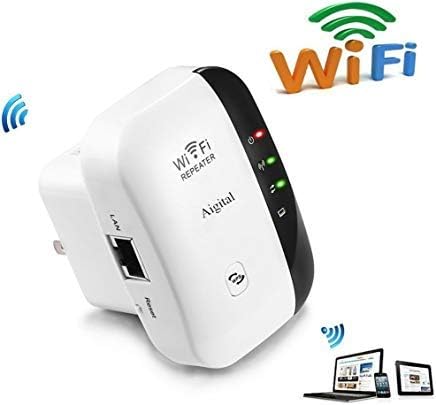
The Aigital N300 WiFi Range Extender is a compact device designed to expand your wireless network coverage. It features indicator lights for power, WLAN, and WPS status, along with an Ethernet (LAN) port and a reset button. The device is white with a black accent on one side.
Componenti chiave:
- Indicatore di alimentazione: Mostra lo stato di alimentazione del dispositivo.
- Indicatore WLAN: Indica l'attività della rete wireless.
- Pulsante WPS: For quick and secure connection to compatible routers.
- Porta LAN: For wired connection to devices or for AP mode setup.
- Pulsante di reset: Utilizzato per ripristinare il dispositivo alle impostazioni predefinite di fabbrica.
3. Istruzioni per l'installazione
Before beginning the setup, ensure your Aigital N300 is plugged into a power outlet near your main router or modem.
Connessione iniziale:
- Collegare il ripetitore WiFi a una presa elettrica.
- Wait for the power indicator light to become stable.
- On your phone, computer, or laptop, connect to the Wi-Fi network named "wifi repeater". This is the default network broadcast by the extender.
Configurazione tramite Web Navigatore:
- Aprire un web browser (ad esempio, Chrome, Firefox, Edge).
- Nella barra degli indirizzi, digita 192.168.10.1 e premi Invio.
- You will be prompted to log in. The default username and password are typically amministratore (or as specified in the included mini-manual).
- Follow the on-screen wizard to select your desired operating mode (Repeater or AP).
Ripristino del dispositivo:
If you need to reconfigure the device or encounter issues, you can perform a factory reset:
- Con il dispositivo acceso, individua il pulsante di reset (solitamente un piccolo foro).
- Use a paperclip or a similar pointed object to press and hold the reset button for over 10 seconds.
- Release the button when the power light and WPS light turn on, and the WLAN light blinks. The device will restart with factory default settings.
4. Modalità operative
4.1. Modalità ripetitore (estensione della portata)
This mode is used to extend the coverage of your existing Wi-Fi network. It is ideal when your primary Wi-Fi signal is weak or non-existent in certain areas of your home or office, such as a yard, other rooms, a second floor, a basement, or a garage.
Setup Steps for Repeater Mode:
- Dopo aver effettuato l'accesso web interface (192.168.10.1), select "Repeater Mode".
- L'extender cercherà le reti Wi-Fi disponibili. Seleziona la tua rete Wi-Fi domestica dall'elenco.
- Enter the exact password for your home Wi-Fi network. Importante: The password must be identical to your main Wi-Fi password for internet access.
- È possibile scegliere di mantenere lo stesso SSID (nome della rete) oppure crearne uno nuovo per la rete estesa.
- Save the settings and wait for the extender to restart. Once restarted, the WLAN indicator should be stable, indicating a successful connection.
4.2. Modalità AP (punto di accesso)
This mode transforms a wired internet connection into a wireless Wi-Fi hotspot. It is useful if you have a modem but no router, or if you want to add Wi-Fi capability to a wired-only network, allowing wireless devices like phones and tablets to connect.
Setup Steps for AP Mode:
- Connect the RJ-45 Ethernet Cable from your modem or wired network to the LAN port of the Aigital N300 extender.
- Dopo aver effettuato l'accesso web interface (192.168.10.1), select "AP Mode".
- Configurare il nuovo nome della rete Wi-Fi (SSID) e la password.
- Save the settings and wait for the extender to restart. Once restarted, your new Wi-Fi network will be available for connection.
5. Risoluzione Dei Problemi
- No Internet Access in Repeater Mode: Ensure the password entered for your home Wi-Fi network during setup is exactly the same. Any mismatch will prevent internet access. Try resetting the device and reconfiguring.
- Cannot Access Configuration Page (192.168.10.1): Ensure your device is connected to the "wifi repeater" network. If still unable, try resetting the extender to factory defaults and attempt connection again.
- Segnale debole dopo l'installazione: Relocate the extender to a position that is halfway between your main router and the area where you need improved Wi-Fi coverage. Avoid placing it near large metal objects or other electronic devices that may cause interference.
- Il dispositivo non si accende: Check the power outlet and ensure the extender is securely plugged in.
- Video di installazione: For visual guidance, a setup video is available at https://youtu.be/3uoGpCGlTWk.
6. Specifiche
| Caratteristica | Dettaglio |
|---|---|
| Modello | N300 |
| Banda di frequenza | 2.4 GHz |
| Velocità di trasferimento dati | 300 Megabit al secondo |
| Volumi supportatitage | 110V-240V |
| Sicurezza WLAN | WPA2, WPA, WEP(128/64) |
| Antenne | Integrato |
| Dimensioni (L x P x A) | Dimensioni: 5.51 x 5.79 x 8 cm |
| Peso | 136 grammi |
| Componenti inclusi | 1x WiFi Repeater, 1x RJ-45 Ethernet Cable, 1x User Manual |
7. Manutenzione
- Pulizia: Utilizzare un panno morbido e asciutto per pulire l'esterno del dispositivo. Non utilizzare detergenti liquidi o spray.
- Posizionamento: For optimal performance, place the extender in an open area, away from obstructions like walls, large furniture, or metal objects. Avoid placing it near other electronic devices that may cause signal interference.
- Aggiornamenti del firmware: Controllare periodicamente le istruzioni del produttore websito per eventuali aggiornamenti firmware disponibili per garantire le migliori prestazioni e sicurezza.
8. Garanzia e supporto
For any inquiries regarding setup, troubleshooting, or product information, please contact Aigital customer support. While specific warranty details are not provided in this manual, please refer to your purchase documentation or contact the seller for warranty terms and conditions.
Puoi contattare il nostro team di supporto via e-mail all'indirizzo: aigital@hotmail.com
Ask a question about this manual
Ask about setup, troubleshooting, compatibility, parts, safety, or missing instructions. Manuals+ will review the question and use this page’s manual context to help answer it.