
UIOTEC SRD-05VDC-SL-C
UIOTEC SRD-05VDC-SL-C 8-Way 5V Relay Module User Manual
Modello: SRD-05VDC-SL-C
Brand: UIOTEC
1. Introduzione
The UIOTEC SRD-05VDC-SL-C is an 8-channel USB controlled relay module designed for ON/OFF switching of electrical devices. It is suitable for various applications including home automation, robotics, and PC intelligent control systems. This module utilizes HID technology, eliminating the need for specific drivers, offering plug-and-play functionality with Windows XP, 7, and 8 (32-bit and 64-bit) systems.
2. Prodotto finitoview
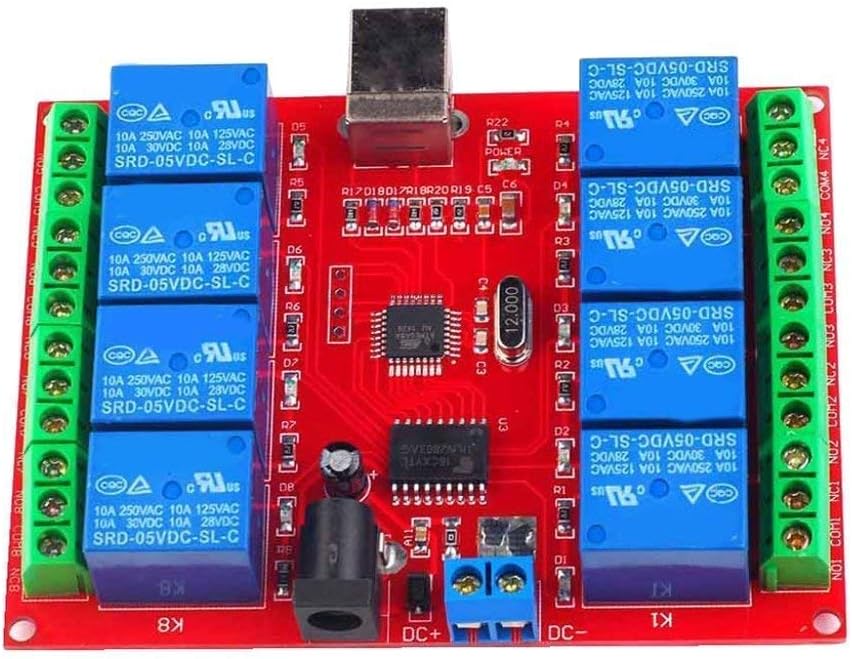
Figure 1: UIOTEC SRD-05VDC-SL-C 8-Way 5V Relay Module. This image shows the red PCB board with eight blue relays, green screw terminals on both sides, a USB Type-B port, and a DC power jack.
2.1 Caratteristiche principali
- HID technology for driver-free, plug-and-play operation.
- Compatibility with Windows XP/7/8 (32-bit and 64-bit systems).
- High-performance USB controller chip and military-grade PCB production.
- Eight 5V relays, capable of controlling loads up to 250V 10A AC or 30V 10A DC.
- Reserved 4-way and 8-way power interfaces for maintaining relay state even when USB is disconnected or PC is off. (Note: 1-way and 2-way versions do not have this power connector).
- LED indicators for power and each relay output.
3. Specifiche
| Parametro | Valore |
|---|---|
| Specifiche del relè | 10A 250VAC / 10A 125VAC / 10A 30VDC / 10A 28VDC |
| Alimentazione elettrica | 5V CC |
| Tipo di relè | Relè 5V |
| Tipo di contatto | NC / COM / NO (Normally Closed / Common / Normally Open) |
| Corrente di ingresso | ≤300mA |
| Carico massimo | AC250V/10A or DC30V/10A |
| Sistema operativo supportato | Win XP/Win7/Win8 32-bit/64-bit systems |
| Consumo attuale | 300mA |
| Dimensioni (L x P x A) | Dimensioni: 93 mm x 70 mm x 16 mm |
| PCB Parameters | FR4 / 1.5mm / two layers / metalized holes / HAL / white stamp / maschera per saldatura |
4. Configurazione e installazione
- Collegamento elettrico: Connect a 5V DC power supply to the module's DC power jack or the DC+ / DC- screw terminals. Ensure the power supply can provide at least 300mA. For 4-way and 8-way modules, this external power supply allows the relay state to be maintained even if the USB connection is lost.
- Connessione USB: Connect the module to your computer's USB port using a standard USB cable. The module will be recognized automatically as a HID device, requiring no additional driver installation.
- Connessione di carico: Identify the Normally Open (NO), Normally Closed (NC), and Common (COM) terminals for each relay.
- Normalmente aperto (NO): The circuit is open (disconnected) when the relay is de-energized and closes (connects) when the relay is energized.
- Normalmente chiuso (NC): The circuit is closed (connected) when the relay is de-energized and opens (disconnects) when the relay is energized.
- Comune (COM): Il terminale comune per l'interruttore del relè.
5. Istruzioni per l'uso
The UIOTEC SRD-05VDC-SL-C module is controlled via software running on your PC. UIOTEC provides universal software compatible with their relay boards, along with example code for various programming environments.
5.1 Controllo del software
- Scarica il software: Obtain the latest control software and example code from the UIOTEC official website or the provided resources.
- Avvia applicazione: Run the provided software application on your Windows PC.
- Controllo relè: The software interface will typically allow you to individually control each of the 8 relays (e.g., turn ON/OFF). Observe the LED indicators on the module, which will illuminate when a corresponding relay is energized.
5.2 Programmazione Examples
UIOTEC provides software examples for various programming languages, facilitating custom application development:
- VB6
- BCB6
- Java (NetBeans)
- VB.NET 2010 Express
- C++.NET 2010 Express
Fare riferimento all'esample code and documentation for integrating the relay module into your own projects.
6. Manutenzione
- Pulizia: Mantenere il modulo pulito e privo di polvere. Utilizzare un panno morbido e asciutto per la pulizia. Non utilizzare detergenti liquidi o solventi.
- Ambiente: Utilizzare il modulo in un ambiente asciutto, lontano da umidità, temperature estreme e sostanze corrosive.
- Connessioni: Controllare periodicamente tutti i collegamenti elettrici per accertarsi che siano saldi e privi di corrosione.
- Magazzinaggio: When not in use for extended periods, store the module in an anti-static bag in a cool, dry place.
7. Risoluzione Dei Problemi
| Problema | Possibile causa | Soluzione |
|---|---|---|
| Module not recognized by PC. | USB cable faulty; USB port faulty; Module not powered correctly. | Try a different USB cable and/or USB port. Ensure 5V DC power is supplied to the module. Check device manager for HID device recognition. |
| Relays not switching. | Incorrect software command; Insufficient power supply; Overload on relay. | Verify software commands are correct. Ensure stable 5V DC power. Check if the connected load exceeds relay specifications. |
| Gli indicatori LED non funzionano. | No power to module; Faulty LED. | Check power supply connection. If power LED is off, troubleshoot power. If individual relay LEDs are off, check software commands. |
| Operazione intermittente. | Unstable power supply; Loose connections; Electromagnetic interference. | Use a stable 5V DC power supply. Secure all connections. Keep module away from strong electromagnetic fields. |
8. Applicazioni
The UIOTEC SRD-05VDC-SL-C 8-Way 5V Relay Module is versatile and can be used in various projects, including:
- Robotics control
- Sistemi di domotica
- Controlling doors and windows via a Windows system
- General controller power supply applications
9. Contenuto della confezione
Dopo aver aperto la confezione, dovresti trovare il seguente articolo:
- 1 x UIOTEC SRD-05VDC-SL-C 8-Channel USB Relay Module
10. Garanzia e supporto
For warranty information, technical support, or further inquiries, please refer to the official UIOTEC webo contattare direttamente il servizio clienti. Conservare la ricevuta d'acquisto per eventuali reclami in garanzia.
Ask a question about this manual
Ask about setup, troubleshooting, compatibility, parts, safety, or missing instructions. Manuals+ will review the question and use this page’s manual context to help answer it.