
Ubio Labs 10W Qi Wireless Charging Pad
Ubio Labs 10W Qi Wireless Charging Pad User Manual
Model: 10W Qi Wireless Charging Pad
Introduzione
Grazie per l'acquistoasing the Ubio Labs 10W Qi Wireless Charging Pad. This device provides convenient and efficient wireless charging for compatible smartphones and other Qi-enabled devices. This manual will guide you through the setup, operation, and maintenance of your new wireless charging pads.
Cosa c'è nella scatola
Il tuo pacco dovrebbe contenere i seguenti articoli:
- 2 x Ubio Labs 10W Qi Wireless Charging Pads
- 2 x 9VDC Wall Adaptors
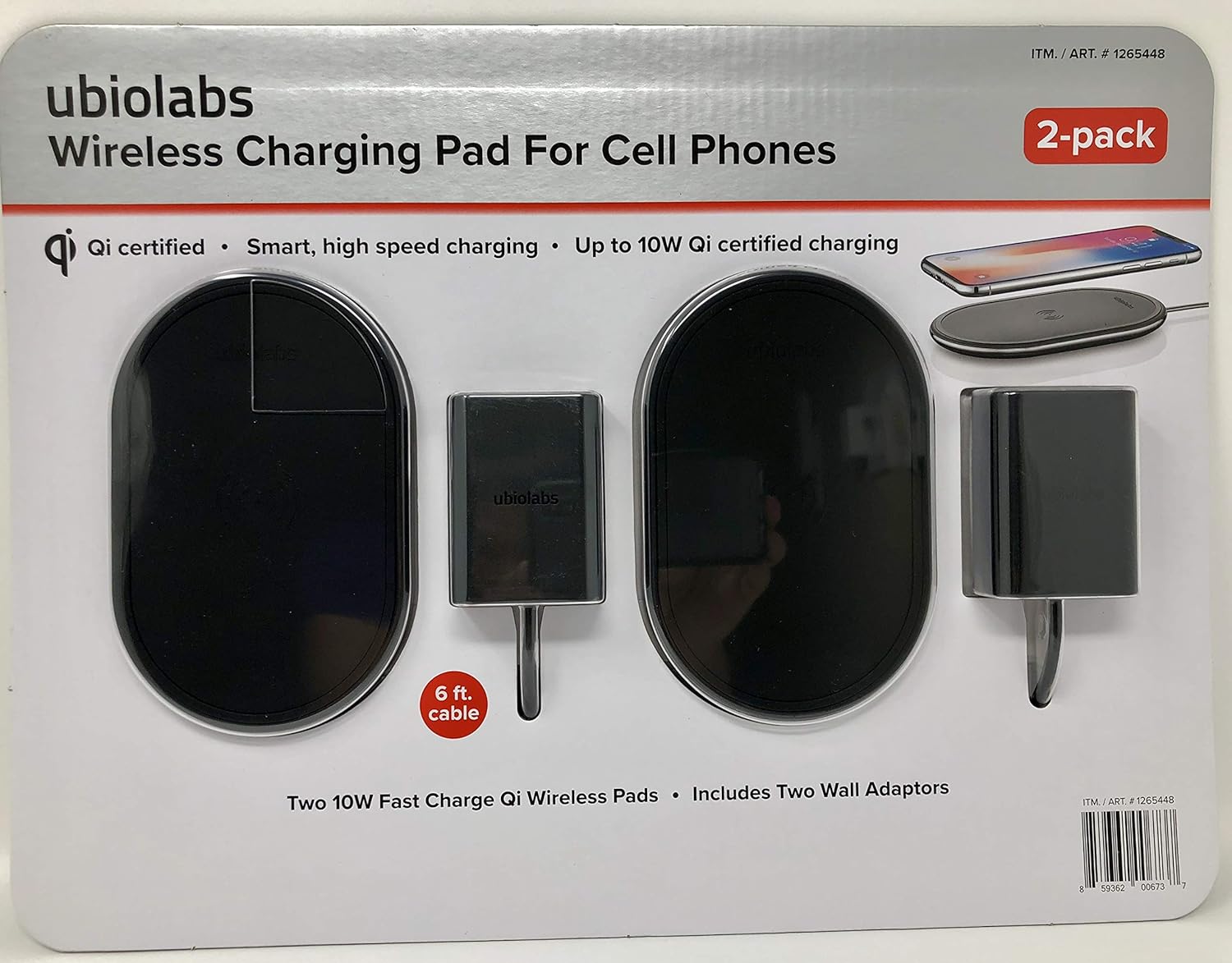
Immagine: Frontale view of the Ubio Labs 10W Qi Wireless Charging Pad 2-pack packaging, showing two black oval charging pads and two wall adapters.
Caratteristiche
- Certificato Qi: Ensures compatibility and safe charging with Qi-enabled devices.
- Smart, High-Speed Charging: Optimized power delivery for efficient charging.
- Up to 10W Qi Certified Charging: Provides fast wireless charging speeds.
- Non-slip, rubberized surface: Helps keep your device securely in place during charging.
- Indicatore LED: Provides visual feedback on charging status.
- 6 ft. Cable: Long cable for flexible placement.
Compatibilità
The Ubio Labs 10W Qi Wireless Charging Pad is designed for use with Qi-enabled smartphones and devices. Charging speeds may vary depending on the device and its wireless charging capabilities.
Android™ Compatibility
Funziona con: Android phones including Samsung Galaxy S9, S9+, Note 9, Note 8, S8, S8+, S7 Active, S7 Edge, S7, LG G6, LGV30, Moto Z, Sony Xperia XZ2, Nokia 8 Sirocco.
Does not work with: Galaxy S5, J7 models, J3 models, On5, Luna, Express Prime 3, Amp Prime models, Sol models, Halo, Android tablets, other Android accessories or wearables.
Compatibilità Apple
Funziona con: Any iPhone released October 2017 or later including iPhone X, iPhone 8 Plus, iPhone 8.
Does not work with: Any iPhone released before October 2017 or other Apple products including iPhone 7 Plus, iPhone 7, iPhone SE, and all older iPhone models, iPad Pro, iPad Mini, iPad Air, iPod Touch, AirPods, Apple Watch.

Immagine: Indietro view of the Ubio Labs Wireless Charging Pad packaging, detailing phone compatibility for Android and Apple devices, and highlighting 10W and 7.5W charging capabilities.
Impostare
- Connect the Wall Adaptor: Plug one end of the included 9VDC wall adaptor into the charging port on the Ubio Labs Wireless Charging Pad.
- Collegare alla presa di corrente: Plug the other end of the wall adaptor into a standard electrical wall outlet.
- Posizionamento: Place the charging pad on a flat, stable surface, such as a desk or nightstand. Ensure there is adequate ventilation around the pad.
Istruzioni per l'uso
- Posiziona il tuo dispositivo: Carefully place your Qi-enabled smartphone or device directly onto the center of the Ubio Labs Wireless Charging Pad.
- Verifica della ricarica: The LED indicator light on the charging pad will illuminate (e.g., green) to confirm that your device is properly aligned and charging. Your device's screen should also indicate that it is charging wirelessly.
- Posizionamento ottimale: If charging does not begin immediately, slightly adjust the position of your device on the pad until the LED indicator lights up and charging commences. Ensure no foreign objects are between the device and the pad.
- Ricarica completata: Once your device is fully charged, it will typically display a full battery icon. You may then remove your device from the charging pad.
Nota: For optimal charging performance, ensure your device is centered on the charging pad. Some phone cases may interfere with wireless charging; if this occurs, remove the case before placing the device on the pad.
Manutenzione
- Pulizia: Disconnect the charging pad from the power source before cleaning. Use a soft, dry cloth to wipe the surface of the charging pad. Do not use liquid cleaners or abrasive materials.
- Magazzinaggio: Quando non in uso, conservare il caricabatterie in un luogo fresco e asciutto, lontano dalla luce solare diretta e da temperature estreme.
- Gestione: Avoid dropping or subjecting the charging pad to strong impacts, as this may damage internal components.
Risoluzione dei problemi
| Problema | Possibile soluzione |
|---|---|
| Il dispositivo non si carica. |
|
| Ricarica lenta. |
|
| L'indicatore LED non si accende. |
|
Specifiche
| Caratteristica | Dettaglio |
|---|---|
| Marca | Laboratori Ubio |
| Modello | Tappetino di ricarica wireless Qi da 10 W |
| Tecnologia di connettività | Senza fili |
| Tipo di connettore | Senza fili |
| Dispositivi compatibili | Smartphones (Qi-enabled) |
| Componenti inclusi | 2 Ubio Labs 10W Qi wireless pads, 2 9VDC wall adaptors |
| Caratteristica speciale | Ricarica wireless |
| Colore | Nero |
| Ingresso volumetage | 9 Volt |
| Cosatage | 10 watt |
| Peso dell'articolo | 1.55 pounds (approx. for the pack) |
| Dimensioni del pacco | 14.25 x 8.82 x 1.02 pollici |
| Produttore | Laboratori Ubio |
| ASIN | B07F22RBK7 |
| Data prima disponibilità | 26 giugno 2018 |
Garanzia e supporto
For warranty information or technical support, please refer to the contact information provided on the product packaging or visit the official Ubio Labs webluogo. Conserva la ricevuta di acquisto per eventuali richieste di garanzia.
Produttore: Laboratori Ubio
Websito: www.biolabs.com (Nota: questo è un segnaposto URL as no specific support link was provided in the data.)
Ask a question about this manual
Ask about setup, troubleshooting, compatibility, parts, safety, or missing instructions. Manuals+ will review the question and use this page’s manual context to help answer it.