
Introduzione
Thank you for choosing the Zerone 2-PIN Dual PTT Shoulder Speaker Microphone. This device is designed to enhance your communication experience with compatible two-way radios, offering convenience and clear audio transmission and reception. This manual provides essential information for the proper setup, operation, and maintenance of your speaker microphone.
This speaker microphone is specifically compatible with Baofeng UV-82 series two-way radios.
Prodotto finitoview
Caratteristiche principali
- Doppi pulsanti PTT (Push-To-Talk): Allows for easy communication with two accessible buttons.
- Integrated Speaker and Microphone: Enables hands-free communication without needing to hold the radio.
- Clip girevole: Features a durable clip on the backside for secure attachment to clothing or gear.
- Design leggero e portatile: Ensures comfortable use during extended periods.
- 2-PIN Connector: Compatible with specific two-way radio models, such as the Baofeng UV-82.
Contenuto della confezione
- 1 x Zerone 2-PIN Dual PTT Shoulder Speaker Microphone
Note: The two-way radio is not included and must be purchased separately.
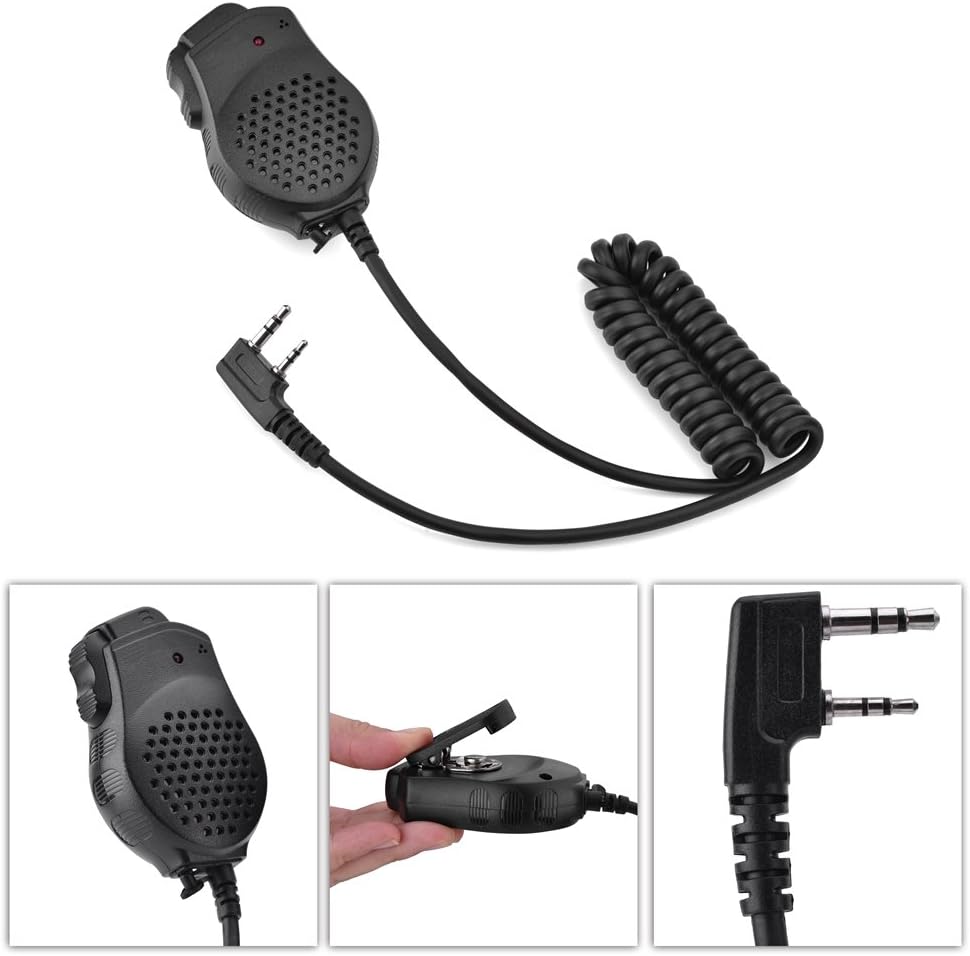
Image 1: Zerone 2-PIN Dual PTT Shoulder Speaker Microphone. This image shows the overall design of the speaker microphone, including the coiled cable and the 2-pin connector.
Impostare
- Identificare il connettore: Locate the 2-pin audio jack on your compatible two-way radio (e.g., Baofeng UV-82).
- Collega il microfono: Align the 2-pin connector of the speaker microphone with the radio's audio jack. Gently push the connector firmly into the radio's port until it is fully seated. Ensure a secure connection to prevent audio interruptions.
- Fissare il microfono: Use the rotatable clip on the back of the speaker microphone to attach it to your collar, shoulder, or other convenient location on your clothing or gear. This allows for easy access and hands-free operation.

Image 2: Close-up of the 2-pin connector. This image highlights the specific 2-pin configuration required for compatibility with your radio.

Image 3: Close-up of the rotatable clip. This image shows the clip mechanism used to secure the microphone to clothing or gear.
Istruzioni per l'uso
Ricezione dell'audio
- Once connected, audio from your radio will be routed through the speaker microphone.
- Adjust the volume on your two-way radio to a comfortable listening level.
Transmitting Audio (Push-To-Talk)
- To transmit, press and hold one of the PTT buttons located on the side of the speaker microphone.
- Speak clearly into the microphone grille, which is typically located on the front face of the unit.
- Una volta terminato di parlare, rilasciare il pulsante PTT per tornare alla modalità di ricezione.

Immagine 4: Indietro view of the speaker microphone. This image shows the location of the dual PTT buttons for transmitting.

Immagine 5: anteriore view of the speaker microphone. This image displays the speaker grille and the integrated microphone for clear audio capture.
Manutenzione
- Pulizia: Wipe the speaker microphone with a soft, dry cloth to remove dust and dirt. Do not use harsh chemicals or abrasive cleaners.
- Magazzinaggio: Quando non in uso, conservare il dispositivo in un luogo fresco e asciutto, lontano dalla luce solare diretta e da temperature estreme.
- Cura del cavo: Evitare di piegare bruscamente o tirare eccessivamente il cavo per evitare danni ai fili interni.
- Esposizione all'acqua: Questo dispositivo non è impermeabile. Evitare di esporlo a pioggia, schizzi o immersioni in acqua.
Risoluzione dei problemi
- No audio from speaker microphone:
-
- Ensure the 2-pin connector is fully and securely inserted into the radio's audio jack.
- Check the volume level on your two-way radio; increase if necessary.
- Verify that your radio is powered on and functioning correctly.
- Cannot transmit (PTT not working):
-
- Assicurarsi che il connettore a 2 pin sia inserito completamente e saldamente.
- Confirm that you are pressing and holding the PTT button firmly while speaking.
- Check your radio's settings to ensure external microphone input is enabled, if applicable.
- Poor audio quality (static, muffled sound):
-
- Assicurarsi che il connettore sia pulito e privo di detriti.
- Controllare che il cavo o il connettore non siano danneggiati.
- Test the speaker microphone with another compatible radio, if available, to rule out radio issues.
- Ensure you are speaking directly into the microphone grille and not covering it.
Specifiche
| Caratteristica | Dettaglio |
|---|---|
| Modello | Zeronemhr496nzay (2 PTT) |
| Materiale | Plastica |
| Livello di pressione sonora | 94 dB ± 3dB |
| Risposta in frequenza | Frequenza |
| Impedenza dell'altoparlante | 8 ± 15% |
| Sensibilità del microfono | -38dB ± 2dB |
| Ingresso audio | 100 mW |
| Impedenza del microfono | 2.2 K Ω |
| Colore | Nero |
| Peso | Circa 100 g |
| Tipo di connettore | 2 pin |
| Dispositivi compatibili | Baofeng UV-82 Two Way Radios |
Garanzia e supporto
Per informazioni sulla garanzia e sull'assistenza clienti, consultare la documentazione fornita con l'acquisto o contattare il rivenditore. Conservare la prova d'acquisto per eventuali reclami in garanzia.
For further assistance, you may also visit the official Zerone brand store or contact their customer service channels.