
1. Introduzione
Thank you for choosing the Eurolite FD-32+1 DMX Dimmer Panel. This manual provides essential information for the safe and efficient operation of your device. Please read these instructions carefully before initial use and keep them for future reference. This device is designed for professional stage and show applications, offering precise DMX control over lighting fixtures.
2. Istruzioni di sicurezza
Osservare sempre le seguenti precauzioni di sicurezza per evitare scosse elettriche, incendi o danni al dispositivo.
- Sicurezza elettrica: Ensure the power supply matches the device's requirements (9V - 12V / 300 mA DC). Disconnect power before cleaning or servicing.
- Ambiente: Do not expose the device to rain, moisture, or extreme temperatures. Operate in a dry, well-ventilated area.
- Gestione: Avoid strong impacts or dropping the device. Do not open the housing or attempt repairs yourself; refer servicing to qualified personnel.
- Ventilazione: Assicurare un adeguato flusso d'aria attorno all'unità per evitare il surriscaldamento. Non ostruire le aperture di ventilazione.
3. Prodotto finitoview
The Eurolite FD-32+1 DMX Dimmer Panel is a compact DMX controller designed for precise control of lighting effects. It features multiple faders for individual channel control and a master fader for overall intensity adjustment.
3.1 Controlli del pannello frontale
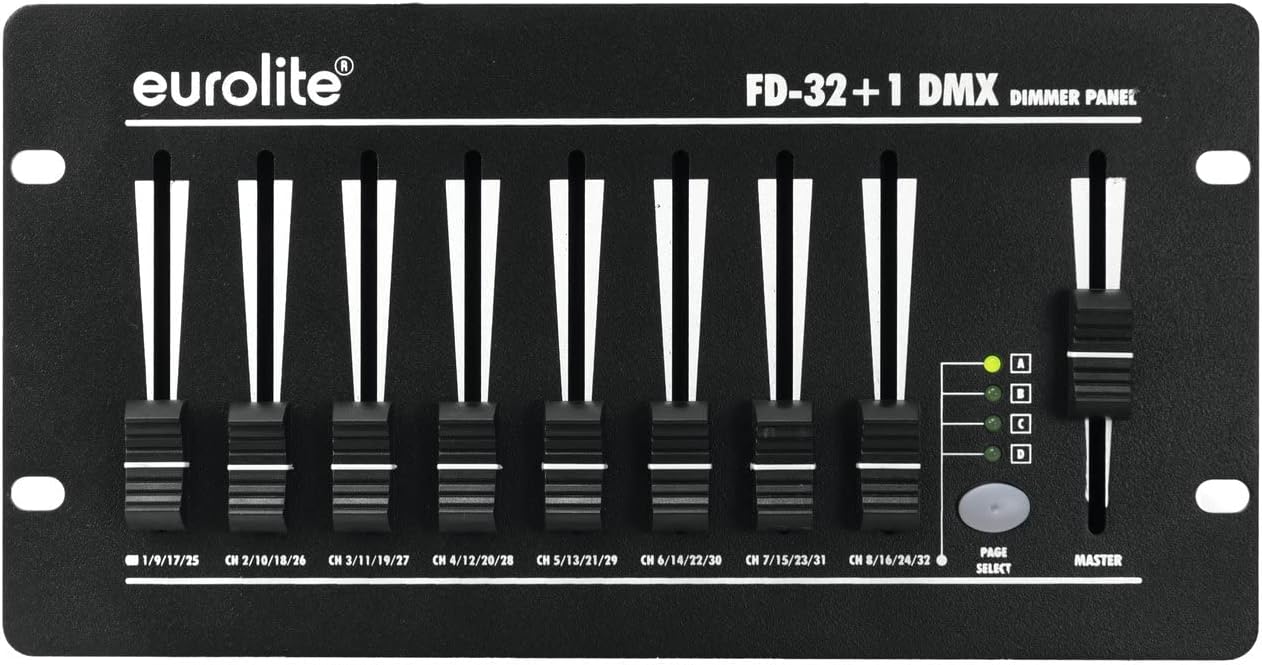
Immagine 1: Davanti view of the Eurolite FD-32+1 DMX Dimmer Panel. This image displays the eight individual channel faders, the master fader on the right, and the 'PAGE SELECT' button with its corresponding indicator LEDs (A, B, C, D).
Il pannello frontale comprende:
- Channel Faders (1-8): Control the intensity of individual DMX channels. Each fader is labeled with its corresponding channel range (e.g., CH 1/9/17/25).
- Fader principale: Controls the overall output intensity of all active channels.
- PAGE SELECT Button: Cycles through four pages (A, B, C, D) to access a total of 32 DMX channels (8 channels x 4 pages).
- Page Indicator LEDs (A, B, C, D): Indicate the currently selected page.
3.2 Collegamenti del pannello posteriore

Immagine 2: Posteriore view of the Eurolite FD-32+1 DMX Dimmer Panel. This image shows the power input (DC INPUT), DMX OUT connector, and the main power switch.
The rear panel provides the necessary connections:
- DC INPUT (9V - 12V / 300 mA DC): Power input connector for the external power adapter.
- USCITA DMX: 3-pin XLR connector for sending DMX signals to compatible lighting fixtures.
- Interruttore di ALIMENTAZIONE: Interruttore principale di accensione/spegnimento dell'unità.
4. Impostazione
Follow these steps to set up your DMX Dimmer Panel:
- Disimballaggio: Carefully remove the device from its packaging. Inspect for any signs of damage during transit.
- Posizionamento: Place the dimmer panel on a stable, flat surface, such as a table (Bordsmontering). Ensure adequate ventilation around the unit.
- Collegamento elettrico: Collegare l'adattatore di alimentazione fornito al INGRESSO CC on the rear panel. Plug the adapter into a suitable power outlet.
- Connessione DMX: Connect a 3-pin DMX cable from the USCITA DMX connector on the dimmer panel to the DMX IN of your first DMX-compatible lighting fixture. Daisy-chain additional fixtures as required.
- Accensione: Capovolgi il ENERGIA switch on the rear panel to the 'ON' position. The unit should power up.
5. Istruzioni per l'uso
This section details how to operate your Eurolite FD-32+1 DMX Dimmer Panel.
5.1 Funzionamento di base
- Accensione: Ensure the unit is powered on using the switch on the rear panel.
- Seleziona Pagina: Premere il tasto SELEZIONA PAGINA button to cycle through pages A, B, C, and D. The corresponding LED will illuminate to indicate the active page. Each page controls a different set of 8 DMX channels. For exampon:
- Page A: Channels 1-8
- Page B: Channels 9-16
- Page C: Channels 17-24
- Page D: Channels 25-32
- Adjust Channel Intensity: Move the individual channel faders (1-8) up or down to control the intensity of the assigned DMX channels on the selected page. Moving a fader up increases intensity, while moving it down decreases intensity.
- Adjust Master Intensity: Utilizzare il MAESTRO fader to control the overall output intensity of all active channels on the currently selected page. This acts as a global dimmer for the page.
5.2 Indirizzamento DMX
The FD-32+1 sends DMX signals starting from channel 1. Ensure your DMX lighting fixtures are addressed correctly to respond to the channels controlled by the dimmer panel. For example, if a fixture is set to DMX address 1, it will respond to fader 1 on Page A. If a fixture is set to DMX address 9, it will respond to fader 1 on Page B.
6. Manutenzione
Una manutenzione regolare garantisce la longevità e le prestazioni ottimali del tuo dispositivo.
- Pulizia: Utilizzare un panno morbido e asciutto per pulire l'esterno dell'unità. Non utilizzare detergenti liquidi o solventi.
- Sostituzione fusibile: If the unit does not power on, check the fuse located near the power input on the rear panel. Replace it with a fuse of the exact same type and rating. Refer to the specifications for fuse details.
- Magazzinaggio: When not in use for extended periods, store the device in a dry, dust-free environment, preferably in its original packaging.
7. Risoluzione Dei Problemi
In caso di problemi, fare riferimento alla seguente guida alla risoluzione dei problemi:
| Problema | Possibile causa | Soluzione |
|---|---|---|
| L'unità non si accende. | No power from outlet; faulty power adapter; blown fuse. | Check power outlet; test power adapter; replace fuse (see Maintenance). |
| Nessuna uscita DMX per gli apparecchi. | Incorrect DMX cable connection; fixture DMX address mismatch; faulty DMX cable. | Ensure DMX cable is securely connected; verify fixture DMX addresses; try a different DMX cable. |
| Individual channels not responding. | Incorrect page selected; fixture DMX address mismatch. | Press PAGE SELECT to ensure the correct page is active; verify fixture DMX addresses correspond to the active page's channels. |
8. Specifiche
- Marca: Eurolite
- Modello: 70063830 (FD-32+1 DMX Dimmer Panel)
- Tipo di montaggio: Montaggio su tavolo
- Peso dell'articolo: 1250 grammi
- Potenza in ingresso: 9V - 12V DC, 300 mA
- Canali DMX: 32 (8 faders x 4 pages)
- Uscita DMX: XLR a 3 pin
9. Garanzia e supporto
For warranty information and technical support, please refer to the documentation provided with your purchase or contact your authorized Eurolite dealer. Keep your proof of purchase for any warranty claims.